If you are researching power bi license types, you are usually trying to answer one practical question: which license gives your team the right mix of sharing, advanced features, and cost control without overpaying.
That question matters because Power BI licensing is not just about authoring reports. It affects:
- who can build content
- who can share and collaborate
- who can view reports without extra licenses
- which advanced capabilities are available
- how well Power BI scales across departments or the whole enterprise
In simple terms, the main Power BI license paths today are:
- Free
- Pro
- Premium Per User (PPU)
- Fabric Capacity
The right choice depends on your mix of report creators, report consumers, governance requirements, and expected growth.
Quick Comparison Table
| License type | Best for | Sharing and collaboration | Advanced features | Viewer access | Cost model | Typical fit |
|---|---|---|---|---|---|---|
| Free | Individuals, learners, personal analysis | Very limited | Basic authoring and personal use | Primarily personal content; broader consumption depends on capacity-hosted content | Free | Solo users exploring Power BI |
| Pro | Small teams and business departments | Full team sharing and workspace collaboration | Standard service capabilities | Paid users typically needed for shared content unless hosted on qualifying capacity | Per user | Day-to-day business reporting |
| PPU | Power users needing premium-style capabilities | Collaboration for users with PPU access | Larger models, more refreshes, advanced lifecycle and analytics features | PPU access rules apply unless content is moved to qualifying capacity | Per user | Advanced analytics teams |
| Fabric Capacity | Enterprises scaling distribution and performance | Centralized distribution at scale | Capacity-based premium capabilities and broader Fabric workloads | Broad internal consumption can be more efficient, especially on qualifying capacity tiers | Capacity-based | Enterprise BI and large audience reporting |
Power BI license types at a glance
Power BI licensing can look more complex than it first appears because there are two layers involved:
- Per-user licensing for people who create or collaborate
- Capacity-based licensing for organizations that need dedicated scale and broader distribution
That is why many teams start with a simple question like, “Do we need Pro or PPU?” and end up realizing the bigger decision is actually about how content will be shared and consumed.
At a high level:
- Free is suitable for learning and personal analysis.
- Pro is the standard starting point for business collaboration.
- PPU adds premium-style features for selected users.
- Fabric Capacity supports enterprise-scale deployment, performance, and broader consumption scenarios.
The best way to choose is to map licenses against three groups:
- content creators
- content collaborators
- content consumers
A team with 10 analysts and 50 viewers has very different needs from an enterprise with 100 authors and 5,000 consumers.
Free vs Pro vs PPU vs Fabric Capacity: the key differences
What you can do with the Free plan
The Free plan is best understood as a personal-use entry point.
With it, users can typically:
- build reports in Power BI Desktop
- connect to data sources
- model and visualize data
- publish personal content for their own use
For many analysts, this is enough to learn the platform, prototype dashboards, or run individual analysis. It is especially useful when you are still validating whether Power BI fits your reporting style.
Where the limitations begin is collaboration. Free is not designed for normal team-based sharing. In practice, the main constraints are:
- no standard report sharing workflow for business teams
- limited collaboration in shared workspaces
- restricted app distribution and broader service usage compared with paid plans
So if your goal is simply to build and explore reports yourself, Free may be enough. If your goal is to distribute insights to colleagues, it usually is not.
What changes with Pro
Power BI Pro is the license that turns Power BI from a personal reporting tool into a collaborative BI platform for teams.
With Pro, users can generally:
- publish reports to shared workspaces
- share dashboards and reports with others
- collaborate with teammates
- distribute apps internally
- access more of the Power BI service for business use
This is why Pro is often treated as the baseline license for business teams. If analysts need to create dashboards for managers, operations teams, finance users, or department leaders, Pro is often the first paid step.
From a practical BI governance perspective, Pro is also where organizations begin to formalize:
- workspace ownership
- report publishing standards
- shared semantic models
- certified datasets
- team-level access control
If your reporting environment depends on routine publishing and internal collaboration, Pro is usually the minimum viable licensing level.
What PPU adds beyond Pro
Premium Per User (PPU) is designed for users who need more than standard collaboration.
PPU includes Pro capabilities, then adds premium-style features for individual licensed users. This can include scenarios where teams need:
- larger semantic model support
- more frequent refreshes
- advanced analytics capabilities
- deployment pipelines
- more advanced lifecycle and development workflows
In other words, PPU is often a fit when a limited group of analysts, BI developers, or data specialists need advanced functionality, but the organization is not ready to commit to broader capacity-based licensing.
This is particularly useful when advanced needs are concentrated in a small team, such as:
- a central BI team
- a finance analytics team
- a data product team
- an analytics center of excellence
The important trade-off is that PPU is still user-based licensing, so it may become less efficient when advanced content needs to be widely consumed across a large internal audience.
How Fabric Capacity fits enterprise deployment
Fabric Capacity is the enterprise-scale option. Instead of licensing advanced capabilities primarily user by user, it provides a capacity-based model for organizations that need centralized performance, scale, and broader distribution.
This matters when your BI environment includes:
- large report audiences
- heavy refresh workloads
- centralized governance
- enterprise deployment standards
- broader internal rollout of dashboards and apps
A capacity-based model can make more sense than assigning higher-cost licenses to every user, especially when many people only consume content rather than create it.
Fabric Capacity is also relevant because Power BI service and licensing now sit within the broader Microsoft Fabric framework. That means organizations evaluating this option are often thinking beyond dashboard sharing alone and into a wider analytics operating model.
[Insert Dashboard Demo Here: Side-by-side comparison table of Free, Pro, PPU, and Fabric Capacity with authoring, sharing, advanced features, and viewer access]
Power BI service features by license type
Collaboration, sharing, and app distribution
One of the biggest differences across power bi license types is who can do what in the service.
Here is the simplest way to think about it:
- Free: good for personal work, not normal team collaboration
- Pro: supports report sharing, workspace collaboration, and app publishing
- PPU: supports collaboration plus advanced premium-style capabilities, but access rules still matter
- Fabric Capacity: helps organizations distribute content more broadly at scale, depending on workspace and capacity setup
For internal business audiences, the key question is often not “Can analysts build a dashboard?” but “What does every viewer need in order to access it?”
That is where licensing mistakes happen. Teams sometimes budget only for authors and forget that viewer access rules can drive a large part of total cost.
Advanced analytics, governance, and performance
Advanced features in Power BI are not distributed equally across all license types.
As a general rule:
- Free focuses on basic individual use
- Pro adds collaboration and service functionality
- PPU adds premium-style advanced capabilities for licensed users
- Fabric Capacity supports broader premium-style performance and scaling scenarios
Capabilities often associated with higher licensing tiers include:
- deployment pipelines
- larger semantic models
- enhanced refresh capacity
- more advanced AI and analytics features
- stronger support for enterprise workload performance
This distinction matters for BI leaders because some capabilities are user-based, while others become more effective in a capacity-based model.
A team evaluating licenses should not only ask, “Do we need advanced features?” but also:
- who needs them
- how often they will be used
- whether they apply to a few authors or the wider organization
- whether performance and scale are becoming platform-level concerns
Content consumption and external access considerations
Viewer access is one of the most misunderstood parts of Power BI licensing.
In many organizations, most users do not create reports. They just need to:
- open dashboards
- apply filters
- review KPIs
- monitor business performance
- access board or executive reporting
When that audience grows, capacity-based licensing can become attractive, because the economics of licensing every viewer individually may no longer make sense.
This is especially important for:
- executive dashboards
- organization-wide KPI rollouts
- departmental app distribution
- enterprise reporting hubs
External access introduces additional planning considerations as well. If you expect to share content beyond a small internal team, licensing and access design should be validated early instead of after rollout.
Pricing, trade-offs, and total cost considerations
Power BI pricing plan basics
Power BI pricing follows two broad models:
- per-user licensing
- capacity-based licensing
Per-user pricing is usually easier to understand at the beginning:
- Free has no license fee
- Pro is priced per user
- PPU is priced per user at a higher level than Pro
Fabric Capacity is different because it is tied to organizational compute capacity rather than just named users.
That means total cost is influenced by more than the license list price. It also depends on:
- number of authors
- number of viewers
- workload intensity
- model size and refresh needs
- governance and admin overhead
- future scaling plans
When paying more saves money
A higher licensing tier is not always a higher overall cost.
For example:
- Pro is often enough for small and medium business teams with normal collaboration needs.
- PPU can be cost-effective when only a limited set of users needs premium-style capabilities.
- Fabric Capacity can become more efficient when a large internal audience needs to consume content and performance matters.
A common mistake is comparing licenses only by unit price. A better BI planning approach looks at the total operating model.
For instance, paying more for capacity can save money if it reduces:
- unnecessary per-user upgrades
- performance complaints from business users
- rework caused by fragmented deployment choices
- scaling issues during enterprise rollout
Pros and cons of each option
Free
Pros
- Lowest barrier to entry
- Good for learning and personal analysis
- Useful for prototyping reports
Cons
- Limited collaboration
- Not suitable for normal team sharing
- Weak fit for governed business reporting
Pro
Pros
- Practical starting point for business collaboration
- Supports sharing, workspaces, and app distribution
- Usually sufficient for routine department reporting
Cons
- May not be ideal for premium-level analytics scenarios
- Per-user costs can add up as audience size grows
PPU
Pros
- Strong advanced feature set for selected users
- Good for analytics specialists or BI teams
- Avoids immediate full capacity commitment
Cons
- Not always ideal for broad internal distribution
- Can become inefficient if many users need premium access
Fabric Capacity
Pros
- Strong fit for scale, centralized governance, and performance
- Supports broader distribution strategies
- Better aligned with enterprise deployment planning
Cons
- Requires larger budget commitment
- Needs more planning discipline and governance maturity
Which Power BI license type is best for you?
Best fit for individuals, small teams, and departments
If you are an individual analyst, student, or business user learning Power BI, Free is usually enough to get started.
Choose Free when:
- you are learning Power BI
- you are building personal reports
- you do not need normal team sharing yet
Choose Pro when:
- your team needs shared dashboards
- analysts must collaborate in workspaces
- managers and department users need routine report access
- business reporting is becoming operational rather than experimental
For many departments, Pro is the most straightforward starting point.
Best fit for advanced analytics teams
Choose PPU when a defined group of users needs premium-style capabilities, such as:
- advanced semantic models
- more frequent refreshes
- more mature development workflows
- advanced analytics features
This is often the right fit when advanced requirements are concentrated among:
- BI developers
- finance analytics leads
- data specialists
- power users in a center of excellence
The key evaluation question is: Are advanced needs limited to a small expert group, or are they spreading across the whole business?
If the answer is the latter, capacity may deserve a closer look.
Best fit for enterprises and broad audience reporting
Choose Fabric Capacity when your priorities include:
- centralized governance
- consistent performance
- large internal consumption
- enterprise distribution of dashboards and apps
- future growth across multiple teams
A simple decision framework looks like this:
- How many people create content?
- How many people only consume content?
- Which advanced features are actually needed?
- Will usage remain departmental, or expand enterprise-wide?
- Do you need scale and governance now, or soon?
If viewer counts are high and business reliance on dashboards is growing, capacity-based licensing often becomes more strategically relevant than a purely per-user model.
Common mistakes and a simple decision checklist
Licensing mistakes to avoid
The most common Power BI licensing mistakes are not technical. They are planning mistakes.
Overbuying advanced licenses too early
Some teams move to premium-style licensing before they have even clarified whether standard collaboration is the real need. If basic dashboard sharing is the immediate goal, Pro may be enough.
Underestimating viewer access requirements
Organizations often focus on authors and forget the larger viewer population. This becomes costly when dashboards are rolled out to executives, managers, or frontline teams.
Confusing desktop authoring with service-based sharing
Power BI Desktop is powerful, but desktop report creation is not the same as governed report distribution. If your success depends on cloud sharing, workspace collaboration, or controlled app delivery, licensing needs change quickly.
Quick checklist before you choose
Before selecting a Power BI license type, answer these questions:
- How many people build content?
- How many people only consume content?
- Which advanced features are truly required?
- Is your priority low upfront cost, premium functionality, or scale?
- Will usage stay within one team or expand across the organization?
If you can answer those five clearly, your licensing decision becomes much easier.
Practical recommendations before you commit
Here are five recommendations I would give as a BI consultant before approving any Power BI licensing model:
-
Separate creators from consumers early.
Do not license everyone as if they build reports. Most users only need to consume information. -
Start with the reporting workflow, not the feature list.
Understand how data moves from authoring to publishing to consumption. This exposes where licensing pressure really sits. -
Validate premium needs with real use cases.
Larger models and advanced features sound attractive, but they should map to actual business requirements. -
Plan for 12 to 24 months, not just the first rollout.
A license model that works for one department may become inefficient when five more teams join. -
Include governance and admin effort in total cost.
The cheapest license on paper can create expensive operational friction if the deployment model becomes hard to manage.
A practical alternative for teams evaluating BI adoption: FineBI + Dora
Tools like Power BI are widely used in the BI market, but teams that need a more business-user-friendly, self-service BI platform may also consider FineBI.
FineBI is positioned around self-service BI, interactive dashboards, and business-user adoption. That makes it relevant for organizations that want to reduce the gap between centralized data teams and everyday business users.
In practical terms, FineBI can be a good fit for teams that need:
- drag-and-drop dashboard creation
- interactive analysis and drill-down
- governed self-service exploration
- enterprise data connectivity
- dashboard sharing and collaboration
- faster dashboard iteration for business teams
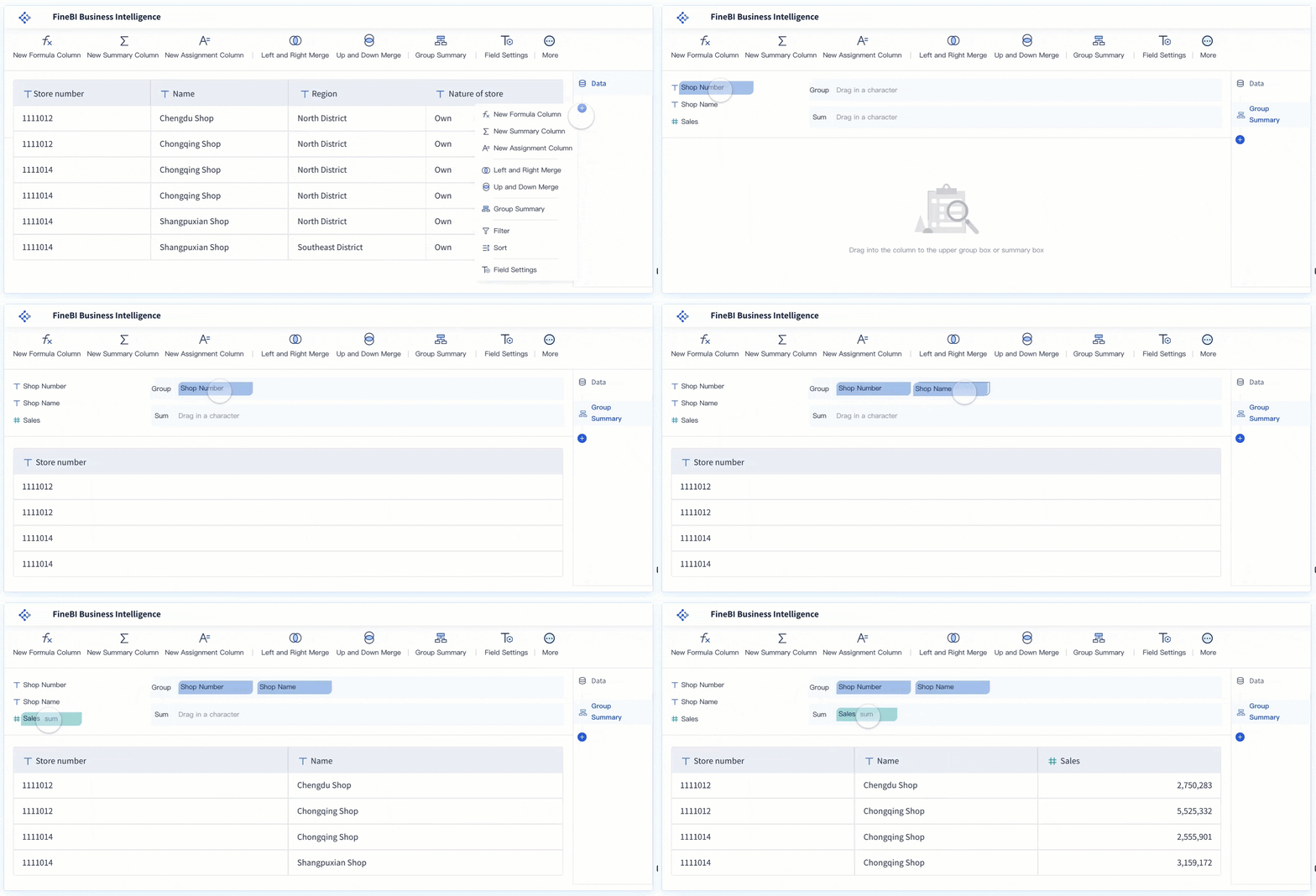
Rather than replacing governance, FineBI helps build the trusted dashboard, metric, and semantic foundation that business users can work from more confidently.
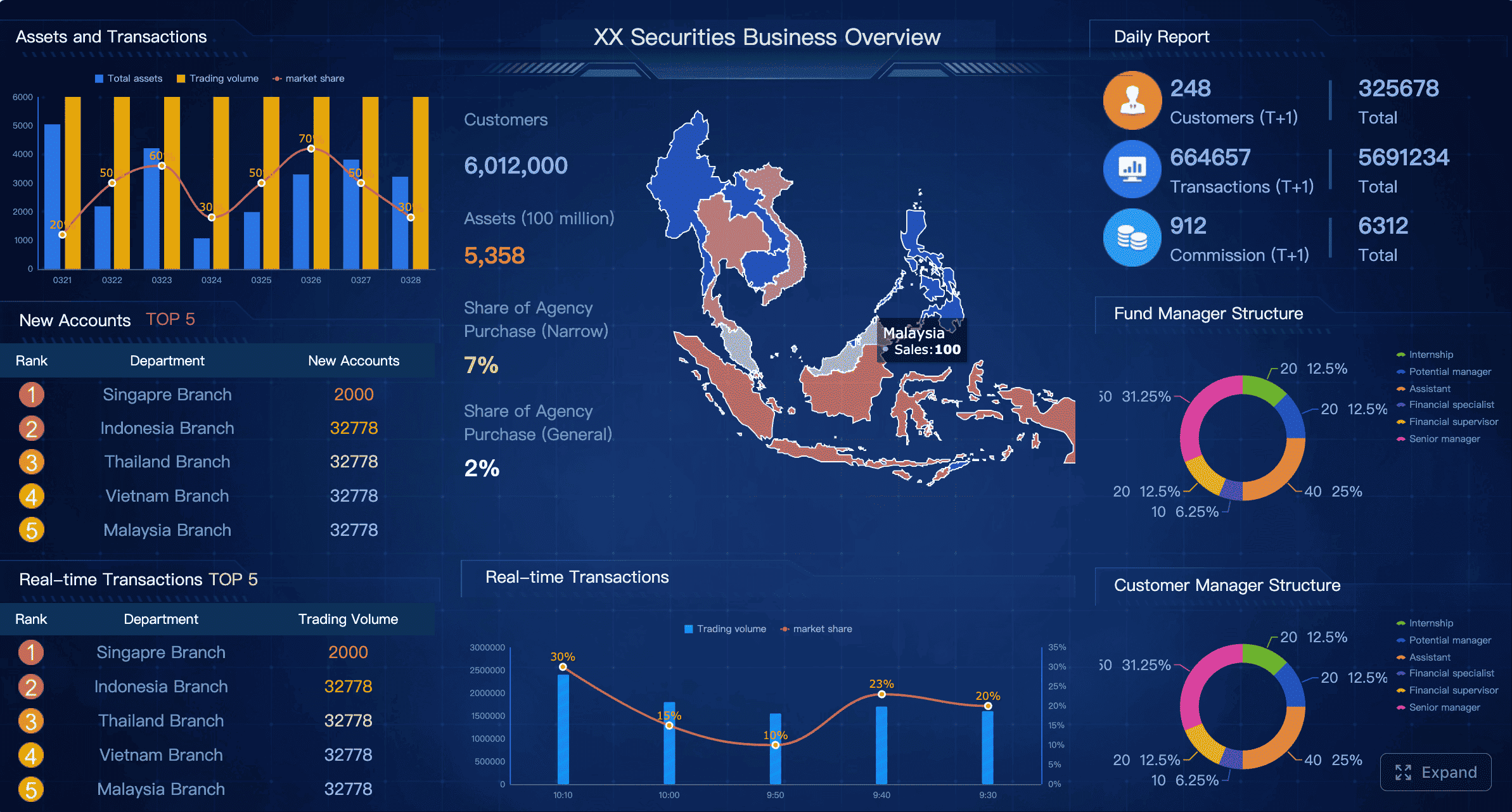
On top of that foundation, Dora extends the experience as an enterprise Data Agent for Agentic BI.
The most useful way to think about Dora is not as a generic chatbot and not as a replacement for FineBI. Instead:
- FineBI builds the trusted analytics foundation
- Dora turns that foundation into a scenario-specific AI assistant or AI digital employee
That can support workflows such as:
- Data Analyst digital employee
- Report Researcher
- Daily Briefing Secretary
- Risk Alert Officer
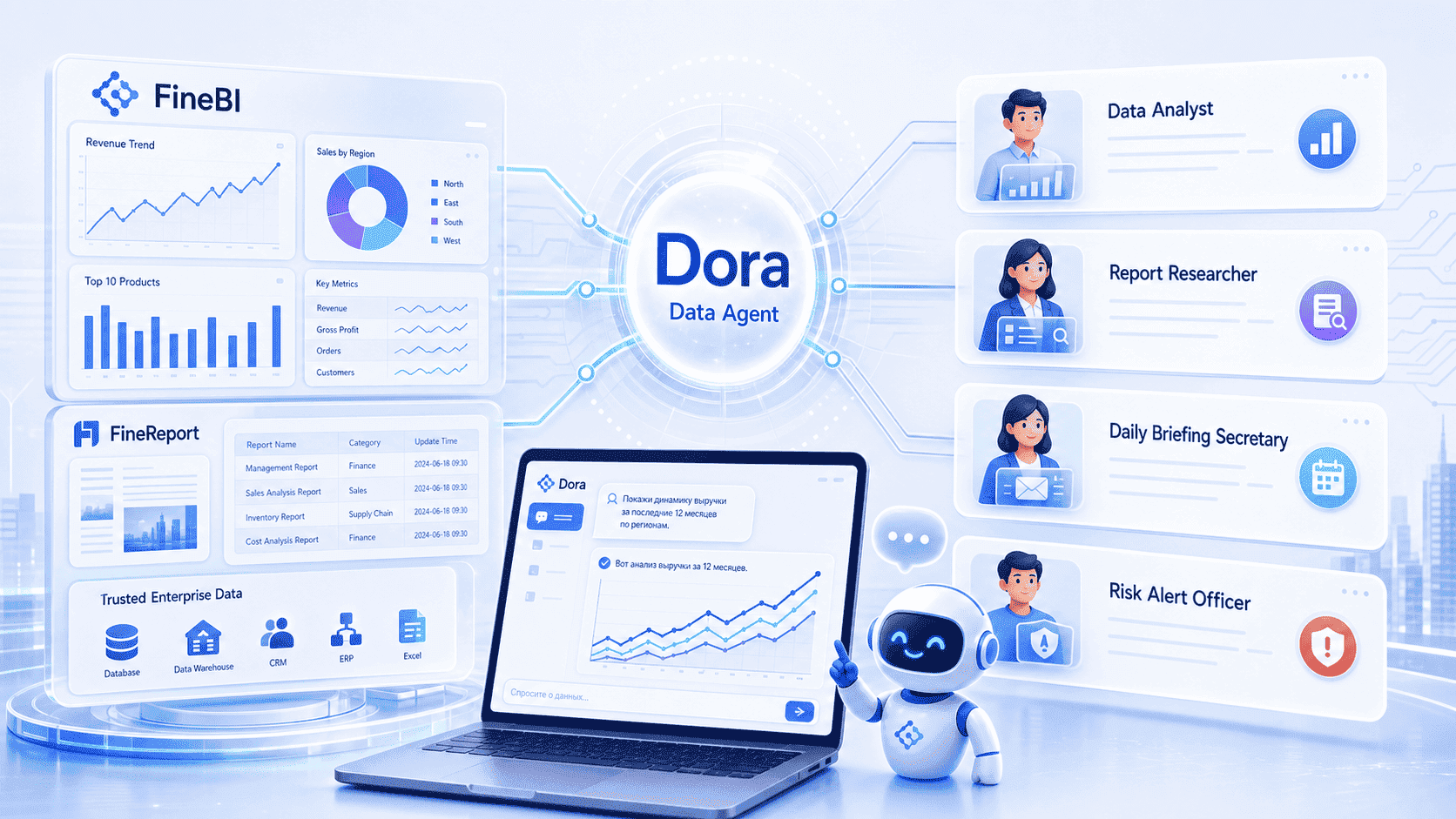
This follows a fourth-generation Agentic BI pattern:
- natural-language request
- trusted semantic layer
- governed query or Skill execution
- answer, chart, summary, action, and follow-up
For organizations comparing BI platforms, that matters because many do not just want dashboards anymore. They want governed AI workflows built on trusted enterprise metrics.


Get Ready-to-Use Dashboard Templates in Fine Gallery
When FineBI + Dora may be a strong fit
If your organization is reviewing power bi license types because you are really trying to solve broader BI adoption challenges, FineBI + Dora may be worth evaluating when:
- business users need a more approachable self-service experience
- dashboard iteration is too dependent on technical specialists
- teams want governed data exploration, not just static report delivery
- AI-assisted analysis must sit on top of a trusted semantic and metric layer
- enterprise leaders want both dashboard access and guided follow-up analysis
In those situations, the decision is not only about license tiers. It is about how well the BI platform supports adoption, governance, and action.
Final takeaway
Choosing between Free, Pro, PPU, and Fabric Capacity comes down to one principle: match the license to the way your organization actually uses BI.
- Choose Free for personal learning and individual analysis.
- Choose Pro for normal business collaboration and team reporting.
- Choose PPU for advanced users who need premium-style features.
- Choose Fabric Capacity for enterprise scale, centralized governance, and broad distribution.
And if your evaluation goes beyond Microsoft licensing into the broader question of how to make BI easier for business users while preparing for governed AI-driven analytics, FineBI + Dora is a practical alternative to consider.
FAQs
Free is mainly for individual analysis, while Pro adds sharing and team collaboration. PPU includes Pro plus premium-style features for advanced users, and Fabric Capacity is designed for enterprise-scale distribution and performance.