If you are researching power bi premium capacity, you are probably trying to answer one practical question: when does Power BI stop being a simple per-user licensing decision and become a capacity planning decision? In 2026, that question matters even more because Microsoft has tied the conversation closely to Microsoft Fabric, changing how many teams think about buying, scaling, and governing enterprise analytics.
In plain English, Power BI Premium capacity refers to dedicated computing resources reserved for your organization’s BI workloads. Instead of relying only on shared cloud resources and individual user licenses, your team gets a reserved pool of performance for report consumption, larger semantic models, scheduled refreshes, and broader distribution across the business.
This model is usually designed for organizations that have one or more of these needs:
- Large audiences consuming dashboards and reports
- Heavier refresh schedules and larger data models
- More predictable performance than shared capacity
- Enterprise governance and workload management
- A growing analytics estate that now overlaps with Fabric planning
Quick Comparison Table
| Criteria | Power BI Pro | Power BI Premium Per User | Power BI Premium Capacity |
|---|---|---|---|
| Best for | Small teams and collaboration | Power users needing advanced features | Organizations needing dedicated resources and broad report distribution |
| Buying model | Per user | Per user | Capacity-based |
| Performance model | Shared | Shared with premium feature access for licensed users | Dedicated organization-level capacity |
| Dashboard consumption | Usually licensed users | Licensed users | Broad internal consumption scenarios become easier at qualifying capacity levels |
| Data model scale | Standard | Larger than Pro | Larger enterprise-scale support depending on SKU |
| Refresh frequency | Lower than premium tiers | Higher than Pro | Higher enterprise-grade scheduling depending on workload and SKU |
| Admin control | Basic to moderate | Moderate | Highest, with workload tuning and capacity monitoring |
| Learning curve | Lower | Moderate | Higher, because sizing and governance matter |
| Recommended users | Small teams, analysts | Advanced analysts, departmental BI | BI leaders, IT, enterprise analytics teams |
The short version: Power BI Premium capacity is about reserved scale, while Pro and Premium Per User are primarily about individual user entitlements.
What power bi premium capacity means in 2026
In 2026, power bi premium capacity means more than just “buying a bigger Power BI plan.” It refers to a dedicated analytics runtime that supports Power BI workloads with organizational-level resources, while also sitting in the shadow of Microsoft’s broader Fabric capacity model.
Define the service in plain English and explain who it is designed for
A simple way to think about Premium capacity is this:
- Pro licenses let people create, share, and collaborate
- Premium Per User gives individual users access to more advanced capabilities
- Premium capacity gives the organization itself a pool of dedicated compute
That dedicated pool is useful when your challenge is not just authoring reports, but serving many users, running large models, scheduling lots of refreshes, and keeping performance stable under load.
Typical buyers include:
- Enterprise BI teams
- Central data and analytics groups
- IT teams managing governed reporting at scale
- Large business units with hundreds or thousands of report consumers
- Organizations standardizing dashboards across finance, sales, operations, and executive teams
Clarify how dedicated capacity differs from user-based licensing
The biggest difference is what scales the cost.
With per-user licensing, cost rises mainly as you add more licensed people.
With capacity licensing, cost is tied more to:
- Total workload demand
- Peak concurrency
- Model size and complexity
- Refresh intensity
- Enterprise distribution needs
That distinction matters. A company with a relatively small number of report authors but a very large report audience may find capacity-based planning more logical than buying advanced licenses for everyone.
Explain why the 2026 conversation now includes Microsoft Fabric by default
In earlier years, teams could discuss Premium mostly as a Power BI topic. In 2026, that is no longer enough. Microsoft has pushed the market toward Fabric-oriented capacity thinking, so buyers now have to consider whether they are only solving for dashboards or also for broader analytics workloads.
That changes the planning conversation in three ways:
- Capacity is no longer viewed only through a reporting lens.
- Fabric workloads can affect resource planning and governance choices.
- Renewal and migration decisions may involve moving from legacy Premium concepts toward Fabric-aligned models.
For many organizations, the real question is now: Do we only need premium reporting capacity, or are we moving toward a broader unified analytics platform?
How power bi premium capacity works behind the scenes
To evaluate power bi premium capacity, it helps to understand what is actually being reserved and how that capacity gets consumed.
Dedicated resources, workloads, and performance isolation
At a high level, Premium capacity reserves compute resources for your organization instead of placing all workloads into a fully shared tenant pool. That does not mean infinite performance, but it does mean your workloads are governed within your purchased capacity rather than competing in the same way as standard shared environments.
Key workloads that use that capacity include:
- Report and dashboard consumption
- Semantic model queries
- Scheduled and on-demand refreshes
- Certain advanced analytics and AI-related features
- Other workload activities depending on how the environment is configured
In practice, performance pressure usually comes from a mix of:
- Many users opening reports at the same time
- Large semantic models being queried repeatedly
- Heavy refresh windows colliding with business-hour usage
- Inefficient report design or complex DAX calculations
- More workloads being placed on the same capacity than originally planned
A useful mindset is this: Premium capacity is not just “bigger Power BI.” It is a governed pool of compute that must be sized and managed.
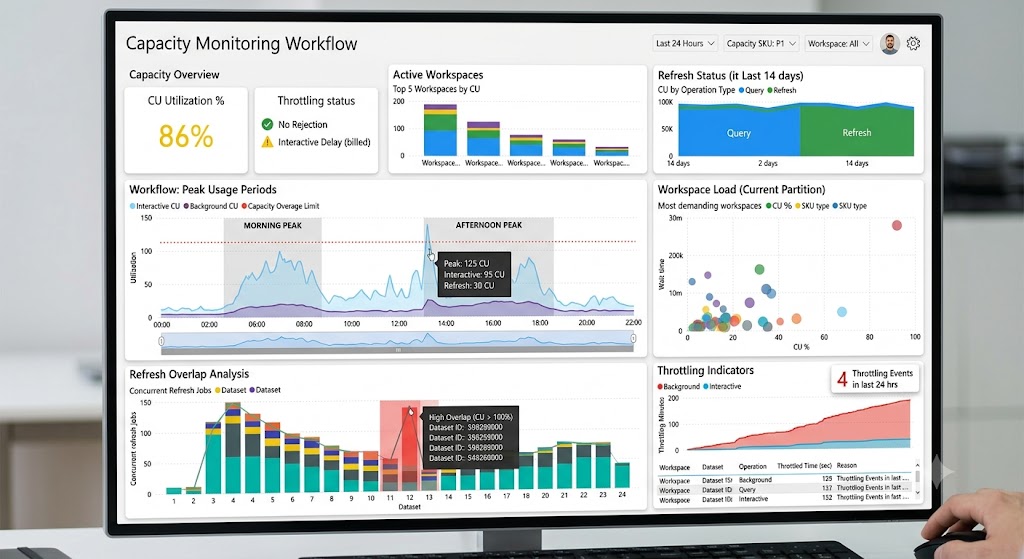
Capacity administration and monitoring basics
Once a team buys Premium capacity, administration becomes much more important. Someone has to decide:
- Which workspaces run on that capacity
- How workloads are configured
- How refresh windows are scheduled
- Whether autoscale is enabled
- How to monitor usage and throttling risk
Admins typically focus on a few basics:
Workload settings
Capacity settings help determine how resources are distributed across supported workloads. This is important because poor workload balancing can hurt report responsiveness even if total capacity looks large on paper.
Autoscale options
Where available and enabled, autoscale can help reduce the impact of overload events by adding resources temporarily. But autoscale is not the same as good sizing. It is better seen as a pressure-relief mechanism than a substitute for planning.
Usage monitoring
Monitoring helps teams answer questions like:
- When is CPU pressure highest?
- Are refreshes colliding with interactive usage?
- Which workspaces are consuming disproportionate resources?
- Are certain datasets or reports repeatedly causing bottlenecks?
Signs a team has outgrown its setup
Common warning signs include:
- Reports that become slow during peak hours
- Frequent throttling or degraded interactivity
- Refreshes that run long or fail under pressure
- More users consuming content than originally planned
- Larger semantic models pushing SKU limits
- Admins spending too much time juggling workload conflicts
Pricing and licensing: where capacity fits in the Power BI plan landscape
Licensing confusion is one of the main reasons people search for power bi premium capacity. In 2026, the confusion is understandable because Power BI purchasing no longer sits cleanly apart from Fabric.
Capacity licensing versus per-user licensing
At a high level, the buying logic looks like this:
- Power BI Pro: best for collaboration, report publishing, and standard sharing among licensed users
- Premium Per User: best when a limited number of advanced users need premium features
- Premium capacity: best when the organization needs dedicated performance and wider content distribution
A practical distinction:
Costs that scale with users
These are typically tied to:
- Report authors
- Collaborators
- Admins
- Advanced users needing specific entitlements
Costs that scale with organizational demand
These usually include:
- Broad report consumption
- Capacity throughput needs
- Heavy data refresh workloads
- Large semantic models
- Enterprise concurrency requirements
So if your user count is growing, per-user costs may dominate. If your audience is already large and consumption is heavy, capacity economics may become more attractive.
What to know about pricing in 2026
In 2026, you should not treat any blog post as a final price authority for Microsoft licensing. The packaging continues to evolve, and commercial terms can vary by region, contract type, and whether your organization is moving to Fabric-aligned purchasing.
The main cost drivers to evaluate are:
- Capacity size
- Expected concurrency
- Model size and complexity
- Refresh frequency
- Need for enterprise distribution
- Whether broader Fabric workloads are included
- Contract structure and renewal timing
Also remember that planning is not only about list price. Total operating cost often includes:
- Admin effort
- Governance complexity
- Optimization work
- Potential autoscale charges
- Migration effort if your architecture changes
The right approach in 2026 is simple: validate current commercial terms directly with Microsoft or your licensing partner before making renewal assumptions.
Power BI Premium P1 vs P2 vs P3: how to choose the right size
For many buyers, the most important version of the query is not just “what is Premium capacity?” but “which SKU should we choose?”
What changes as you move from P1 to P2 to P3
At a practical level, moving from P1 to P2 to P3 increases the amount of available compute and the ability to support:
- More users consuming reports concurrently
- Larger and more complex semantic models
- Heavier refresh activity
- More demanding enterprise reporting patterns
- Greater tolerance for mixed workloads on the same capacity
You can think about the progression like this:
| SKU | Typical planning meaning | Best fit profile |
|---|---|---|
| P1 | Entry point for dedicated enterprise capacity | Mid-size deployments with meaningful but controlled scale |
| P2 | Higher throughput and more headroom | Large deployments with heavier concurrency and refresh demand |
| P3 | Significant scale for enterprise-wide usage | Very large environments with broad distribution and complex workloads |
What changes is not only raw resource availability, but also operational breathing room. Larger capacities usually handle workload spikes, denser refresh schedules, and more complex model activity with less contention.
That said, upgrading SKU size does not fix bad BI design. If your reports are poorly modeled, refresh pipelines are inefficient, or too many workloads are stacked onto one capacity, a larger SKU may only delay the next bottleneck.
A practical sizing framework
A better sizing approach starts with business behavior, not product labels.
Scenario 1: Mid-size deployment
A P1-type profile may fit when:
- You have a moderate number of report authors
- You want broader distribution to internal consumers
- Your models are growing, but not extreme
- Refresh schedules are important but manageable
- You need dedicated performance without enterprise-wide saturation
Scenario 2: Large deployment
A P2-type profile may fit when:
- Multiple departments rely on Power BI daily
- Peak-hour concurrency is rising
- Refresh overlap is common
- Data models are larger and business-critical
- Performance consistency is becoming a board-level or executive concern
Scenario 3: Very large deployment
A P3-type profile may fit when:
- Power BI is serving as a major enterprise analytics layer
- Many business units consume dashboards at scale
- Executive, operational, and departmental reporting all coexist
- Data volumes and model complexity are substantial
- Downtime, slowdowns, or throttling have high business impact
Signals that suggest an upgrade instead of more optimization
Teams should consider an upgrade when they see repeated signs such as:
- Capacity pressure during normal business operations
- Sustained throttling rather than isolated spikes
- Consistently delayed refresh windows
- Growing concurrency from report consumers
- Stable, well-optimized content still performing poorly under load
But if your issues stem from bad model design, duplicated datasets, ungoverned workspace sprawl, or excessive refresh frequency, optimize first, upgrade second.
Microsoft Fabric impact: why the decision changed
This is the part many older Power BI sizing guides miss. In 2026, the decision is no longer just about Premium SKUs in isolation.
How Fabric reshapes the value of premium capacity
Microsoft Fabric broadens the conversation from a BI-serving platform to a larger analytics environment. That means the old mental model of “buy Premium for dashboards” is no longer complete.
The key relationship is this:
- Legacy Power BI Premium concepts focused on dedicated BI capacity
- Fabric capacity thinking expands planning to include broader analytics workloads and a more unified platform model
That affects planning because reporting is now more likely to share strategic attention with:
- Data engineering workflows
- Lake-oriented storage and data access decisions
- Cross-workload governance
- New AI-enabled analytics experiences
For some organizations, this is a benefit. A unified model can reduce fragmentation and create a more connected analytics stack. For others, it introduces more complexity than they actually need.
Migration, coexistence, and future-proofing
Before renewing, upgrading, or redesigning your environment, ask these questions:
- Are we solving a Power BI reporting scale problem, or a broader analytics platform problem?
- Do we need Fabric workloads now, or are we buying future optionality?
- Which workspaces and business processes would be affected by migration?
- How much governance maturity do we have today?
- Will a more complex platform help our users, or mostly help our architecture diagram?
In many cases, coexistence is the realistic path. Some teams will continue focusing on straightforward BI delivery while evaluating broader Fabric features gradually.
And that is often the right move. Not every organization should adopt every new platform capability at once. If your reporting needs are stable, your governance is still maturing, or your users are already struggling with self-service adoption, staying simple can be smarter than over-platforming.
Benefits, trade-offs, and when Power BI premium capacity is worth it
By this point, the key question becomes: is Premium capacity actually worth it for your organization?
Key advantages for enterprises
For the right environment, power bi premium capacity offers meaningful benefits.
Scale
Dedicated capacity supports larger distribution scenarios, especially when many people need to consume dashboards without making every decision around per-user licensing.
Performance consistency
Because compute is reserved for your organization, performance is usually more predictable than purely shared environments, assuming the capacity is sized and managed well.
Governance
Central teams gain better control over:
- Workspace placement
- Workload behavior
- Resource allocation
- Monitoring and troubleshooting
- Enterprise reporting standards
Advanced feature access
Premium-oriented environments generally support more advanced enterprise features, larger models, and stronger support for demanding analytical workloads.
Broader distribution
Capacity is especially valuable when report consumption far exceeds report authorship. That is a common enterprise pattern.
Common limitations and decision checkpoints
Premium capacity is not automatically the right answer.
Cost control can get harder
Once you move to capacity-based thinking, you are managing infrastructure economics as well as BI licensing. Underused capacity is expensive. So is oversized capacity bought “just in case.”
Admin overhead increases
Someone has to monitor usage, optimize workloads, control workspace sprawl, and coordinate refresh behavior. Premium requires stronger operational discipline than smaller deployments.
Some teams may be better served by Premium Per User
If your advanced feature needs are concentrated in a relatively small group, Premium Per User may be enough. Not every company with premium features needs dedicated capacity.
Bigger capacity does not solve weak BI foundations
If your semantic models are poorly designed, dashboard governance is weak, and report duplication is everywhere, Premium can amplify inefficiency rather than eliminate it.
Short checklist: is Premium capacity your next step?
Use this quick checklist:
- Do you have a large and growing audience for report consumption?
- Are performance issues tied to real scale, not just poor design?
- Do you need more predictable throughput for refreshes and queries?
- Does centralized governance matter to your BI operating model?
- Are you prepared to monitor and manage capacity actively?
- Do your Fabric plans justify broader capacity thinking?
If you answered “yes” to most of these, Premium capacity is worth serious evaluation.
Practical recommendations before you choose
Here are five practical recommendations I would give any BI leader evaluating power bi premium capacity in 2026.
-
Measure actual usage before sizing.
Look at concurrency, refresh collisions, model growth, and peak-hour consumption before selecting a SKU. -
Separate design problems from capacity problems.
Slow dashboards are not always evidence that you need P2 or P3. Sometimes you need better semantic models and cleaner report design. -
Model your author-to-consumer ratio.
If you have relatively few creators and many consumers, capacity may make more sense than expanding premium user licensing widely. -
Treat Fabric as a governance decision, not only a feature upgrade.
The question is not whether Fabric has more capabilities. The question is whether your organization is ready to operate them well. -
Plan renewal and migration together.
Do not review licensing, workspace architecture, and operating model separately. In 2026, those decisions are connected.
A practical alternative for teams that want self-service BI without overcomplicating adoption
Tools like Tableau and Power BI are widely used in the BI market, but teams that need a more business-user-friendly, self-service BI platform may also consider FineBI.
Where Power BI Premium capacity planning often becomes an infrastructure and governance conversation, some organizations are still trying to solve a more immediate problem:
- Business users need dashboards they can actually explore
- Departments want faster reporting cycles
- Analysts need to iterate without excessive technical friction
- BI leaders want governed self-service, not uncontrolled spreadsheet sprawl
This is where FineBI can be relevant.
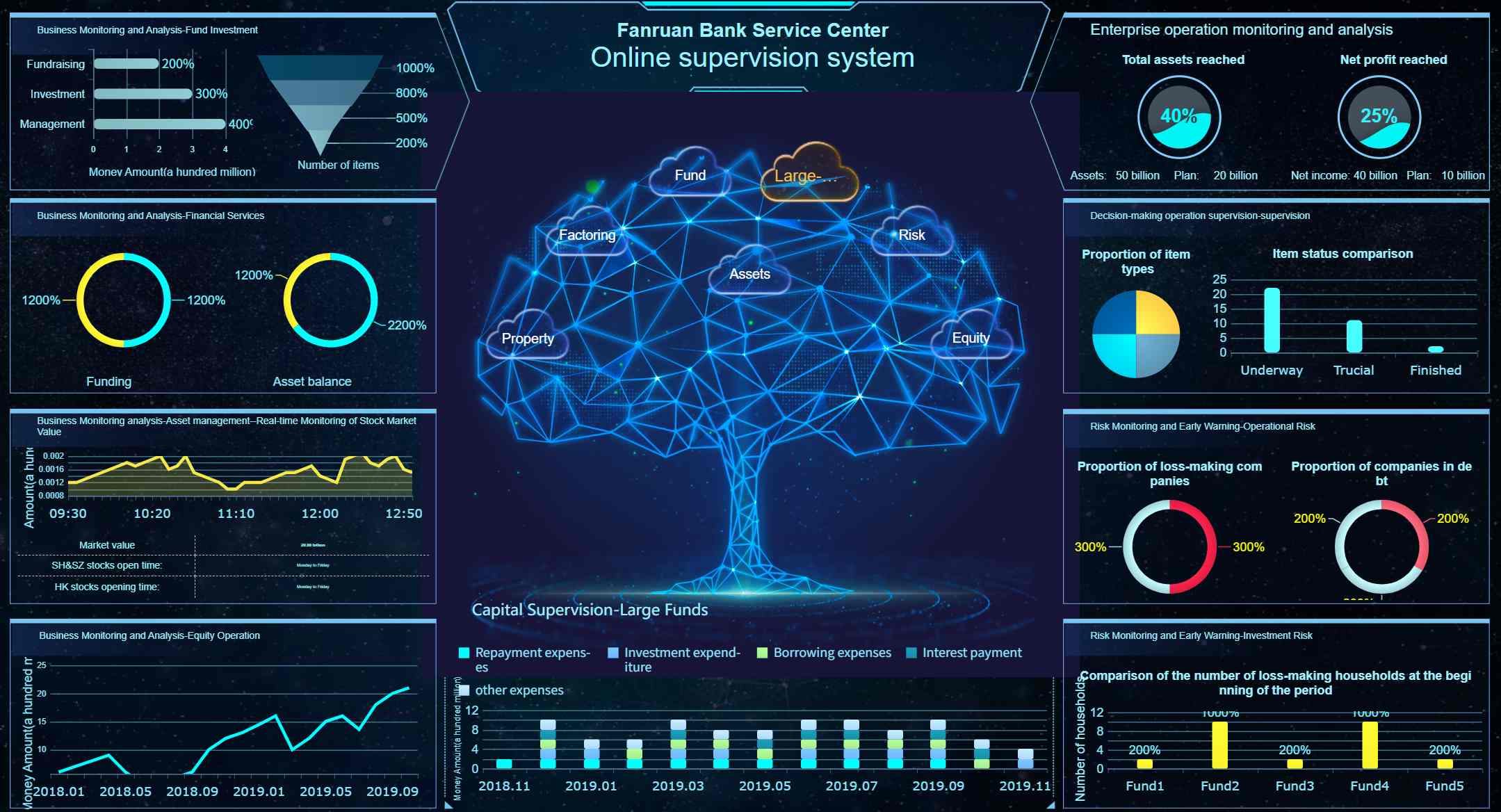
FineBI is designed as a self-service BI platform that helps enterprises build interactive dashboards, enable drag-and-drop analysis, and support drill-down exploration on top of governed data. It is especially relevant for teams that want to expand analytics beyond specialist developers and into day-to-day business use.
Common fit scenarios include:
- Operations teams tracking daily KPIs
- Sales teams exploring performance by region, product, or channel
- Finance teams monitoring profitability and budget trends
- Enterprise BI teams standardizing dashboard delivery across departments
FineBI can be a strong fit when you want:
- Interactive dashboard creation
- Business-user adoption of self-service analytics
- Drag-and-drop analysis
- Governed data exploration
- Faster iteration across departments
- Enterprise dashboard sharing and collaboration
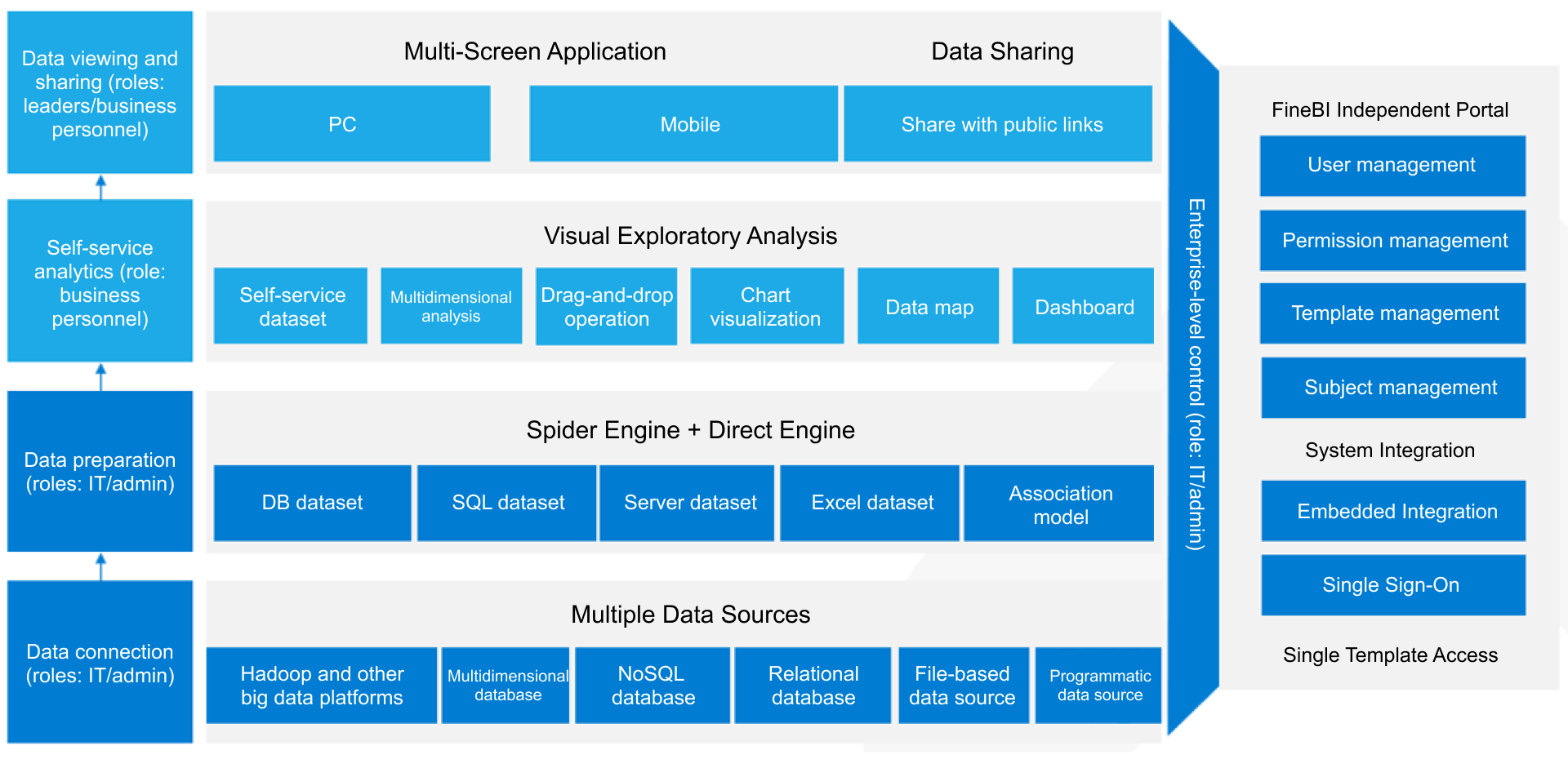 FineBI Workflow
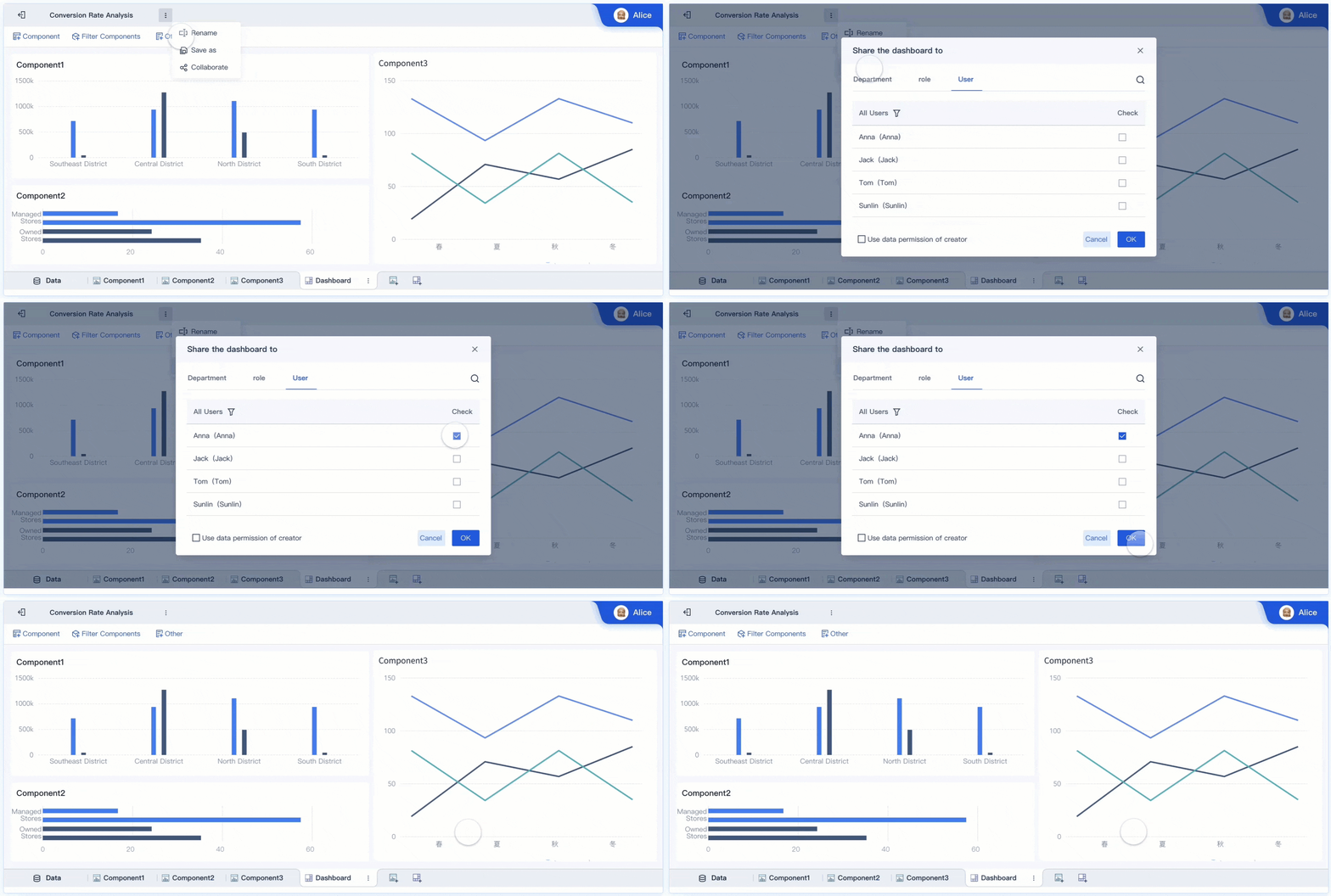 Dashboard Sharing and Collaboration
And in environments moving toward AI-enabled analytics, FineBI + Dora adds a useful next layer.
How FineBI + Dora extends BI into Agentic BI
Dora is FanRuan’s enterprise Data Agent platform. It works as an AI assistant and AI digital employee layer on top of FineBI and existing enterprise data assets.
That matters because many organizations are hitting a new bottleneck: they already have dashboards, but users still struggle to ask the next question, interpret results quickly, follow up on anomalies, or turn insights into action.
Together, FineBI + Dora helps enterprises move from people looking at dashboards to AI helping people ask, analyze, generate, push, alert, and follow up.
A practical way to understand the positioning:
- FineBI builds the trusted dashboard, metric, and semantic foundation
- Dora turns that foundation into a scenario-specific AI assistant or digital employee
- Dora can also work where the enterprise already has trusted BI or data assets
This is best understood as Agentic BI, with a governed workflow that typically includes:
- Natural-language request
- Trusted semantic understanding
- Governed query or skill execution
- Answer, chart, summary, action, and follow-up
Potential use cases include:
- Data Analyst digital employee
- Report Researcher
- Daily Briefing Secretary
- Risk Alert Officer

For teams evaluating the future of analytics after dashboard rollout, this is an important shift. Traditional BI helps people see metrics. Agentic BI helps them interact with metrics, get guided answers, and trigger next-step workflows more naturally.

Get Ready-to-Use Dashboard Templates in Fine Gallery
Final takeaway
In 2026, power bi premium capacity is best understood as a dedicated organizational analytics resource, not just a more expensive Power BI plan. It becomes valuable when you need scale, stable performance, centralized governance, and broader report distribution. But it also now sits within a Microsoft Fabric-shaped decision framework, which means sizing and renewal choices are more strategic than they used to be.
If your organization mainly needs to support large-scale Power BI consumption, Premium capacity can be the right path. If your advanced needs are limited to a smaller user group, Premium Per User may be enough. And if your bigger challenge is enabling more business teams to analyze trusted data without making BI adoption overly technical, FineBI is worth evaluating. If you also want to move toward governed AI-assisted analytics, FineBI + Dora offers a practical path from dashboards to Agentic BI.
FAQs
Power BI Premium capacity is a dedicated pool of compute resources reserved for your organization’s BI workloads. It is meant to improve performance, support larger models and refreshes, and make broad internal report distribution easier than shared capacity.