
If you are researching Power BI Copilot, you are probably trying to answer one practical question: Will this actually help my team work faster and smarter, or will it create more cost, governance overhead, and AI risk than expected?
That is the right question to ask.
Power BI Copilot sits inside Microsoft’s analytics ecosystem and adds generative AI assistance to reporting, data exploration, summaries, and some authoring workflows. For many teams, it can reduce friction when building reports, asking follow-up questions, and turning data into plain-language explanations. But it is not magic. Its usefulness depends heavily on your semantic model quality, your Power BI environment, your licensing setup, and your team’s governance maturity.
This article breaks down what Power BI Copilot is, where it helps, where it falls short, what it can really cost, and how to evaluate it responsibly as a team decision rather than a shiny feature.
| Evaluation Area | Power BI Copilot |
|---|---|
| Best for | Teams already invested in Microsoft Fabric or Power BI Premium environments |
| Main value | Natural-language assistance for report consumption, report creation support, summaries, and guided exploration |
| Ease of use | Can be approachable for business users, but quality depends on model preparation and permissions |
| Dashboard design support | Helps with first-pass report/page creation and summaries, but still needs human refinement |
| Data preparation | Strongly dependent on well-modeled semantic layers, naming, and descriptions |
| Collaboration | Useful for shared summaries and faster question-answer cycles between builders and stakeholders |
| Enterprise reporting | Works best in governed Microsoft BI environments with admin oversight |
| Deployment considerations | Requires supported capacity, admin enablement, region support, and readiness checks |
| Learning curve | Lower for asking questions; higher for admins, model owners, and report authors enabling it well |
| Recommended users | Analysts, report builders, BI managers, business users, and leaders who already consume Power BI content |
This summary is important because many teams search for Power BI Copilot expecting a simple yes-or-no answer. In practice, the answer depends on whether your team already has the foundations Copilot needs: trusted models, consistent definitions, access controls, and realistic expectations.
What Power BI Copilot Is and Who It Helps

Power BI Copilot is Microsoft’s generative AI assistance layer within Power BI and the broader Fabric environment. It helps users interact with reports and semantic models using natural language, generate summaries, assist with some report-building tasks, and support analytical workflows such as drafting visuals or suggesting DAX-related outputs in certain contexts.
In simple terms, Power BI Copilot tries to reduce the gap between a business question and a usable analytical response.
Define what Power BI Copilot does inside the Microsoft analytics ecosystem
Inside the Microsoft analytics stack, Power BI Copilot supports both content consumers and content creators.
For consumers, it can help:
- summarize a report
- answer questions about report content
- propose visual interpretations
- support ad hoc exploration through prompts
For creators, it can help:
- draft report pages
- suggest or explain calculations in some workflows
- create first-pass narrative summaries
- accelerate report-building steps
That said, Copilot does not replace the underlying Power BI model, report logic, or governance. It relies on those foundations. If the model is weak, the AI layer tends to be weak too.
Clarify which team roles benefit most, including analysts, report builders, managers, and business users
Different roles get different value from Power BI Copilot.
Analysts and report builders
Analysts often benefit most when Copilot helps them:
- generate first drafts faster
- accelerate exploratory questioning
- create initial summaries for recurring reports
- reduce repetitive explanation work
BI managers and analytics leads
Managers may see value in:
- faster iteration cycles between teams
- better accessibility for business users
- improved adoption of existing reports
- more standardized communication around insights
Business users and department managers
Non-technical users can benefit when Copilot makes it easier to:
- ask follow-up questions in plain language
- understand what a report is saying
- get quick summaries before meetings
- explore performance changes without waiting on an analyst for every simple question
Set expectations for what it can and cannot automate today
This is where teams need discipline.
Power BI Copilot can automate parts of reporting and analysis workflows. It can help draft, summarize, suggest, and guide. It cannot fully automate:
- metric governance
- business context interpretation
- executive judgment
- data quality repair
- complex analytical design
- sensitive access decisions
A good expectation is this: Copilot is a productivity assistant, not an autonomous BI replacement.
7 Benefits of Power BI Copilot for Teams
When used in the right environment, Power BI Copilot can create meaningful team-level advantages. The strongest gains usually come from speed, accessibility, and communication.
Faster report and dashboard creation
One of the clearest advantages of Power BI Copilot is reducing the time required to create a first draft of a report or dashboard experience.
Instead of starting from a blank page, report authors can use prompts to:
- draft a page layout
- generate an initial narrative
- structure a starting point for review
- accelerate the move from idea to prototype
For experienced analysts, this can reduce repetitive setup time. For less experienced users, it lowers the intimidation factor of report creation.
Reduce time spent drafting visuals, summaries, and first-pass report structures
Many reporting cycles get delayed not because the final answer is hard, but because the first version takes too long to assemble. Copilot can help teams move faster through the rough-draft stage.
That matters in real business settings where:
- weekly operations reviews need refreshed commentary
- sales teams need quick performance recaps
- finance teams need summary narratives
- managers need a starting point before asking for revisions
Help less technical users move from questions to insights more quickly
Some business users never become full report builders, but they still need answers. Copilot can help them cross the gap between “I know what I want to ask” and “I know how to navigate this report.”
This can improve self-service behavior, especially for users who are comfortable with business language but not filters, measures, and analytical structures.
Easier data exploration and question answering
Power BI Copilot also supports exploratory analysis by letting users ask questions in natural language.
This can help teams move faster when they need to understand:
- why a KPI changed
- which segment underperformed
- whether a trend is regional, temporal, or product-specific
- what follow-up question to ask next
Turn natural-language prompts into chart ideas, summaries, and follow-up questions
This matters because many business conversations start as loose questions:
- Why did margin decline this month?
- Which regions drove revenue growth?
- What changed after the pricing update?
- Are returns concentrated in a few categories?
Copilot can help translate these into structured exploration paths. Even if the output needs review, the time to first insight often decreases.
Support quicker discovery of trends, outliers, and performance changes
In team environments, speed matters. If a manager can quickly identify an outlier before a weekly review, or if an analyst can validate a trend more efficiently, the value is real.
Copilot is especially useful for:
- recurring monitoring workflows
- ad hoc business questions
- executive readouts that need quick summaries
- report consumption scenarios where users need a guided explanation
Better collaboration across business and data teams
A common analytics bottleneck is not technical complexity. It is communication.
Business stakeholders ask broad questions. Analysts need more precise definitions. Managers want concise takeaways. Report builders want clear requirements. Copilot can serve as a shared starting point for that exchange.
Give shared starting points for discussions, iterations, and stakeholder reviews
Instead of waiting for an analyst to create every first response manually, teams can use Copilot-generated summaries or prompt-based outputs as a discussion draft.
That can help meetings become more specific:
- “This summary is directionally right, but missing channel context.”
- “The trend is useful, but we need customer-level segmentation.”
- “This chart should compare YoY rather than MoM.”
That kind of faster refinement is often where AI adds practical value.
Improve communication between technical builders and decision-makers
Report builders often think in data structures. Decision-makers think in business implications. Copilot-generated language can sometimes help bridge the two by producing plain-language explanations that are easier to react to.
It does not eliminate the need for human translation, but it can shorten the path.
More consistent insight summaries
One underappreciated advantage of Power BI Copilot is consistency in narrative output.
Many organizations struggle because recurring reports are interpreted differently depending on who writes the commentary. AI-assisted summaries can help standardize tone and structure.
Generate plain-language explanations that make reports easier to interpret
Not every stakeholder wants to inspect every visual. Many want a concise explanation:
- what changed
- what matters
- what might need attention
Copilot can help create those first-pass explanations, especially for recurring operational, sales, and financial reporting.
Help standardize executive-ready takeaways across recurring reporting cycles
This is particularly useful when teams produce:
- weekly business reviews
- monthly KPI updates
- departmental scorecards
- recurring performance packs
Standardization does not mean blind automation. It means giving teams a repeatable base that analysts can review and improve.
Faster onboarding for new report consumers
New employees, new managers, and newly promoted department heads often struggle with existing BI content because they do not know where to start. Copilot can reduce that ramp time by allowing users to ask questions instead of learning the entire navigation path first.
That can improve report adoption, especially in organizations with large dashboard portfolios.
More value from existing Power BI assets
Some organizations already have many reports but low usage outside the analyst community. Copilot can help unlock more value from those reports by making them easier to query and summarize.
This does not fix poor dashboard design, but it can make good assets more accessible to a wider audience.
Better support for iterative analysis workflows
Teams often analyze in loops, not one-shot questions. They ask one question, review the result, then ask a better question. Copilot fits this pattern reasonably well when models are prepared properly.
It can support iterative back-and-forth analysis, which is closer to how real teams work than static dashboards alone.
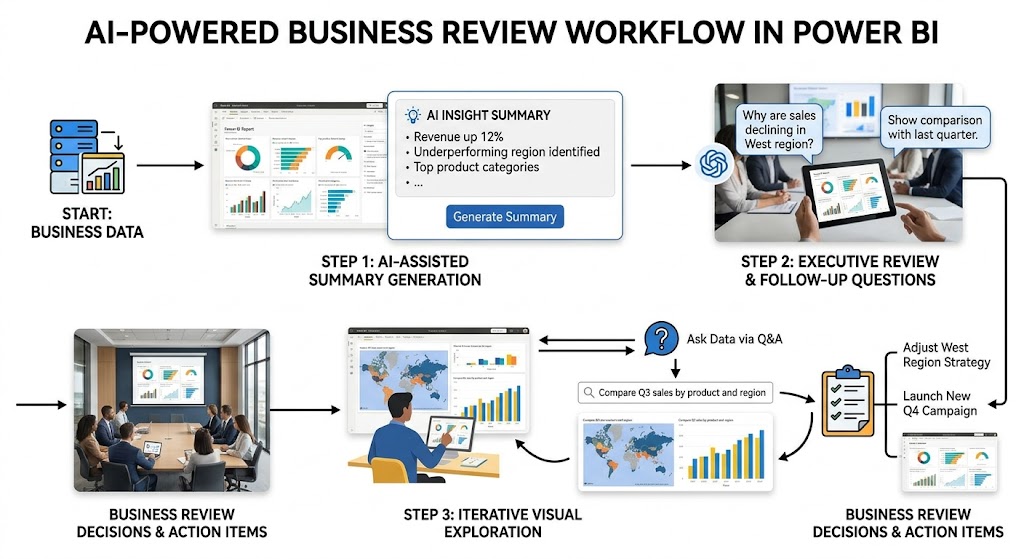
5 Limitations of Power BI Copilot Teams Should Understand Before Adopting
Power BI Copilot can be useful, but teams should not treat it as a plug-and-play productivity multiplier. Several limitations directly affect reliability, rollout success, and ROI.
Output quality still depends on data model quality
This is the single most important limitation.
If your semantic model has weak naming conventions, unclear measure definitions, hidden business logic, inconsistent field descriptions, or poor hierarchy structure, Copilot will struggle to produce dependable results.
Weak semantic models, unclear measures, or poor naming reduce usefulness
Generative AI does not create business meaning from nothing. It relies on the structures you already built.
If your model has:
- cryptic field names
- duplicate metric definitions
- unclear dimensions
- no descriptions
- inconsistent business terminology
then Copilot is more likely to generate vague, generic, or misleading outputs.
AI-generated answers may sound confident even when context is incomplete
This is a major operational risk. AI-generated language often sounds polished even when it is incomplete or slightly wrong.
That means teams need review processes, especially for:
- executive summaries
- regulated reporting
- board-facing analysis
- sensitive operational decisions
Not a replacement for analyst judgment
Power BI Copilot can assist analysts. It does not replace them.
Teams still need validation, business context, and metric governance
Analysts still provide:
- business context
- exception handling
- methodology decisions
- logic validation
- stakeholder interpretation
Without those things, a nicely worded summary can still point the business in the wrong direction.
Complex calculations and edge cases often require manual review
As soon as analysis moves into nuanced territory, human review becomes essential:
- blended KPIs
- custom business logic
- exception-heavy calculations
- financial close adjustments
- attribution logic
- unusual segmentation rules
AI may help draft or explain, but it should not be the final authority.
Feature access and experience can vary
Another practical limitation is that “Power BI Copilot” is not a single identical experience for every team.
Availability may differ by tenant settings, capacity, licensing, and supported experiences
Access can depend on factors such as:
- admin enablement
- supported capacity
- workspace setup
- region support
- tenant configuration
- feature availability across different Power BI experiences
This can create confusion if one team sees Copilot in one place but not in another.
Rollout timing and product changes may affect what teams can use in practice
AI product experiences change quickly. Features move from preview to general availability, interfaces shift, and requirements evolve.
That means teams should validate current availability in their own environment instead of assuming documentation or demos reflect their exact setup today.
Prompting skill still matters
Natural language is easier than DAX, but it is not effortless. Users still need to learn how to ask precise questions, clarify filters, and avoid ambiguous requests.
In practice, prompt quality often determines whether Copilot saves time or creates rework.
Governance overhead increases with scale
The more users you enable, the more important governance becomes:
- who can use it
- where generated content can be shared
- what models are AI-ready
- how outputs are validated
- how usage is monitored
For mature BI programs, this is manageable. For loosely governed environments, it can become messy quickly.
Real Costs of Power BI Copilot: Licensing, Setup, Training, and Ongoing Administration
The cost question around Power BI Copilot is broader than license math. Teams often underestimate the total cost because they focus only on direct Microsoft charges and ignore operational readiness.
Direct platform and licensing costs
At a high level, organizations need to separate baseline Power BI costs from Copilot-related prerequisites.
Copilot generally requires more than a basic user license approach. Teams need to consider whether they have the right supported capacity, whether Copilot is enabled at the tenant level, and whether the environment meets region and platform prerequisites.
Assess Microsoft licensing, capacity requirements, and potential premium dependencies
For many organizations, the real entry point is not “Can a single user try Copilot?” but “Do we have the required organizational capacity and admin configuration to use it properly?”
Costs may include:
- paid Fabric or Premium capacity requirements
- existing Power BI platform commitments
- environment configuration effort
- admin review and enablement work
This is why teams should avoid evaluating Copilot in isolation from their broader Microsoft BI architecture.
Separate baseline Power BI costs from Copilot-related prerequisites
A good internal finance discussion separates:
- what you would already pay to run Power BI at your scale
- what you must add specifically to support Copilot
- what extra overhead appears after rollout
That structure helps avoid inflated ROI assumptions.
Indirect team costs that affect ROI
Indirect costs are often the difference between a successful pilot and a disappointing rollout.
Include onboarding, prompt training, governance setup, change management, and support time
Real-world adoption includes:
- prompt training for business users
- AI usage guidance for analysts
- semantic model cleanup
- governance policy updates
- documentation work
- admin troubleshooting
- stakeholder expectation management
These are not optional if you want reliable outcomes.
Estimate savings realistically instead of assuming immediate productivity gains
A better ROI model asks:
- Which workflows become faster?
- For which roles?
- Under what data conditions?
- How often?
- With how much review still required?
For example, if Copilot saves analysts 20 minutes on first drafts but still needs 15 minutes of validation, the value may still be real. But it is different from claiming fully automated reporting.
Governance Risks and How to Enable Power BI Copilot Responsibly
AI in BI environments raises governance questions immediately. Power BI Copilot is no exception.
The main issue is not whether the AI is interesting. It is whether it is operating against trusted, controlled, and appropriately permissioned data.
Security, privacy, and data exposure concerns
If your data access model is weak, Copilot can amplify the consequences.
Review who can access sensitive data, summaries, and generated content
Teams should review:
- workspace permissions
- report-level access
- semantic model visibility
- row-level security behavior
- app access boundaries
- whether generated summaries could expose sensitive patterns
If a user can query or summarize content they should not interpret freely, the problem is not just the AI. It is the access model behind it.
Prevent accidental exposure caused by weak permissions or misunderstood model access
This matters especially in:
- HR reporting
- finance reporting
- customer-level analytics
- healthcare or regulated environments
- executive dashboards
- profitability analysis
Before enabling Copilot broadly, organizations should confirm that permissions are not merely convenient, but correct.
How to enable Power BI Copilot and prepare your environment
A responsible rollout starts with environment checks, not broad deployment.
Outline the basic activation path, admin prerequisites, and workspace readiness checks
At a practical level, teams should confirm:
- Copilot is enabled by administrators
- capacity and workspace requirements are met
- supported region conditions are satisfied
- target workspaces are appropriate for AI-assisted use
- intended users have the right access level
- semantic models are prepared for AI interaction
This preparation phase is often where success or failure is decided.
Explain what teams should verify before turning it on for wider use
Before wider rollout, verify:
- Model readiness: are measures, descriptions, names, and relationships understandable?
- User readiness: do users know what Copilot is for and what it is not for?
- Governance readiness: are permission models reviewed?
- Support readiness: who handles questions, misuse, and quality concerns?
- Use-case readiness: are you enabling it for clear scenarios rather than vague experimentation?
A practical decision framework: Is Power BI Copilot worth it?
Power BI Copilot is usually worth piloting when:
- your team already relies on Power BI heavily
- your semantic models are reasonably well governed
- business users ask many recurring follow-up questions
- analysts spend too much time on repetitive summaries
- you have budget and admin support for controlled rollout
It may be worth limiting or delaying when:
- your models are messy or inconsistent
- permissions are not mature
- the team expects full automation
- you lack training capacity
- your Power BI environment is fragmented
- budget pressure is high and ROI is unclear
A good approach is to treat Copilot as a targeted productivity layer, not a blanket enterprise transformation decision.
Practical Recommendations Before You Adopt Power BI Copilot
As a BI consultant, I would recommend five steps before any broad rollout.
1. Start with one or two high-value use cases
Choose narrow, repeatable scenarios such as:
- monthly executive summaries
- sales performance Q&A
- recurring operations dashboards
- report consumption support for managers
This gives you measurable outcomes.
2. Prepare semantic models before you evaluate the AI
Do not judge Copilot on top of a poor model. Clean up naming, descriptions, measures, and hierarchies first.
3. Pilot with trained users, not the whole company
Roll out first to:
- analysts
- report owners
- trusted business champions
- BI managers
They can identify gaps before broader release.
4. Define validation rules for generated outputs
Decide what must always be reviewed by a human, especially:
- executive narratives
- sensitive data summaries
- financial commentary
- regulated use cases
5. Measure time saved realistically
Track:
- drafting time reduced
- follow-up questions avoided
- adoption improvements
- training effort required
- support burden created
That is how you determine whether Copilot is delivering value or just novelty.
Where FineBI + Dora Fit for Teams Evaluating AI in BI
Tools like Tableau and Power BI are widely used in the BI market, but teams that need a more business-user-friendly, self-service BI platform may also consider FineBI.
FineBI is designed around self-service analytics, interactive dashboards, business-friendly exploration, and drag-and-drop analysis. For teams comparing AI-assisted BI workflows, that matters because the value of AI depends on whether users can already interact with trusted dashboards and metrics efficiently.
Why some teams consider FineBI as an alternative or complement
In many organizations, the challenge is not just “add AI.” The challenge is:
- improve dashboard usability
- let business teams explore data without heavy technical dependence
- shorten iteration time between business and data teams
- standardize reporting while keeping analysis flexible
FineBI is relevant in those scenarios because it supports:
- self-service dashboard creation
- interactive filtering and drill-down
- enterprise data connectivity
- collaborative dashboard sharing
- faster dashboard iteration for business users and analysts
For organizations that want AI on top of governed business metrics, this foundation matters.
[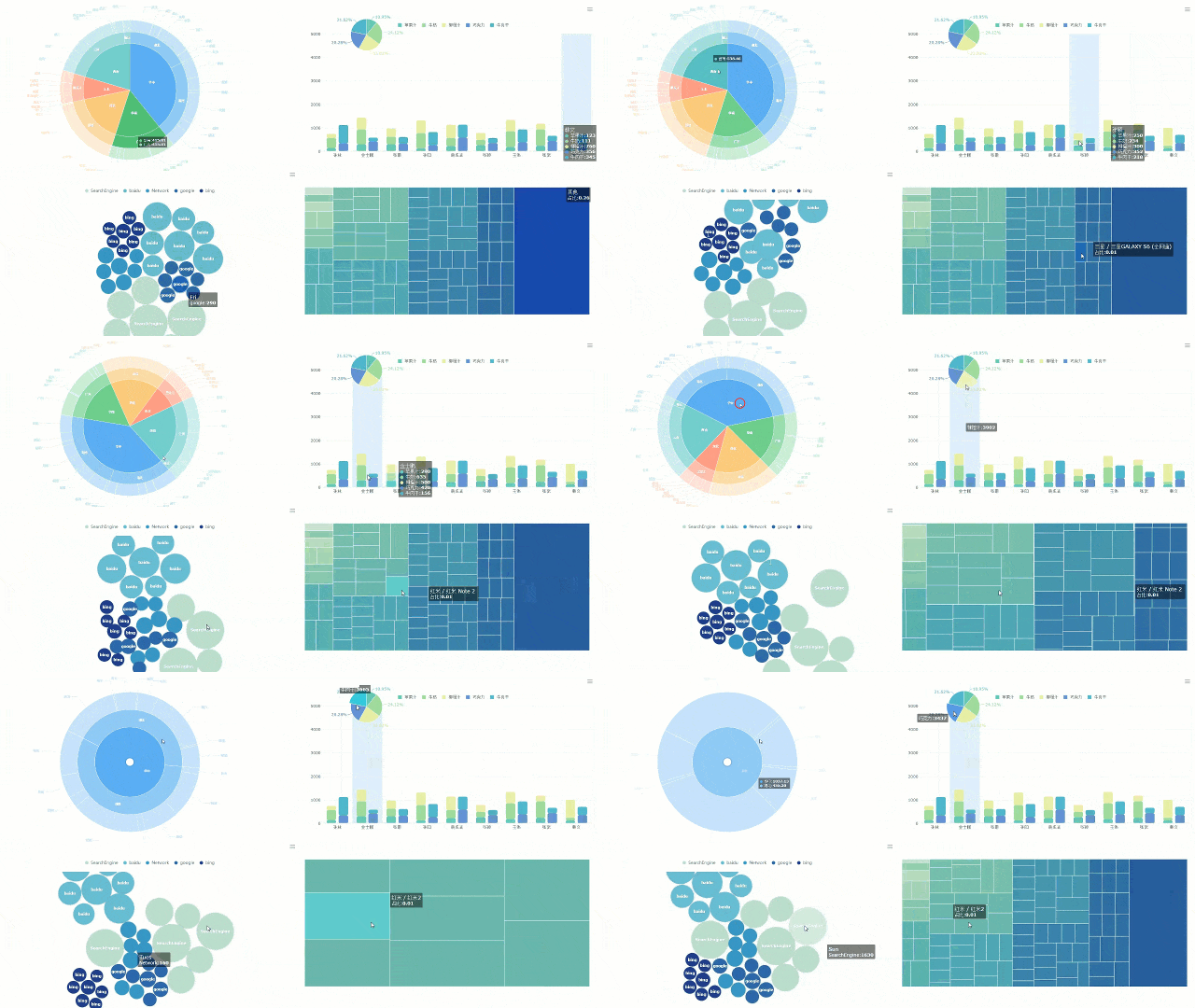 ]
Interactive Filtering
]
Interactive Filtering
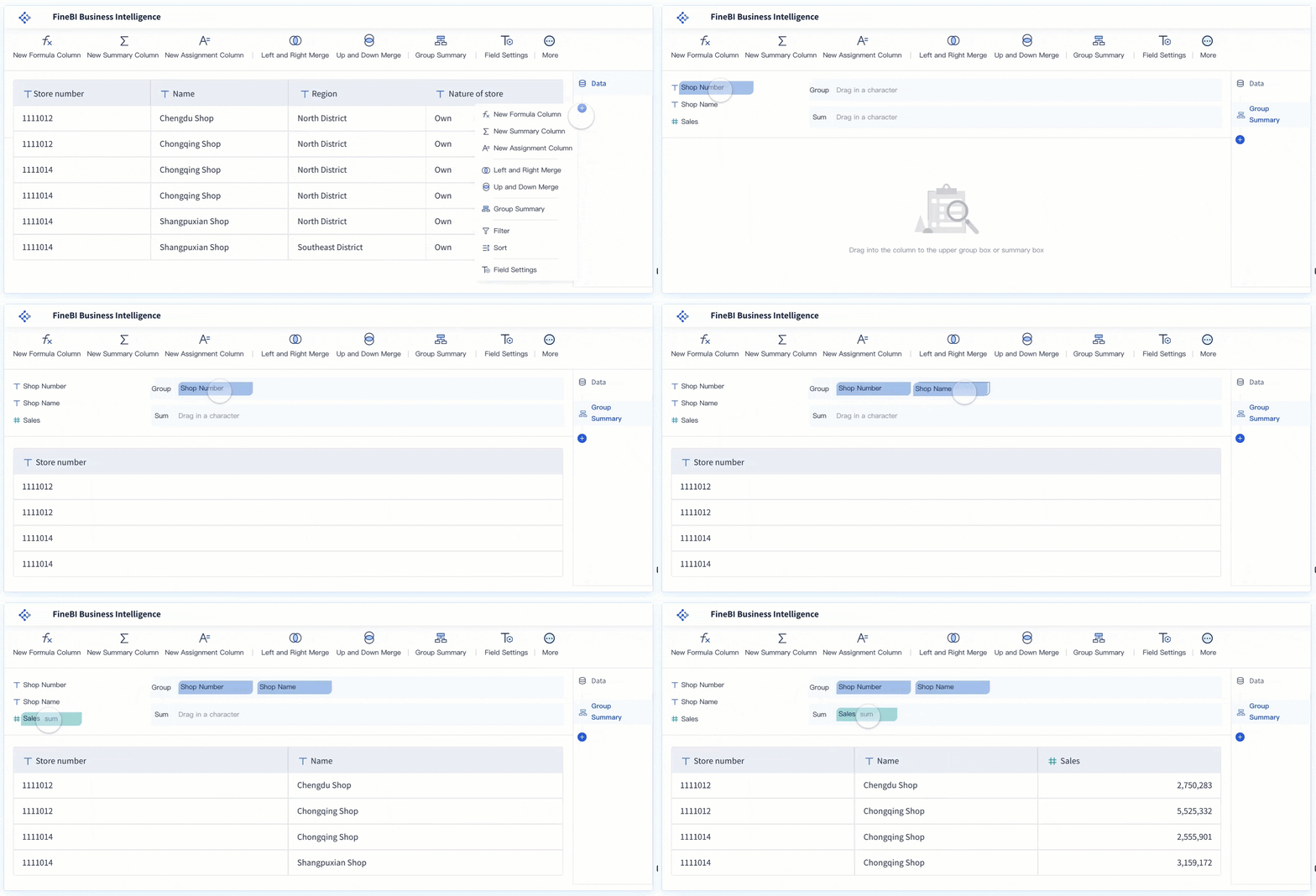 Drag-and-drop Analysis
Dora adds an enterprise Data Agent layer on top of trusted BI assets
Dora is FanRuan’s enterprise Data Agent platform. It is best understood as an AI assistant and digital employee layer built on top of FineBI and existing enterprise data assets.
Together, FineBI + Dora help organizations move from static dashboard consumption toward Agentic BI workflows where users can ask, analyze, summarize, generate, push, alert, and follow up in a more governed way.
The positioning is important:
- FineBI provides the trusted dashboard, metric, and semantic foundation
- Dora turns that foundation into a scenario-specific AI assistant or AI digital employee
- Dora can also support enterprises that already have trusted BI or data assets in place
This makes FineBI + Dora relevant for teams that like the idea of AI in BI but want to think beyond chat-style assistance alone.
How FineBI + Dora can support practical BI workflows
A mature BI program often needs more than visual dashboards. It needs governed workflows around insight delivery.
That is where the FineBI + Dora combination becomes interesting:
- FineBI supports dashboard creation and interactive analysis
- Dora extends that into governed AI workflows
- teams can structure scenario-specific assistants such as a Data Analyst digital employee, Report Researcher, Daily Briefing Secretary, or Risk Alert Officer
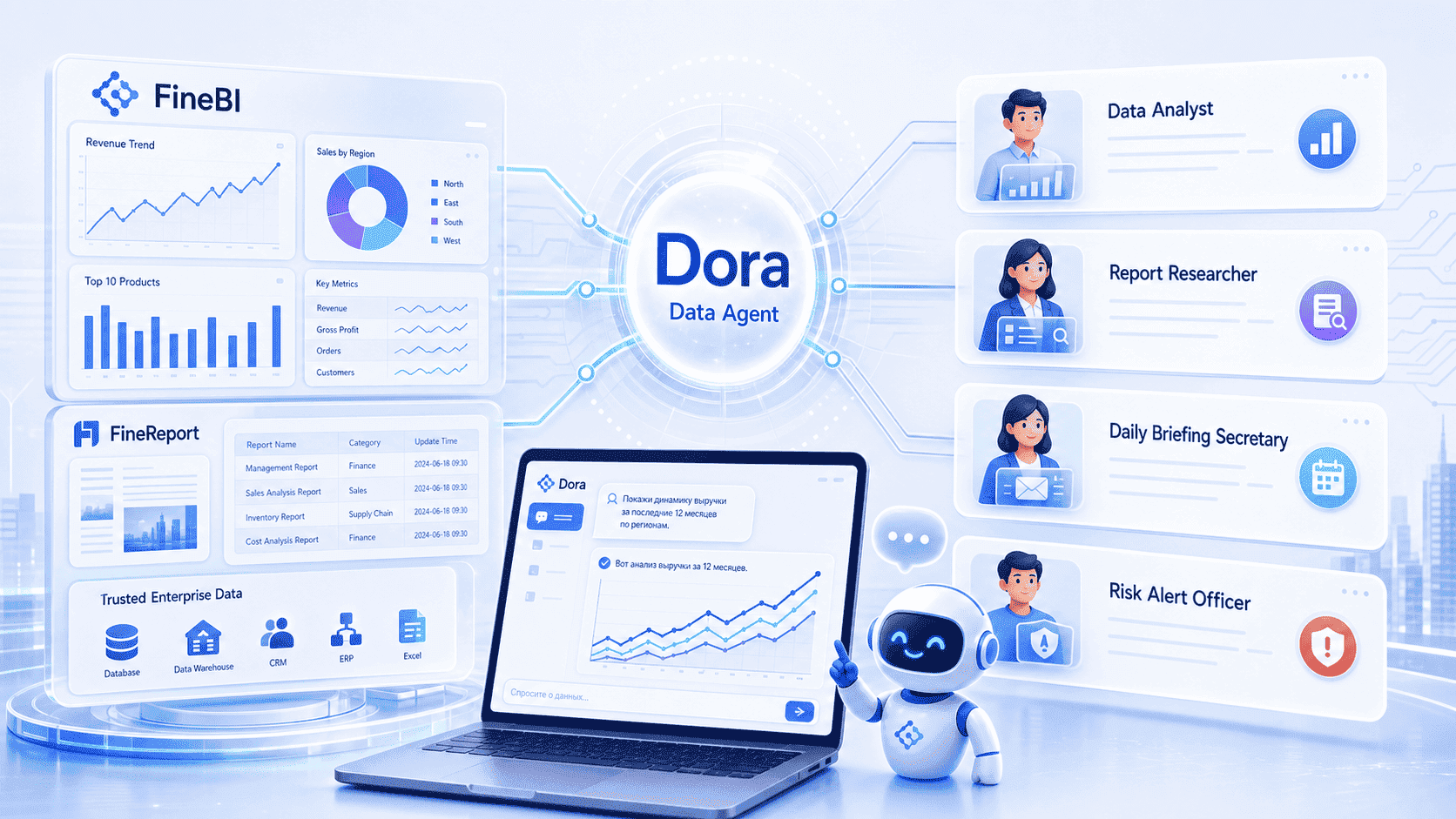
This is a different conversation from generic AI chat. It is about making analytics usable in recurring enterprise scenarios.

Get Ready-to-Use Dashboard Templates in Fine Gallery
Final Verdict: Should Your Team Use Power BI Copilot?
Power BI Copilot can be a useful addition for teams already working inside a well-managed Microsoft BI environment. Its strongest benefits are faster first drafts, easier report consumption, better natural-language exploration, and more consistent summaries.
But the limitations are just as real:
- weak data models reduce output quality
- analyst judgment remains essential
- access and experience can vary by environment
- direct and indirect costs affect ROI
- governance must be taken seriously
If your organization already has strong Power BI adoption, decent semantic model hygiene, and a clear rollout plan, Power BI Copilot is worth piloting.
If your environment is still immature, the smarter move may be to improve your semantic layer, governance, and self-service reporting foundations first.
And if your broader goal is not just AI assistance inside reports, but a more business-friendly self-service BI experience combined with governed Agentic BI, then FineBI + Dora are worth evaluating as part of that strategy.
FAQs
It helps users ask questions in natural language, summarize reports, explore data faster, and assist with parts of report creation. Its biggest value is usually speeding up analysis and making reports easier for non-technical users to understand.