
A well-designed business management dashboard gives leaders a single, reliable view of performance across the company. Instead of reviewing disconnected spreadsheets, static reports, and fragmented updates from different departments, management teams can monitor progress, spot risks early, and act with more confidence.
 Figure 1: A business management dashboard example created with FineBI
What a business management dashboard is and why it matters
A business management dashboard is a visual reporting interface that brings together the most important metrics, trends, and exceptions needed to manage the business. Its purpose is not simply to display data. It is to support day-to-day management, improve coordination across functions, and help executives make faster, better-informed decisions.
In practical terms, a dashboard translates strategy into a working management system. It connects goals, KPIs, targets, actual results, and actions in one shared view. When leaders open the dashboard, they should immediately understand three things:
- What is happening
- Why it is happening
- What action is needed next
This is why dashboards matter. Most organizations do not suffer from a lack of data; they suffer from a lack of clarity. Sales, finance, operations, customer service, and HR often maintain separate reporting logic and reporting cycles. A strong dashboard solves that fragmentation by turning business performance into a common language.
A dashboard also improves alignment. If department heads, managers, and executives all work from different versions of the truth, decisions become slower and accountability becomes weaker. A shared business management dashboard creates a consistent operating picture that helps teams focus on the same priorities.
 Figure 2: A dashboard helps business alignment
Operational, tactical, and executive reporting are different
Not every dashboard should serve the same audience. One common mistake is trying to satisfy all reporting needs in a single screen. In reality, management reporting usually falls into three levels:
- Operational reporting focuses on daily execution, such as backlog volume, service response times, order fulfillment, or production output.
- Tactical reporting supports mid-level management decisions, such as weekly performance trends, team productivity, campaign effectiveness, or budget versus actual by department.
- Executive reporting gives senior leaders a high-level summary of company health, strategic progress, major risks, and cross-functional dependencies.
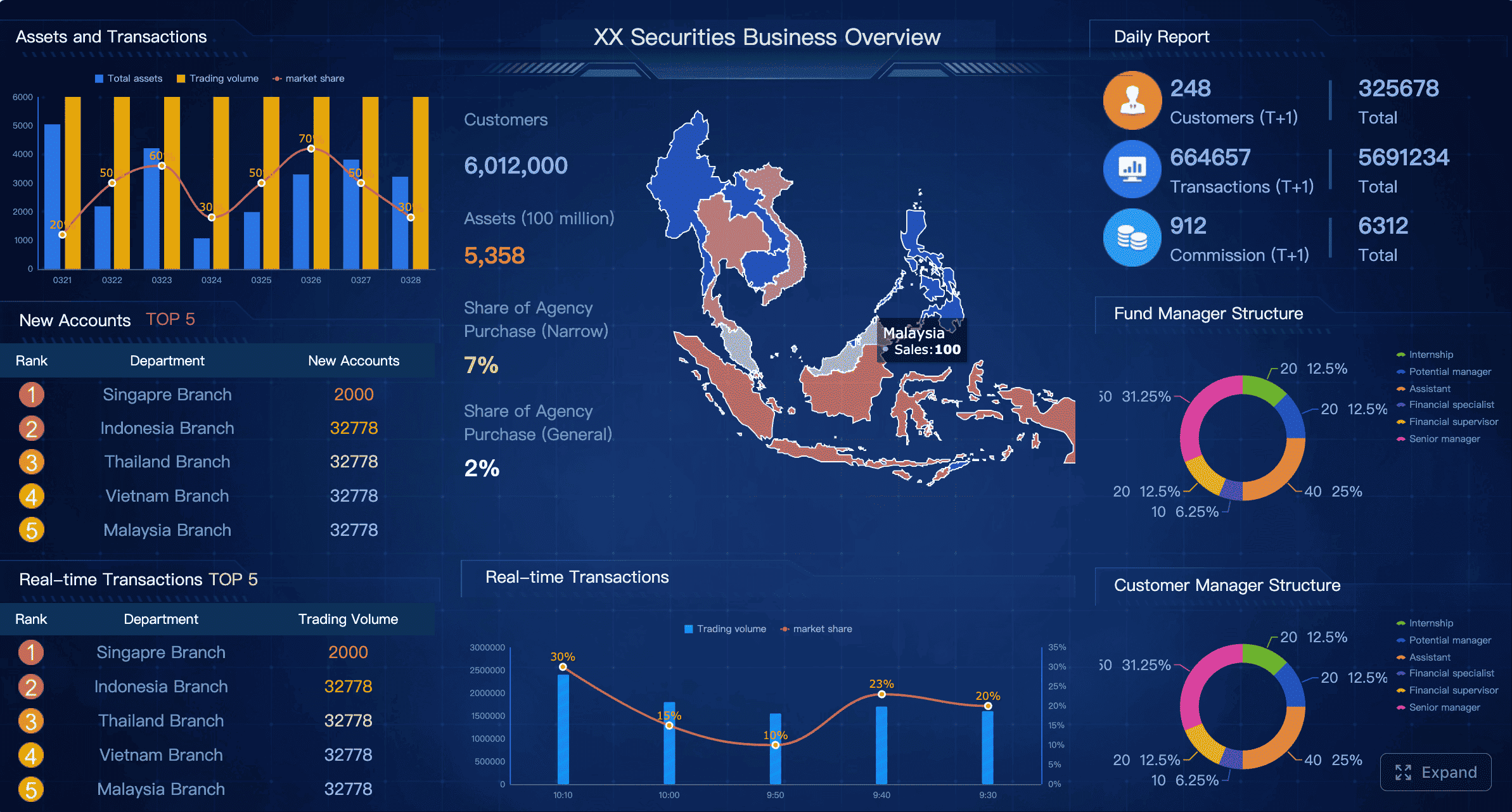 Figure 3: A business management dashboard example created with FineBI
A business management dashboard may combine elements from all three, but it should do so intentionally. For example, an executive summary dashboard may show top-line revenue, operating margin, customer churn, and delivery risk, while allowing drill-down into departmental details when needed.
This is also where a modern BI platform becomes important. Tools such as FineBI help organizations build role-based dashboards that preserve one data model while offering different views for executives, managers, and teams. That approach keeps definitions consistent without forcing every user into the same reporting layout.
Set goals and choose the right KPI framework for the business management dashboard
A dashboard is only as useful as the management logic behind it. Before selecting charts or building pages, define what the dashboard is supposed to help the business achieve.
Start with business goals and decisions
The right starting point is not “What data do we have?” but “What decisions do we need to make?” A business management dashboard should be built around recurring management questions, such as:
- Are we on track to hit revenue and margin targets this quarter?
- Which teams or regions are underperforming?
- Where are delivery bottlenecks increasing risk?
- Is customer retention improving or declining?
- Are costs rising faster than output?
These questions should be mapped to clear business goals and ownership. For each goal, define:
- The decision the dashboard should support
- The person or team responsible
- The measurable outcome
- The review frequency
For example:
- Goal: Improve quarterly profitability
- Decision: Reallocate spending or adjust pricing in underperforming segments
- Owner: CFO and business unit heads
- Outcome: Higher gross margin and lower cost variance
- Review cadence: Weekly and monthly
This process keeps the dashboard focused on management action rather than passive observation.
Select KPIs that show performance clearly
Once goals are defined, select KPIs that reveal whether the business is moving in the right direction. A strong business management dashboard usually includes both:
- Leading indicators, which signal future performance
- Lagging indicators, which confirm achieved results
For example:
Growth KPIs
- Pipeline coverage
- Lead-to-opportunity conversion
- Revenue growth rate
- New customer acquisition
Efficiency KPIs
- Cycle time
- Cost per order
- Utilization rate
- Productivity per employee or team
Risk KPIs
- SLA breach rate
- Inventory stockout rate
- Budget variance
- Churn risk score
Customer health KPIs
- Retention rate
- Net revenue retention
- CSAT or NPS
- Average resolution time
The key is restraint. Too many metrics reduce clarity and slow decision-making. A focused management dashboard often works better with a small set of high-value KPIs than with a crowded page of every available metric.
A useful rule is to ask whether each KPI answers one of these questions:
- Does it reflect progress toward a business goal?
- Does it help someone make a decision?
- Does it indicate where action is required?
If the answer is no, it likely does not belong on the main dashboard.
Define data sources and refresh rules
Before design begins, document the data foundation behind every KPI. This step prevents the common problem of dashboards that look polished but are not trusted.
For each metric, define:
- Source system
- Refresh frequency
- Calculation logic
- Metric owner
- Data quality checks
- Exception handling rules
Typical source systems may include:
- ERP for revenue, cost, and inventory
- CRM for pipeline and sales activity
- Finance systems for budget and actuals
- HRIS for headcount and capacity
- Service platforms for tickets and support KPIs
- Project tools for delivery progress
Refresh rules should align with business needs. A production or customer support dashboard may require near real-time updates, while strategic financial measures may only need daily or weekly refreshes.
This is another area where FineBI can support governance. By centralizing metric logic and connecting multiple enterprise systems, FineBI helps teams reduce duplicate calculations and improve consistency across reports, dashboards, and self-service analysis.
Design the business management dashboard layout for clarity
After goals and KPIs are defined, layout becomes the mechanism that determines whether users can understand the dashboard quickly. Good layout design reduces cognitive load and supports scanning.
Organize the page by priority
A business management dashboard should guide attention from summary to detail. A proven structure is:
- Top section: Headline KPIs and status indicators
- Middle section: Trend analysis and key comparisons
- Bottom section: Detailed breakdowns, root-cause views, and drill-down tables
This hierarchy matches how executives and managers read dashboards. They typically begin by asking whether performance is on track, then move to trends, then investigate drivers.
A typical page layout may include:
- Top row: Revenue, gross margin, operating cost, customer churn, on-time delivery
- Middle row: Trend lines for the last 6 to 12 months, target versus actual charts, variance views
- Lower row: Breakdown by region, product, team, channel, or customer segment
Grouping also matters. Related metrics should appear together by business function, such as:
- Sales
- Finance
- Operations
- Customer service
- Project delivery
This structure helps users connect performance patterns across departments without jumping between unrelated visuals.
Choose charts and components that fit the metric
The most effective business management dashboard uses simple chart types matched to analytical purpose.
Use these visual choices intentionally:
- Scorecards for headline KPI values
- Line charts for trends over time
- Bar charts for comparisons across categories
- Stacked bars for composition
- Tables for detail and drill-down
- Bullet charts for target versus actual
- Variance visuals for budget, forecast, and performance gaps
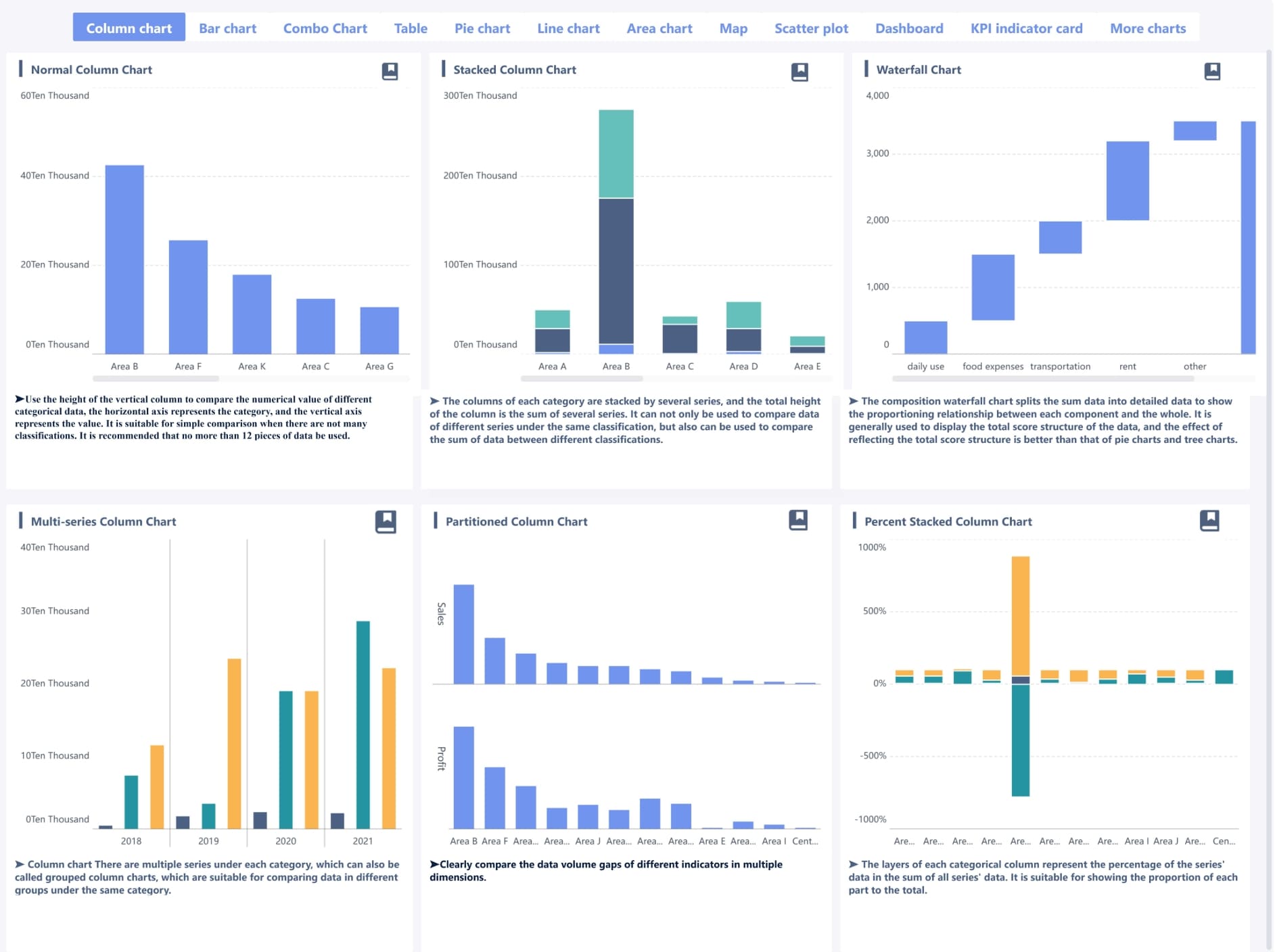
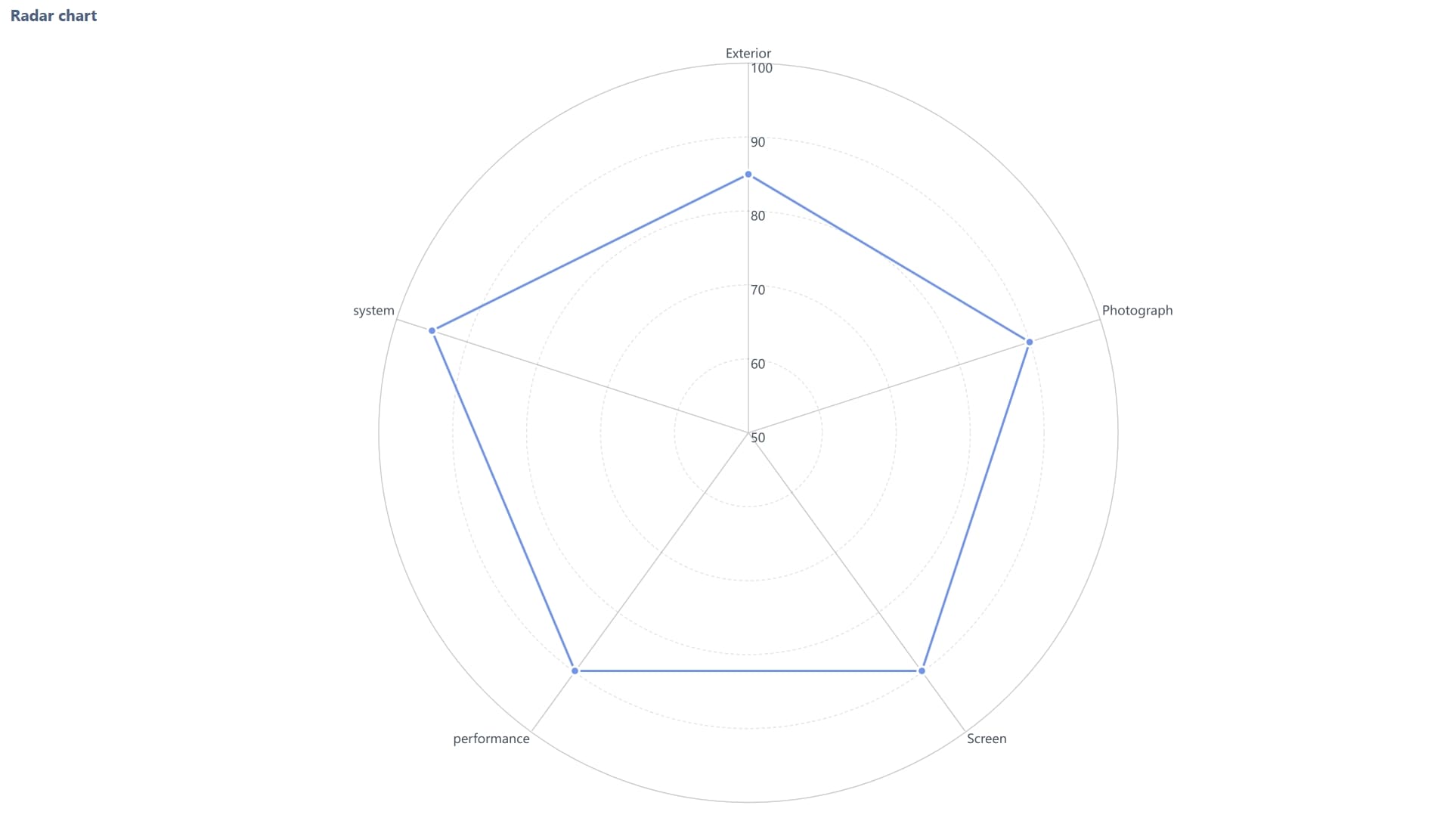
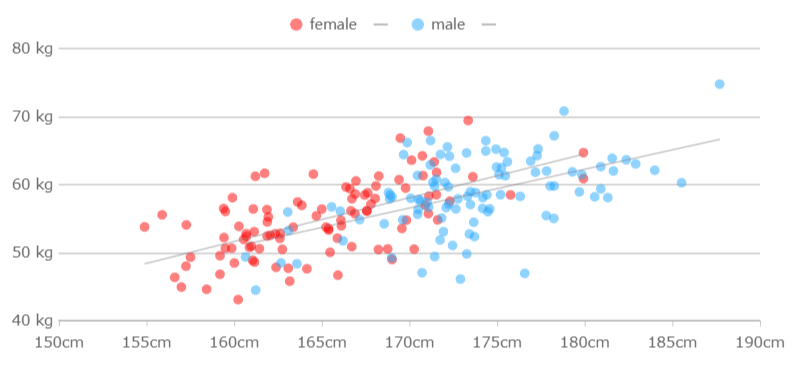
Different Charts created with FineBI
Avoid decorative visuals that add visual weight without improving interpretation. A dashboard is a management tool, not a presentation poster.
Consistency is equally important. Keep these elements standardized across the dashboard:
- Date ranges
- Color logic
- Units of measure
- Label format
- Definitions of favorable and unfavorable movement
For example, if red indicates underperformance in one section and a neutral category in another, users will lose trust in the design. Similarly, if one chart shows monthly values and the next shows rolling 30-day values without explanation, comparisons become misleading.
Make the dashboard easy to scan
Management dashboards are usually scanned in seconds before they are studied in detail. Visual design should support that behavior.
The most important techniques include:
- Using whitespace to separate logical groups
- Creating a clear visual hierarchy
- Limiting the number of accent colors
- Highlighting exceptions rather than everything
- Reducing unnecessary labels and borders
Clarity improves when only a few elements compete for attention. If every KPI is bold, color-coded, and highlighted, then nothing stands out.
A practical approach is to use neutral tones for most visuals and reserve stronger colors for exception states such as:
- Below target
- Critical threshold exceeded
- Sharp decline versus prior period
- SLA breach or overdue status
With tools like FineBI, design teams can also build reusable dashboard components and style standards. This is particularly useful for organizations that need multiple role-based dashboards while maintaining a coherent visual system.
Build alert rules and decision workflows for the business management dashboard
A dashboard becomes far more valuable when it not only displays metrics but also helps teams respond to change. Alert rules transform passive reporting into active management.
Set thresholds that trigger action
An effective business management dashboard defines what “normal,” “warning,” and “critical” look like for each KPI. Thresholds can be based on:
- Strategic targets
- Historical performance ranges
- Contractual service levels
- Capacity limits
- Statistical anomalies
For example:
- Revenue below 95% of monthly target = warning
- Gross margin below 90% of target = critical
- Ticket backlog above 120% of normal range = warning
- Customer churn above 3% in a month = critical
The goal is not to alert on every fluctuation. The goal is to identify conditions that require a specific response.
Some alerts should appear visually on the dashboard, such as red status badges or exception panels. Others should trigger direct notifications through email, messaging tools, or workflow systems when speed matters.
Assign owners and response steps
Alerts without ownership do not improve performance. Every major KPI on the dashboard should have a documented owner and an expected response process.
Define for each alert:
- Who investigates
- What action they take
- How quickly they respond
- When escalation occurs
- How resolution is recorded
For instance:
- Alert: Order fulfillment delay above threshold
- Owner: Operations manager
- Response time: Within 2 hours
- Action: Check warehouse backlog, labor availability, and shipping constraints
- Escalation: Notify supply chain director if unresolved within 24 hours
This structure turns the business management dashboard into part of the operating model, not just a monitoring layer.
Review alert quality over time
Alert logic should evolve. If teams receive too many low-value notifications, they begin to ignore them. If thresholds are too loose, major issues go unnoticed until they become expensive.
Review alert performance regularly by asking:
- Which alerts are frequently ignored?
- Which alerts lead to meaningful action?
- Are thresholds too sensitive or too broad?
- Do alerts help teams respond faster?
- Is the same issue recurring without root-cause resolution?
The best alert systems balance visibility with trust. Teams should feel that when a dashboard flags an issue, it genuinely deserves attention.
FineBI can be especially useful here because it allows organizations to combine visual monitoring with automated warning rules and cross-department sharing, improving both responsiveness and management transparency.
Learn from business management dashboard examples and common patterns
Looking at common dashboard patterns helps teams avoid reinventing the structure from scratch. The best business management dashboard examples usually share a few characteristics: focused scope, clear ownership, actionable thresholds, and consistent visual logic.
Common dashboard types and use cases
Different management scenarios require different dashboard designs.
Executive dashboard
Built for senior leadership, this view focuses on company-wide KPIs such as revenue, margin, cash position, strategic initiatives, customer retention, and major operational risks.
Use it when leaders need a concise overview across departments.
Operational dashboard
Built for daily management, this dashboard tracks process health in near real time, such as production throughput, backlog, fulfillment speed, service response, or uptime.
Use it when frontline teams need immediate visibility and rapid intervention.
Sales dashboard
Focused on pipeline, conversion, win rate, quota attainment, revenue by segment, and forecast confidence.
Use it when sales leaders need to manage both current attainment and future revenue risk.
Finance dashboard
Tracks revenue, cost, profit margin, cash flow, budget variance, receivables, and financial forecast performance.
Use it when the business needs tighter control over profitability and resource allocation.
Project or delivery dashboard
Shows milestone progress, schedule variance, workload balance, issue backlog, and resource utilization.
Use it when delivery performance directly affects customer satisfaction, cost, or strategic outcomes.
In some organizations, one master business management dashboard is enough. In others, a role-based set of connected views works better. If user needs differ significantly, it is usually more effective to maintain a summary dashboard plus targeted functional dashboards.
Example layouts and reusable components
Many strong dashboards use the same reusable building blocks. Examples include:
- KPI summary row: Top-level metrics with target, actual, and variance
- Trend panel: Multi-period line charts showing movement over time
- Variance section: Budget versus actual or target versus actual views
- Breakdown matrix: Performance by region, team, business unit, or product
- Drill-down table: Detailed records for investigation
- Exception list: Open alerts, unresolved issues, or repeated misses
A reusable layout might look like this:
Example 1: Executive business management dashboard
- Top row: Revenue, EBITDA, operating cash flow, churn, on-time delivery
- Middle row: 12-month trends, budget variance, segment comparison
- Bottom row: Regional performance, high-risk accounts, open critical issues
Example 2: Operations management dashboard
- Top row: Throughput, backlog, cycle time, SLA compliance
- Middle row: Daily trend, bottleneck analysis, capacity utilization
- Bottom row: Shift-level performance, open incidents, overdue work items
Example 3: Sales management dashboard
- Top row: Pipeline value, win rate, booked revenue, average deal size
- Middle row: Funnel conversion, forecast trend, rep performance
- Bottom row: Opportunities at risk, lost deal reasons, territory table
Reusable templates speed up implementation, but they should remain flexible. Good design systems create consistency without forcing every department into the same reporting model.
Common mistakes to avoid
Many business management dashboard projects fail not because of technology, but because of design and governance mistakes.
The most common issues include:
- Too many KPIs on one page
- No clear owner for each metric
- Inconsistent definitions across departments
- Outdated or stale data
- Missing context for numbers
- Attractive visuals that hide the actual message
- No action path when performance declines
Another frequent problem is mixing strategic and operational metrics without clear separation. A CEO does not usually need row-level ticket details on the main view, just as a frontline team may not need a broad strategic scorecard as their default screen.
The best dashboards make performance changes easy to see, easy to explain, and easy to act on.
Launch, test, and improve the business management dashboard over time
A dashboard is not finished when it is published. Real value appears after rollout, when teams begin using it in recurring decisions and operational reviews.
Validate with real users before rollout
Before launching a business management dashboard broadly, test it with the actual people who will use it. This includes executives, department heads, analysts, and frontline managers where relevant.
Validation should answer practical questions:
- Can users identify key insights within a minute?
- Can they tell what is on track and what is off track?
- Do they understand how metrics are calculated?
- Can they find the right next step when something is wrong?
- Are any visuals confusing or unnecessary?
A good test method is scenario-based review. Ask users to complete realistic tasks, such as:
- Find the largest area of budget variance
- Identify which region is driving churn
- Spot the KPI that needs immediate escalation
- Explain why forecast confidence has declined
If users struggle, the issue is often layout, labeling, or metric selection rather than training alone.
Track adoption and business impact
After rollout, measure whether the dashboard is actually being used and whether it improves management behavior.
Key adoption indicators include:
- Number of active users
- Frequency of dashboard access
- Time spent by role
- Most-viewed sections
- Drill-down behavior
- Alert acknowledgment and resolution rate
Business impact measures are even more important:
- Faster decision cycles
- Improved exception handling
- Better forecast accuracy
- Higher accountability by owner
- Reduced reporting effort
- Better alignment between teams
Dashboards should evolve with the business. As priorities, team structures, and market conditions change, the KPI set and layout should be reviewed. Quarterly or semiannual governance reviews are often enough to keep the dashboard relevant without causing constant redesign.
For organizations aiming to scale dashboard management, FineBI offers an effective path: centralized data governance, self-service analysis for business users, flexible dashboard design, and easier reuse across departments. This combination is especially valuable when the company wants one consistent business management dashboard framework but different role-based views for different levels of decision-making.
Conclusion
Creating a strong business management dashboard requires more than selecting a few charts and connecting data sources. The most effective dashboards are built on a clear management foundation:
- Start with goals and decisions
- Select focused KPIs with clear ownership
- Define data sources and refresh rules carefully
- Design the layout for scanning and action
- Add alert thresholds and response workflows
- Learn from proven dashboard patterns
- Test, measure adoption, and improve continuously
When these elements come together, the dashboard becomes a working control system for the business. It helps leaders align teams, monitor what matters, reduce reporting friction, and respond to issues before they become larger problems.
A dashboard should not merely report the business. It should help manage it.
FAQs
It should include a focused set of KPIs tied to business goals, targets, trends, and exceptions that require action. Most dashboards also show ownership, review cadence, and drill-down paths so leaders can move from summary to cause quickly.