
Comparing FineChatBI and Mercury Labs MLX
Explore the performance differences in 2025.
| Features | FineChatBI | Mercury Labs MLX |
|---|---|---|
| Focus | Conversational AI with business intelligence | Modular AI platform with components |
| Interaction | Natural language querying | Fast setup with ready-made parts |
| Technology | Special LLMs and rule-based engine | RAG Knowledge Base and Multi-Model LLM Router |
| Time to Production | Quick data analysis focus | Four-week implementation timeline |
| Customization | Limited customization options | Extensive customization with modules |
| Speed | Instant responses during queries | Fast updates with modular design |
| Analytics | Reports with actionable insights | Analytics dashboard for performance tracking |
| Integration | Connects with common business apps | Advanced connections with custom modules |
| Support | Fast help via multiple channels | Email and ticket system support |
You want the best mlx dashboard performance in 2025. FineChatBI is ahead because it has strong conversational AI. You can ask questions and get answers right away. Mercury Labs MLX gives you fast modular AI tools. These tools help you build solutions quickly. You should look at speed, features, integration, usability, pricing, and support before you pick one. Your business goals will help you choose the best platform.
MLX Dashboard Platform Overview
FineChatBI
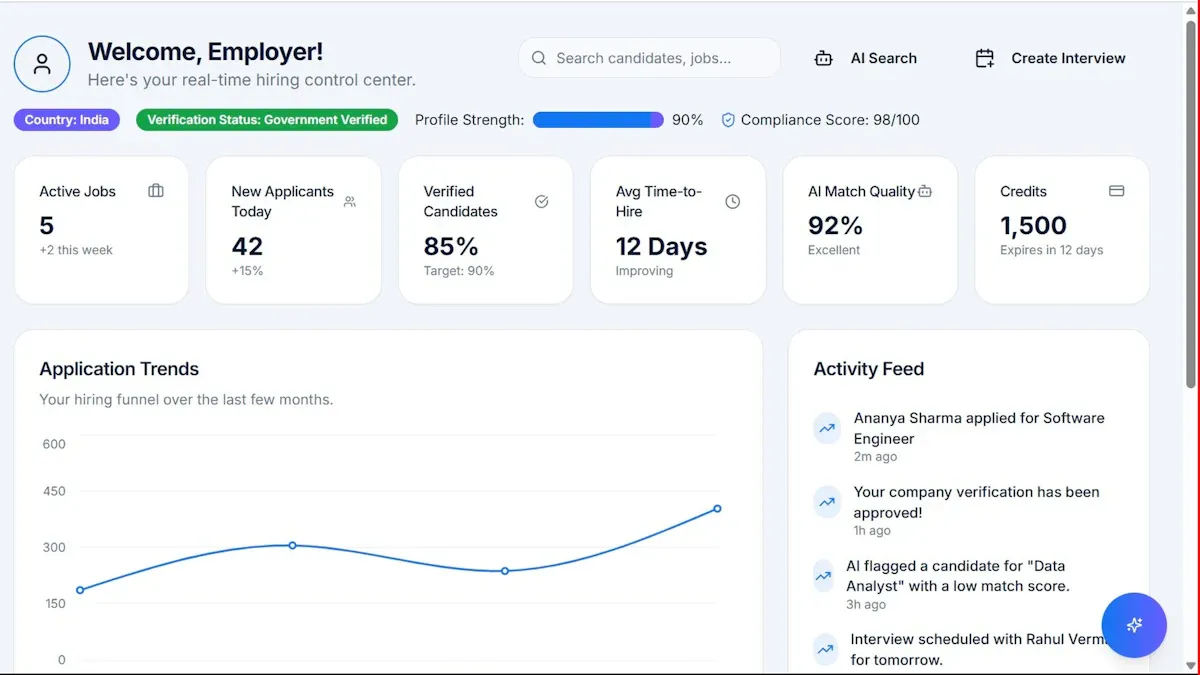
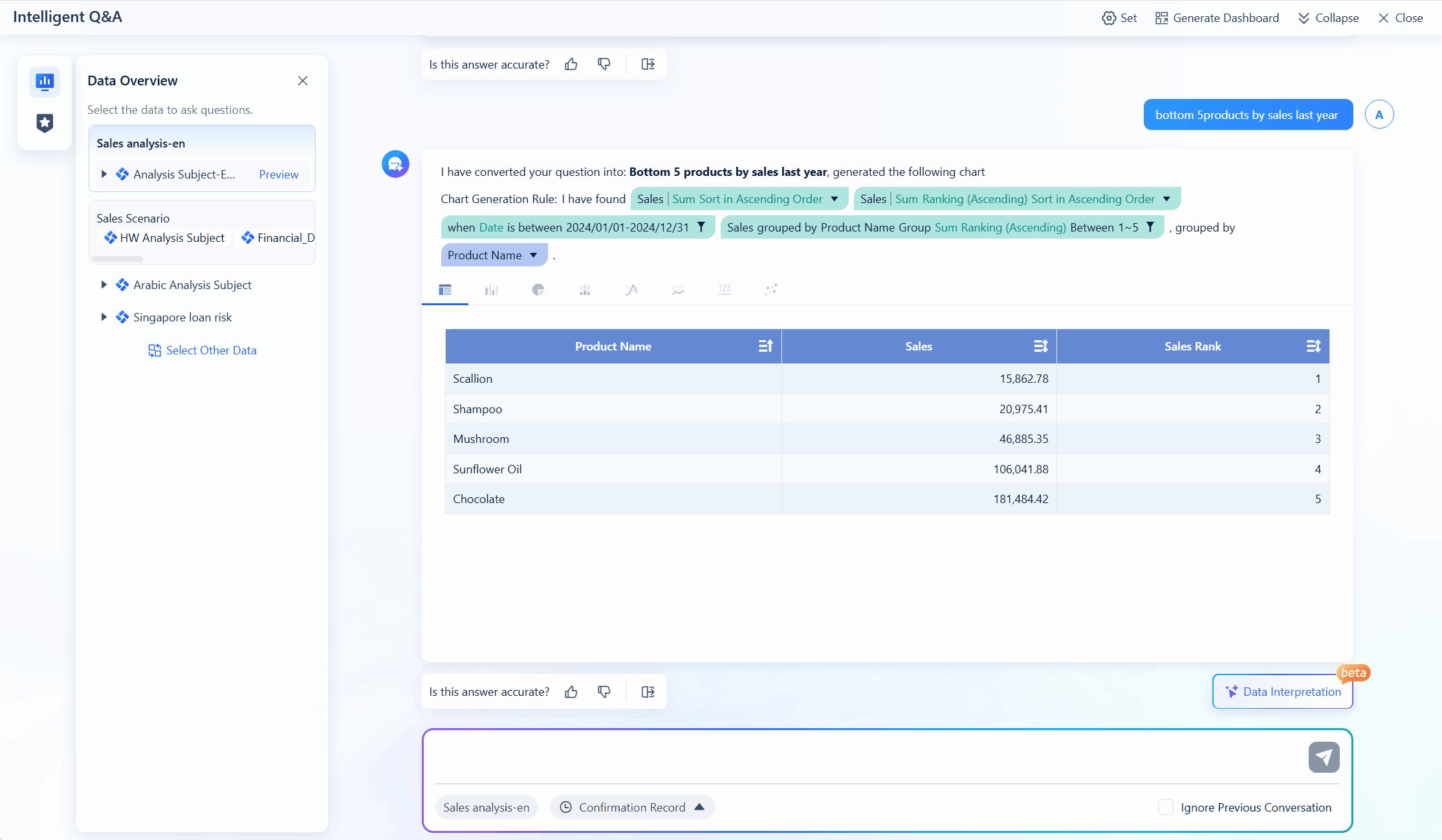
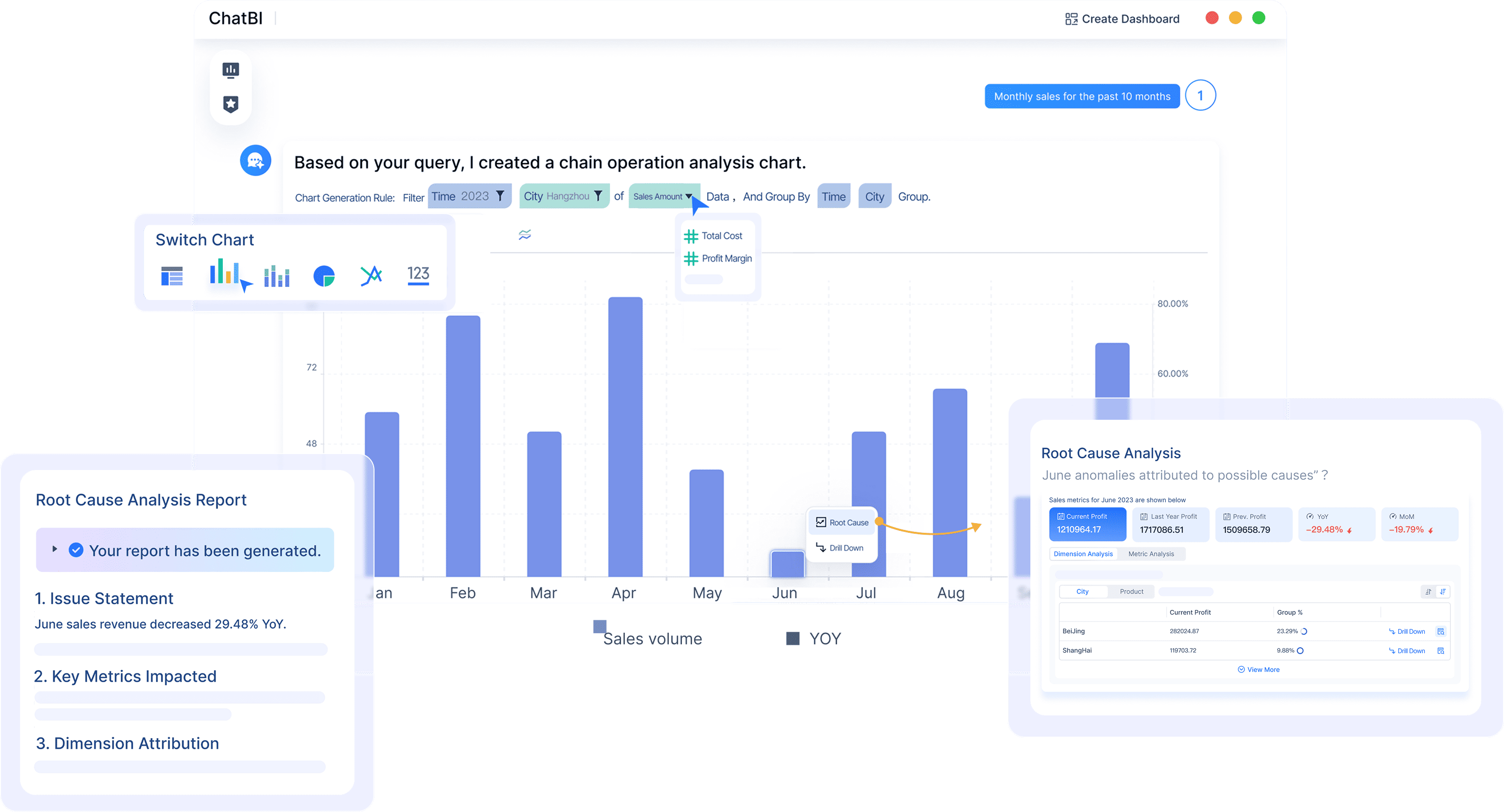
FineChatBI lets you work with business intelligence in a new way. You can ask questions about your data using everyday words. The platform understands what you say and shows answers in smart charts. You do not have to learn hard commands. FineChatBI uses special large language models and a rule-based engine. This helps you get correct results every time. You can check your data on your phone or computer. The dashboard lets you make reports and share them with your team fast.
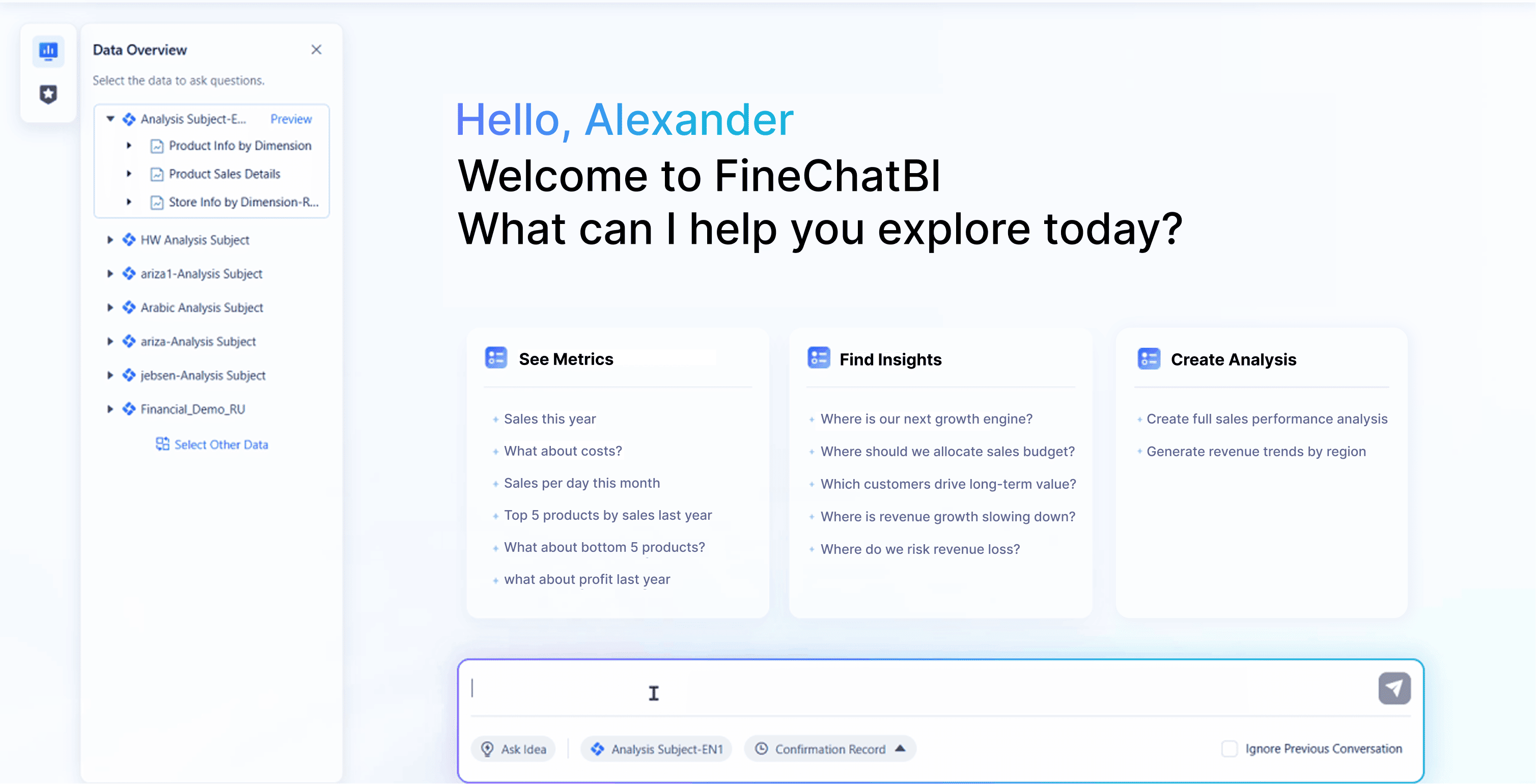
- You use plain language to talk to your data.
- The system finds patterns and things that stand out.
- You get reports with hints that explain changes.
- You can see your dashboard anywhere.
FineChatBI makes data analysis easy and quick. You do not have to build anything from the start. The platform mixes conversational intelligence with business intelligence. This means you get answers fast and can use them right away.
| Feature | FineChatBI |
|---|---|
| Focus | Mixes conversational intelligence with business intelligence |
| Interaction | Users talk to data in natural language |
| Technology | Uses special LLMs and a rule-based engine |
| Time to Production | Focuses on data analysis with conversational tools |
| Customization | Not many ways to customize because it focuses on conversational AI |
Mercury Labs MLX
Mercury Labs MLX gives you a modular AI platform. You can use ready-made parts to make solutions quickly. The platform takes care of infrastructure and model setup for you. You do not need to spend months making AI tools. MLX lets you add features in weeks. You can connect documents, databases, and APIs to build a knowledge base. The Multi-Model LLM Router picks the best model for each job. You can change your dashboard with licensed modules.
- You get fast setup and easy ways to change things.
- The platform keeps improving itself.
- You can make workflow automations with simple tools.
- MLX works for big companies and has strong security.
Mercury Labs MLX helps you use AI across your business. You can add new modules as you need them. The platform gives you lots of choices and control.
| Feature | Mercury Labs MLX |
|---|---|
| Focus | Modular AI platform with ready-made parts |
| Interaction | Fast setup and changes without lots of coding |
| Technology | Ready-made parts for finding knowledge, chat tools, and more |
| Time to Production | Focuses on quick setup and managed infrastructure |
| Customization | Many ways to customize with licensed modules for special needs |
Tip: If you want quick answers and simple data analysis, FineChatBI is a good pick. If you need to build custom AI tools and grow fast, Mercury Labs MLX gives you more options.
MLX Dashboard Performance

Speed & Responsiveness
You want your mlx dashboard to be fast. FineChatBI gives answers right away when you ask. The platform uses smart language models that work in real time. You see results in charts without waiting long. You can switch reports and dashboards with one tap. This speed helps you decide things faster.
Mercury Labs MLX is also built for speed. You get a system that loads dashboards quickly. The platform uses ready-made parts to cut down lag. You can add new modules and see changes fast. MLX dashboard works well even with lots of data sources. You do not need to wait for updates or refreshes.
| Platform | Speed of Response | Real-Time Updates | Mobile Access |
|---|---|---|---|
| FineChatBI | Instant | Yes | Yes |
| Mercury Labs MLX | Fast | Yes | Yes |
Note: Both platforms let you get to your data quickly, but FineChatBI gives instant answers when you talk to it. Mercury Labs MLX gives fast updates and strong performance with big data sets.
Data Processing
You need your mlx dashboard to handle data easily. FineChatBI uses a rule-based engine and special models. You can ask hard questions using simple words. The dashboard finds patterns and points out things that stand out. You get reports that explain changes in your data. FineChatBI works on your phone, so you can check data anywhere.
Mercury Labs MLX gives strong data tools. The platform connects to documents, databases, and APIs. You can build a knowledge base that grows with your business. MLX dashboard uses a router to pick the best AI model for each job. You can handle lots of data and set up automatic tasks. The dashboard tracks how you use it, costs, and how well models work.
- FineChatBI:
- Handles questions in plain language.
- Finds things that are different and trends.
- Makes reports with helpful hints.
- Mercury Labs MLX:
- Works with many data sources.
- Sets up automatic data tasks.
- Tracks analytics and how models perform.
Tip: If you want easy data analysis with simple words, FineChatBI helps you get answers fast. If you need to work with lots of data and set up automatic tasks, Mercury Labs MLX gives you more control.
You should think about what your business needs. FineChatBI is best for teams that want quick insights and easy data work. Mercury Labs MLX is good for companies that need strong data tools and modular features. Both mlx dashboard platforms work well, but your choice depends on your goals.
Features of MLX Dashboard
Visualization Tools
You want to see your data in a way that is easy. FineChatBI gives you smart charts. You can ask questions using normal words. You make dashboards with just a few words. The platform helps you find trends and things that stand out. You can check your dashboards on your phone anywhere. Mercury Labs MLX gives you an analytics dashboard. It tracks how much you use it, costs, and how well your models work. You get a clear look at your AI performance. Both platforms help you understand your data. FineChatBI makes it easy to ask questions and see answers in charts. Mercury Labs MLX helps you track and measure your AI tools.
| Tool | FineChatBI | Mercury Labs MLX |
|---|---|---|
| Visualization | Smart charts, natural language querying, mobile | Analytics dashboard, performance stats |
Tip: If you want to talk to your data and see charts right away, FineChatBI is a good pick. If you want to track AI usage and costs, Mercury Labs MLX gives you more details.
Customization
You might need to change your dashboard for your business. FineChatBI lets you build dashboards from chat. You can make reports fast. You do not need to know coding. The platform keeps things simple and guides you. Mercury Labs MLX gives you more ways to change things. You can add modules, connect new data, and set up automatic tasks. The mlx dashboard lets you change features as you need. You get more control over how your dashboard looks and works.
- FineChatBI: Easy dashboard building, guided setup, simple changes.
- Mercury Labs MLX: Add modules, connect data, automate tasks.
Analytics
You want to make smart choices. FineChatBI gives you reports that explain changes and show hints for action. You can see what is happening in your business and why. Mercury Labs MLX has an analytics dashboard. It tracks usage, costs, and how well models work. You can measure return on investment and find ways to get better. Both platforms help you study your data. Mercury Labs MLX focuses on tracking and making your AI tools better.
| Feature | Description |
|---|---|
| Analytics Dashboard | Tracks usage, costs, model performance |
| Optimization Opportunities | Shows ways to improve and save time |
| ROI Measurement | Lets you see return on investment |
Note: FineChatBI helps you understand your business with easy reports. Mercury Labs MLX helps you track and improve your AI tools.
Integration
Third-Party Apps
You want your mlx dashboard to work with other tools. FineChatBI connects with business apps you use often. You can link your dashboard to chat, cloud storage, and team tools. This helps you share reports with your team fast. You do not need to open lots of apps. FineChatBI lets you send data where you want.
Mercury Labs MLX gives you more ways to connect with other apps. You can add modules for customer service and document tasks. The platform works with many big company apps. You can build custom links using ready-made parts. MLX lets you grow your dashboard as your business gets bigger.
Tip: FineChatBI is good for easy links to common apps. Mercury Labs MLX is better if you need more advanced connections.
API & Data Sources
You need your mlx dashboard to get data from many places. FineChatBI uses special language models for your business. You can connect to databases, spreadsheets, and cloud services. The platform uses rules to keep your data safe and correct. You can ask questions and get answers from all your sources.
Mercury Labs MLX has a RAG Knowledge Base. You can link documents, APIs, and databases to make a hub. The Multi-Model LLM Router picks the best model for each job. You can set up custom data flows and make updates happen by themselves. MLX works with many types of data and lets you control how data moves.
| Integration Feature | FineChatBI | Mercury Labs MLX |
|---|---|---|
| Third-Party Apps | Popular business tools | Wide range, custom modules |
| API/Data Sources | Domain-tuned LLMs, rule-based engine | RAG Knowledge Base, LLM Router |
| Automation | Guided setup | Custom workflows |
Note: FineChatBI helps you connect and study data from many places easily. Mercury Labs MLX gives you more control for harder data jobs.
Usability
Interface Design
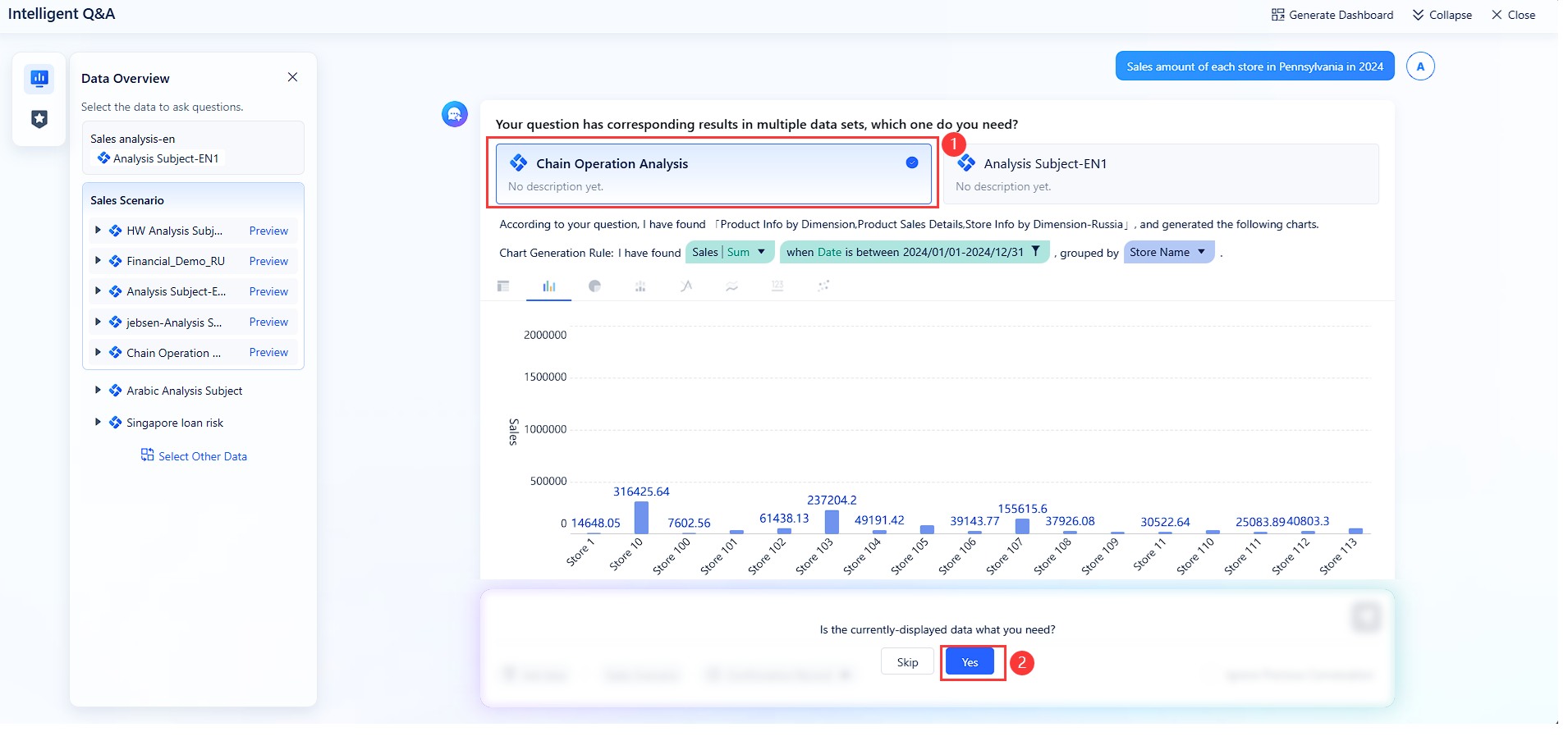
You want a dashboard that feels easy to use. FineChatBI gives you a clean interface. You ask questions in plain language. The system shows answers in smart charts. You do not need to learn special commands. You see your data and reports with simple taps. The design helps you focus on your work, not on learning new tools.
Mercury Labs MLX also offers a user-friendly dashboard. You use ready-made modules to build your workspace. The platform lets you drag and drop features. You can change the layout to fit your needs. You see all your AI tools in one place. The design supports quick changes and fast setup.
Tip: If you want a dashboard that works with natural language, FineChatBI makes it simple. If you prefer to build and change your workspace, Mercury Labs MLX gives you more control.
Accessibility
You need to access your mlx dashboard anywhere. Both FineChatBI and Mercury Labs MLX support mobile and desktop users. You check your data on the go using your phone. You create dashboards from chat with one tap. You share insights instantly with your team. The platforms help you stay connected and make decisions fast.
Here is a quick look at key accessibility features:
| Feature | Description |
|---|---|
| Mobile Access | Use on mobile to check data on the go |
| Dashboard Creation | Create dashboards from chat with one tap |
| Instant Sharing | Share insights instantly with your team |
You do not need to sit at your desk to use these dashboards. You get the same experience on your phone or computer. The learning curve stays low because both platforms guide you step by step.
- FineChatBI: Natural language interaction, easy mobile access, fast sharing.
- Mercury Labs MLX: Modular design, mobile support, instant updates.
Note: Both dashboards help you work from anywhere. You get fast access and easy sharing, so your team stays informed.
Pricing
Subscription Plans
You want to know how much each mlx dashboard will cost. FineChatBI uses a subscription plan that fits many business sizes. You can choose a plan for a small team or a large company. You pay a set fee each month or year. This fee covers all main features, updates, and support. You do not need to worry about hidden costs.
Mercury Labs MLX also uses a subscription model. You pick a plan based on the number of users and the modules you need. The base plan gives you core features. You can add more modules for extra cost. This lets you build a plan that matches your needs.
Here is a quick look at how the plans compare:
| Platform | Pricing Model | What’s Included | Add-Ons/Extras |
|---|---|---|---|
| FineChatBI | Flat subscription | All main features, support | Advanced integrations |
| Mercury Labs MLX | Modular subscription | Core features, pay for extras | Extra modules, users |
Tip: You should check if you need advanced features before picking a plan. This helps you avoid paying for things you do not use.
Value for Money
You want to get the most for your money. FineChatBI gives you a simple price that covers everything you need for data analysis. You get updates and support without extra fees. This makes it easy to plan your budget.
Mercury Labs MLX gives you more ways to customize your plan. You pay for what you use. If your business grows, you can add more modules. This helps you control costs as you scale.
Key points to consider:
- FineChatBI works well if you want a clear price and all-in-one features.
- Mercury Labs MLX fits if you want to pay only for what you use and add features as you grow.
Note: Both platforms offer good value. Your choice depends on how much control you want over your mlx dashboard costs.
Support
Customer Service
You want good help when you use an MLX dashboard. FineChatBI lets you talk to experts right away. You can get help by email, phone, or live chat. The team answers fast and helps you fix problems. You get easy guides and clear instructions. These help you learn features and solve issues yourself.
Mercury Labs MLX also gives strong customer service. You can reach their team by email or ticket system. The platform has detailed guides and video lessons. You find answers to common questions in their help center. Mercury Labs MLX replies quickly to big company clients.
Here is a quick look at customer service choices:
| Feature | FineChatBI | Mercury Labs MLX |
|---|---|---|
| Contact Methods | Email, phone, live chat | Email, ticket system |
| Documentation | Easy guides, instructions | Detailed manuals, videos |
| Response Time | Fast | Fast for big companies |
Tip: Check which support options work best for your team. Quick help and simple guides make your job easier.
Community
You get help from other users in a strong community. FineChatBI has active users who share tips and ideas. You can join forums and online groups to ask questions. The company runs webinars and Q&A events. You learn from others and find new ways to use your dashboard.
Mercury Labs MLX also builds a friendly community. You find forums and boards for users. The platform lets people share custom modules and workflows. You can join online events and workshops. Mercury Labs MLX supports learning from each other.
Here are ways to join each community:
- FineChatBI: Forums, webinars, Q&A events, user tips.
- Mercury Labs MLX: Boards, workshops, shared modules.
Note: A strong community helps you fix problems and find new features. You get help from other users and learn faster.
You should think about both customer service and community help when picking your MLX dashboard. Good support helps you use the platform with confidence.
Recommendation for MLX Dashboard
For Enterprises
If you run a big company, you need a dashboard that is safe and can handle lots of data. FineChatBI gives you strong conversational AI. You can ask questions and get answers right away. This helps your teams make choices fast. You can use it on your phone and share data easily. The platform keeps your data safe with special rules.
Mercury Labs MLX is good for big companies that want to add new features as they grow. It uses end-to-end encryption and follows rules like SOC 2 Type II and GDPR. You get to control who can see what with role-based access. The system keeps track of changes with audit logs. MLX is great for companies that need to follow strict rules and want to set up fast. If you want to build your own workflows and connect lots of data, MLX gives you more options.
Pick FineChatBI if you want quick answers and easy sharing. Choose Mercury Labs MLX if you need strong security and custom features.
For SMBs
Small and medium businesses need dashboards that are simple and quick to start. You want to spend time working, not learning hard tools. FineChatBI mixes business intelligence with smart chat. You get step-by-step help and can ask questions in normal words. This makes it easy for your team to look at data.
Mercury Labs MLX is also good for SMBs. The platform is easy to use and sets up fast. You get SSO and can control who uses the dashboard. MLX lets you change dashboards to fit your business.
Here is a quick comparison:
| Feature | FineChatBI | Mercury Labs MLX Dashboards |
|---|---|---|
| Ease of Use | Business intelligence with chat | Easy to use, good for rules |
| Integration Capabilities | Connects to many data sources | SSO, role-based access |
| Customization Options | Uses domain-tuned LLMs | Make your own dashboards |
| Security Features | Safe queries | SOC 2, GDPR, encryption |
| Implementation Speed | Starts up quickly | Sets up fast |
| Actionable Insights | Answers in plain language | Audit logs, tracks data changes |
FineChatBI is best for easy setup and smart tips. Mercury Labs MLX is better if you want more control and strong security.
For Individuals
If you want a dashboard for yourself, FineChatBI helps you ask questions and see answers fast. You can make your own dashboards and track your goals. It works well with Microsoft tools, so you can get your data easily.
Mercury Labs MLX is also good for one person. You can build dashboards without needing help from tech experts. The platform lets you check your progress and share your views with others.
| Feature | Benefit |
|---|---|
| Real-time insights | Make smart choices for what you do next |
| Custom dashboards | Make and share your own views |
| Performance tracking | See how you are doing easily |
| Microsoft integration | Get data from business apps |
FineChatBI is good if you want fast answers and easy dashboards. Mercury Labs MLX is best if you want to change your analytics and connect to more tools.
You have learned how FineChatBI and Mercury Labs MLX are different. FineChatBI gives you answers right away and lets you share data easily. Mercury Labs MLX lets you change things and connect more tools. Here is a simple chart:
| Platform | Speed | Features | Integration | Support |
|---|---|---|---|---|
| FineChatBI | Instant | Smart charts | Easy connections | Fast help |
| Mercury Labs MLX | Fast | Modular options | Advanced links | Quick reply |
Think about what is most important for your business. Try both platforms to find which mlx dashboard works best for you.
Frequently asked questions
FineChatBI gives answers right away when you ask. Mercury Labs MLX updates dashboards fast, even with lots of data. Both platforms care about speed. FineChatBI responds instantly during chats.