

If you are responsible for reporting performance across teams, you do not need more data—you need faster clarity. The right metrics dashboard helps sales leaders spot pipeline risk, marketing managers identify wasted spend, operations directors catch bottlenecks, finance teams control cash, and HR leaders monitor workforce health before issues escalate.
For enterprise decision-makers, dashboard design is not just a reporting exercise. It directly affects forecasting accuracy, response time, accountability, and cross-functional alignment. Reviewing strong metrics dashboard examples is one of the fastest ways to understand which KPIs matter, how to organize them, and how to make dashboards useful for daily decisions instead of passive reporting.
A well-built dashboard should answer three questions immediately:
- What is happening now?
- Is performance on track?
- What action should we take next?

All dashboards in this article are created by FineBI
What metrics dashboard examples show at a glance
A metrics dashboard is a visual reporting interface that displays the most important performance indicators for a team, process, or business unit. Its purpose is simple: help users monitor results quickly and act with confidence.
For busy managers, dashboards reduce the friction of pulling reports from multiple systems. Instead of hunting through spreadsheets, users can review current performance, compare trends, and identify exceptions from one place.
Dashboard examples are especially useful because they help teams evaluate:
- Layout structure: how metrics are grouped and prioritized
- KPI selection: which indicators are essential for a department
- Reporting goals: whether the dashboard supports monitoring, analysis, or executive review
- Visualization style: which chart types make trends and risks easier to understand
- Decision flow: how users move from high-level summary to detailed drill-down
Core elements every metrics dashboard should include
Below are the essential building blocks most high-performing dashboards share:
- Primary KPI cards: Headline metrics such as revenue, conversion rate, cash balance, or turnover rate
- Trend indicators: Comparisons against previous periods to show movement over time
- Target vs. actual views: Goal tracking to reveal underperformance or overachievement
- Segment filters: Controls for region, team, channel, department, or time period
- Exception alerts: Visual cues that highlight risks, misses, delays, or anomalies
- Drill-down paths: Supporting detail that explains why a KPI changed
- Data freshness indicators: Timestamps that show whether the dashboard is current and reliable
Key Metrics (KPIs)
When evaluating metrics dashboard examples, these KPI characteristics matter as much as the metrics themselves:
- Relevance: The metric must align with a real business decision.
- Actionability: Users should know what to do when the number changes.
- Consistency: Definitions, formulas, and date ranges must be standardized.
- Timeliness: Data should be refreshed at the cadence the business needs.
- Comparability: Metrics should support comparisons against goals, prior periods, or benchmarks.
- Ownership: Every KPI should have a responsible team or stakeholder.
- Context: A number without trend, target, or segmentation is rarely useful.
Operational dashboards vs. strategic dashboards vs. executive summaries
Not all dashboards serve the same purpose. One of the biggest mistakes organizations make is using the same reporting style for every audience.
Operational dashboards
Operational dashboards track day-to-day activity. They are used by frontline managers and team leads who need near-real-time visibility into workflows, outputs, queues, and service levels.
Examples include:
- Daily sales activity
- Campaign performance by channel
- Manufacturing throughput
- Accounts receivable aging
- Recruiting pipeline stages
Strategic dashboards
Strategic dashboards focus on medium- to long-term performance against business goals. They are commonly used by department heads who need to monitor trends, resource allocation, and target attainment.
Examples include:
- Quarterly revenue growth
- Customer acquisition cost trends
- Gross margin by product line
- Retention by business unit
- Hiring plan progress
Executive summary dashboards
Executive dashboards provide high-level snapshots for senior leadership. These dashboards emphasize a concise set of enterprise KPIs across departments and are designed for rapid review.
Examples include:
- Revenue vs. target
- Pipeline coverage
- Marketing-sourced opportunities
- EBITDA trend
- Employee turnover
- Operational service levels
12 metrics dashboard examples by department
The best metrics dashboard examples are tied to the actual decisions each function makes. Below are 12 practical dashboard scenarios across five departments, along with the metrics that make them effective.
Sales dashboard examples
Sales dashboards should help leaders answer three questions fast: Are we going to hit target? Where is pipeline risk? Which reps or segments need intervention?
1. Sales performance dashboard
This dashboard gives sales managers a high-level view of team results against quota. It is ideal for weekly pipeline reviews and monthly business reporting.
Key metrics typically include:
- Revenue
- Pipeline value
- Win rate
- Average deal size
- Sales cycle length
- Quota attainment
- Forecast accuracy
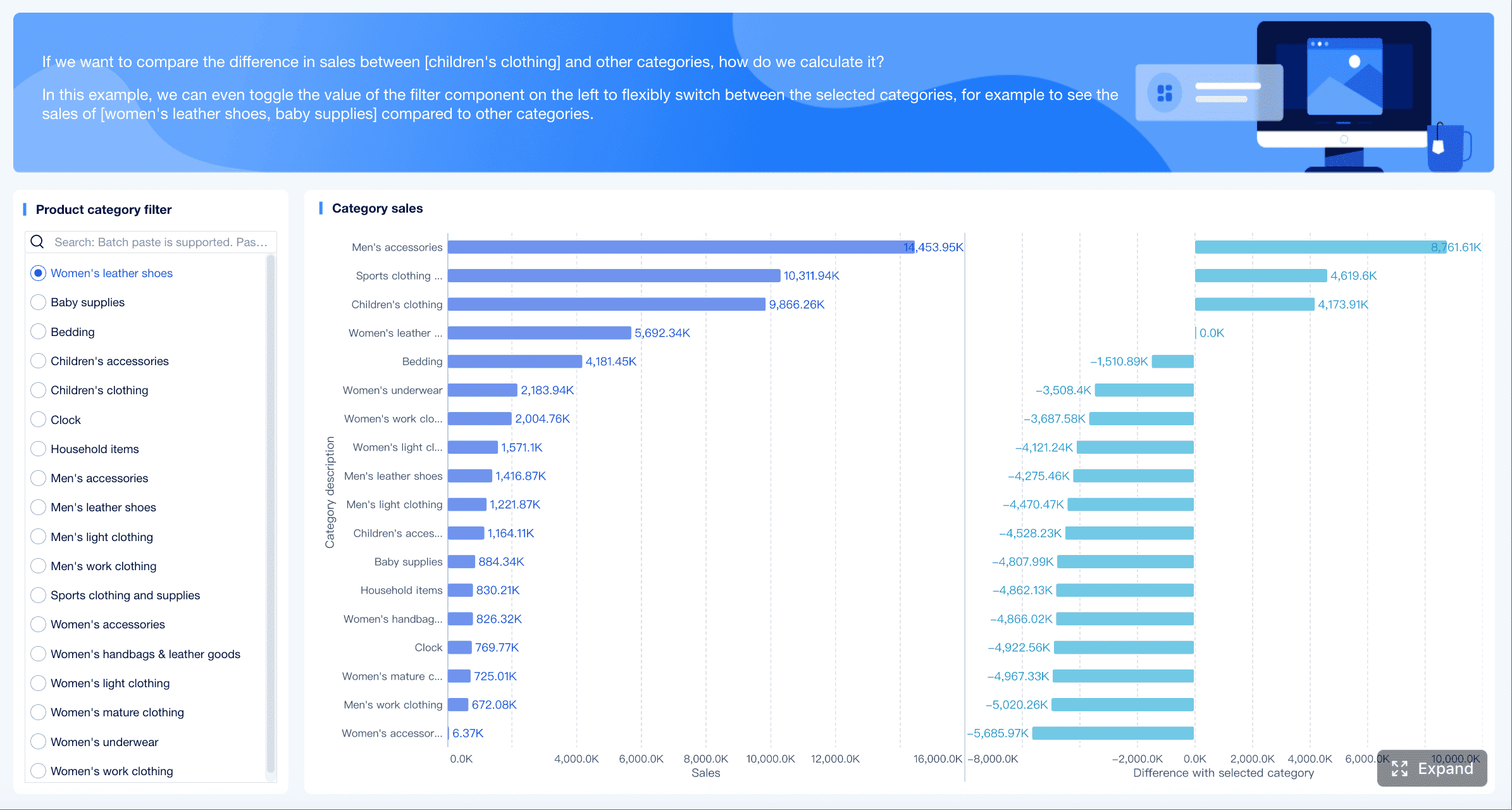 Metrics dashboard examples with FineBI
A strong layout puts headline KPI cards across the top, followed by pipeline funnel charts, rep ranking tables, and revenue trend lines by month or quarter. This allows leaders to spot whether weak bookings are caused by poor conversion, low deal value, or delayed close timing.
2. Sales conversion and rep productivity dashboard
This dashboard focuses on sales execution. It is especially useful for regional managers and revenue operations teams that need to evaluate activity quality and conversion efficiency.
Common metrics include:
- Lead-to-close conversion
- Opportunity-to-win conversion
- Meetings booked
- Demo-to-proposal rate
- Follow-up speed
- Rep activity volume
- Pipeline created per rep
The best version of this dashboard combines individual performance with team benchmarks. It should make it easy to compare top reps against underperformers and identify coaching opportunities.
3. Sales forecast and pipeline health dashboard
Forecast dashboards are critical for executive planning. They show whether current pipeline is sufficient to support future revenue goals.
Useful KPIs include:
- Forecasted revenue
- Commit vs. best-case pipeline
- Pipeline coverage ratio
- Stage aging
- Deal slippage
- Open opportunities by close month
- Forecast variance
This dashboard works best when it highlights risk visually. For example, stage-aging heatmaps and coverage charts can quickly show whether pipeline is thin in a specific segment or period.
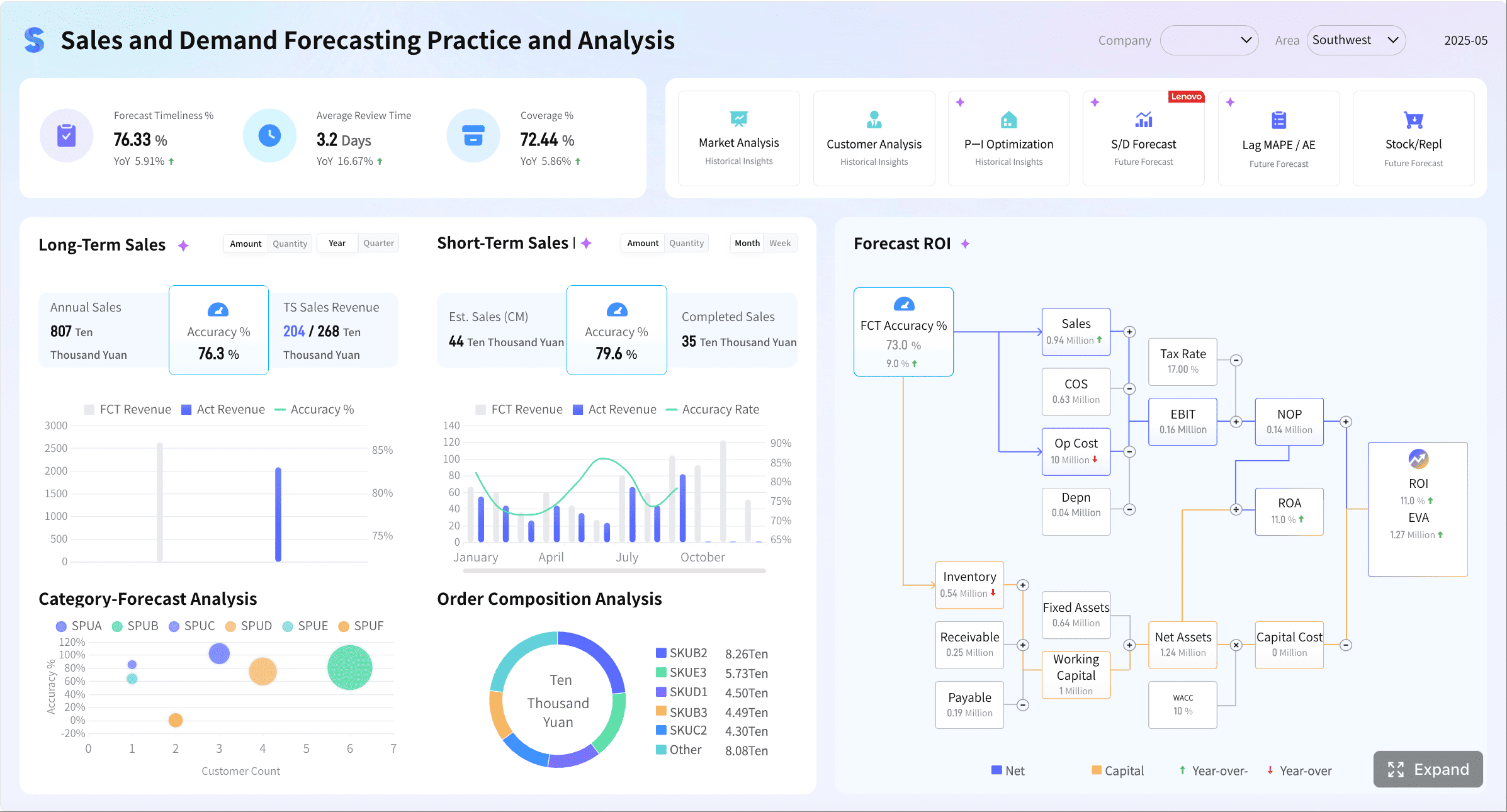 Metrics dashboard examples with FineBI
Marketing dashboard examples
Marketing dashboards must connect activity to outcomes. If they only report volume metrics, they fail the business. Good marketing dashboards reveal which channels, campaigns, and content investments are producing qualified pipeline and revenue impact.
4. Digital marketing performance dashboard
This is the standard dashboard for marketing managers running multi-channel acquisition programs.
Core metrics include:
- Website traffic
- Sessions by source
- Conversion rate
- Cost per lead
- Return on ad spend
- Form submissions
- Bounce rate
- Landing page performance
A practical design uses traffic and conversion KPI cards at the top, channel breakdown charts in the middle, and campaign tables underneath for deeper analysis.
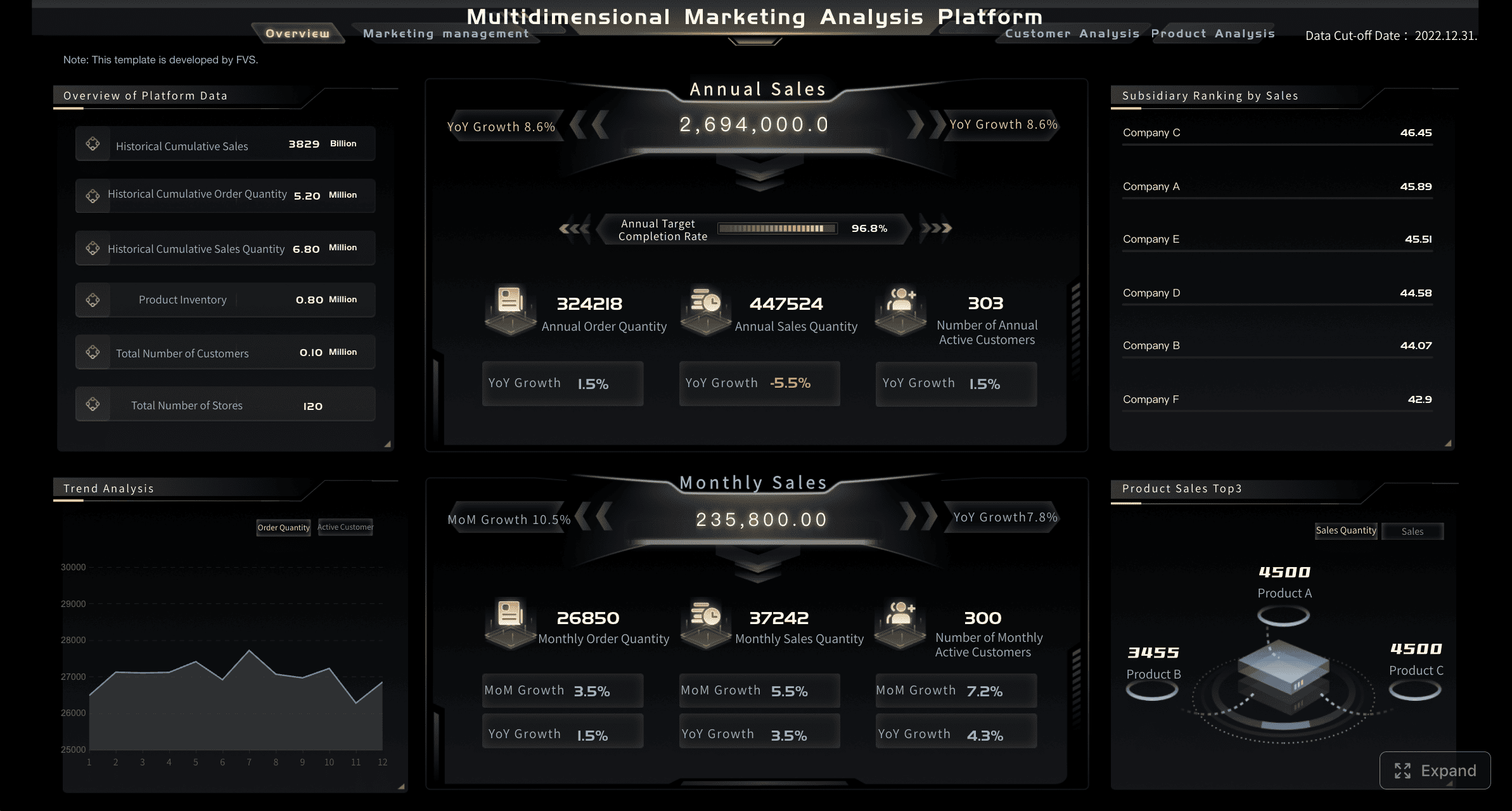 Marketing metrics dashboard examples with FineBI
5. Campaign and channel performance dashboard
This dashboard compares paid, organic, email, social, and event performance to support budget allocation decisions.
Important metrics include:
- Campaign spend
- Leads generated
- Marketing qualified leads
- Cost per acquisition
- Conversion by channel
- Click-through rate
- Email engagement
- Attributed opportunities
This dashboard should clearly show both efficiency and outcome. A channel that drives low-cost traffic but weak conversion should not be treated the same as one that creates fewer but higher-value opportunities.
6. Content and attribution dashboard
Content teams often struggle to prove business impact. This dashboard bridges that gap by tying content consumption to downstream actions.
Recommended metrics include:
- Top-performing pages
- Content downloads
- Time on page
- Assisted conversions
- Organic traffic growth
- Attribution trends
- Content-influenced pipeline
- Engagement by asset type
A strong version groups content metrics by funnel stage so teams can distinguish awareness assets from conversion-driving assets.
Operations dashboard examples
Operations dashboards are built for control. They should reveal whether the business is running on time, at expected quality, and with efficient use of capacity.
7. Production and process efficiency dashboard
This dashboard helps operations managers monitor output and identify workflow constraints.
Core metrics include:
- Output volume
- Cycle time
- Capacity utilization
- Throughput
- Defect rate
- Rework rate
- Downtime
- Process efficiency trend
The layout should move from summary to diagnosis: KPI cards first, then trend charts, then bottleneck views by line, shift, team, or facility.
8. Service level and fulfillment dashboard
For logistics, service operations, and fulfillment teams, this dashboard shows whether customer commitments are being met.
Key metrics include:
- On-time delivery
- Order cycle time
- Backlog volume
- Service level attainment
- Fill rate
- Order accuracy
- Escalation count
- Resource allocation
This dashboard becomes especially valuable when it includes exception alerts for missed SLAs, delayed orders, and resource shortages.
9. Workflow bottleneck dashboard
This dashboard is designed to surface operational friction. It is useful in complex environments where delays happen across multiple stages or handoffs.
Track metrics such as:
- Queue time
- Stage duration
- Work-in-progress volume
- Bottleneck frequency
- Utilization by team
- Exception rate
- First-pass yield
- Process variance
For process improvement initiatives, this dashboard can become the operational backbone for continuous improvement reviews.
Finance dashboard examples
Finance dashboards must do more than present accounting outputs. They should support cash control, cost management, margin analysis, and planning confidence.
10. Financial performance dashboard
This dashboard gives finance leaders a consolidated view of business health.
Common KPIs include:
- Cash flow
- Revenue
- Gross margin
- Operating expenses
- Net profit
- Budget vs. actuals
- Profitability trends
- EBITDA or operating income
A strong dashboard compares actual performance against budget and prior periods, helping leaders identify where margin pressure or overspending is emerging.
11. Cash management and working capital dashboard
This dashboard is especially useful for CFOs, controllers, and FP&A teams that need tighter liquidity visibility.
Important metrics include:
- Cash balance
- Accounts receivable aging
- Accounts payable aging
- Days sales outstanding
- Days payable outstanding
- Burn rate
- Forecast variance
- Working capital trend
The best design emphasizes timing. Aging charts, inflow-outflow trends, and forecast variance indicators help finance teams detect liquidity risk before it becomes urgent.
HR dashboard examples
HR dashboards should connect people metrics to workforce stability, hiring efficiency, and organizational performance. The goal is not just visibility—it is early intervention.
12. Workforce and talent dashboard
This dashboard supports HR leaders, department managers, and executives who need a broad view of hiring, retention, and employee health.
Key metrics include:
- Headcount
- Turnover rate
- Time to hire
- Absenteeism
- Employee engagement
- Retention trends
- Diversity metrics
- Training completion
- Performance review progress
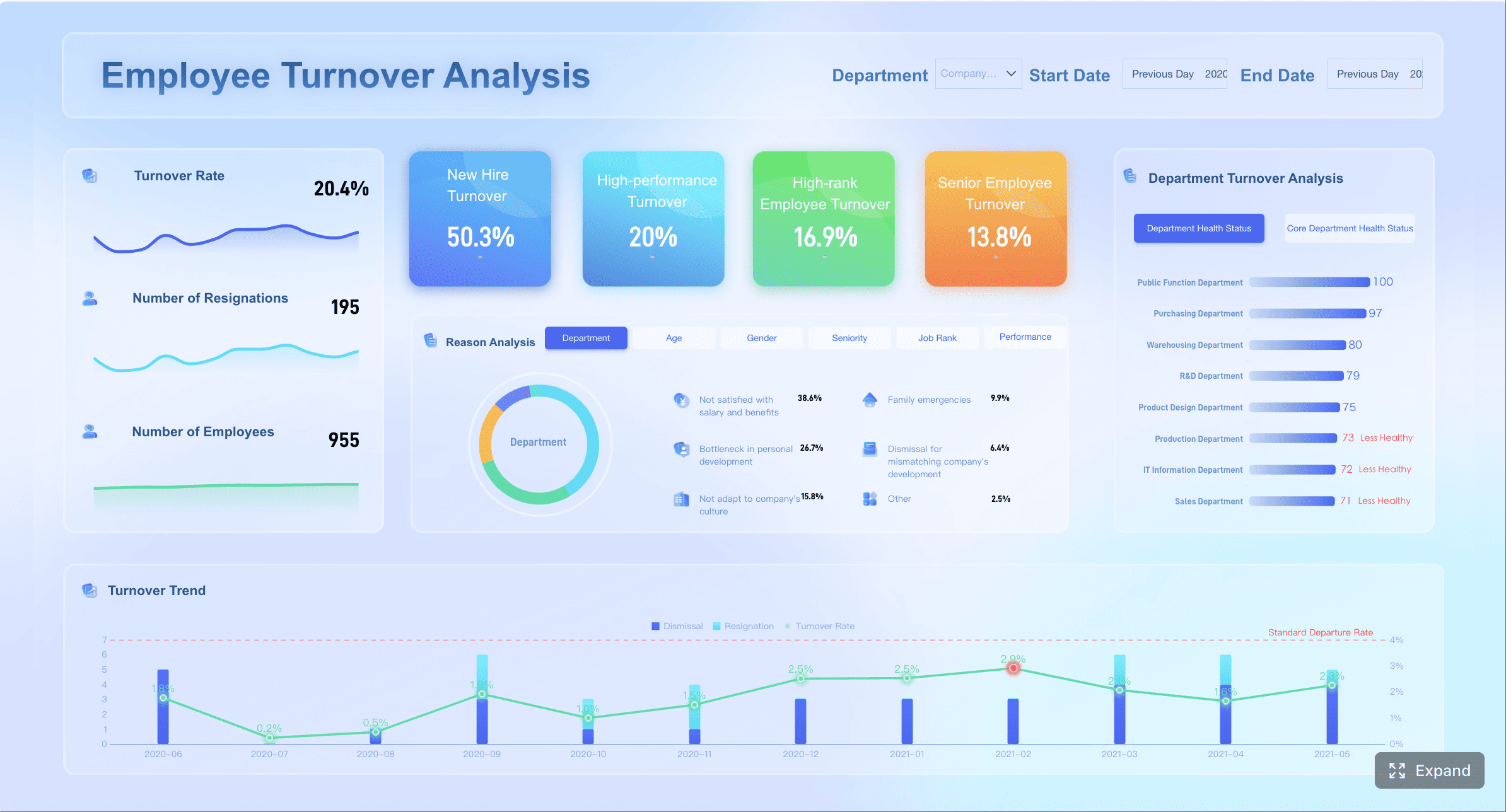 HR metrics dashboard examples with FineBI
This dashboard works best when it balances current workforce status with trend analysis. For example, a stable headcount number may hide rising voluntary turnover in critical departments.
How to choose the right KPIs for each department
Many dashboards fail because they start with available data instead of business purpose. The right KPI set should be determined by the decisions the dashboard is meant to support.
Start with business goals
Begin with the team’s objectives, not the reporting tool. Every metric on the dashboard should map to a real decision, operational target, or strategic outcome.
For example:
- Sales teams need KPIs tied to bookings, conversion, and forecast confidence
- Marketing teams need KPIs tied to lead quality, efficiency, and pipeline impact
- Operations teams need KPIs tied to throughput, quality, and service reliability
- Finance teams need KPIs tied to cash, margin, and variance management
- HR teams need KPIs tied to hiring, retention, and workforce engagement
A simple test: if a metric changes tomorrow, would the team know what action to take? If not, it may not belong on the dashboard.
Focus on actionable measures
Not every metric deserves top-level visibility. Prioritize KPIs that reveal trends, exceptions, and next steps.
Good dashboard metrics should do at least one of the following:
- Expose performance against target
- Signal risk early
- Help allocate resources
- Show where intervention is required
- Support planning and forecasting
Vanity metrics often look impressive but create little value. High traffic without conversion context, large pipelines without stage quality, or high training volume without completion and impact are common examples.
Keep definitions consistent
Consistency is where dashboard trust is won or lost. If different teams calculate the same metric differently, the dashboard becomes political instead of useful.
Standardize:
- Metric formulas
- Date ranges
- Data sources
- Refresh frequency
- Segment definitions
- Target-setting logic
For enterprise environments, this step is essential. Without consistency, cross-department comparisons and executive reporting quickly break down.
Common dashboard design patterns that improve clarity
Even the best KPIs can fail if the dashboard is visually confusing. Good design improves speed to insight.
Use visual hierarchy
Put the most important metrics first. Users should understand the health of the function within seconds.
A practical hierarchy looks like this:
- Top-row KPI summary cards
- Mid-level trend and target comparison charts
- Lower-section drill-down tables and segmented analysis
This structure keeps dashboards scannable while preserving analytical depth.
Compare targets and trends
A raw number rarely tells the full story. Every important metric should be framed with context.
Useful comparison methods include:
- Current vs. target
- Current vs. previous period
- Current vs. same period last year
- Actual vs. forecast
- Team vs. benchmark
These comparisons turn dashboards from static reports into management tools.
Reduce clutter
Clutter is one of the biggest reasons dashboards go unused. If users have to think too hard to read the page, they stop relying on it.
Best practices include:
- Limit the number of widgets
- Use clear, direct labels
- Avoid unnecessary chart types
- Keep color usage consistent
- Make filters simple and relevant
- Remove duplicate information
A dashboard should feel curated, not crowded.
Mistakes to avoid when building departmental dashboards
Several common errors repeatedly undermine dashboard adoption and decision quality.
- Tracking too many metrics without a clear audience or decision purpose: More data does not mean more insight.
- Mixing leading and lagging indicators without explanation: Users need to understand how activity metrics connect to outcome metrics.
- Using outdated data: A dashboard that is not trusted will not be used.
- Applying inconsistent definitions: Conflicting metric logic destroys confidence fast.
- Choosing charts that hide key changes: Some visualizations look polished but obscure trends or exceptions.
- Copying one dashboard format across departments: Sales, finance, HR, and operations have fundamentally different workflows and information needs.
As a consultant, one of the most important recommendations I give organizations is this: design dashboards around decisions, not departments alone. The same department may need one dashboard for frontline execution and another for executive review.
How to turn dashboard examples into your own template
Once you review enough metrics dashboard examples, the next step is translating ideas into a working template your teams will actually use.
1. Identify the audience and reporting cadence
Start by clarifying who will use the dashboard and how often:
- Daily operational monitoring
- Weekly team management
- Monthly strategic review
- Quarterly executive reporting
This determines the level of detail, data freshness, and chart structure required.
2. Select a focused KPI set
Choose a small number of core KPIs and a few supporting metrics for drill-down analysis. In most cases, the top section of the dashboard should include only the most business-critical indicators.
A practical rule is:
- 5 to 8 primary KPIs
- 3 to 5 supporting trend views
- 1 to 3 drill-down tables or segmented analyses
This keeps the dashboard focused while still allowing investigation.
3. Sketch the layout before building
Before opening a BI tool, map the dashboard on paper or in a wireframe. This helps stakeholders agree on information flow early.
Include:
- KPI card placement
- Trend chart position
- Filter locations
- Drill-down sections
- Alerts or exception indicators
4. Validate with real users
Do not assume the first version is correct. Review the draft with actual users and ask practical questions:
- Can they identify the most important metrics in five seconds?
- Can they explain what each KPI means?
- Can they spot an issue quickly?
- Do they know what action to take from the dashboard?
Usage feedback is often more valuable than design opinions.
5. Refine based on adoption and outcomes
The best dashboards evolve. Remove unused widgets, simplify confusing views, and adjust KPIs as business priorities change.
A dashboard should be treated like an operating asset, not a one-time reporting project.
Building departmental dashboards at scale with FineBI
Reviewing metrics dashboard examples is the right first step, but building production-ready dashboards manually across sales, marketing, operations, finance, and HR is far more complex than most teams expect. You need data integration, KPI standardization, role-based access, refresh automation, governance, and reusable templates that work across business units.
This is where FineBI becomes the practical solution.
Instead of creating every dashboard from scratch, teams can use FineBI to utilize ready-made templates and automate this entire workflow. That matters for enterprises that want faster deployment without sacrificing consistency or trust.
 Utilize ready-made templates and automate this entire workflow with FineBI
With FineBI, organizations can:
- Connect data from multiple business systems in one place
- Standardize KPI logic across departments
- Build interactive dashboards for both operational and executive use
- Reuse dashboard templates to accelerate rollout
- Enable self-service analysis without overwhelming business users
- Automate refresh cycles and reduce manual reporting effort
For decision-makers, the real value is not just better-looking dashboards. It is faster insight, stronger alignment, and less reporting friction across the organization.
If your team is still managing fragmented reports in spreadsheets or rebuilding dashboards from the ground up for every department, the smarter path is clear: use proven metrics dashboard examples as your blueprint, then deploy them at scale with FineBI to shorten implementation time and improve reporting maturity.
FAQs
A strong metrics dashboard should include core KPI cards, trend comparisons, target versus actual views, filters, exception alerts, drill-down paths, and data freshness indicators. These elements help users quickly see performance, identify issues, and decide what to do next.




