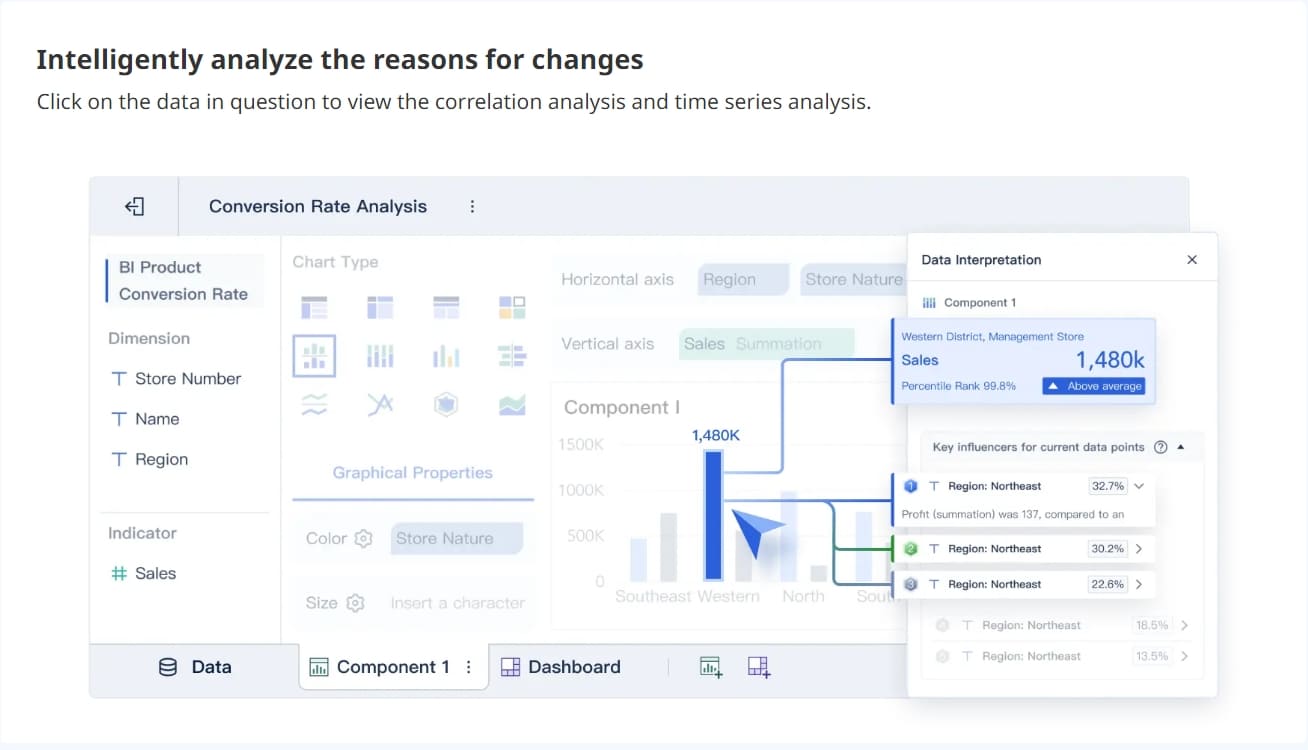
To pick the best safety dashboard solution, look at your organization’s special safety needs. Focus on the most important features. Check vendors for how easy their tools are to use. See if their tools work well with your other systems. Make sure they offer good support. Digital transformation is changing how you handle safety. The EHS services market is growing quickly. This is true in industries like manufacturing and energy. More companies are using digital safety solution tools.
When you pick workplace safety software, think about today’s problems and future needs. Using a step-by-step plan helps you choose with confidence.
Benefit
Description
Real-time insights
Safety dashboards show data right away. This helps you find risks fast.
Improved communication
They help safety leaders and teams share information better.
Proactive risk management
Dashboards help you find hazards before they cause problems.
Safety dashboards help you find hazards that happen again and again.
Workplace safety software lets you track how safety plans work over time.
You can use data to decide which safety actions are most important.
What Is a Safety Dashboard and Why It Matters
Core Functions of Safety Dashboards
A safety dashboard shows how your organization is doing with safety. You can see all the important safety numbers in one spot. This tool helps you keep track of safety data. You can watch for patterns, find risks, and make smart choices for your team. Safety dashboards are important for keeping your workplace safe and following rules.
When you use ehs software, health experts help with the process. This makes the dashboard better and easier to use. You should pay attention to the numbers that matter most to your team. This helps everyone get involved and learn more. A good safety dashboard uses a clear plan. First, you learn what you need. Next, you think about the right numbers to track. Then, you pick the best ones, design the dashboard, and use it every day. If you include your team at each step, you get better results.
FineReport give you strong safety management software. FineReport lets you make dashboards for ehs that fit your needs. You can build reports that work for you. The software helps you handle safety data, keep track of incidents, and check if you follow rules. You get updates right away and can share news with your team fast.
The Role of Data in Safety Management
Data is very important for ehs software and safety management software. You need good data to make smart choices. With FineReport, you can connect to many places where data is stored. This helps you see everything about your safety programs. The software gives you updates right away, so you can act fast if there is a problem.
Here is how data analytics in safety dashboards can help you:
Feature
Benefit
Customizable dashboards
Help you report and study safety data for your company.
Real-time insights
Let you make quick choices and track problems right away.
360-degree view
Show you everything about your safety programs and results.
You can see important safety KPIs right away. You can watch for trends and late actions as they happen. This helps you make quick choices and fix problems before they get worse. You can also see which teams need help, send resources where they are needed, and solve issues fast.
Ehs software and safety management software make it easier to handle workplace safety. You can use these tools to gather, sort, and study safety data. This helps everyone stay safer at work.
Key Benefits of Safety Dashboard
Improved Compliance and Risk Reduction
You need good tools to keep your workplace safe. EHS software helps you follow rules and lower risks. Safety dashboards let you see incidents as they happen. You can spot patterns and fix problems before they get worse. You can find out which places are most dangerous and act fast. Safety management software helps you keep track of rules, so you do not get fines or legal trouble. You also get a clear look at your safety plans. This helps you make better plans and keep your team safe.
Here is how a safety dashboard helps in factories and other jobs:
Benefit
Description
Real-time tracking of incidents
Gives you quick insights into workplace events and helps you improve safety.
Compliance with safety standards
Makes sure you follow rules and lowers legal risks.
Cost reduction from accidents
Shows you the cost of accidents, like medical bills and lost work time.
Employee safety training
Tracks who joins training and how well it works.
Overview of workplace risk
Points out dangerous spots so you can prevent accidents.
You can respond to incidents faster.
You help build a strong safety culture.
You save money by having fewer accidents and problems.
Real-Time Insights and Reporting
EHS software gives you real-time updates that help you act fast. You see accident data, near-misses, and safety checks right away. FineReport lets you set alerts for new problems or missed checks. This means you can act quickly and keep people safe. Safety management software also helps you see if you follow the rules. You get reports you can change, so you focus on what matters most.
Feature/Benefit
Description
Incident Tracking
Shows real-time and past data on accidents and injuries.
Safety Compliance
Tracks if you follow rules and checks.
Real-Time Alerts & Notifications
Sends messages for safety problems or missed checks.
Improves Safety Awareness
Makes risks and trends easy to see.
Enhances Decision-Making
Helps you make smart choices to prevent accidents.
Reduces Workplace Injuries
Finds risk factors and helps you take action early.
Tools like heat maps and charts help you spot problems fast.
Dashboards make it easy to share safety news with your team.
You can make better choices with the latest data.
Enhanced Collaboration and Mobile Access
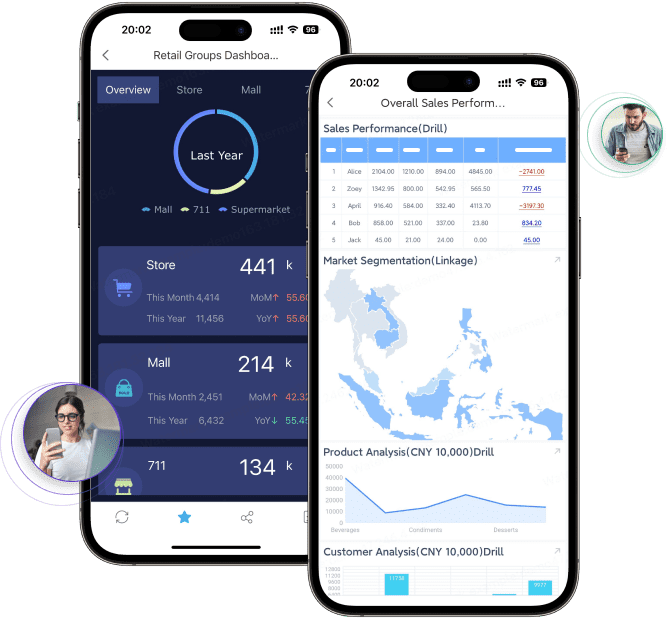
EHS software helps teams work together by letting everyone see safety data anytime. FineReport gives you mobile dashboards, so you can check safety updates on your phone or tablet. This helps you stay in touch, even when you are not at your desk. You can report dangers, check training, and look at incidents from anywhere. It is easier to manage safety when everyone can join in.
Feature
Benefit to Collaboration
Real-time incident awareness
Keeps your team ready to act on new events.
Department-wide communication
Makes sure everyone understands safety goals.
Role-based visibility
Shows the right data to the right people.
Access across platforms
Lets you work together from any device.
Mobile access helps you handle safety issues quickly.
You can share updates and reports with all teams.
EHS software makes safety management something everyone can do together.
FineReport puts all these features in one place. You get real-time updates, mobile access, and strong tools to manage risks. This helps you make your workplace safer and reach your goals.
Essential Features in Workplace Safety Dashboard
When picking workplace safety software, focus on what matters most. The right software keeps your team safe and helps you follow rules. It also helps you make smart choices. FineReport gives you strong integration, mobile access, and security tools. These features help you make your workplace safer.
Real-Time Data and Integration
You need real-time data to keep your workplace safe. Real-time updates show problems as they happen. This helps you act fast and stop accidents. Integration with your current systems is important. You want your safety dashboard to work with HR and project management tools. This makes your safety management software stronger.
FineReport is good at integration. You can connect data from databases, spreadsheets, and cloud apps. This lets you see all your safety data in one place. You do not have to switch between systems. You save time and avoid mistakes.
Here are some technical needs for real-time data integration:
Connect your dashboard to all your current systems.
Train your team so they know how to use the new software.
Update your workflows to match the new tools.
A good integration plan helps your dashboard work with other tools. This makes your safety management process better.
Customization and User Experience
You want workplace safety software that fits your needs. Customization lets you change the dashboard to show what matters most. FineReport gives you a drag-and-drop interface. You can build reports and dashboards without coding. This makes it easy for anyone to use.
A good user experience means your team will use the software every day. You want clear charts, simple menus, and easy navigation. FineReport lets you track important safety KPIs, such as:
Total Recordable Incident Rate (TRIR)
Lost Time Injury Frequency Rate (LTIFR)
Near Miss Reporting Rate
Employee Safety Training Completion Rate
Safety Compliance Rate
First Aid Case Rate
Mostly Injured Body Parts
Average Time to Incident Resolution
Employee Safety Perception Survey Scores
Safety Risk Score
You can set up your dashboard to focus on the KPIs that matter most for your team. This helps you spot trends and fix problems quickly.
Feature
Description
Mobile-First
Lets you check safety data on your phone or tablet, even on the go.
Ease of Use
Simple menus and clear charts help your team learn the software fast.
Cloud-Based
Access your dashboard from anywhere, which helps teams in different locations work together.
Top Notch Security
Protects your data and keeps you in line with safety rules.
Mobile and Multi-Device Access
You need to check safety data wherever you are. Many workers are not always at a desk. Mobile dashboards let you see updates on your phone or tablet. You can get alerts, report incidents, and check training from any location.
FineReport gives you mobile and multi-device access. You can use the software on PCs, tablets, and smartphones. This helps you stay connected to your team and respond to safety issues fast.
You can monitor worker locations in real time.
You get alerts if someone is overdue or in a high-risk area.
You can set how often workers check in and manage groups easily.
Employees expect to use workplace safety software from anywhere. Mobile access helps you make quick decisions and keep everyone safe.
Security and Compliance
Security is a must for any safety dashboard. You need to protect sensitive data and follow industry rules. FineReport gives you strong security features. You can control who sees what data. You can track who makes changes and when.
Your dashboard should:
Limit access based on job roles.
Track who views or changes information, with time and reason.
Show who adds new data for full accountability.
Use analytics and metrics to help you avoid risks.
Match your company’s workflow and processes.
Pull data from many systems and show it in a way everyone understands.
FineReport’s integration capabilities help you meet these needs. You can connect data from quality control, finance, and other departments. This makes your safety management software a complete tool for your whole organization.
Workplace safety software with these features helps you build a safer, smarter workplace. FineReport gives you the tools, integration, and capabilities you need to protect your team and reach your goals.
Comparing Safety Dashboard Vendors
Picking the right ehs software vendor is important for your safety plan. You need a solution that matches your needs and works well with your team. Good support from the vendor is also very important. Here are some ways to compare ehs software vendors and find the best one for your group.
Creating a Comparison Framework
First, write down what is most important to you. Think about your safety problems and what you want the ehs software to do. Make a table to compare vendors side by side. This makes it easy to see which ehs software is better.
Feature
Importance (1-5)
Vendor A Score
Vendor B Score
User-friendliness
5
4
3
Compliance automation
4
5
2
Mobile-friendly interface
3
4
5
Cost-effectiveness
4
3
4
Evaluating Usability and Support
Pick ehs software that is simple to use. Check if you get information quickly and if you see real-time data. Make sure the software fits into your daily work. Good customer support is very helpful. You want support that solves problems fast. Ask if the vendor gives training for all users. See if they keep helping you and listen to your ideas. Good support helps your team use the software every day.
Considering Cost and ROI
Think about all the costs of the software. This means the price to buy, set up, and keep it working. Look at what you get back for your money. Good ehs software can save you money by making work safer and faster. Use a table to compare costs and benefits.
Cost/Metric Category
Amount/Value
Description/Notes
Technology Platform Cost
$150,000
Initial cost for the software platform
Implementation Services
$300,000
Deploying and configuring the system
Annual Maintenance & Support
$75,000
Yearly fees for upkeep and technical support
Training & Change Management
$50,000
User training and organizational change
Total 3-Year Investment
$725,000
All costs over three years
Annual Benefits
$2,800,000
Yearly gains from dashboard use
Three-Year ROI
340%
Return on investment over three years
Payback Period
3.1 months
Time to recover initial investment
Requesting Demos and References
Ask vendors to show you a demo of their ehs software. Try using the software yourself. See if it matches your daily work and if your team finds it easy. Ask for references from other customers. Find out how the vendor helps with support and if they fix problems quickly. Good customer support and help are important for long-term use.
Best Practices for Safety Dashboard Implementation
Planning and Onboarding
Careful planning helps your ehs dashboard work well. Start with different ways to learn. Use short lessons and live workshops together. Let new users try the technology early. This helps them get used to the tools. Give each new person a mentor for help. Introduce new hires to important people in other departments. Make the first week full of hands-on practice. Check in often to see how everyone is doing. This helps you find problems early. Try to build a team where everyone feels included and knows what is happening.
Give safety training that lets people practice real-life situations.
Keep records of training to make sure everyone learns the skills.
Let new users do real work with help before they work alone.
Training and Change Management
Training and change management are very important for your team. You want everyone to feel ready to use the new ehs dashboard. Make a safe place for open talks about dashboard data. Leaders should explain why the dashboard is helpful. Build trust so teams use the dashboard to get better, not just to watch them.
Metric
Description
Employee Training Effectiveness
Shows if training helps your team use the new system.
Adoption Rate
Tells how many people use the new safety dashboard.
Time-to-Adoption
Tracks how long it takes for everyone to use the system.
Measuring Success and Continuous Improvement
You need to check if your ehs dashboard is working well. Track both leading and lagging indicators. Count how many incidents happen and what kind they are. Watch your Experience Modification Rate (EMR) to see injury costs. Write down near misses to find hidden dangers. Do regular safety checks and inspections. Track if you fix problems after finding them.
Look at dashboard numbers often to keep safety strong.
Use real-time data to find risks and act quickly.
Set clear KPIs and goals to get better.
You should make sure your safety dashboard software fits your company’s goals. First, look at how your company handles safety now. Set SMART goals to help your team know what to do. Ask leaders to join in and build teams from different departments. Use new tools to watch how things are going. For improvement, let end users help and test if the software is easy to use. Use numbers and feedback to see how well things work. Make a checklist or plan demos to help your team. Keep checking your dashboard so your workplace stays safe.
Product Trial
FineReport
Pixel-perfect reports · Interactive dashboards · Easy data entry · Digital twins
Access a wealth of case studies, industry insights, and solution guides to accelerate digital transformation.
FAQ
What is a safety dashboard?
A safety dashboard puts all your safety data in one spot. You can watch for incidents and see risks. It helps you notice patterns and trends. This tool helps you make smart choices. It keeps your workplace safer.
How does FineReport help with safety management?
FineReport lets you make dashboards and reports that fit your needs. You can connect data from different places. You get updates right away. You can share safety news with your team fast.
How do I start using a safety dashboard?
First, write down your safety needs. Next, pick the features that matter most. Try demos from vendors like FanRuan. Train your team and check your dashboard often. This helps you keep getting better.
Is my safety data secure with FineReport?
FineReport uses strong security tools to protect your data. You can pick who sees your information. The system keeps track of changes. It keeps your data safe.