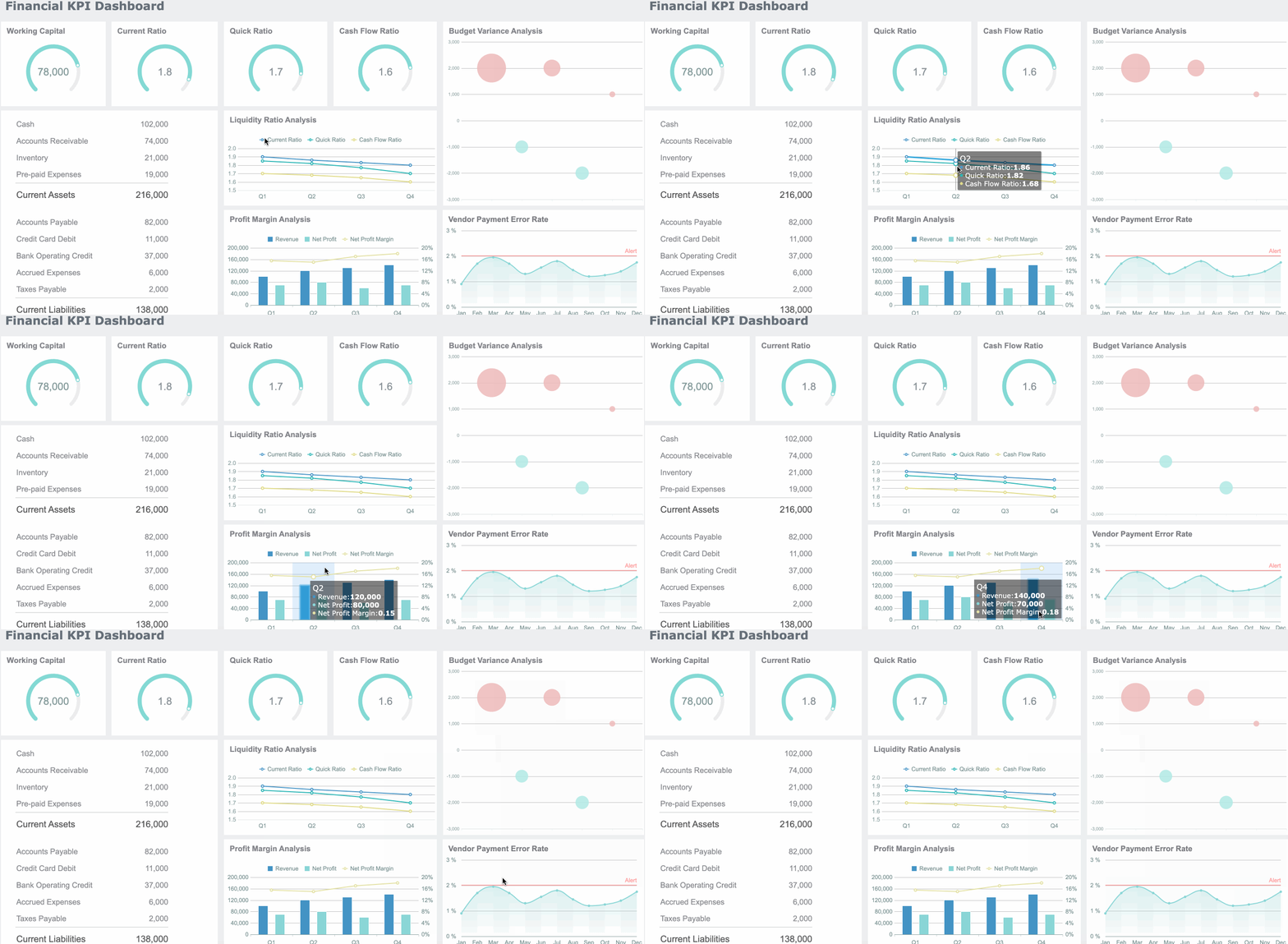
Designing a user-friendly UX dashboard means knowing what users want. You pick the right metrics. You use clear visual design. You make data simple to look at. Tools like FineReport from FanRuan help you change raw data into useful insights. This helps people make decisions faster, helps teams work together better, and also helps you get more value for your money.
What is a UX dashboard and why it matters
UX dashboard definition
A UX dashboard is a tool that shows how people use your product or service. It has charts, graphs, and numbers. These help you see what users do and how they feel. In business intelligence, a UX dashboard helps you watch user behavior and find trends. It helps you make better choices. You can see what works and what needs to get better. The main jobs of a UX dashboard in business intelligence systems are:
Accessibility: You make sure everyone can use the dashboard, even people with disabilities.
Usability: You design the dashboard so it is simple to use and easy to understand.
Alignment with User Needs: You focus on what users want to see and make sure the dashboard shows the right data.
Importance of user-friendly design
A user-friendly design makes the dashboard simple to use and easy to understand. When you build a clear dashboard, people find what they need fast. User-friendly dashboards make hard data easier to use and more fun. Interactive features let you look at the data you care about most. Dashboards turn numbers into pictures, so you can spot patterns and trends. They use different kinds of charts and graphs. This makes it easier to find what you need. You can also download or upload data. This helps you act on what you see. FineReport by FanRuan helps you make dashboards that are easy to use and fit your needs. You can use drag-and-drop tools and change the layout for your team.
Common dashboard challenges
Many people have problems when using a UX dashboard. Some of the most common problems are:
Challenge Type
Description
Data Overload
Too much information makes it hard to find what matters.
Visual Clutter
Bad design makes things confusing and tires your eyes.
Jargon Overload
Hard words confuse people who are not experts.
Numbers Without Context
Data is hard to understand without examples or history.
Outdated Data
Old data can make you choose wrong.
Frustrating Filters
Filters that are hard to use make the dashboard less helpful.
Misleading Visuals
Bad charts can give you the wrong idea.
Empty States
No feedback when there is no data to show.
You can stop these problems by making the design clear and thinking about what users need. FineReport has features that help you fix these problems, so your dashboard stays useful and easy to use.
Identify UX dashboard user needs
Know your audience
You need to start by understanding who will use your dashboard. Each person has different goals and ways of working. For example, a Sales Manager wants to see regional sales numbers. An Executive looks for high-level KPIs. A Marketing Analyst checks campaign stats and conversion funnels. General users want easy-to-use filters and custom views.
Here is a table showing what different roles often ask for in a dashboard:
User Role
Commonly Requested Features
Sales Manager
Customization to spotlight regional data
Executives
Role-based personalization for high-level KPIs
Marketing Analyst
Detailed metrics on campaign stats and conversion funnels
FineReport gives you the tools to build dashboards for all these roles. You can set up tailored views and interactive features that match what each user needs.
Gather user requirements
You need to find out what your users want and what problems they face. There are several ways to do this:
Talk to users in interviews to learn about their goals and challenges.
Use surveys to collect data on what features people need most.
Watch users as they work with dashboards in their real environment.
Run usability tests to see where users get stuck or confused.
Collect feedback through in-app tools so users can report issues or suggest improvements.
Note: Regular feedback helps you keep your dashboard useful and up to date.
FineReport supports this process by letting you adjust dashboards quickly. You can add new filters, change layouts, or update data sources based on what users ask for.
Map user tasks
You need to know what tasks users do most often. This helps you design a dashboard that fits their daily work. Start by listing the main actions for each role. For example, a manager might check sales trends every morning. An analyst might dig into campaign results after each launch.
Interview stakeholders to learn about their top priorities.
Map out user flows to see how people move through the dashboard.
Focus on the steps users take to reach their goals.
When you map user tasks, you make sure your dashboard shows the right information at the right time. This makes the dashboard more helpful and easier to use. If you skip this step, even the best-looking dashboard may not help users do their jobs.
FineReport makes it easy to match dashboards to user tasks. You can use drag-and-drop tools to build custom workflows. You can also set up interactive charts and reports that guide users through their daily work.
Select key metrics and data sources
Choose relevant UX metrics
You need to pick numbers that show how people use your dashboard. Focus on numbers that tell you what is really happening. The table below lists some common metrics that help you see if your dashboard works well:
Metric
Description
Time to value
Measures how quickly users realize the value of the product.
Depth/breadth of adoption
Shows how often features are used and how many users engage with them.
Task success rate
Indicates the percentage of tasks completed successfully.
User error rate
Tracks the percentage of errors made by users.
Customer Acquisition Cost (CAC)
Evaluates the cost of getting new customers.
Monthly Recurring Revenue (MRR)
Represents predictable monthly revenue.
Pick numbers that match what you want to do. If you want to make user experience better, watch task success rate and user error rate. If you want your business to grow, look at CAC and MRR.
Avoid data overload
Too much information can make your dashboard hard to use. You should keep things simple. Here are some problems that happen when there is too much data:
Too many things on the screen make it hard to see.
Bad layout hides important numbers.
Data that changes too fast can confuse people.
Messy screens make it hard to find what matters.
Too much information makes it hard for users to focus.
A good dashboard design helps people understand data easily. If users feel lost, they might stop using the dashboard. Keep your dashboard neat and show the most important numbers.
Integrate with FineReport and FanRuan solutions
You can connect your dashboard to many data sources with FineReport and FineDataLink. These tools help you build a strong base for your data. The table below shows how FineReport helps you connect data:
Feature
Description
Data integration
Connects to various data sources, resolving data silos.
ETL and ELT support
Processes and integrates data from different sources efficiently.
Multi-terminal support
Presents data across devices for better accessibility.
FineReport lets you update data in real time and breaks down data silos. You can connect to databases, spreadsheets, and other systems. This makes your ux dashboard stronger and easier to use. You get a full view of your business and can make smarter choices.
Tip: Use FineReport’s drag-and-drop tools to mix data from different places. This helps you make dashboards that show the most important things.
Apply UX dashboard design principles
Simplify layout and navigation
You want your dashboard to be easy to use. Make sure users can find things fast. Use clear labels for buttons and menus. Do not use confusing words. Show only what each user needs. Add filters that change for each person. Leave space so nothing feels crowded. Hide extra details until someone wants them. Use icons with text to help everyone know what buttons do. Use formats for dates and numbers that people know. Test your dashboard with real users to see if they get confused.
Tip: FineReport’s drag-and-drop lets you move charts and tables fast. You can copy and line up parts with one click. This helps you build a neat layout that people like.
Make navigation easy to use.
Use space to keep things clean.
Show only what matters.
Test your layout with real users.
Use visual hierarchy
Visual hierarchy helps people know what to look at first. Put important information where people look first, like the top left. Use bigger text or brighter colors for key numbers. Keep spacing even so things look organized. Draw clear paths for eyes to follow. When you do this, users find answers faster and trust your dashboard more.
Put important data in the best spots.
Use size and color to show what matters.
Keep spacing the same everywhere.
Guide users with clear paths.
A strong visual hierarchy makes your dashboard easier to use. It helps people focus and makes data simple to understand.
Ensure consistency and accessibility
Consistency means using the same colors and fonts everywhere. This helps users feel comfortable and safe. Accessibility means everyone can use your dashboard, even people with disabilities. Use strong color contrast so text is easy to read. Do not use color alone to show meaning—add patterns or labels. Make sure all buttons and links work with a keyboard. Use ARIA labels and semantic HTML so screen readers can read your dashboard. Follow rules like WCAG and ADA to help more people and meet legal standards.
Use the same style for everything.
Make text easy to read.
Add labels and patterns, not just colors.
Support keyboard use.
Use ARIA labels for screen readers.
Responsive design for all devices
People use dashboards on computers, tablets, and phones. Your dashboard must look good and work well on any screen. FineReport supports responsive design, so your dashboard changes to fit any device. You can design once and trust users will see the right layout everywhere. Drag-and-drop tools let you build dashboards for big and small screens. This means you do not need to make a new dashboard for each device.
Design for all screen sizes.
Use tools that support responsive layouts.
Test your dashboard on different devices.
A responsive dashboard keeps your insights ready wherever your users go.
Tools and process for UX dashboard creation
FineReport dashboard builder
You can make your ux dashboard with FineReport. This tool lets you drag and drop things to build your dashboard. You do not have to write any code. You can connect to many databases with just one click. FineReport helps you build dashboards fast and share them with your team. You can check KPIs on big screens or on your phone. The dashboard builder has ready-made HTML5 charts and cool moving effects. You can add more features by using the open source library. The table below shows why FineReport is special:
Feature/Benefit
Description
User-friendly design
Drag-and-drop for fast dashboard creation
Integration capabilities
One-click connection to mainstream databases
Stream-to-TV feature
Track KPIs on large screens and TV dashboards
Pre-built HTML5 charts
Over 19 categories and 50+ styles with dynamic effects
Dedicated mobile app
Seamless mobile dashboarding experience
Open source library
Add more functionalities as needed
Excellent data connectivity
Easy access to various data sources
Intuitive design mode
Simplifies dashboard creation
Prototyping and user testing
You need to test your dashboard before you show it to everyone. Prototyping lets you try out ideas and see what works best. You can make a simple version and ask users what they think. Here are the steps:
Decide what you want to learn from user testing.
Pick the parts of your dashboard that need feedback.
Ask users to try your dashboard and tell you their thoughts.
Feedback helps you make your dashboard better. You can meet with different users and listen to their opinions. Each new version gets better because of what users say.
Evidence Description
Details
Iterative Refinement
The dashboard changed through four versions, each fixing problems found in reviews.
Feedback Sessions
Four data science experts looked at each version and gave feedback in 20-30 minute sessions.
Diverse Perspectives
The team made sure to listen to different ideas and fix important problems.
Iterative improvement
You should keep making your dashboard better over time. Make small changes when users give you feedback. Update your dashboard often so it stays helpful. Regular updates and testing help more people use your dashboard. Companies that keep improving their dashboards make fewer mistakes and make choices faster.
Iterative improvement means you always try to make things better.
It helps user experiences match new needs and business goals.
This way, you make small updates you can measure.
You can quickly change things when users ask for it.
Automatic data refresh keeps your dashboard up to date. You do not have to update it by hand. This makes your dashboard stay helpful and correct.
You can make a user-friendly ux dashboard if you do these things: First, pick the best charts for your data. Next, put the most important numbers at the top. Make sure all charts use the same titles and legends. Pick colors that help you see patterns. Let people click to see more details with drill-down features. Give users choices to change how their dashboard looks.
FineReport helps you work faster and makes your dashboard better:
Feature
Benefit
Automated data creation
Saves time and means less work for you
Fast data processing
Works with big data sets quickly
Flexible design tools
Gives you lots of chart and layout choices
Start making your dashboard now and turn your data into useful ideas.
Product Trial
FineReport
Pixel-perfect reports · Interactive dashboards · Easy data entry · Digital twins
Access a wealth of case studies, industry insights, and solution guides to accelerate digital transformation.
FAQ
What makes a UX dashboard user-friendly?
A user-friendly dashboard has clear labels and simple layouts. It is easy to move around and find things. You can filter and change views without getting confused.
Why does dashboard UX design matter for business decisions?
Dashboard UX design transforms raw data into actionable insights. A well-structured dashboard layout highlights key performance indicators (KPIs), organizes critical metrics, and reduces cognitive load so dashboard users can focus on what matters. Instead of sifting through spreadsheets, users see critical information at a glance and make faster, smarter decisions.
What role do interactive elements play in UX dashboard?
Interactive elements turn dashboards from static reports into dynamic tools. Features like filters, drill-downs, hover-to-expand details, and personalized dashboard layouts let users explore data points at their own pace. For example, in a sales dashboard, users might filter by date range, region, or salesperson to derive meaningful insights without being overwhelmed by all the data at once.
How often should you update your dashboard?
You should update your dashboard often. Automatic refresh helps keep your data up to date. This way, you always make better choices with the newest information.