
A dashboard development company designs, builds, and supports data dashboards that turn business data into usable reporting, operational visibility, and decision-making tools.
Snapshot of the 10 Dashboard Development Companies
At-a-glance comparison table
| Company | Core Services Offered | Typical Tech Stacks and Integrations | Pricing Model and Flexibility | Best-Fit Use Cases |
|---|---|---|---|---|
| FanRuan | Enterprise dashboards, embedded analytics, reporting platforms, BI implementation, data integration | FineReport, FineBI, Java, SQL, APIs, ERP/CRM/database integration, on-premises and cloud deployment | License + implementation, project-based, partner delivery, enterprise support options | Enterprises needing governed reporting, scalable dashboard rollouts, embedded analytics |
| The Dashboard Company | Dashboard design, data strategy, scorecards, data engineering, visualization consulting | Custom BI environments, ETL workflows, multi-source reporting, common cloud data connectors | Project-based consulting, custom scope engagements | Executive dashboards, KPI scorecards, strategy-led reporting initiatives |
| COBIT Solutions | Power BI development, ETL, data warehouse design, ERP integration, BI consulting | Microsoft Power BI, Azure Data Factory, SQL Server, ERP/API/CRM integrations | Fixed-price, time-and-materials, monthly consulting, dedicated BI team | Microsoft-centric organizations, finance reporting, ERP-connected dashboards |
| Queppelin | Custom dashboard development, dedicated teams, product engineering, UI-focused dashboard builds | Custom web stacks, JavaScript frameworks, APIs, cloud deployment | Fixed-price, hourly, dedicated team | Businesses wanting custom-built dashboard products with flexible engagement models |
| Softweb Solutions | Real-time analytics, enterprise dashboard development, digital transformation, app and data engineering | React, Angular, Node.js, Python, cloud platforms, BI and IoT integrations | Enterprise project pricing, managed services | Real-time operations dashboards, enterprise digital transformation projects |
| Fuselab Creative | Dashboard UX/UI, data visualization, product design, dashboard engineering | FineReport, Tableau, Grafana, Databox, custom front-end/back-end stacks | Project-based design and development engagements | Teams prioritizing dashboard usability, design quality, and interface modernization |
| DATAFOREST | Custom dashboards, analytics engineering, predictive analytics, API integration, scalable web apps | React, Node.js, Python, ETL pipelines, cloud data platforms, ML libraries | Project-based, custom software engagement | SaaS analytics, growth-stage companies, predictive and operational dashboards |
| Successive Digital | Custom digital products, dashboard development, engineering teams, enterprise software delivery | Modern JavaScript stacks, cloud-native architecture, API integrations | Team-based, project-based, long-term engineering support | Enterprises needing broader software engineering beyond dashboards |
| LaSoft | Dashboard development, analytics consulting, data visualization, BI integrations, audit and support | Power BI, Tableau, custom web dashboards, CRM/ERP/SaaS integrations | Custom project pricing, productized dashboard options | SMBs, agencies, and firms needing bespoke dashboards or faster deployment options |
| Tableau Services Partners / Tableau-led ecosystem | Tableau dashboard development, implementation, training, governance, analytics enablement | Tableau, SQL, Snowflake, Salesforce, cloud warehouses, APIs | License plus partner services, retainers, implementation packages | Organizations standardizing on Tableau for self-service BI and executive reporting |
What makes each option stand out
Below is a structured look at what each dashboard development company brings to the table.
1. FanRuan
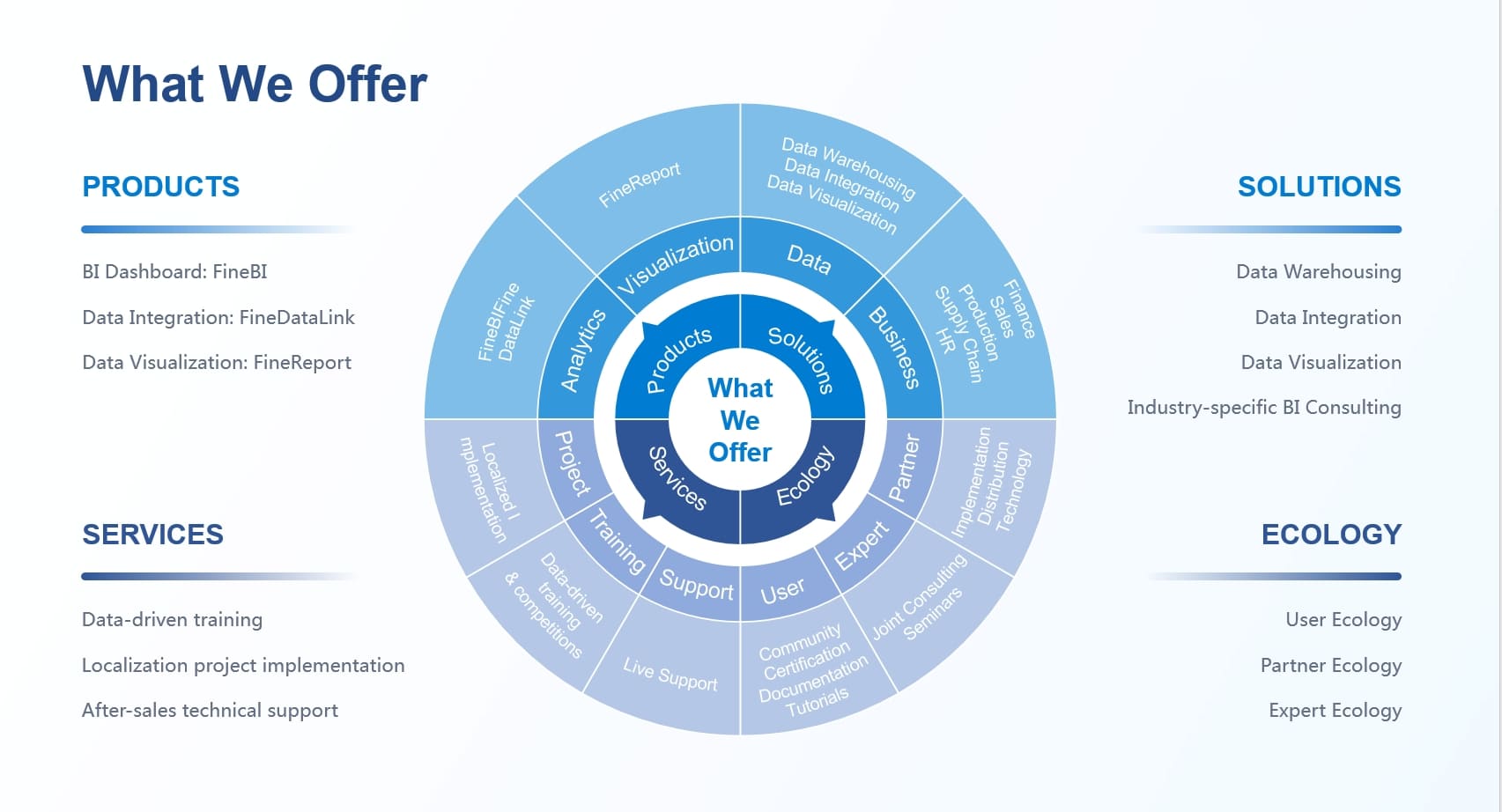
One-sentence overview: FanRuan is a strong choice for organizations that need enterprise-grade dashboard delivery backed by a mature BI platform, governed reporting, and scalable deployment options.
 Key Features:
- FineReport and FineBI for dashboarding, reporting, and analytics
- Support for embedded BI and customer-facing analytics portals
- Integration with ERP, CRM, databases, APIs, and mixed-source environments
- Role-based permissions, governance controls, and enterprise deployment support
- Options for cloud, on-premises, and hybrid architecture
Pros & Cons:
- Pros: Strong fit for enterprise reporting, scalable architecture, useful for governed environments, good for companies that want both dashboard development and long-term BI capability
- Cons: May be more platform-oriented than firms focused purely on bespoke software builds; enterprise rollout usually requires structured implementation planning
Best For (Target user/scenario):
- Enterprises
- Internal BI leaders
- Companies building standardized reporting across departments
- Teams that want a dashboard development company with a robust BI product foundation
2. The Dashboard Company
One-sentence overview: The Dashboard Company emphasizes strategy, scorecard design, and decision-ready dashboards for organizations that want advisory support alongside delivery.
Key Features:
- KPI discovery and scorecard development
- Dashboard design and data storytelling
- Data engineering and data model design
- Multi-source reporting support
Pros & Cons:
- Pros: Strong strategy lens, useful for executive reporting, good for organizations still clarifying metrics and reporting structure
- Cons: May be less suitable for buyers seeking large-scale software product engineering or deeply productized embedded analytics
- Best For (Target user/scenario):
- Leadership teams needing KPI definition
- Mid-market companies improving management reporting
- Organizations starting from fragmented spreadsheets
3. COBIT Solutions
One-sentence overview: COBIT Solutions is a specialized BI services provider with a clear focus on Power BI, Azure, ERP integration, and data warehouse delivery.
Key Features:
- Power BI dashboard development
- Azure Data Factory and Microsoft data stack support
- ERP, CRM, API, and SQL integration
- Fixed-price, hourly, consulting, and dedicated BI team options
Pros & Cons:
- Pros: Clear Microsoft specialization, strong ERP integration experience, flexible commercial models, good for BI modernization
- Cons: Best value is usually realized if your stack already leans Microsoft; less ideal if you want a fully tool-agnostic, custom front-end product
Best For (Target user/scenario):
- Companies already using Microsoft ecosystems
- Finance-heavy reporting
- ERP-connected management dashboards
4. Queppelin
One-sentence overview: Queppelin offers custom dashboard development through flexible delivery models that suit businesses wanting a dedicated external engineering partner.
Key Features:
- Custom dashboard web development
- Dedicated team, hourly, and fixed-price models
- UI-centric implementation options
- Broader product engineering capabilities
Pros & Cons:
- Pros: Flexible team structure, useful for custom builds, adaptable for businesses needing more than BI configuration
- Cons: Buyers should validate depth in analytics engineering and data governance for complex enterprise reporting projects
Best For (Target user/scenario):
- Startups and digital businesses
- Teams needing custom product development plus dashboards
- Buyers who want delivery model flexibility
5. Softweb Solutions
One-sentence overview: Softweb Solutions is suited to organizations looking for dashboard development tied to real-time analytics, enterprise systems, and broader transformation initiatives.
Key Features:
- Real-time analytics dashboards
- Enterprise application integration
- Cloud and data engineering support
- Cross-functional development and consulting capabilities
Pros & Cons:
- Pros: Good fit for operational dashboards, enterprise integration, and complex digital ecosystems
- Cons: Broader consulting scope can be more than smaller teams need for a narrower reporting project
Best For (Target user/scenario):
- Enterprise operations teams
- Manufacturing, logistics, and connected-system use cases
- Real-time monitoring initiatives
6. Fuselab Creative
One-sentence overview: Fuselab Creative stands out for dashboard UX, product design discipline, and visually refined interfaces for internal and external users.
Key Features:
- Dashboard UX/UI design
- Custom dashboard development
- Integration strategy and adaptive revisions
- Experience across business, financial, healthcare, and web dashboards
Pros & Cons:
- Pros: Strong design-first approach, effective for usability-sensitive dashboard projects, helpful when adoption is a priority
- Cons: Buyers with heavy back-end data architecture needs may need to confirm engineering depth or combined delivery support
Best For (Target user/scenario):
- SaaS products with customer-facing analytics
- Teams redesigning underused dashboards
- Organizations where user experience drives adoption
7. DATAFOREST
One-sentence overview: DATAFOREST combines custom dashboard development with data engineering and predictive analytics for businesses that want dashboards tied to scalable software architecture.
Key Features:
- Custom web dashboards
- API and ETL integration
- Predictive analytics and ML support
- Industry-focused dashboard solutions
Pros & Cons:
- Pros: Strong technical orientation, scalable architecture, useful for analytics-heavy products and operational intelligence
- Cons: Can be more engineering-centric than buyers seeking packaged BI rollout with standardized governance frameworks
Best For (Target user/scenario):
- SaaS companies
- Analytics products
- Businesses needing predictive or operational dashboards
8. Successive Digital
One-sentence overview: Successive Digital is best viewed as a broader digital engineering partner that can include dashboard development inside larger modernization or product programs.
Key Features:
- Custom software and dashboard development
- Enterprise engineering teams
- Cloud-native and API-led architecture
- Product modernization support
Pros & Cons:
- Pros: Strong for long-term engineering partnerships, useful when dashboards are part of a wider application ecosystem
- Cons: May be less specialized in BI tooling than dedicated analytics consultancies
Best For (Target user/scenario):
- Enterprises
- Platform modernization programs
- Teams combining dashboards with broader product delivery
9. LaSoft
One-sentence overview: LaSoft offers bespoke dashboard development with consulting, integration, and optional faster-start dashboard approaches for SMB and mid-market buyers.
Key Features:
- Custom dashboard design and development
- Dashboard strategy and consulting
- BI integrations across CRM, ERP, and SaaS tools
- Predictive analytics and dashboard audits
Pros & Cons:
- Pros: Balanced offering for custom work, useful for SMBs and agencies, practical scope across design and development
- Cons: Buyers with very large enterprise governance requirements should assess platform and security maturity in detail
Best For (Target user/scenario):
- SMBs
- Agencies
- Mid-market reporting modernization
- Custom web dashboards with moderate complexity
10. Tableau Services Partners / Tableau-led ecosystem
One-sentence overview: Tableau-focused service providers are a strong option for organizations that already want standardized BI on Tableau with partner-led implementation and enablement.
Key Features:
- Tableau dashboard development
- Data modeling and visualization best practices
- Governance, training, and analytics adoption support
- Warehouse and cloud integration
Pros & Cons:
- Pros: Mature BI ecosystem, strong self-service capability, broad familiarity among business users
- Cons: Total cost can rise with licenses and partner support; deeper customization may require complementary engineering work
Best For (Target user/scenario):
- Tableau-first companies
- Executive reporting programs
- Self-service analytics rollouts
Services and Delivery Models Compared
Custom dashboard builds vs ongoing analytics support
A dashboard development company may offer very different delivery models, even if the end output looks similar in a sales pitch.
Common delivery options include:
- One-time delivery: Best for a clearly defined dashboard project with stable requirements
- Phased implementation: Suitable when data models, user groups, and integrations will expand over time
- Monthly retainer or managed analytics support: Useful for continuous KPI evolution, dashboard tuning, and stakeholder support
- Dedicated product or BI team: Best for long-term roadmap execution, embedded analytics products, or multi-dashboard programs
Typical dashboard categories include:
- Executive reporting dashboards
- Operational dashboards
- Embedded BI inside software products
- Customer-facing analytics portals
- Department-specific dashboards for sales, finance, HR, supply chain, and service teams
If your need is narrow and immediate, a project-based engagement can be efficient. If your reporting environment changes frequently, a retained model usually delivers better long-term value.
Real-time data analytics and integration capabilities
Not every dashboard development company handles real-time analytics at the same level.
When comparing vendors, review whether they support:
- Streaming or near-real-time data refresh
- Warehouse connectivity across Snowflake, BigQuery, Redshift, Synapse, or similar platforms
- API integrations across CRM, ERP, marketing tools, ticketing systems, and internal platforms
- ETL/ELT workflows and automation
- Data quality checks and refresh monitoring
- Role-based access controls and environment separation
For example, a startup may only need daily refresh from Stripe, HubSpot, and PostgreSQL. An enterprise may need event streams, warehouse modeling, SSO, row-level security, audit logs, and region-specific access policies.
This is where companies like FanRuan, COBIT Solutions, and enterprise-focused development partners often separate themselves from lighter web development firms.
Strategy, compliance, and business process alignment
The strongest dashboard projects usually begin before any visual is designed.
A high-quality dashboard development company should be able to support:
- Requirements discovery
- KPI and metric design
- Stakeholder workshops
- User role mapping
- Governance and ownership models
- Change management and rollout planning
For regulated or process-heavy businesses, also assess experience with:
- Auditability
- Permission frameworks
- Documentation quality
- Regulated reporting workflows
- Industry compliance expectations
- On-premises or private deployment requirements
This is especially important in healthcare, finance, government, manufacturing, and any environment where reporting errors create operational or legal risk.
Tech Stacks, Architecture, and Scalability
Front-end, back-end, and BI tool choices
The best tech stack depends on whether you need a traditional BI dashboard, a fully custom analytics application, or a hybrid model.
Common stack combinations include:
- React + Node.js + PostgreSQL + APIs
- Angular + .NET + SQL Server
- Python + FastAPI + modern front-end frameworks
- Power BI + Azure stack
- Tableau + cloud warehouse
- Looker + dbt + warehouse-centric semantic modeling
- FineReport/FineBI + enterprise data sources and embedded deployment
Choose off-the-shelf BI platforms when you need:
- Faster deployment
- Standardized reporting
- Internal analytics
- Governed access and reusable report logic
- Lower build complexity
Choose fully custom architecture when you need:
- Product-grade embedded analytics
- Unique user interactions
- Multi-tenant customer-facing portals
- Specialized workflows and permissions
- Tight integration into an existing SaaS product
A company like FanRuan is particularly relevant when you want the efficiency of a mature BI platform without sacrificing enterprise-grade reporting depth. By contrast, firms such as Queppelin, DATAFOREST, or Successive Digital may be better matched to custom application-centric dashboard builds.
Data infrastructure and performance factors
Dashboard quality is not just about chart design. Performance, data reliability, and scalability matter just as much.
Evaluate whether the provider can support:
- Data pipelines and transformation layers
- Warehouses and lakehouses
- Query optimization
- Caching strategies
- Semantic layers and metric definitions
- Multi-source reporting logic
- Mobile responsiveness
- Load handling under increased concurrency
Poor architecture shows up later as:
- Slow filters
- Broken joins
- Conflicting KPI definitions
- Expensive refresh cycles
- Limited scalability as user counts grow
For organizations expecting broader adoption, ask how the dashboard development company handles:
- Growth from 20 to 2,000 users
- New source additions
- Permission complexity
- Embedded deployment
- Versioning and testing
- Operational support after launch
Pricing Models, Pros and Cons, and Selection Criteria
Common pricing structures
Most dashboard development company engagements fall into four pricing categories.
1. Fixed-price projects
Best when scope is well defined.
Usually includes:
- Discovery
- Wireframes or dashboard design
- Development
- QA
- Deployment
- Limited hypercare support
Strength: Predictable budget
Risk: Scope changes can be expensive or delayed
2. Time-and-materials
Best when requirements are still evolving.
Usually includes:
- Flexible sprint-based development
- Change-friendly prioritization
- Shared planning and review cycles
Strength: Adaptable
Risk: Final cost can exceed early estimates
3. Monthly retainers
Best for ongoing analytics support.
Usually includes:
- Dashboard enhancements
- Data source additions
- Bug fixes
- KPI refinement
- Performance tuning
Strength: Good for continuous improvement
Risk: Less ideal if you only need a one-off build
4. Dedicated team model
Best for long-term roadmap execution.
Usually includes:
- Assigned developers and analysts
- Product or project management
- Ongoing delivery velocity
- Expanded platform support
Strength: Strong continuity
Risk: Higher ongoing commitment
Pros and cons across the 10 options
Across these 10 providers, the key trade-offs are consistent.
Cost efficiency vs customization depth
- BI-platform-driven vendors can reduce build time and support governance
- Fully custom engineering firms can deliver unique workflows but often at higher long-term cost
Speed to launch vs long-term flexibility
- Off-the-shelf BI gets dashboards live faster
- Custom applications offer more control over UX, permissions, and extensibility
Specialist expertise vs broader digital product capability
- BI specialists are stronger in metrics, reporting logic, and analytics governance
- General product engineering firms are stronger when dashboards are only one part of a larger software platform
Design excellence vs back-end depth
- Design-led firms improve adoption and usability
- Data-engineering-led firms improve reliability and scale
A balanced buyer should match provider strengths to project priorities rather than assuming one firm is universally best.
How to choose the best-fit provider
Use this shortlist framework when selecting a dashboard development company.
1. Match the company to your dashboard type
- Internal BI reporting
- Executive dashboards
- Customer-facing analytics
- Operational monitoring
- Embedded analytics product
2. Match the company to your data complexity
- Simple SaaS and spreadsheet inputs
- ERP and CRM integration
- Warehouse and real-time data
- Multi-tenant or governed enterprise environments
3. Match the company to your internal capacity
- No internal BI team
- Strong product team but weak analytics layer
- Mature data team needing implementation help
- Enterprise IT governance constraints
4. Match the company to your timeline
- MVP in 4–8 weeks
- Phased rollout over a quarter
- Multi-region enterprise rollout
Questions to ask before signing a contract
- Who owns KPI definition and metric logic?
- How do you handle conflicting source data?
- What does post-launch support include?
- Can you support governance, row-level security, and auditability?
- What stack do you recommend, and why?
- What parts are custom-built versus platform-configured?
- How will performance be managed as usage grows?
- What documentation and training are included?
Red flags to watch for
- No clear discovery process
- Vague answers about data quality and governance
- Overemphasis on visual polish without architecture discussion
- No named post-launch support model
- Unrealistic promises on timeline or integration complexity
- Lack of examples in your level of data maturity or industry
Best-Fit Use Cases and Final Recommendations
Which company fits which scenario
Fast MVP dashboards for startups
Best options:
- Queppelin
- LaSoft
- DATAFOREST
Why:
- Flexible engagement models
- Custom product thinking
- Practical support for early-stage dashboard builds
- Better suited for evolving requirements than rigid enterprise rollouts
Enterprise-grade reporting and governance for large organizations
Best options:
- FanRuan
- COBIT Solutions
- Tableau ecosystem partners
Why:
- Stronger platform maturity
- Better support for governance and role-based access
- Better fit for standardized reporting across departments
- More suitable for scale, auditability, and controlled deployment
If your organization needs both deployment flexibility and a strong BI platform layer, FanRuan deserves serious consideration. It is especially relevant for companies that want to move beyond one-off dashboard projects into a repeatable analytics capability.
Customer-facing analytics products for SaaS teams
Best options:
- Fuselab Creative
- DATAFOREST
- Successive Digital
Why:
- Better alignment with product UX
- Custom application architecture
- Stronger fit for embedded or external-facing analytics experiences
Industry-specific implementations for operations-heavy businesses
Best options:
- Softweb Solutions
- COBIT Solutions
- The Dashboard Company
Why:
- Stronger fit for operational workflows
- Better support for process-heavy environments
- More likely to bring structured discovery and systems thinking
Final takeaway
The best dashboard development company is the one that aligns with your data complexity, delivery speed, governance needs, and product goals.
A simple way to narrow the list is to shortlist three types of providers:
- A BI-platform-led option for speed, governance, and long-term reporting structure
- A custom engineering option for product-grade flexibility
- A design-led option if adoption and usability are your main risks
For many enterprise and mid-market teams, FanRuan is a particularly strong candidate because it combines dashboard development capability with a proven BI platform approach, which can reduce implementation friction while supporting long-term scale.
If your priority is:
- Customization: look harder at custom engineering firms
- Analytics depth and governance: prioritize BI specialists like FanRuan, Microsoft-focused providers, or Tableau ecosystem partners
- Long-term support: choose a partner with structured post-launch services, not just project delivery
In practice, most buyers should compare their top two or three options against the same checklist: service scope, stack fit, pricing model, governance support, and post-launch ownership. That will usually reveal the right partner faster than comparing portfolios alone.
FAQs
A dashboard development company helps plan, design, build, integrate, and maintain dashboards that turn raw data into usable reporting and decision support. Many also handle data modeling, BI setup, governance, and ongoing optimization.