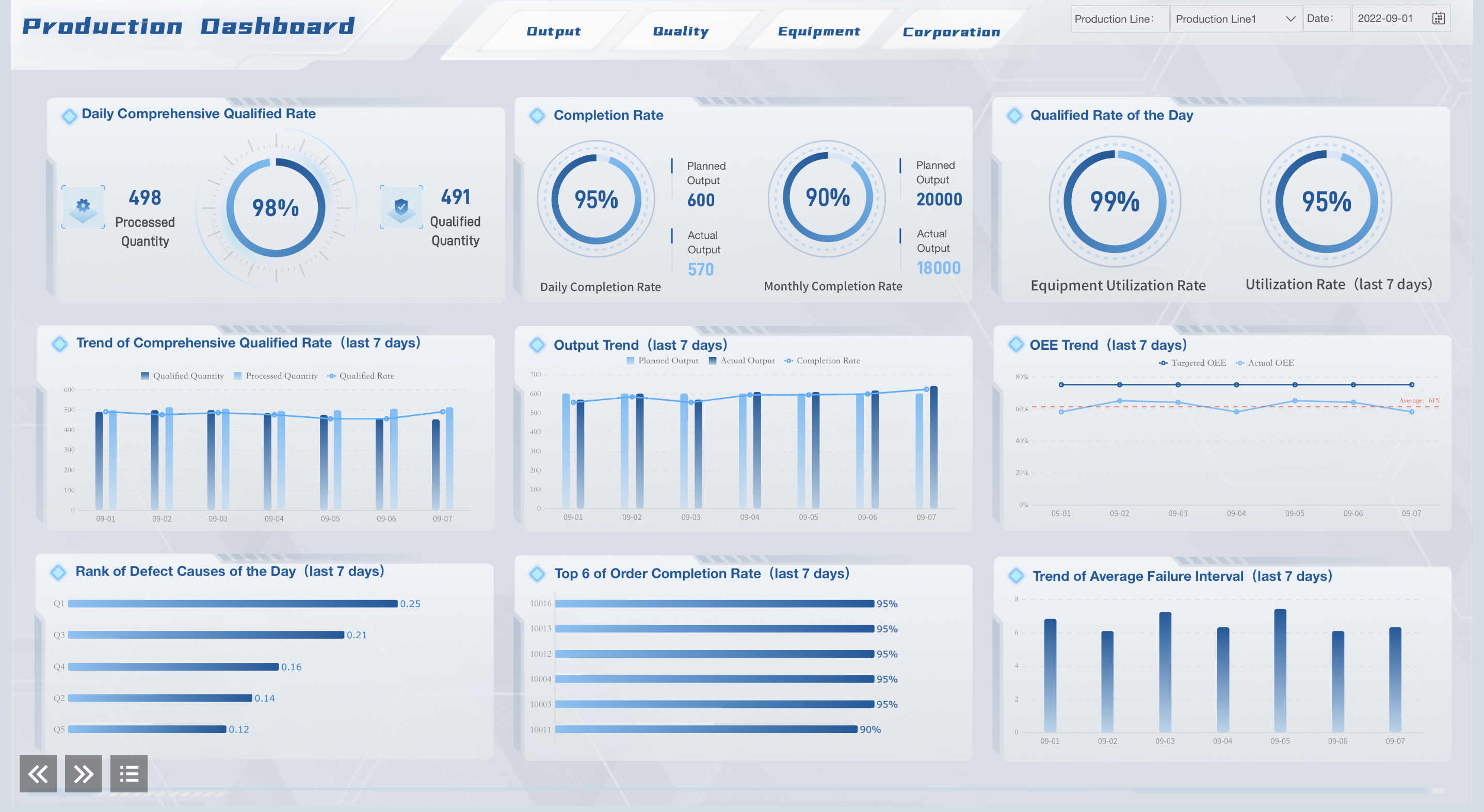
You need the right guidance to build the best dashboard. Start with simplicity. You want a clear story on one screen. Use dashboard best practices for effective results. Testing helps you improve your work. Here are tips that make your dashboard easy to use and understand.
Dashboard Best Practices: Define Purpose and Audience
Before you start building a dashboard, you need to know why you are making it and who will use it. This is the first step in dashboard best practices. When you set clear goals and understand your audience, you make sure your dashboard brings value and supports smart decisions.
Set Clear Objectives
You should always begin by asking, “What do I want this dashboard to achieve?” Clear objectives help you focus on what matters most. Here are some tips for setting the right goals:
Align your dashboard with your company’s main goals.
Decide what outcomes you want, like tracking sales or monitoring quality.
Make sure your dashboard is easy to read and use.
FineBI makes this step easier. You can use its planning tools to define your objectives and organize your data. This helps you follow dashboard best practices from the start.
Know Your Users
You need to know who will use your dashboard. Different people need different information. For example:
Executives want to see big trends.
Managers look for daily operations.
Analysts want detailed data.
Workers need real-time updates.
If you involve users in planning, you get higher adoption rates. User testing and user feedback help you improve your dashboard. FineBI lets you set roles and permissions, so each person sees what they need. This is one of the best practices for dashboard design.
By following these practices, you make dashboards that people want to use.
Dashboard Best Practices: Identify Key Metrics and Data Sources
Select Relevant KPIs
You need to choose the right key metrics for your dashboard. These metrics help you measure what matters most in your business. Here are some tips for picking the best KPIs:
Align your KPIs with your company’s main goals.
Make sure each KPI is measurable and easy to track.
Pick KPIs that drive action and help you make decisions.
Choose KPIs that you can get data for without too much effort.
Keep your KPIs specific and clear.
Review your KPIs often to make sure they stay relevant.
Avoid using the same KPIs as everyone else. Your business is unique.
Limit the number of KPIs on your dashboard. Too many can be confusing.
Make sure your KPIs are “alive.” Update them as your business changes.
Integrate Data with FineBI
You want your dashboard to show a complete picture. FineBI helps you connect to many data sources, like big data platforms, SQL databases, and Excel files. This makes it easy to bring all your information together in one place.
Metric
Description
Importance for Dashboards
Completeness
No important data is missing.
You get accurate insights.
Consistency
Data looks the same across all sources.
You avoid confusion and errors.
Accuracy
Data matches real-world values.
You can trust your decisions.
When you use FineBI, you can trust your dashboard. Data integration quality matters. If your data is complete, consistent, and accurate, your dashboard will be reliable. Testing your data connections helps you catch problems early. This is one of the best ways to build dashboards that people trust.
Dashboard Best Practices: Dashboard Design Fundamentals
Choose Effective Visuals
Your dashboard should tell a simple story. Pick visuals that fit your data and goals. Bar charts are good for comparing groups. Line graphs help you see changes over time. Pie charts show how parts make up a whole. Scatter plots help you spot connections. Heatmaps make patterns easy to see. Bubble charts show data with more than one detail. Infographics make learning fun and easy. Dashboards give you information right away.
Visualization Type
Purpose
Best Use Cases
Bar Charts
Compare categories
Sales numbers, market share
Line Graphs
Show trends
Revenue growth, web traffic
Scatter Plots
Identify correlations
Marketing spend vs. revenue
Pie Charts
Show proportions
Budget allocations
Heatmaps
Visualize patterns
Website clicks
Bubble Charts
Multi-dimensional data
Product performance
Infographics
Engage and educate
Summarizing reports
Don’t add too much information or make your design too hard. This keeps things clear and helps people use your dashboard. FineBI lets you pick the right visual with drag-and-drop tools. You can make dashboards that work without knowing how to code. This follows dashboard design best practices and makes your dashboard simple to use.
Organize Layout for Clarity
A clear layout is important for dashboard design. Put related data together in groups. Place the most important information at the top. Grouping things in a smart way stops confusion and helps people learn faster. A clear order helps users find what they need fast. Show information a little at a time if needed.
Keep your dashboard layout simple to help your brain.
Don’t put too much data on one screen. Too much can be confusing.
Pick the right chart for each number. Give numbers meaning.
FineBI’s drag-and-drop tools make it easy to organize your layout. You can move things around for the best look. Real-time math and checks keep your dashboard up to date. User testing helps you make your dashboard better and follow your checklist. A clear design gives users the best experience.
Dashboard Best Practices: Visual Hierarchy and Emphasis
Prioritize Key Data
You want your dashboard to show the most important information first. Good visual hierarchy helps you do this. Start by telling a story on one screen. Place all essential data where users can see it without scrolling. Accent the most important numbers with card visualizations. These cards make key data stand out. Put your most critical information at the top left corner. People read from left to right, so this spot gets the most attention.
A clear layout supports simplicity. When you group related data and highlight what matters, you help users focus. Research shows that organizations using well-structured dashboards make better decisions and often see higher revenue growth. Visual hierarchy ensures that users find key metrics quickly and do not feel overwhelmed by too much data.
Guide User Attention
You can guide users to the right data by using smart design practices. Start with a clear visual hierarchy. Use layout, color, and font size to show what is most important. Keep your dashboard consistent. Use the same colors and styles for similar data. This makes your dashboard easy to use.
Reduce distractions by showing only what matters. Make your data easy to read. Choose the best visual for each metric. Add color-coding or trend arrows to highlight changes. This helps teams act fast when something important happens. Always check if your dashboard matches what users need. Ask for feedback and improve your design.
Dashboard Best Practices: Use Color and Labels Wisely
Apply Meaningful Colors
Using color the right way makes your dashboard easier to read. Keep things simple. If you use too many colors, people get confused. Try to use between four and eight colors. This keeps your dashboard neat. It helps users focus on what matters most. Always make sure colors have enough contrast. This helps numbers and charts stand out. It works even for people with color vision problems.
Use one color for single metrics to show if numbers go up or down.
Pick colors that are very different when you compare two groups, like sales teams.
Use bright colors to highlight important information. Use softer colors for less important data.
Make sure all colors are easy to tell apart.
Test your dashboard for color blindness. This helps everyone understand your data.
Best Practice
Description
Limit the number of colors
Use seven or fewer colors so viewers do not feel overwhelmed.
Ensure colors are distinguishable
Do not use colors that are hard to tell apart.
Consider accessibility
Pick colors that work for everyone, even those with color vision problems.
Align color meaning with data
Use red for decreases, green for increases, blue for stability.
Colors can change how people feel. Blue helps people trust your dashboard. Green shows growth. Red makes things seem urgent. Warm colors like yellow and orange grab attention.
Ensure Clear Labeling
Clear labels help users find information quickly. Good labels make your dashboard easy to use. When you use clear labels, you help people avoid mistakes. You help them make better choices. A clean and uniform design across dashboards helps users learn faster. They know where to look. They know what each number means. This is one of the best practices for dashboard design.
Dashboard Best Practices: Dashboard Interactivity with FineBI
Add Filters and Drill-Downs
Dashboards should do more than show numbers. FineBI lets you add filters and drill-downs. Filters help you see only what you need. For example, you can check sales by region or by month. Drill-downs let you click a chart to see more details. This makes your dashboard fun and easy to use.
FineBI has many interactive tools for your data. Here is a table with some features:
Feature
Description
Collaborative dashboard editing
Many people can edit dashboards at once.
Real-time data verification
See changes as soon as data updates.
Customizable data stories
Make your own story with the data.
One-click report sharing
Share reports fast with your team.
Linkage and drill effects
Click to see deeper information.
These features help your team decide faster. Interactive dashboards show live data. You can act quickly and improve your business.
Enable Responsive Design
Dashboards should look good on any device. FineBI makes dashboards work on computers, tablets, and phones. You can check your numbers at your desk or anywhere else. Responsive dashboards help everyone stay connected and know what is happening.
Responsiveness gives users the best experience. Dashboards that fit all screens stop confusion and save time. You can spot trends and act fast, even away from the office. FineBI’s mobile tools make sure your team always has the newest information.
Dashboard Best Practices: Context and Comparisons
Add Benchmarks and Trends
You need to give your dashboard context. Benchmarks help you see if your numbers are good or bad. You can compare your results to targets, past performance, or industry standards. This helps you know if you are on track. For example, you can add a line to a chart that shows last year’s sales. You can also show the average for your industry. Trends help you spot changes over time. You can use line charts or bar charts to show how things move up or down. When you add benchmarks and trends, you make your dashboard more useful. You help users see what matters most.
Provide Explanatory Notes
Sometimes, numbers alone do not tell the whole story. You should add notes to your dashboard to explain what users see. Explanatory notes help users understand why a number is high or low. You can use text boxes, tooltips, or callouts. For example, you can add a note to explain a sudden drop in sales. You can also use notes to point out important events or changes. This makes your dashboard easier to use. It also helps users make the best decisions.
Feature
Benefit
Benchmarks
Show targets or goals
Trends
Reveal patterns over time
Explanatory Notes
Add meaning to the numbers
You can make a good dashboard if you follow each step. Dashboards help you see progress, make choices, and get better results. Look at this table to see how dashboards help:
Dashboard Role
Description
Example
Intervention
Changes how things turn out.
Dashboards for anesthesiology care management.
Implementation Strategy
Helps with interventions by giving feedback.
Dashboards for addiction program access in Washington State.
Adjunctive Intervention
Gets users involved and helps outcomes improve.
Community dashboards for opioid overdose prevention.
Keep your dashboard up to date. Update it so the information stays helpful:
Updates make dashboards stay important.
Pick someone to check and update metrics.
Old dashboards lose trust fast.
Automatic updates keep dashboards new.
Use FineBI and FanRuan to build dashboards for your team. Check your dashboard often. Ask users what they think. Change your dashboard as your business changes. Share your dashboard story so everyone can learn.
Product Trial
FineReport
Pixel-perfect reports · Interactive dashboards · Easy data entry · Digital twins
Access a wealth of case studies, industry insights, and solution guides to accelerate digital transformation.
FAQ
What is a dashboard?
A dashboard is a tool that shows your data in charts and graphs. You can see important numbers and trends in one place.
How often should you update your dashboard?
You should update your dashboard as often as your data changes. This keeps your information fresh and helps you make smart choices.
Can you share a dashboard with your team?
Yes, you can share a dashboard with your team. Everyone can see the same numbers and work together to reach your goals.
Why is security important for intranet dashboards?
Security keeps your company’s information safe from others. You use things like role-based access and multi-factor authentication. These tools make sure only the right people can see private data.