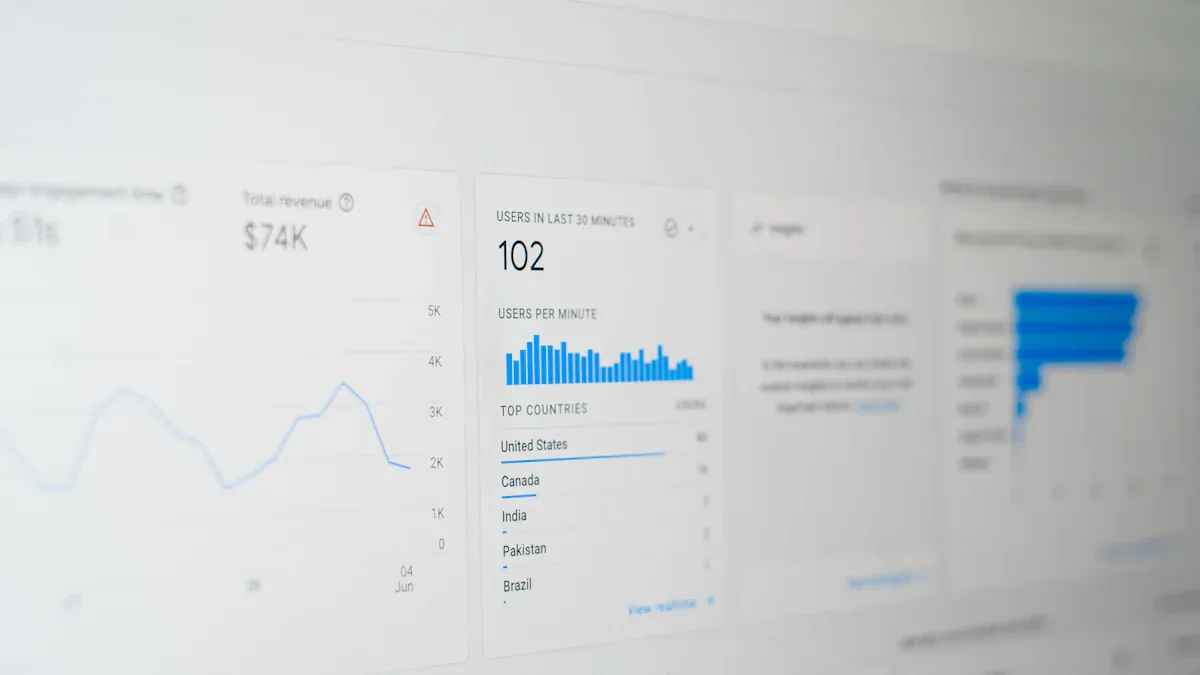
Automated data processing lets you use technology to collect, transform, and analyze data with very little human effort. You can handle large volumes of information quickly and reduce errors. Many companies now rely on automated solutions to improve how they manage data. In 2024, 60% of organizations have adopted automation, and the number will climb to 85% by 2029. The table below shows how automation is changing workplaces:
| Year | Percentage of Companies Implementing Automation | Projected BPA Market Growth |
|---|---|---|
| 2024 | 60% | $13 billion |
| 2029 | 85% | $23.9 billion |
Automated data processing helps you make better decisions by providing faster access to information and supporting real-time decision-making.
How Automated Data Processing Works

Automated data processing follows a series of steps that help you turn raw information into valuable insights. Each step uses automation to save time, reduce errors, and improve accuracy. Let’s explore how this process works in practice.
| Step | Description |
|---|---|
| Data Collection | Automated systems pull data from various sources, creating a single source of truth. |
| Data Cleaning | Data is cleaned to remove duplicates and correct invalid entries. |
| Data Transformation | Clean data is transformed for analysis, using automated ETL tools. |
| Data Storage | Processed data is stored in databases or data lakes for accessibility and security. |
Data Collection
You start by gathering data from different sources. Automated data processing software can connect to databases, cloud platforms, sensors, and even paper documents. Automation lets you collect information quickly and accurately, so you do not have to enter it by hand.
Some common technologies used for automated data collection include:
- Optical Character Recognition (OCR)
- Intelligent Character Recognition (ICR)
- Intelligent Document Recognition (IDR)
- Ephesoft
- Amazon Textract
- Rossum
- IBM Datacap
These tools help you capture data from scanned documents, emails, and digital forms. Automation ensures you always have up-to-date information for your business needs.
Tip: Automated data collection reduces manual errors and speeds up the entire data processing workflow.
Data Cleaning
Once you collect the data, you need to clean it. Automated data processing uses algorithms to spot and fix problems like duplicates, missing values, or incorrect entries. You can rely on automation to handle large volumes of information without missing important details.
The Octozi platform’s ability to maintain high sensitivity while dramatically improving specificity addresses a fundamental challenge in clinical data management, with a 15.48-fold reduction in false query generation.
Automated data cleaning uses several techniques:
- Automated algorithms identify patterns and anomalies, making it easier to find data quality issues.
- Imputation, formatting, outlier treatment, deduplication, and validation are all automated, which improves accuracy and consistency.
- Automation reduces manual effort, so you can focus on more strategic tasks.
You can see the impact of automation in data cleaning through these results:
- The F1-score improved from 58.5 to 91.0, showing better accuracy in finding discrepancies with AI assistance.
- A 6.44-fold reduction in error rate made the cleaning process much more reliable.
- The accuracy improvement yielded a Cohen’s d of 2.8, confirming the effectiveness of AI-assisted methods.
Data Transformation
After cleaning, you need to transform the data so you can analyze it. Automated data processing uses ETL (Extract, Transform, Load) tools to change the format, structure, or values of your information. This step prepares your data for reporting, analytics, or machine learning.
| Technique | Problem Solved | Use Case Scenarios | How It Works |
|---|---|---|---|
| Data Manipulation | Fixes errors and inconsistencies. | Used in almost every data analysis project. | Removes duplicates, fills missing values, corrects typos, and standardizes formats. |
| Normalization | Scales numbers to a standard range. | Important for machine learning algorithms. | Uses min-max scaling and z-score standardization. |
| Attribute Construction | Creates new features for better analysis. | Helps capture patterns and extract new information. | Uses mathematical transformations, aggregation, and dimensionality reduction. |
| Generalization | Reduces complexity by replacing detailed attributes. | Useful for complex datasets like images or speech. | Uses abstraction, summarization, and clustering. |
| Discretization | Converts continuous data into categories. | Needed for decision trees and similar techniques. | Uses equal width, equal frequency, and clustering-based discretization. |
| Data Aggregation | Combines data at different levels. | Useful in financial analysis or sales forecasting. | Uses summarization, averaging, and grouping. |
| Data Smoothing | Removes noise and fluctuations. | Helps when data is noisy and patterns are hard to see. | Uses moving averages, exponential smoothing, and kernel smoothing. |
You can use these transformation techniques to make your data more useful and easier to understand. Automation ensures each step happens quickly and consistently, so you can trust your results.
Automated data processing gives you a clear path from raw information to actionable insights. By using automation at every stage, you can handle more data, improve accuracy, and make better decisions for your organization.
Data Storage
You need a reliable way to store your data after you collect and transform it. Automated data processing systems use advanced storage solutions to keep information safe, organized, and easy to access. You can choose from databases, data warehouses, or data lakes, depending on your needs. These systems help you manage large volumes of data and support fast retrieval for analysis.
Here is a table that shows the main benefits of modern data storage solutions in automated data processing:
| Benefit Type | Description |
|---|---|
| Flexible Solutions | Modular systems let you customize storage for different logistics demands. |
| High Density | Compact storage maximizes capacity and optimizes available space. |
| Accurate Management | Warehouse management systems ensure precise inventory control and scheduling. |
| Cost Effective | Automation reduces personnel needs and lowers overall storage costs. |
| Service Oriented | Trained staff provide support for logistics and warehousing operations. |
| Secure | Access restrictions protect valuable goods from theft and unauthorized access. |
You can use these features to build a secure and efficient data storage environment. Automation helps you organize information and maintain high standards for data integrity.
Note: Automated data processing software often includes built-in security features to protect sensitive information.
Data Processing Automation
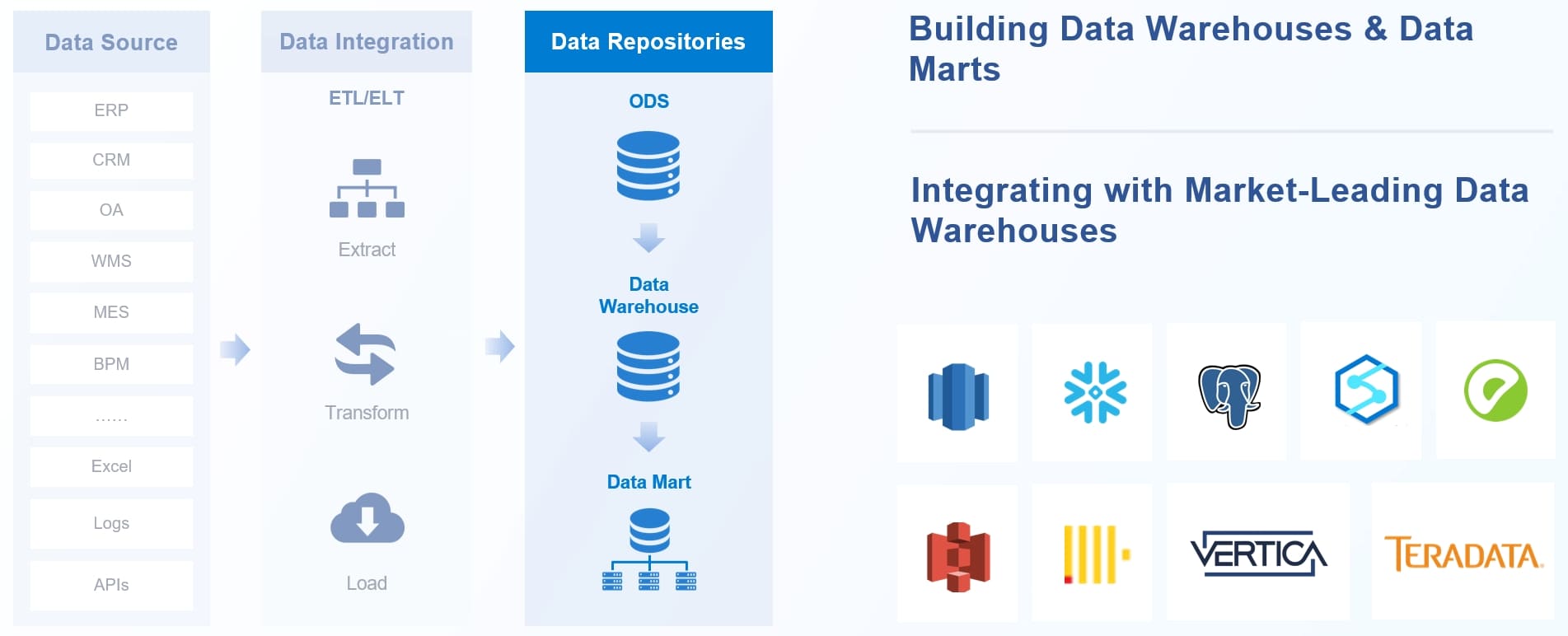
You can automate every step of the data processing workflow. Automation tools help you manage data from collection to analysis without manual intervention. You define your data sources, set up workflows, and let the system handle the rest.
Here is how automation orchestrates end-to-end data processing:
- Define and integrate data sources. You gather data from multiple places to make sure you have everything you need.
- Transform data and build workflows. You convert raw information into usable formats and design workflows to control how data moves.
- Schedule and monitor workflows. You set times for each process, watch performance, and use error-handling to keep everything running smoothly.
Automation lets you process data faster and with fewer mistakes. You can scale your operations and handle more data as your business grows. Automated data processing gives you the flexibility to adapt to new challenges and opportunities.
Tip: You can use automated data processing software to schedule regular updates and monitor data quality in real time.
Data Analysis
You unlock the true value of your data through analysis. Automated data processing uses powerful algorithms to find patterns, make predictions, and support decision-making. You can choose from many techniques, depending on your goals.
Some of the most widely used algorithms in business applications include:
- Regression helps you understand relationships between variables and forecast trends.
- Classification lets you categorize data into predefined groups based on features.
- Clustering groups similar data points together, which is useful for market segmentation.
- Deep learning uses neural networks to recognize complex patterns.
- XGBoost provides efficient gradient boosting for supervised learning tasks.
- Prophet specializes in forecasting time series data for business planning.
- Linear regression analyzes how one variable affects another.
- Decision trees use a tree-like model to show possible outcomes.
- Neural networks mimic the human brain to solve complex analysis problems.
You can use these algorithms to gain insights and make informed decisions. Automated data processing ensures you analyze information quickly and accurately. Automation helps you focus on strategy instead of manual tasks.
Callout: Automated data processing makes it possible to analyze huge datasets in minutes, giving you a competitive edge.
Data Output
After you process and analyze your data, you need to deliver the results in a way that people can use. Automated data processing makes this step fast and reliable. You can send information to the right people or systems without manual effort. This final stage turns your insights into action.
You have many options for output formats and channels. Each one serves a different business need. Here is a table that shows the most common formats used in enterprise systems:
| Format/Channel | Description |
|---|---|
| Standard format for business documents like invoices and reports, generated from various sources. | |
| Word | Used for contracts and letters, integrated with business systems for automatic population. |
| XML | Facilitates data exchange, allowing for real-time document generation. |
| Excel/CSV | Commonly used for data storage and reporting, enabling automatic generation of labels and invoices. |
You can choose the format that fits your workflow. For example, you might generate a PDF report for your manager or export a CSV file for further analysis. Automated systems can create these files instantly, saving you time and reducing errors.
Automated data output does more than just create files. It also manages how you distribute information. Here are some ways automation helps you handle data output:
- Streamlines document management from creation to distribution.
- Automates routine tasks like batch processing and document sorting.
- Distributes communications across channels such as email, print, and web portals.
You can set up your system to send reports by email, upload files to a web portal, or print documents automatically. This flexibility means you always get the right data to the right place at the right time.
Security and traceability matter when you share business information. Automated data processing ensures that only authorized users can access sensitive documents. The system tracks every step, so you know who received each file and when. This helps you meet compliance requirements and protect your company’s data.
Personalization is another benefit of automated data output. You can format and customize documents for different users or departments. For example, you might add a customer’s name to an invoice or adjust a report layout for a specific team. Automation makes this easy and consistent.
Tip: Automated data output lets you focus on using insights, not just creating reports. You spend less time on paperwork and more time making decisions.
Automated data processing gives you a complete workflow from raw information to actionable results. You collect, clean, transform, store, analyze, and finally deliver data—all with minimal manual work. This end-to-end automation helps your organization stay efficient, accurate, and ready to act on new opportunities.

Main Types of Automated Data Processing
You can choose from several types of data processing automation to match your business needs. Each type offers unique benefits and works best for specific scenarios. Let’s explore the three main types: batch, real-time, and distributed data processing.
Batch Data Processing
Batch data processing lets you handle large volumes of information at scheduled times. You group data into batches and process them together. This method works well for tasks like payroll, billing, or end-of-day reports.
Here is a table that shows the advantages and limitations of batch data processing:
| Advantages | Limitations |
|---|---|
| Cost efficiency | Higher latency |
| Scalability | Potential for stale data in reports |
| Resource optimization | Delay in processing results until the next batch |
| Automation and scheduling | Debugging and maintenance |
| Accuracy and consistency | Manual interventions |
| Integration with legacy systems | Dependency on IT specialists |
Batch processing helps you optimize resources and maintain accuracy. You may face challenges like latency and the need for manual intervention. Managing large data volumes and ensuring data integrity require careful planning.
Tip: Batch processing is ideal when you do not need instant results and want to maximize efficiency.
Real-Time Data Processing
Real-time data processing gives you instant access to information as events happen. You can make decisions quickly and respond to changes without delay. This type of automation is essential for industries like finance and healthcare, where timing matters.
Here is a table that highlights how real-time data processing benefits different industries:
| Application | Benefit |
|---|---|
| Fraud detection | Instantly identifies suspicious transactional patterns to prevent fraudulent activities. |
| Trading and finance | Enables algorithmic trading and real-time market monitoring for rapid response. |
| Healthcare monitoring | Powers real-time patient monitoring systems for swift medical intervention. |
You can use real-time data processing to improve budget control, forecasting, and workflow efficiency. This approach supports real-time decision-making and helps you stay ahead in fast-paced environments.
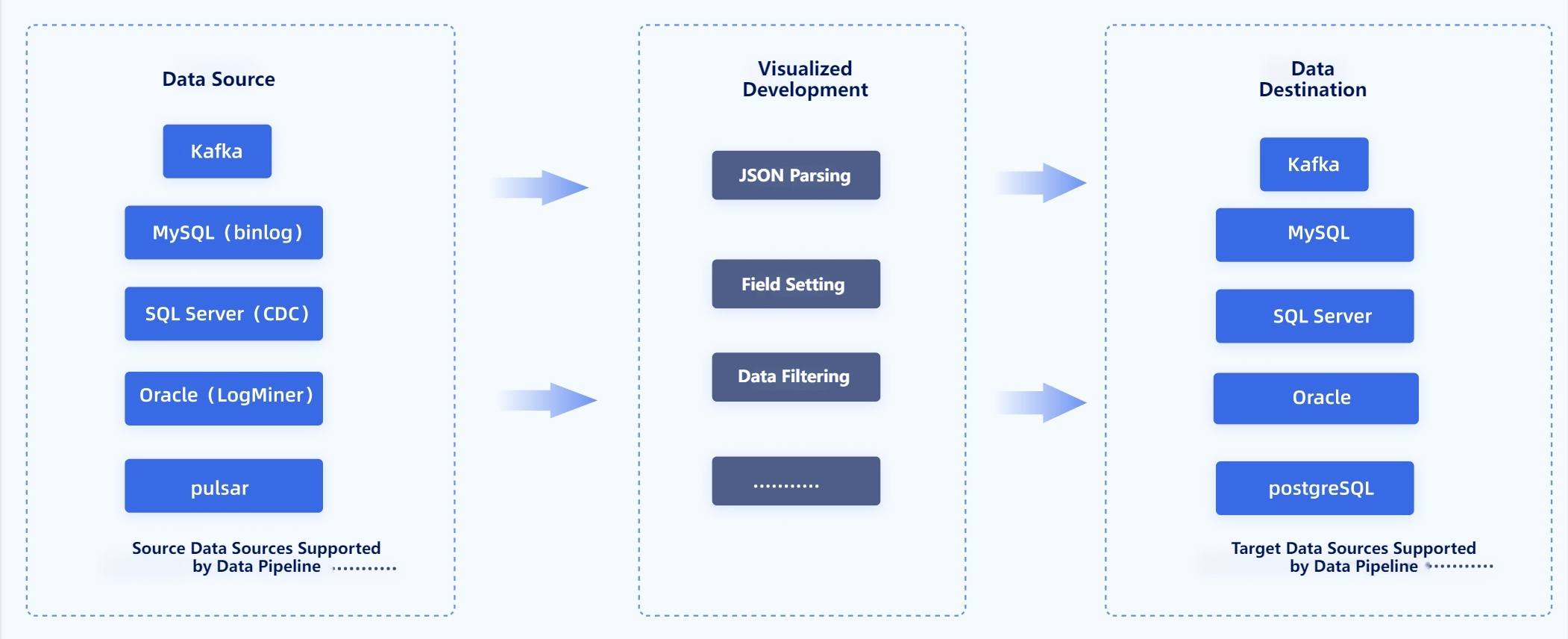
Distributed Data Processing
Distributed data processing uses multiple machines to handle large and complex datasets. You can scale your operations and process data faster by spreading tasks across clusters. This type of automation is popular for big data analytics and cloud-based solutions.
Here is a table that shows key platforms and features for distributed data processing:
| Platform | Key Features |
|---|---|
| Informatica PowerCenter | Comprehensive ETL tool with strong data transformation capabilities and high scalability. |
| Talend | Robust open-source version with built-in tools for data accuracy and big data integration. |
| Apache Hadoop | Handles large volumes of structured and unstructured data with high fault tolerance. |
| Google BigQuery | Serverless architecture with automatic scaling and built-in machine learning capabilities. |
Distributed processing offers speed, efficiency, and scalability. You can manage security and simplify cluster setup with modern platforms. Automated systems like Databricks and Apache Wayang also support advanced data workflows.
Note: Distributed data processing helps you analyze massive datasets and adapt to changing business needs.
You can select the right type of automation based on your goals, data volume, and need for speed. Each method supports different aspects of data management and helps you build a more efficient organization.
Cloud-Based Data Processing
Cloud-based data processing changes how you manage and analyze information. You can use cloud platforms to store, process, and automate your data workflows. This approach gives you flexibility and power that traditional systems cannot match.
When you use cloud-based automation, you gain several important benefits:
- You can adjust resources based on your current needs. This helps you handle seasonal spikes in data usage without wasting money on extra infrastructure.
- Cloud platforms let you scale resources up or down. You only pay for what you use, so you avoid costs for unused servers or storage.
- Serverless computing removes the need to manage physical servers. The cloud provider allocates resources for you, which lowers operational costs and boosts performance.
- You can break applications into smaller parts. This lets you scale each service individually, making your data processing more efficient and cost-effective.
Cloud-based data processing automation also improves collaboration. Your team can access data and tools from anywhere with an internet connection. This makes it easier to share insights and work together on projects.
Automated workflows in the cloud help you process large volumes of data quickly. You can set up triggers and schedules to run tasks without manual effort. For example, you might automate data collection, cleaning, and transformation so your reports are always up to date.
Security remains a top priority in cloud environments. Providers use advanced encryption and access controls to protect your data. You can monitor activity and set permissions to ensure only authorized users access sensitive information.
Cloud-based solutions support innovation. You can try new tools and technologies without large upfront investments. This flexibility helps your organization stay competitive in a fast-changing world.
Tip: Cloud-based data processing automation lets you focus on insights and growth instead of managing hardware.
Cloud-based data processing gives you the speed, scalability, and reliability you need to succeed. You can automate every step, from data collection to analysis, and deliver results faster than ever.
Key Benefits of Automated Data Processing
Increased Efficiency
You can achieve increased efficiency when you use automated data processing in your organization. Automation helps you complete tasks faster and reduces manual work. You spend less time on repetitive actions and more time on strategic projects. Many companies report dramatic improvements in how quickly they resolve issues and process information. The table below shows how automation boosts efficiency across several key metrics:
| Metric | Improvement Description |
|---|---|
| Mean Time to Resolution | Lowered by systems that detect anomalies and propose solutions automatically. |
| Processing Times | Improved due to less manual intervention. |
| Employee Productivity | Increased as staff focus on strategic work. |
| Decision Velocity | Enhanced through autonomous data collection and recommendations. |
| Incident Response Time | Reduced with rapid recovery actions. |
| Time-to-Market | Decreased as systems adapt strategies to new data. |
Automation lets you respond to changes quickly and helps your team work smarter.
Improved Accuracy
Automated data processing leads to improved accuracy in your operations. You can trust your data because automation reduces human error. Studies show that electronic methods match or even surpass manual approaches in data quality. You see better case capture and more consistent results. Here are some ways automation improves accuracy:
- Electronic systems provide good agreement with manual methods.
- Automation increases data quality and case ascertainment.
- Automated data collection enhances accuracy and consistency in nursing and clinical settings.
- You see fewer mistakes because automation reduces manual entry errors.
- Electronic methods identify more eligible cases, making manual record abstraction less necessary.
You get reliable data for analysis and decision-making.
Cost Savings
You save money when you switch to automated data processing. Automation lowers the cost of handling data and reduces the need for manual labor. Companies in insurance, healthcare, and accounts payable report significant cost reductions. The table below highlights average savings:
| Industry | Cost Reduction (%) | Annual Savings ($) |
|---|---|---|
| Insurance | 55 | 1,930,000 |
| Healthcare | Up to 75 | Positive ROI in 6-9 months |
| AP Automation | 67 | 7.56 - 10.56 per invoice |
You also see lower costs per invoice and faster returns on investment. Automated processing helps you allocate resources more effectively and supports business growth.
Tip: Automation not only saves money but also frees up your team to focus on higher-value tasks.
Scalability
You need a system that grows with your business. Automated data processing gives you that flexibility. As your organization handles more data, automation lets you process larger volumes without hiring more staff. You can manage thousands or even millions of records with the same resources. This is especially important for industries like e-commerce and finance, where data volumes can spike quickly.
Automated systems help you keep up with demand. You do not have to worry about slowdowns or errors as your data grows. Automation ensures that your operations remain smooth and reliable. You also benefit from improved data governance, which means you can track and control your information more effectively.
Here is a table that highlights the main benefits of scalable automated data processing:
| Key Benefit | Description |
|---|---|
| Speed | Automated data processing allows for rapid handling of large data volumes with minimal human intervention. |
| Accuracy | Reduces errors in data handling, ensuring reliable outcomes. |
| Cost Savings | Enables organizations to scale without needing to hire additional staff or extend work hours. |
| Improved Data Governance | Enhances the management and oversight of data processes, contributing to better scalability. |
You gain increased efficiency as your business expands. Automation supports your growth by making sure your data processing keeps pace with your needs.
Enhanced Decision-Making
Automated data processing transforms how you make decisions. You get accurate, up-to-date information that helps you act quickly. Automation improves accuracy and reduces the risk of mistakes. You can trust your data when making important choices.
Many companies have seen real results from automation. For example, Trupanion used automated data processing to predict customer churn. They identified two-thirds of customers likely to leave before it happened. BMW applied automation in manufacturing for predictive maintenance. They reduced downtime by predicting equipment failures, saving 500 minutes of disruption each year. Another BMW project used AI and real-time monitoring to optimize repairs and cut disruptions by up to 40%.
| Company | Application | Outcome |
|---|---|---|
| Trupanion | Customer churn prediction | Identified two-thirds of customers likely to churn before they do. |
| BMW | Predictive maintenance | Reduced downtime by predicting equipment failures, avoiding 500 minutes of disruption annually. |
| BMW | AI in manufacturing | Optimized repair and minimized disruptions by up to 40% through real-time monitoring. |
You can see how automated data processing leads to better decision-making. You get the right information at the right time, which helps you stay ahead in your industry.
Real-World Use Cases of Automated Data Processing
Finance and Banking
You see the impact of automated data processing every day in finance and banking. Banks and financial institutions use these systems to handle large volumes of data quickly and accurately. You benefit from faster customer onboarding, as automated workflows streamline data entry and identity checks. Loan processing becomes more efficient because the system validates documents and checks credit automatically. Fraud detection improves since automated tools analyze transaction data in real time to spot suspicious activity. You also notice smoother accounts payable operations, with automated invoice processing and payment approvals.
Here are some common applications:
- End-to-end KYC and customer due diligence for compliance and onboarding
- Intelligent loan and mortgage origination with automated document validation
- Automated trade finance document processing for faster transactions
- Fraud investigation and response orchestration using real-time data analysis
- Dispute resolution and chargeback processing
- Automated financial close and reconciliation
- Regulatory reporting and compliance automation
- Supplier and third-party risk management
These solutions help you reduce errors, save time, and meet strict regulatory requirements.
Healthcare
Automated data processing transforms healthcare by improving patient care and operational efficiency. Hospitals use AI to manage resources, predict peak times, and optimize staff schedules. This reduces wait times and ensures better patient flow. You see AI models predicting patient admission rates, which helps emergency departments avoid bottlenecks.
| Case Study | Description |
|---|---|
| AI in Hospital Resource Management | Predicts peak times, improves bed management, and enhances staff scheduling |
| Predictive Analytics for Efficiency | Predicts admission rates, optimizes staffing, and reduces wait times |
You also benefit from automation in routine tasks. AI handles data entry and scheduling, so staff can focus on patient care. Automated systems organize patient records, making information easy to access. Billing and claims processing become faster and more accurate. Appointment scheduling improves, reducing wait times and improving the patient experience.
Retail and E-Commerce
Retailers and e-commerce platforms rely on automated data processing to manage inventory and enhance customer experience. You get real-time insights into inventory levels and customer behavior. Machine learning forecasts store traffic, helping you optimize operations. In e-commerce, automation covers supply chain, sales, shipping, and returns, which boosts productivity and customer satisfaction.
You notice chatbots providing 24/7 support, improving user experience. Automated systems update customers on orders in real time, building trust. Inventory management becomes more efficient, with real-time tracking and automated replenishment. Data synchronization across sales channels gives you a unified view of inventory, reducing errors and ensuring products are always available.
Automated data processing in these industries helps you deliver better service, reduce costs, and make smarter decisions.
Manufacturing and Smart Factory Solutions
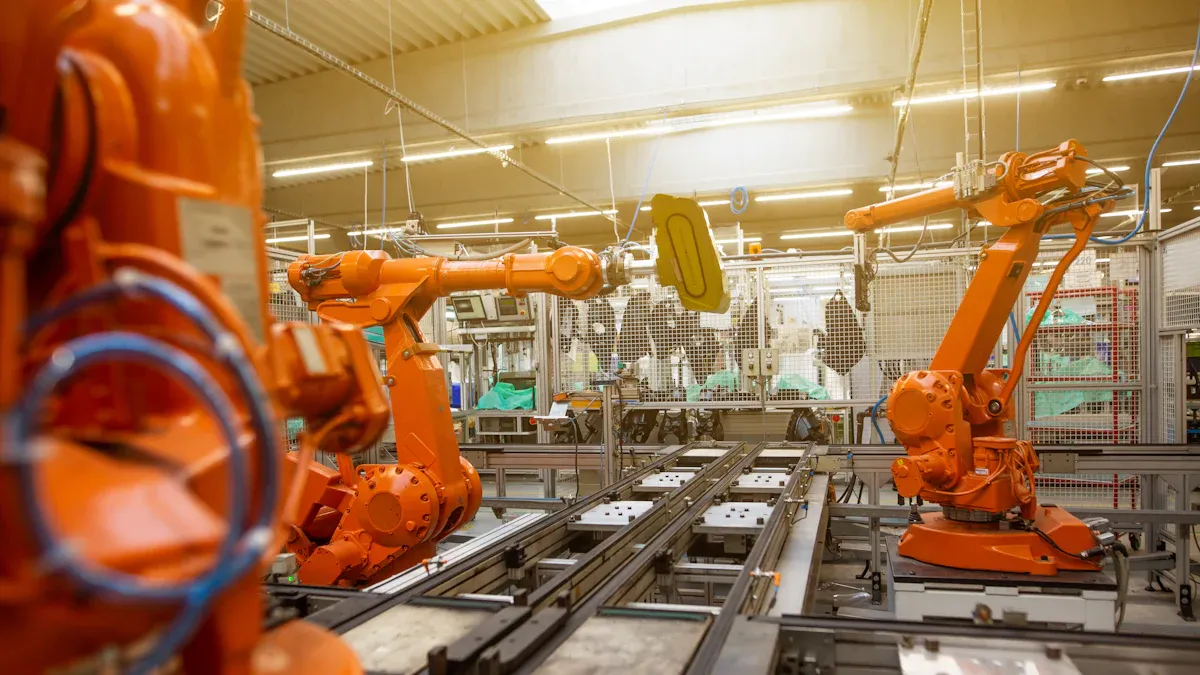
You see a major shift in manufacturing as companies adopt automated data processing to build smart factory solutions. Automated systems help you collect, analyze, and act on data from every part of your production line. This approach increases productivity and reduces the risk of human error. You get consistent performance, which means better product quality and less variability.
Automated data processing also helps you save on labor costs. Workers can focus on complex tasks while machines handle repetitive work. You gain enhanced forecasting by analyzing historical data and market trends. This lets you align production with demand and reduce inventory costs. Data analytics also helps you manage risks by identifying potential supply chain disruptions. You can then create contingency plans to keep operations running smoothly.
Many manufacturers, like Procter & Gamble, use data-driven strategies to optimize their supply chains. By analyzing data from suppliers, inventory, and sales, they improve demand forecasting and inventory management. This leads to better collaboration and significant cost savings. Automated data processing gives you the tools to make smarter decisions and stay competitive in a fast-changing industry.
- Increased productivity and better product quality
- Consistent performance and reduced variability
- Labor cost savings and focus on value-added tasks
- Enhanced forecasting and risk management
- Cost reduction in supply chain operations
Data Integration with FineDataLink
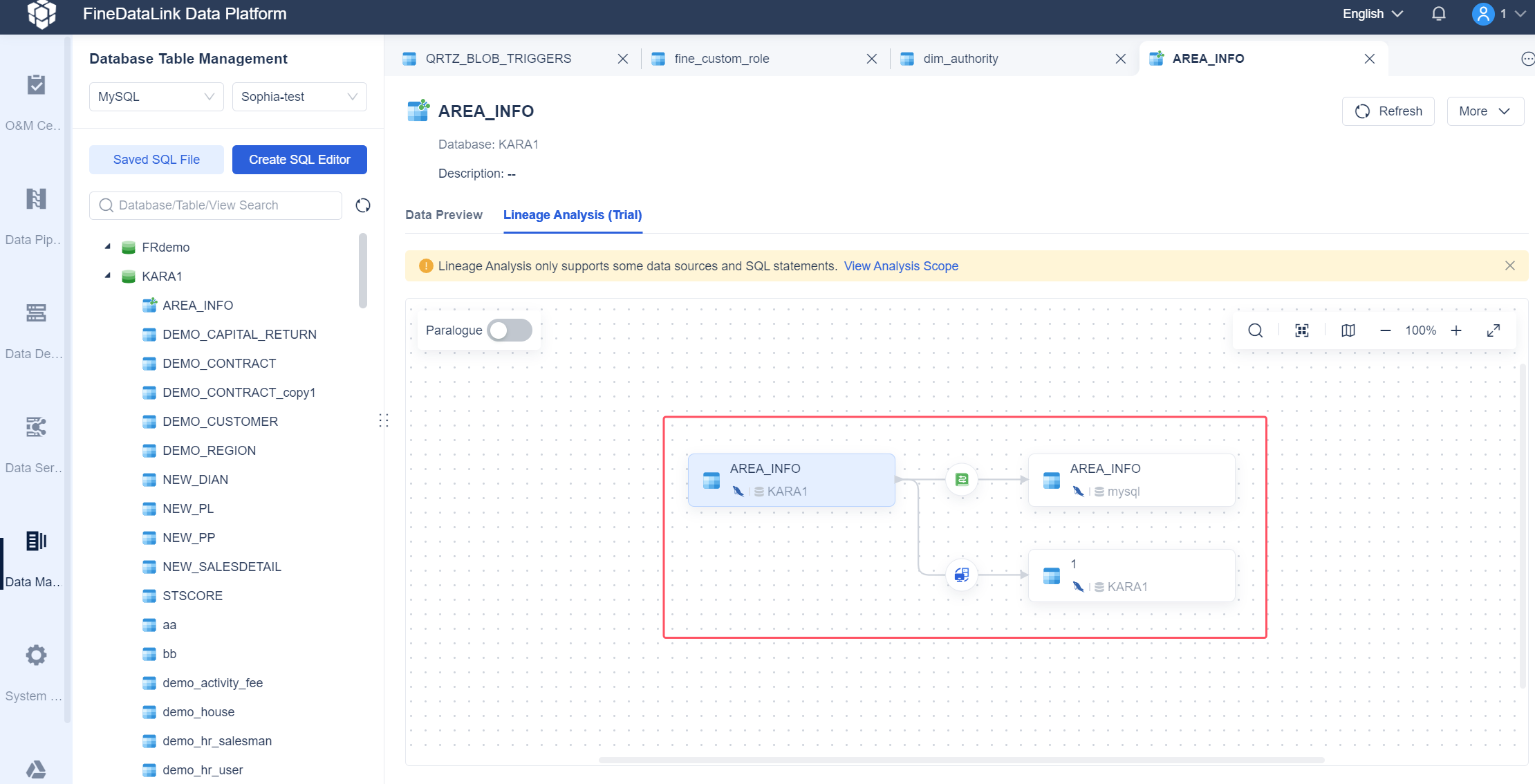
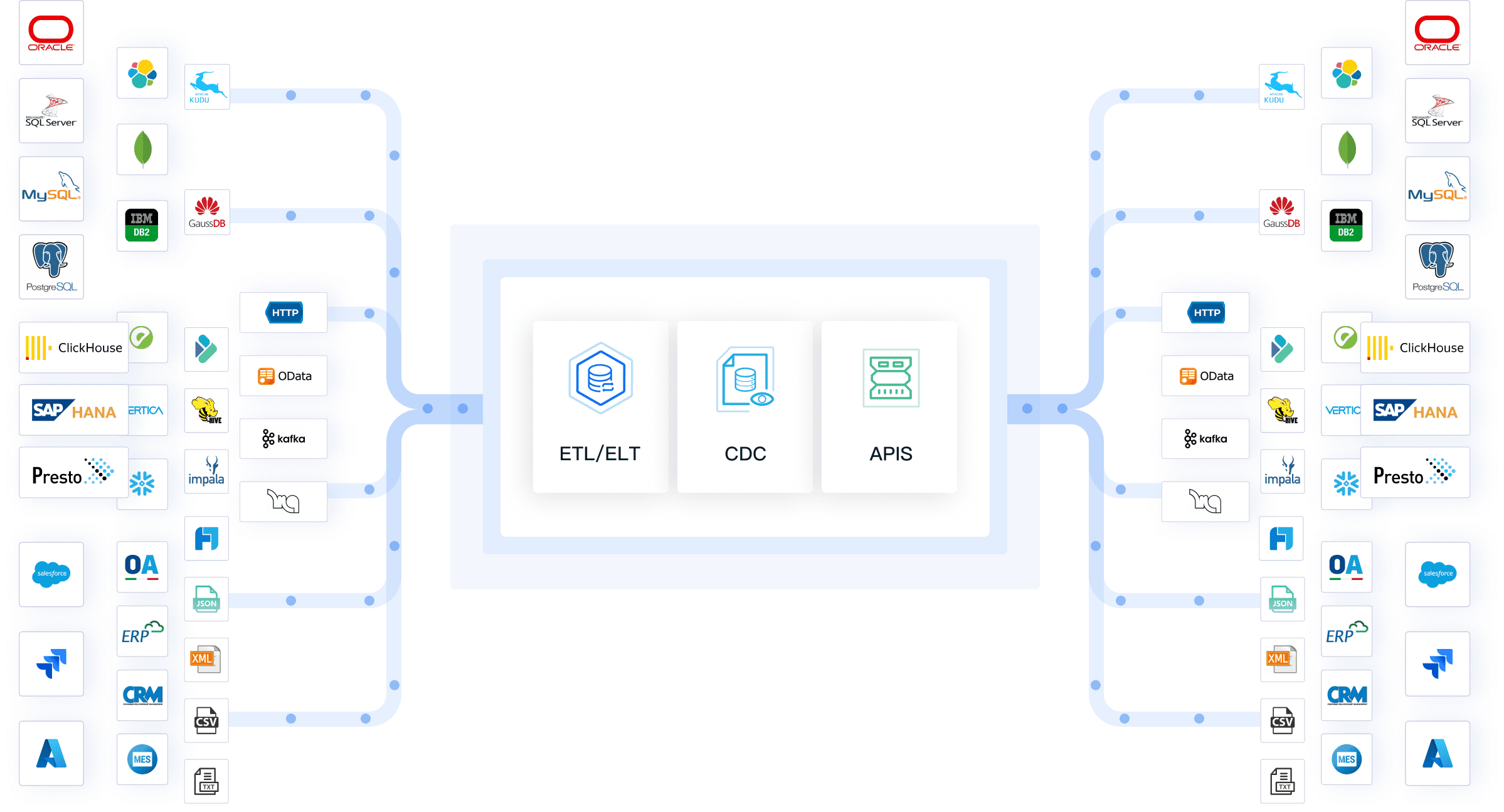
You need a reliable way to connect and manage data from many sources. FineDataLink offers a powerful platform for data integration and automation. You can collect data from relational, non-relational, interface, and file databases. The platform supports non-intrusive real-time synchronization, so your business data stays up to date.
FineDataLink helps you build low-cost data services using APIs for easy sharing and interconnection. You can schedule tasks flexibly and monitor them in real time, which reduces the workload for your operations team. The platform supports high extensibility with built-in Spark SQL and allows you to use both ELT and ETL processes for efficient data development.
You can choose from various data synchronization methods, such as timestamp, trigger, full-table comparison, and log parsing. FineDataLink also protects your data with encryption and SQL injection prevention. Its process-oriented low-code platform makes development fast and user-friendly. With FineDataLink, you streamline your automated data workflows and ensure secure, efficient integration across your organization.
Automated data processing changes how you manage and use data. You gain efficiency, accuracy, and better decision-making by automating your workflows. As the AI market grows toward $407 billion by 2027, companies using automated solutions like FineDataLink will lead in a competitive world. You can integrate and synchronize data from many sources, making your business more agile. Experts recommend building cross-functional teams and focusing on secure, scalable systems. Embracing automated data processing helps you stay ahead as trends like real-time analytics and AI-driven management shape the future.
Continue Reading About Automated Data Processing
Enterprise Data Integration: A Comprehensive Guide
What is enterprise data and why does it matter for organizations
Understanding Enterprise Data Centers in 2025
Enterprise Data Analytics Explained for Modern Businesses
Frequently asked questions
You use automated data processing to collect, clean, transform, and analyze data with minimal manual work. This process helps you handle large amounts of information quickly and accurately.