

A digital marketing reports dashboard is the control layer that helps executives and marketing leaders turn scattered channel data into fast, confident decisions. If you are a CEO, CMO, operations director, or marketing analytics lead, the real problem is rarely a lack of data. It is a lack of clarity. Teams have campaign reports, ad platform exports, web analytics, CRM data, and ecommerce numbers, but leadership still struggles to answer basic business questions: What is driving revenue? Which channels deserve more budget? Where is performance slipping? A well-built dashboard solves that by aligning marketing activity to pipeline, revenue, efficiency, and accountability.
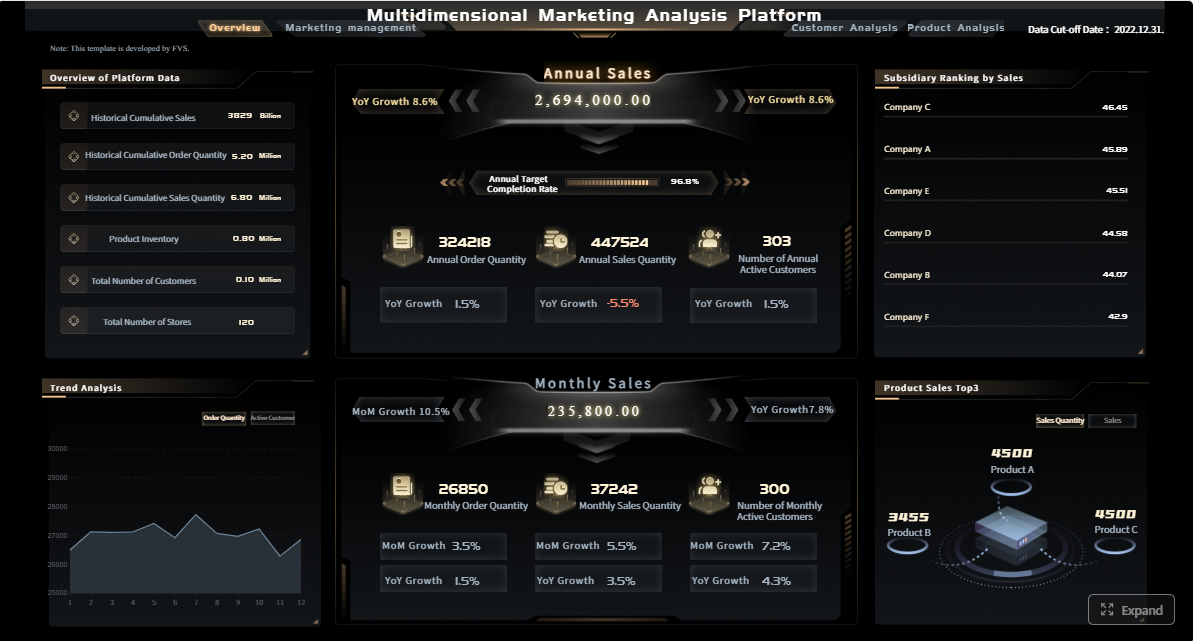
All reports in this article are built with FineReport.
What a Digital Marketing Reports Dashboard Should Include for Executives
An executive-ready digital marketing reports dashboard should not look like a media buyer’s workspace or a data analyst’s sandbox. It should answer business questions quickly, surface risks early, and make ownership obvious.
Define the dashboard’s purpose: fast decision-making, trend visibility, and accountability across channels
The primary purpose of an executive dashboard is not to display everything. It is to reduce decision latency. Leaders need to see whether marketing is contributing to growth, whether performance is moving toward targets, and where intervention is required.
At minimum, the dashboard should help executives do three things:
- Make fast decisions on budget, priorities, and corrective action
- Spot trends early before they become revenue problems
- Create accountability across paid, organic, email, social, partner, and lifecycle teams
A good dashboard acts as an operating system for reviews, not just a reporting artifact.
Separate views for CEOs, CMOs, and channel managers so each audience sees the right level of detail
One of the most common dashboard failures is forcing every stakeholder to use the same view. That creates clutter for executives and not enough detail for operators.
A stronger approach is role-based reporting:
- CEO dashboard: business outcomes, efficiency, forecast risk, exception alerts
- CMO dashboard: channel mix, budget allocation, campaign contribution, trend analysis
- Channel manager dashboard: granular platform metrics, pacing, creative performance, testing insights
This layered structure keeps the top-level dashboard clean while still enabling drill-down analysis.
Focus on business outcomes first, then supporting marketing metrics
Executives should see outcomes before activity. That means the top row of the dashboard should prioritize:
- Revenue influenced or sourced by marketing
- Pipeline contribution
- Acquisition cost
- ROI or ROAS
- Conversion movement
- Forecast confidence
Supporting metrics like impressions, clicks, sessions, and engagement still matter, but only after the business impact is clear.
Establish a reporting cadence that balances daily monitoring with weekly and monthly reviews
The best dashboard is tied to a practical review rhythm. Different decisions require different time horizons.
A simple cadence often works best:
- Daily: spend pacing, campaign anomalies, lead flow, conversion drops
- Weekly: channel efficiency, budget shifts, funnel movement, test results
- Monthly: executive review, target attainment, forecast, strategic reallocation
Without a reporting cadence, even a strong digital marketing reports dashboard becomes shelfware.
Executive Digital Marketing Reports Dashboard Examples by Role
Different leaders need different dashboard experiences. The smartest reporting environments do not force one format onto every role.
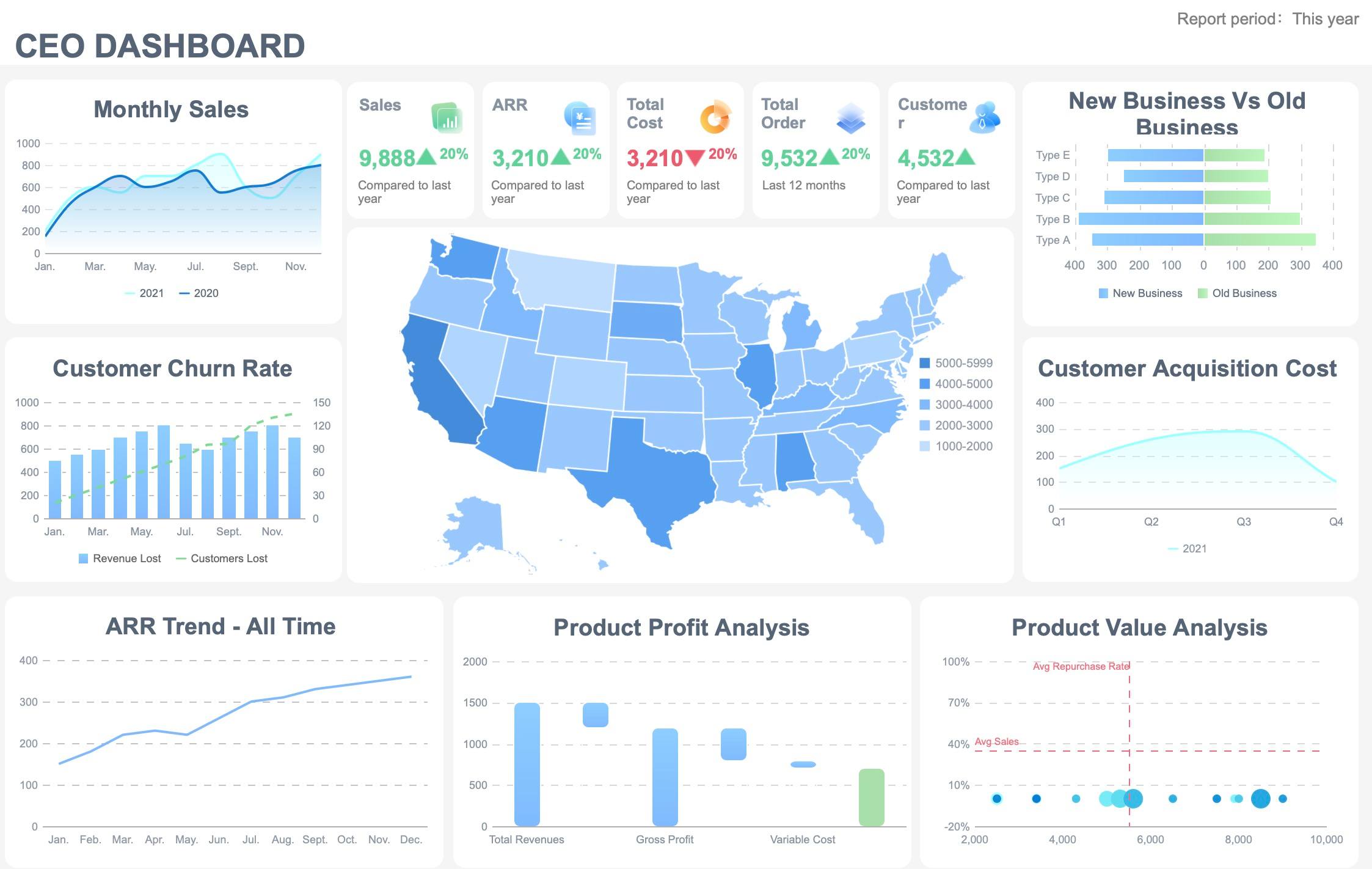
CEO view: revenue, pipeline, efficiency, and forecast confidence
The CEO view should be compact, high signal, and tied directly to growth. This dashboard is not for campaign management. It is for strategic oversight.
A CEO dashboard should highlight:
- Topline revenue trend
- Marketing-sourced revenue
- Marketing-influenced pipeline
- Customer acquisition cost
- Return on investment
- Conversion trend from lead to customer
- Forecast confidence or target attainment
- A short list of exception alerts
The visual design should favor summary cards, trend lines, and only a few comparison charts.
Best CEO-level KPI snapshot:
- Revenue growth: Measures whether total business performance is improving
- Marketing-sourced revenue: Revenue directly attributed to marketing-created demand
- Influenced pipeline: Pipeline value touched by marketing activity
- CAC: Cost to acquire a new customer
- Marketing ROI: Return generated from marketing spend
- Forecast confidence: Likelihood of hitting monthly or quarterly targets based on current trends
CMO view: channel mix, campaign performance, and budget allocation
The CMO needs a broader marketing command view. This dashboard should connect outcomes to channel strategy and budget decisions.
A useful CMO dashboard compares:
- Paid search performance
- Paid social performance
- Organic traffic and conversions
- Email contribution
- Social engagement and traffic quality
- Partner or affiliate contribution
- Budget by channel versus performance
- Conversion efficiency by campaign or segment
The key is to show where spending creates efficiency and where reallocation is needed. A CMO should be able to answer, in one screen, which channels are scaling, which are plateauing, and which are wasting budget.
Recommended CMO layout:
| Section | What to show | Why it matters |
|---|---|---|
| Executive summary | Revenue, pipeline, CAC, ROI, target variance | Keeps focus on business impact |
| Channel mix | Paid, organic, email, social, partner comparison | Supports budget allocation |
| Campaign performance | Top and bottom performers | Identifies reallocation opportunities |
| Funnel view | Visitor to lead to opportunity to customer | Exposes leakage points |
| Budget pacing | Spend versus plan | Prevents over- or under-investment |
Channel manager view: platform metrics, creative performance, and optimization opportunities
Channel managers need operational detail. Their dashboard should move from summary to action.
For platform-level optimization, include:
- Spend pacing
- Reach and frequency
- Click-through rate
- Conversion rate
- Cost per lead or cost per acquisition
- Creative performance
- Audience segment results
- Landing page conversion trends
This level of reporting should support daily and weekly decisions, such as pausing ad sets, shifting bids, adjusting audience exclusions, or refreshing creative.
Channel manager essentials:
- Campaign-level trend charts
- Audience and placement breakdowns
- Creative ranking tables
- Cost and conversion trend lines
- Alert flags for pacing or frequency fatigue
Core KPIs to Track in a Digital Marketing Reports Dashboard
KPIs should be selected based on decisions, not availability. A dashboard overloaded with vanity metrics slows down reviews and weakens trust.
Revenue and pipeline KPIs
These metrics connect marketing to actual commercial results.
Key Metrics (KPIs):
- Marketing-sourced revenue: Revenue generated from leads originally created by marketing
- Influenced revenue: Revenue from deals where marketing had measurable touchpoints
- Qualified leads: Leads that meet agreed qualification standards
- Pipeline value: Total potential revenue associated with active opportunities
- Lead-to-opportunity conversion rate: Percentage of leads that progress to pipeline
- Opportunity-to-customer conversion rate: Percentage of opportunities that close
- Stage conversion rate: Movement efficiency between funnel stages
- Average deal value: Revenue size by closed-won deal, useful for segment analysis
Efficiency and cost KPIs
These KPIs tell executives whether growth is becoming more or less expensive.
Key Metrics (KPIs):
- Customer acquisition cost (CAC): Total acquisition cost divided by new customers
- Cost per lead (CPL): Spend required to generate one lead
- Return on ad spend (ROAS): Revenue generated for each unit of ad spend
- Blended ROI: Return across all marketing investment, not just paid media
- Payback period: Time required to recover customer acquisition cost
- Cost per opportunity: Spend needed to generate one sales opportunity
- Budget pacing: Actual spend versus planned spend over time
Engagement and channel health KPIs
These are diagnostic KPIs. They should support action, not dominate the dashboard.
Key Metrics (KPIs):
- Traffic quality: Sessions that show intent through low bounce, high engagement, or high conversion
- Click-through rate (CTR): Percentage of impressions that generate clicks
- Engagement rate: Interaction level with content or campaigns
- Bounce rate: Percentage of visitors leaving without meaningful action
- Email open rate: Share of delivered emails that are opened
- Email click rate: Share of opens or deliveries that generate clicks
- Branded search demand: Volume of brand-related searches, often a signal of market traction
- Landing page conversion rate: Percentage of visitors completing the desired action
Retention and lifecycle KPIs
For subscription, ecommerce, SaaS, and lifecycle-led models, retention must appear in the dashboard.
Key Metrics (KPIs):
- Repeat purchase rate: Share of customers who buy again
- Churn rate: Percentage of customers who leave in a given period
- Customer lifetime value (CLV): Projected revenue per customer over time
- Expansion revenue: Additional revenue from existing customers
- Retention rate: Percentage of customers retained over a set period
- Lifecycle conversion rate: Movement from first purchase to repeat or upsell stages
How to Structure the Digital Marketing Reports Dashboard for Clear Reporting
Even the right KPIs can fail if the layout is confusing. Structure matters because executives scan before they analyze.
Start with an executive summary row for goals, current performance, and major changes versus target
The first row should answer three questions immediately:
- What were we trying to achieve?
- Where are we now?
- What changed versus target or last period?
This row usually includes:
- Revenue versus goal
- Pipeline versus goal
- CAC versus target
- ROI versus target
- Lead volume or conversion trend
- Alert indicators for unusual movement
This is the summary layer leaders should understand in under a minute.
Group metrics by funnel stage so stakeholders can connect awareness, acquisition, conversion, and retention
A funnel-based structure helps stakeholders understand cause and effect. Instead of random channel blocks, organize reporting by customer journey stage.
A practical structure looks like this:
- Awareness: reach, impressions, branded demand, traffic
- Acquisition: sessions, leads, CPL, CTR, landing page conversion
- Conversion: opportunities, pipeline, CAC, revenue, ROAS
- Retention: repeat purchase, churn, CLV, expansion revenue
This makes it easier to identify where performance is breaking down.
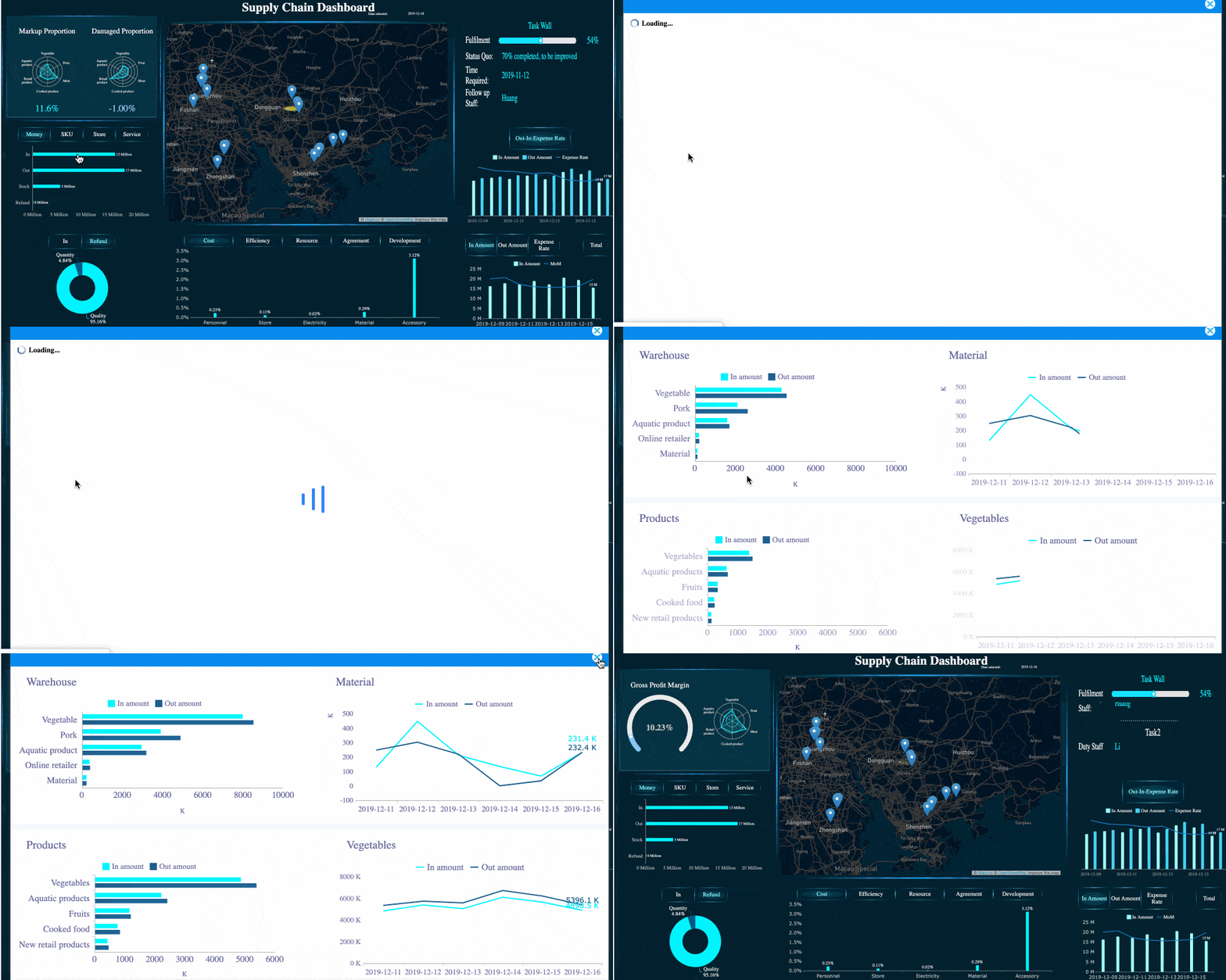
Use drill-down sections to move from summary charts into channel-level detail without cluttering the main view
The main dashboard should stay clean. Detailed analysis belongs in collapsible sections, tabs, or linked drill-down views.
For example:
- Executive card: CAC is rising
- Drill-down: paid social CAC increased due to frequency fatigue
- Deeper detail: one audience segment drove the increase
This design gives senior stakeholders clarity without sacrificing analyst depth.
 FineReport's Drill-down Capability
Add benchmarks, targets, and period-over-period comparisons to make trends actionable
A number without context is not insight. Every major metric should be paired with one or more of these:
- Target
- Prior period comparison
- Year-over-year comparison
- Benchmark or acceptable range
This changes reporting from passive observation to guided interpretation.
Digital Marketing Reports Dashboard Templates and Tools to Build Faster
Templates reduce design time, improve consistency, and make reporting easier to scale across teams.
Common dashboard template layouts
Most organizations benefit from a small set of repeatable templates instead of a new dashboard for every request.
One-page executive summary template for leadership meetings
This template should fit on one screen and include:
- Revenue and pipeline headline KPIs
- CAC and ROI trend
- Channel contribution snapshot
- Exceptions or risks
- Forecast summary
It is ideal for board prep, executive reviews, and monthly performance meetings.
Channel performance template for weekly optimization reviews
This template is designed for action and should include:
- Spend, conversions, CPL, CAC
- CTR and conversion rate by platform
- Creative and audience performance
- Pacing against budget
- Change versus prior week
Campaign reporting template for launches, promotions, and seasonal analysis
This format should focus on a specific initiative:
- Campaign goals and target audience
- Spend and delivery pacing
- Funnel conversion
- Revenue impact
- Best and worst creatives
- Audience response by segment

Data sources and software to consider
A dashboard is only as strong as the reporting layer behind it. To build a reliable digital marketing reports dashboard, connect data from the systems that actually define performance.
Common data sources include:
- Ad platforms such as Google Ads, Meta Ads, LinkedIn Ads, TikTok Ads
- Web analytics platforms
- CRM and sales systems
- Ecommerce platforms
- Email automation tools
- Attribution or marketing measurement tools
- Internal budget or finance systems
When evaluating software, prioritize:
- Integration coverage
- Refresh frequency
- Custom visualization flexibility
- Role-based permissions
- Governance controls
- Sharing and export options
- Ability to build executive and operational views from the same model
FineReport is a strong fit when you need highly customized dashboards, enterprise data connectivity, permission management, and report formats that work across executive, operational, and analytical use cases.
How to customize templates for your business
Templates should never stay generic for long. Customization is where dashboards become decision tools.
Adapt each template based on:
- Your revenue model
- Sales cycle length
- Marketing channel mix
- Executive reporting expectations
- Attribution model
- Market segment or geography
A B2B pipeline-driven business will emphasize MQLs, opportunities, and influenced pipeline. An ecommerce brand may prioritize ROAS, conversion rate, average order value, and repeat purchase rate. The right template reflects how your company actually grows.
Most importantly, keep only the KPIs that support decisions. Remove vanity metrics that do not change action.
Common Mistakes and a Practical Digital Marketing Reports Dashboard Build Process
Many dashboard projects fail not because the team lacks tools, but because the design logic is weak.
Mistakes that make dashboards hard to use
The most common dashboard problems are predictable.
Avoid these mistakes:
- Too many metrics on one screen: Creates noise and slows decisions
- Inconsistent definitions: Causes endless debate over whose number is correct
- Missing targets: Makes trends hard to interpret
- No clear owner: Leads to broken updates and trust erosion
- Channel-only reporting: Hides business impact by isolating media metrics
- No drill-down path: Prevents teams from moving from symptom to root cause
- Overemphasis on vanity metrics: Makes dashboards look busy but strategically weak
A dashboard should reduce ambiguity, not multiply it.
A step-by-step process to launch your dashboard
A practical rollout process is more important than a perfect first version.
1. Identify stakeholders and decisions the dashboard must support
Start with decision use cases, not charts. Ask:
- What decisions will this dashboard improve?
- Who uses it?
- How often is it reviewed?
- What action should each KPI trigger?
This prevents overbuilding and keeps the dashboard tied to operational value.
2. Define KPI formulas and data sources before designing visualizations
Before choosing a single chart, lock down:
- KPI definitions
- Attribution logic
- Source systems
- Refresh frequency
- Ownership
If CAC, influenced revenue, or qualified lead definitions vary across teams, fix that first.
3. Build a minimum viable version, validate it in live reviews, and refine based on stakeholder feedback
Do not wait for a perfect enterprise-wide rollout. Launch a focused version with the metrics leaders actually use.
A practical MVP includes:
- Summary KPI row
- Funnel structure
- Channel comparison
- One drill-down path
- Basic alerts or variance indicators
Use real review meetings to observe where users hesitate, ask for more context, or ignore sections entirely. Then refine.
4. Document ownership, update cadence, and governance so reporting stays reliable over time
Sustainable reporting requires clear operating rules.
Document:
- Dashboard owner
- Data owners by source
- KPI definitions
- Update schedules
- Review cadence
- Change request process
- Access permissions
That is how a dashboard remains trusted after launch, not just during the initial build.
Best Practices to Implement a High-Value Digital Marketing Reports Dashboard
If I were advising an enterprise marketing team, these would be the non-negotiables.
1. Build from business questions backward
Start with five to seven leadership questions such as:
- Is marketing driving profitable growth?
- Which channel deserves more budget?
- Where is funnel conversion weakening?
- Are we on track for quarterly targets?
Then map KPIs and visuals to each question.
2. Use a layered reporting model
Create one summary layer for executives, one management layer for functional leaders, and one detail layer for channel operators. This avoids the classic mistake of trying to make one dashboard serve everyone equally.
3. Standardize KPI definitions across marketing, sales, and finance
A dashboard becomes politically fragile when teams do not trust the math. Align definitions for pipeline, sourced revenue, influenced revenue, CAC, ROI, and qualified lead status before rollout.
4. Design for exception-based management
Leaders do not need to inspect every fluctuation. Use alert thresholds, target variance highlights, and simple red-amber-green logic to draw attention to areas requiring action.
5. Review the dashboard in live operating meetings
Dashboards become valuable when they shape decisions in real time. Make the digital marketing reports dashboard the default view in weekly optimization meetings and monthly executive reviews.
Why FineReport Works Well for Digital Marketing Reporting
For enterprise teams, dashboard success depends on more than attractive charts. You need data integration, governance, customization, and stakeholder-friendly output. FineReport supports that operating model well.

It is particularly useful when you need to:
- Combine marketing, CRM, ecommerce, and finance data in one reporting layer
- Build different views for executives, CMOs, and channel managers
- Create highly customized visual layouts instead of fixed templates
- Manage permissions across teams and leadership roles
- Deliver dashboards plus printable reports for formal review settings
That combination is especially valuable when marketing reporting must satisfy both operational teams and executive leadership.
Final Takeaway
A great digital marketing reports dashboard does not just centralize metrics. It improves how the business decides. For executives, it creates immediate visibility into revenue impact, efficiency, and forecast risk. For CMOs, it clarifies channel mix and budget allocation. For channel managers, it enables faster optimization.
If you want your dashboard to be used consistently, keep it role-based, KPI-driven, funnel-structured, and tightly connected to business outcomes. Start with a minimum viable version, validate it in real meetings, and refine it around the decisions that matter most.
If you are ready to build a dashboard that works for both leadership reporting and day-to-day optimization, FineReport is a practical platform to evaluate.
FAQs
It is a high-level reporting view that combines data from channels like ads, web analytics, CRM, and ecommerce into one place. Its purpose is to help executives quickly understand revenue impact, efficiency, risks, and where action is needed.




