Choosing a data warehouse solution in 2026 means navigating a crowded market of cloud-native platforms, lakehouses, and hybrid architectures. Each option makes different trade-offs across cost, scalability, ecosystem lock-in, and real-time capability. This guide compares the leading data warehouse solutions on objective criteria, clarifies the distinction between warehouses, lakes, and lakehouses, and explains where data integration tools like FineDataLink fit into a modern warehouse architecture.
What Is a Data Warehouse Solution?
A data warehouse solution is a centralized analytics repository designed to store, organize, and query large volumes of structured and semi-structured data from multiple source systems. Unlike operational databases optimized for transaction processing, data warehouses are optimized for analytical queries — aggregations, joins across large tables, historical trend analysis, and complex reporting.
A complete data warehouse solution includes more than just the storage and query engine. It typically encompasses:
- Storage and compute layer: The core warehouse platform (e.g., Snowflake, BigQuery, Redshift).
- Data integration layer: ETL/ELT pipelines that extract, transform, and load data from source systems into the warehouse.
- Semantic / modeling layer: Views, schemas, or semantic models that encode business logic for downstream consumers.
- Consumption layer: BI tools, reports, dashboards, and AI agents that query the warehouse.
Confusing these layers — particularly treating a data integration tool as if it were a warehouse, or vice versa — leads to poor architecture decisions and misaligned vendor evaluations. This article addresses each layer distinctly.
Data Warehouse vs Database vs Data Lake vs Lakehouse
These four concepts are frequently conflated. Understanding the differences is essential before evaluating any specific solution.
| Term | Meaning |
|---|---|
| Database | Stores operational data for applications |
| Data warehouse | Stores operational data for applications |
| Data lake | Stores operational data for applications |
| Lakehouse | Stores operational data for applications |
| Data integration platform | Stores operational data for applications |
Key takeaway: A data warehouse is one component of a broader data platform. Most enterprises need both a warehouse (for governed BI and reporting) and an integration layer (to keep the warehouse current). Some also need a lake or lakehouse for unstructured data and advanced analytics. These are complementary, not interchangeable.
Best Data Warehouse Solutions in 2026
The following platforms are evaluated as data warehouse and lakehouse solutions — the storage, compute, and query engines that serve as the analytical foundation. Data integration tools are addressed separately in the architecture section below.
1. Snowflake
Snowflake's defining characteristic is its separation of storage and compute. You can scale each independently, spin up multiple virtual warehouses against the same data without contention, and share live datasets across accounts without copying. It runs natively on AWS, Azure, and GCP, making it the most cloud-agnostic major warehouse.
| Strengths | Considerations |
|---|---|
| Independent storage/compute scaling; multi-cloud native | Credit-based pricing can be unpredictable without governance |
| Secure data sharing without ETL duplication | Less mature streaming/real-time than specialized platforms |
| Strong semi-structured (JSON, Parquet) support | Ecosystem breadth favors partners over native tooling |
Best for: Organizations needing cross-cloud flexibility, secure data sharing, or variable analytical workloads.
2. Google BigQuery
BigQuery is a serverless warehouse that abstracts infrastructure entirely. You submit SQL queries and BigQuery allocates compute automatically. Its pay-per-query model (with flat-rate options) suits organizations with bursty or unpredictable analytical demand. Native integration with Google Cloud AI/ML services (Vertex AI, Looker) creates a tight analytics-to-intelligence pipeline.
| Strengths | Considerations |
|---|---|
| Zero infrastructure management; auto-scaling | Query costs can spike unexpectedly on large scans |
| Tight GCP AI/ML and Looker integration | Multi-cloud support exists but less mature than Snowflake |
| Real-time streaming ingestion via BigQuery Streaming API | Fewer third-party ecosystem connectors than Snowflake |
Best for: GCP-native organizations, teams wanting zero-ops warehousing, and workloads integrating AI/ML directly into analytics.
3. Amazon Redshift
Redshift is AWS's managed petabyte-scale warehouse, built on PostgreSQL-compatible MPP architecture. Its deepest advantage is native integration with the AWS ecosystem — S3, Glue, SageMaker, Kinesis, Lambda. Redshift Serverless removes cluster management for smaller or variable workloads, while RA3 nodes separate storage and compute for larger deployments.
| Strengths | Considerations |
|---|---|
| Deepest AWS ecosystem integration | Requires more tuning than serverless alternatives |
| Predictable reserved-instance pricing | Cross-cloud portability is limited |
| Redshift ML enables in-warehouse model training | Semi-structured data handling less flexible than Snowflake |
Best for: AWS-committed organizations, teams already using S3/Glue/SageMaker, and workloads benefiting from predictable reserved pricing.
4. Azure Synapse Analytics
Synapse unifies dedicated SQL pools (traditional warehouse), serverless SQL pools (ad-hoc lake querying), and Spark pools (big data processing) under a single workspace. For Microsoft-centric enterprises, its integration with Power BI, Azure Data Factory, and Purview creates a cohesive analytics-to-governance stack.
| Strengths | Considerations |
|---|---|
| Unified warehouse + lake + Spark in one platform | Complexity can overwhelm teams not invested in Azure |
| Native Power BI and Purview integration | Performance tuning required across pool types |
| Dedicated + serverless options for varied workloads | Pricing model requires careful pool sizing |
Best for: Microsoft/Azure enterprises, organizations needing unified warehouse and lake querying, and teams standardizing on Power BI.
5. Databricks (Lakehouse)
Databricks pioneered the lakehouse architecture, combining open table formats (Delta Lake) with a unified Spark-based engine for BI, streaming, and ML/AI on the same data. Unlike traditional warehouses, Databricks stores data in open formats in your cloud storage, avoiding vendor lock-in at the storage layer. Its Unity Catalog provides governance across tables, files, and ML models.
| Strengths | Considerations |
|---|---|
| Open table formats; no proprietary storage lock-in | Steeper learning curve for non-Spark users |
| Unified BI + streaming + ML/AI on same platform | SQL warehouse maturity still catching up to pure warehouses |
| Unity Catalog for cross-workload governance | Cost optimization requires active cluster/pipeline management |
Best for: Organizations with significant ML/AI workloads, teams wanting open-format portability, and those unifying batch, streaming, and AI on one platform.
Data Warehouse Solutions Comparison Table
| Solution | Best For | Key Strength |
|---|---|---|
| Snowflake | Multi-cloud enterprise data warehouse | Separate storage and compute |
| Google BigQuery | Serverless analytics on Google Cloud | Fast SQL analytics and scalability |
| Amazon Redshift | AWS-centered data warehouse | Deep AWS ecosystem integration |
| Azure Synapse | Microsoft/Azure ecosystem | Warehouse + big data analytics |
| Databricks | Lakehouse and AI/ML workloads | Data lake + warehouse architecture |
| FineDataLink | Data integration for warehouse projects | ETL/ELT, real-time sync, API integration |
How to Choose the Right Data Warehouse Solution
No single platform is best for everyone. Use this decision framework:
- Start with workload, not features. Are you running daily batch reports, real-time dashboards, ML training, or all three? Workload profile determines which architectural trade-offs matter.
- Assess existing cloud commitment. If you are deeply invested in AWS, Redshift's ecosystem integration may outweigh Snowflake's multi-cloud advantage. Avoid multi-cloud premiums unless you have concrete portability requirements.
- Model total cost, not unit price. Include compute, storage, data transfer, integration tooling, and team expertise. A cheaper per-query platform with expensive integration overhead may cost more overall.
- Evaluate real-time needs honestly. Many organizations overestimate real-time requirements. If daily batch suffices for 90% of use cases, optimize for batch performance and add a targeted real-time layer only where needed.
- Plan the integration layer upfront. A warehouse without reliable, automated data pipelines is an empty shell. Budget and evaluate integration tooling (ETL/ELT, CDC, API sync) as part of the warehouse selection, not as an afterthought.
- Consider governance early. Row-level security, audit logging, lineage tracking, and compliance certifications vary significantly across platforms. Retrofitting governance is far more expensive than designing it in.
Data Warehouse Architecture and Integration Layer
A common mistake in warehouse projects is treating the warehouse platform as the entire solution. In practice, the integration layer determines whether the warehouse delivers value or becomes a stale, unreliable repository.
Why the Integration Layer Matters
| Challenge Without Integration Tooling | Impact |
|---|---|
| Manual CSV exports and uploads | Data is days or weeks old; errors are frequent |
| Custom scripts for each source | Maintenance burden scales linearly with source count |
| No change data capture (CDC) | Full reloads waste compute; latency increases |
| No transformation standardization | Business logic lives in scattered scripts, not governed pipelines |
| No monitoring or alerting | Failures go undetected until downstream reports break |
What a Data Integration Platform Should Provide
- Broad connector coverage: Native support for ERP, CRM, databases, APIs, SaaS applications, and file systems.
- ETL and ELT flexibility: Transform before loading (ETL) or push raw data and transform inside the warehouse (ELT), depending on workload.
- Real-time synchronization: CDC-based replication for low-latency data freshness.
- Visual pipeline design: Low-code interfaces that reduce dependency on specialized engineering resources.
- Monitoring and lineage: End-to-end visibility into pipeline health, data freshness, and transformation logic.
- Governance alignment: Permission controls, audit trails, and metadata management consistent with warehouse security policies.
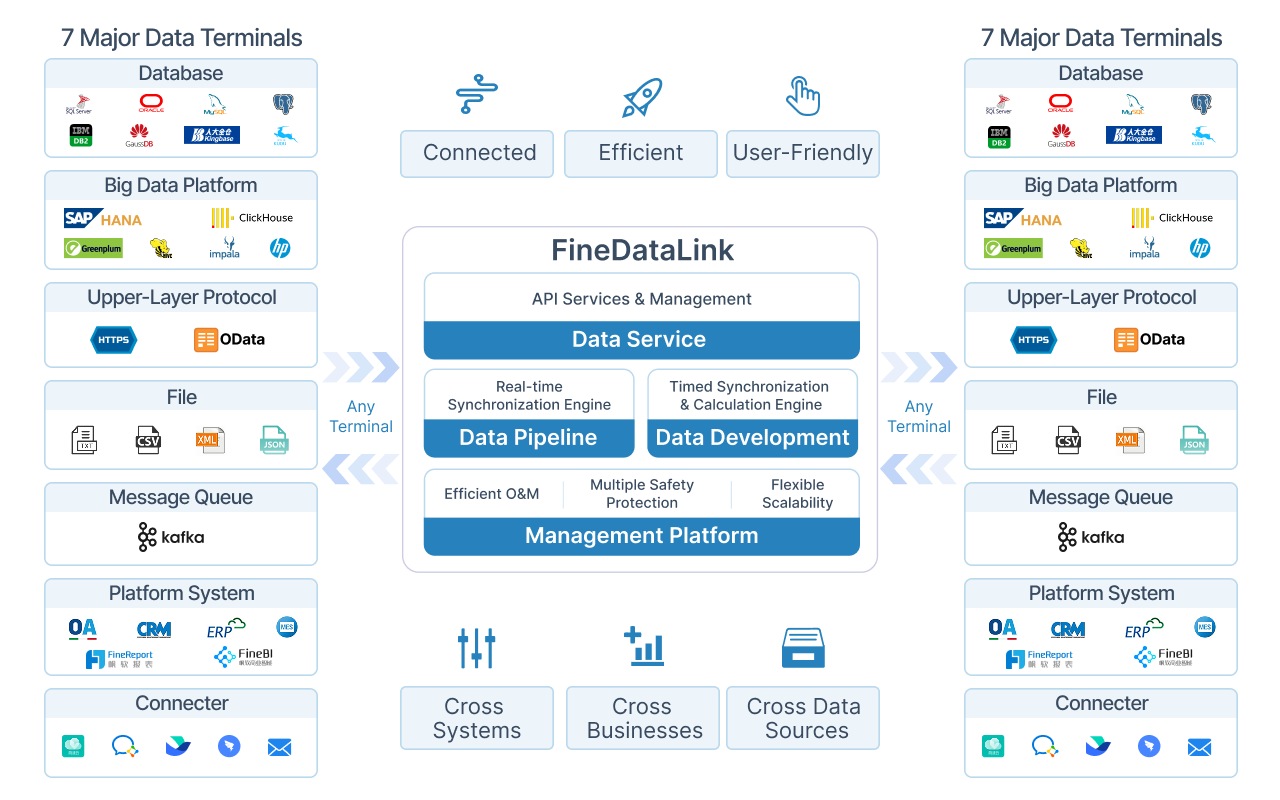 FineDataLink Workflow
This layer is distinct from the warehouse itself. Platforms like FineDataLink operate here — they do not replace Snowflake, BigQuery, or Redshift; they make those platforms useful by ensuring trusted data flows into them continuously.
How FineDataLink Supports Data Warehouse Projects
FineDataLink is not a cloud data warehouse like Snowflake, BigQuery, or Redshift. It is a data integration platform that helps enterprises connect business systems, build ETL/ELT pipelines, synchronize data in real time, and deliver trusted data into warehouses, BI tools, reports, and AI workflows.
A data warehouse is only useful when trusted data can flow into it continuously. FineDataLink helps enterprises connect ERP, CRM, databases, APIs, spreadsheets, and SaaS applications, then transform and synchronize data into a centralized warehouse or analytics layer. This reduces manual data preparation and helps teams build a reliable foundation for BI, reporting, and AI analysis.
Where FineDataLink Fits in the Stack
| Layer | Role | Example Tools |
|---|---|---|
| Source Systems | Generate business data | SAP, Salesforce, MySQL, REST APIs, Excel |
| Integration Layer | Extract, transform, synchronize, monitor | FineDataLink, Fivetran, Airbyte, Talend |
| Warehouse / Lakehouse | Store, organize, query analytical data | Snowflake, BigQuery, Redshift, Databricks |
| Consumption Layer | Visualize, report, analyze, ask questions | FineBI, Looker, Power BI, Tableau, Dora |
FineDataLink supports over 100 data source connectors, provides visual low-code pipeline design, enables real-time CDC-based synchronization, and includes built-in monitoring and error handling. For teams building or maintaining a data warehouse, it addresses the integration gap that warehouse platforms alone do not solve.
From Data Warehouse to Dora AI Data Agent
Once warehouse data is standardized and governed, Dora can help business users ask questions in natural language, generate summaries, detect anomalies, and follow up on insights based on trusted enterprise data.
Dora operates as an AI application layer on top of your warehouse and BI assets. Instead of requiring users to write SQL or navigate dashboards, Dora interprets natural-language questions against governed report definitions, metrics, and knowledge libraries connected to the warehouse. It respects the same permission model as your BI platform, so users only see insights derived from data they are authorized to access.
 Ask Dora in Natural Language
This completes the warehouse value chain: source systems → FineDataLink integration → warehouse storage → BI/reporting → Dora AI agent. Each layer serves a distinct purpose; none replaces the others.
Frequently asked questions
A data warehouse stores structured, transformed data optimized for analytical queries and BI. A data lake stores raw data in any format (structured, semi-structured, unstructured) optimized for exploration and ML training. Many modern architectures use both, or adopt a lakehouse pattern that combines open table formats with warehouse-like querying.