Most data warehouse projects fail not because of bad technology, but because of unclear design. Teams skip architecture planning, choose the wrong data model, or build pipelines that cannot keep up with real-time demands. The result is a warehouse that exists but nobody trusts.
A well-designed data warehouse does three things: it integrates data from scattered sources into a single source of truth, it supports fast analytical queries for BI dashboards and reports, and it creates a governed data foundation that AI applications can rely on.
This guide walks you through the complete data warehouse design process — from architecture and modeling to ETL/ELT, governance, real-time design, and the path from warehouse to BI and AI-powered analytics. FineDataLink from FanRuan is referenced throughout as a practical integration tool, but the principles apply regardless of your technology stack.
What Is Data Warehouse Design?
Data warehouse design is the process of defining how data flows from source systems into a centralized analytical repository, how it is modeled for efficient querying, and how it is governed for accuracy and security. It is not just about choosing a database — it is about building an end-to-end system that turns raw operational data into trusted, analysis-ready information.
Good data warehouse design addresses five core questions:
- What business decisions will this warehouse support? Every table, metric, and pipeline should trace back to a specific analytical need.
- Where does the data come from? ERP, CRM, spreadsheets, APIs, IoT sensors — each source has different formats, latency, and quality characteristics.
- How should data be modeled? Star schema, snowflake schema, or Data Vault — each serves different complexity and query patterns.
- How often must data refresh? Daily batch, hourly micro-batch, or real-time streaming — the answer determines your entire pipeline architecture.
- Who can access what? Role-based access, column-level security, and audit trails are design decisions, not afterthoughts.
When these questions are answered before implementation begins, the warehouse becomes a reliable foundation for BI, reporting, and AI-driven analytics. When they are skipped, teams spend months reworking pipelines and rebuilding trust.
Data Warehouse Design Architecture
A modern data warehouse follows a layered architecture. Each layer has a distinct purpose, and data flows through them in a defined sequence. Understanding this architecture is essential before you write a single line of ETL code.
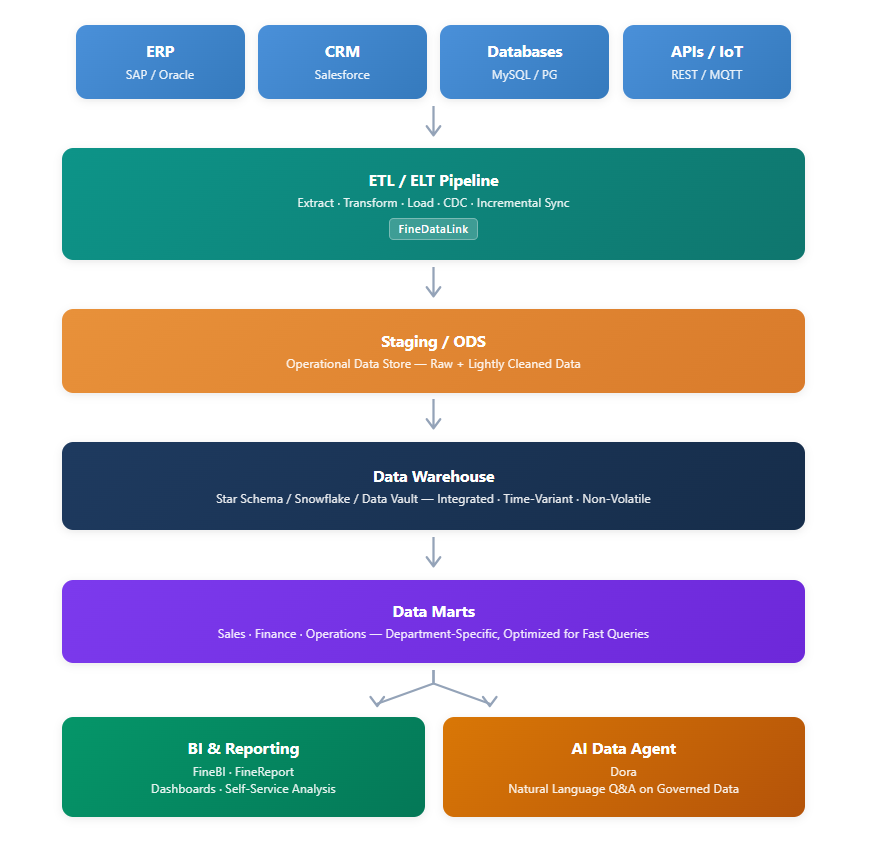
Layer-by-layer explanation
| Layer | Purpose | Key Characteristics |
|---|---|---|
| Source Systems | Operational data origin | ERP, CRM, databases, spreadsheets, APIs, IoT devices |
| ETL/ELT Pipeline | Extract, transform, and load data | Batch or real-time; CDC for incremental sync; error handling |
| Staging / ODS | Temporary landing zone | Raw or lightly cleaned data; preserves source structure; enables reprocessing |
| Data Warehouse | Central analytical repository | Integrated, subject-oriented, time-variant, non-volatile |
| Data Marts | Business-unit-specific views | Pre-aggregated, department-scoped, optimized for fast BI queries |
| BI & Reporting | Visualization and self-service | Dashboards, ad-hoc analysis, scheduled reports |
| AI Data Agent | Natural language analytics | Governed AI workflows that query trusted warehouse data |
This architecture is not rigid. Small organizations may combine staging and warehouse layers. Real-time designs may bypass traditional ETL in favor of streaming. But every production warehouse maps to some version of this flow.
7 Steps to Design a Data Warehouse
Follow these seven steps in order. Each step produces a deliverable that feeds the next one.
Step 1: Define Business Requirements
Interview stakeholders from sales, finance, operations, and IT. Document the specific decisions the warehouse must support. Translate vague requests like "we need better reporting" into concrete requirements: "sales team needs daily revenue by region with year-over-year comparison."
Deliverable: A prioritized requirements document listing use cases, KPIs, and stakeholder sign-off.
Step 2: Inventory and Assess Source Systems
Catalog every data source. For each source, document: connection method, data volume, refresh frequency, data quality issues, and ownership. This inventory reveals integration complexity early.
Deliverable: A source system matrix with technical and business metadata.
Step 3: Choose a Data Model
Select star schema, snowflake schema, or Data Vault based on your requirements (detailed comparison below). This decision affects query performance, maintenance effort, and scalability.
Deliverable: An entity-relationship diagram and dimensional model documentation.
Step 4: Design the ETL/ELT Pipeline
Define extraction strategy (full vs. incremental), transformation logic (cleaning, deduplication, enrichment), and loading approach (batch vs. streaming). Decide whether to use ETL (transform before load) or ELT (load then transform inside the warehouse).
Deliverable: Pipeline specifications with scheduling, error handling, and monitoring plans.
Step 5: Implement Data Quality and Governance Rules
Define validation rules, deduplication logic, consistency checks, and access controls. These rules must be embedded in the pipeline, not applied manually after loading.
Deliverable: A data quality rulebook and governance policy document.
Step 6: Build and Validate Incrementally
Do not attempt a big-bang launch. Start with one subject area (e.g., sales), validate end-to-end, gather feedback, then expand. Each iteration should produce usable dashboards or reports.
Deliverable: Working data mart with validated metrics and stakeholder acceptance.
Step 7: Connect BI and AI Layers
Once the warehouse delivers trusted data, connect it to BI tools for dashboards and self-service analysis. Then evaluate whether an AI Data Agent can extend access to non-technical users through natural language queries.
Deliverable: Live dashboards, self-service analytics portal, and (optionally) AI-powered Q&A interface.
Data Warehouse Design Checklist
Use this checklist before and during implementation to ensure no critical design area is overlooked.
| Design Area | What to Decide |
|---|---|
| Business goal | What decisions will the warehouse support? |
| Source systems | ERP, CRM, databases, spreadsheets, APIs |
| Data model | Star schema, snowflake schema, or Data Vault |
| Refresh frequency | Batch, hourly, near real-time, real-time |
| Data quality | Validation, deduplication, consistency rules |
| Access control | Who can view which metrics and reports? |
| BI layer | Dashboards, reports, self-service analysis |
| AI layer | Whether Dora can answer questions from trusted data |
Print this table and review it with your team at the start of every warehouse project. If any row is blank, pause and resolve it before writing code.
Star Schema vs Snowflake Schema vs Data Vault
Choosing the right data model is one of the most consequential decisions in warehouse design. The wrong model leads to slow queries, difficult maintenance, or inability to scale. Here is a practical comparison:
| Model | Best For | Strength | Limitation |
|---|---|---|---|
| Star schema | Fast BI reporting | Simple and query-friendly; fewer JOINs; easy for business users to understand | Can duplicate dimension data; harder to maintain when dimensions change frequently |
| Snowflake schema | More normalized warehouse design | Better data consistency; reduced storage through normalization; easier dimension updates | More JOINs slow down queries; more complex for analysts to navigate |
| Data Vault | Large enterprise data integration | Excellent for history tracking and auditability; scales well with many source systems | Steeper learning curve; requires additional bridge tables for BI queries |
How to choose:
- Choose star schema if your primary use case is BI dashboards and self-service reporting, your team is small, and query speed matters more than storage efficiency.
- Choose snowflake schema if you have complex dimension hierarchies, strict normalization requirements, or regulatory constraints that demand minimal data redundancy.
- Choose Data Vault if you integrate dozens of source systems, need full audit trails, operate in regulated industries, or plan to scale to hundreds of tables over time.
Many organizations use a hybrid approach: Data Vault for the enterprise integration layer, star schemas for departmental data marts that feed BI tools. This gives you both scalability and query simplicity.
ETL vs ELT in Data Warehouse Design
The choice between ETL and ELT shapes your pipeline architecture, infrastructure costs, and data freshness.
| Aspect | ETL (Extract-Transform-Load) | ELT (Extract-Load-Transform) |
|---|---|---|
| Process order | Transform data before loading into warehouse | Load raw data first, transform inside warehouse |
| Best for | Complex transformations, legacy warehouses | Cloud-native warehouses, high-volume data |
| Infrastructure | Requires separate transformation server | Leverages warehouse compute power |
| Data freshness | Slower due to pre-load processing | Faster; raw data available immediately |
| Flexibility | Transformations fixed at load time | Transformations can be re-run on raw data |
| Tool examples | FineDataLink, Informatica, Talend | dbt, Snowflake Tasks, BigQuery SQL |
Modern trend: ELT is gaining adoption because cloud warehouses provide scalable compute. However, ETL remains relevant when source systems cannot handle extraction load, when transformations require external logic, or when data quality must be enforced before data enters the warehouse.
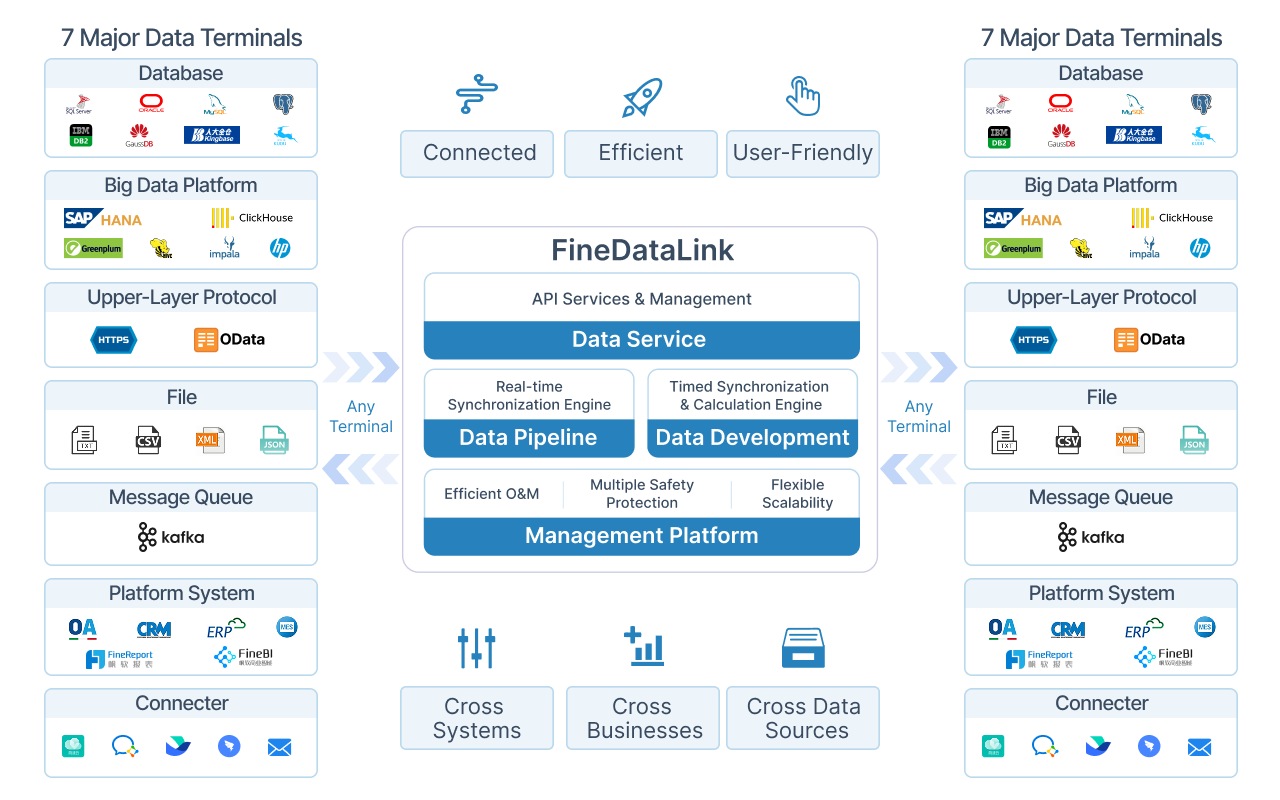
FineDataLink supports both approaches. You can build traditional ETL pipelines with its visual designer, or use it as an ELT loader that pushes raw data into your warehouse where SQL-based transformations run downstream. Its incremental sync and CDC capabilities work in both modes.
Data Quality, Governance, and Security Rules
A warehouse with inaccurate data is worse than no warehouse at all. Users who encounter wrong numbers stop trusting the system, and recovery takes longer than initial adoption.
Data quality rules to embed in your pipeline
- Validation: Reject records that violate business rules (e.g., negative revenue, future dates).
- Deduplication: Identify and merge duplicate records using composite keys or fuzzy matching.
- Consistency: Standardize formats across sources (date formats, currency codes, category names).
- Completeness: Flag missing mandatory fields; decide whether to reject, default, or flag.
- Timeliness: Monitor pipeline latency; alert when data falls behind SLA.
Governance and security essentials
- Role-based access control (RBAC): Define who can see which schemas, tables, and columns.
- Audit trails: Log every data load, transformation, and access event.
- Data lineage: Track data from source to dashboard so users can verify provenance.
- Encryption: Encrypt data at rest and in transit; manage keys separately.
- Retention policies: Define how long historical data is kept and when it is archived.
These rules are not optional add-ons. They are core design elements that must be specified during Step 5 of the design process and enforced automatically by your pipeline tool.
Real-Time Data Warehouse Design
Traditional warehouses refresh daily. Modern businesses increasingly need data that reflects the current state of operations — not yesterday's snapshot. Real-time warehouse design is not about replacing batch processing entirely; it is about adding a real-time layer where business value justifies the complexity.
Traditional Data Warehouse vs Real-Time Data Warehouse
| Area | Traditional Warehouse | Real-Time Warehouse |
|---|---|---|
| Refresh | Daily or scheduled batches | Continuous or near real-time sync |
| Best for | Historical reporting | Operational monitoring and fast decisions |
| Data pipeline | ETL batch jobs | ELT, CDC, streaming, APIs |
| Business value | Stable reporting | Timely alerts, dashboards, AI-ready analysis |
When real-time design is worth the investment:
- Financial services: fraud detection, risk monitoring, compliance reporting
- Retail and e-commerce: inventory management, dynamic pricing, customer behavior tracking
- Manufacturing: equipment monitoring, supply chain visibility, quality control
- Logistics: shipment tracking, route optimization, delivery ETA updates
Key technical components:
- CDC (Change Data Capture): Monitors source database logs and captures only changed records, reducing load and latency.
- Streaming ingestion: Processes events as they arrive using message queues or stream processors.
- Micro-batch processing: Runs ETL/ELT every few minutes instead of daily, balancing freshness and resource usage.
- Lambda or Kappa architecture: Combines batch and streaming layers, or uses a single streaming layer for all processing.
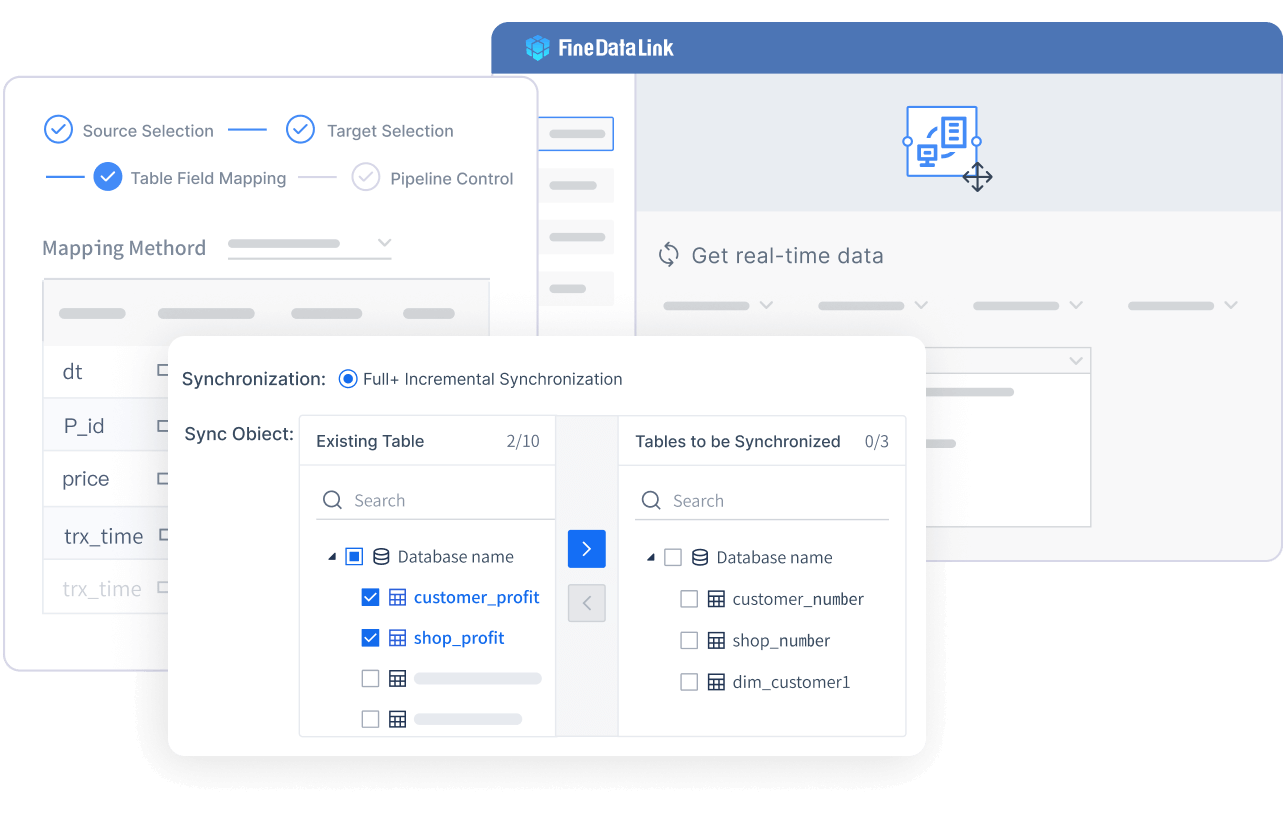 Real-time Data
FineDataLink supports real-time warehouse design through log-based CDC, incremental synchronization, and automatic structure sync. It monitors source database transaction logs, captures changes in near real-time, and applies them to the warehouse without full-table reloads. This keeps latency low while avoiding the operational overhead of custom streaming infrastructure.
Data Warehouse Design Example
Consider a mid-sized manufacturing company that needs a unified view of production, sales, and supply chain data.
Business requirement: Plant managers need daily production yield dashboards; sales team needs weekly revenue forecasts; procurement needs real-time supplier delivery tracking.
Source systems: SAP ERP (production), Salesforce CRM (sales), MySQL database (supplier portal), Excel files (manual forecasts).
Design decisions:
| Decision | Choice | Rationale |
|---|---|---|
| Data model | Star schema for data marts; Data Vault for enterprise layer | BI users need simple queries; enterprise layer needs auditability |
| Refresh frequency | Production: hourly micro-batch; Sales: daily batch; Suppliers: real-time CDC | Matches business urgency per domain |
| ETL/ELT | ELT for SAP and Salesforce; ETL for Excel cleanup | Cloud warehouse handles heavy transforms; Excel needs pre-cleaning |
| Data quality | Automated validation on load; anomaly alerts on yield metrics | Prevents bad data from reaching dashboards |
| BI layer | FineBI for self-service; FineReport for scheduled production reports | Different tools for different user types |
| AI layer | Dora for natural language queries on production and sales data | Enables plant managers to ask questions without SQL knowledge |
Result: The company achieved a single source of truth across four previously siloed systems. Production yield reporting moved from manual Excel consolidation to automated hourly dashboards. Supplier delivery delays now trigger real-time alerts. Plant managers use Dora to ask "Which production line had the lowest yield last week?" and receive accurate answers backed by governed warehouse data.
How FineDataLink Supports Data Warehouse Design
FineDataLink is FanRuan's data integration platform designed to address the most common pain points in warehouse design. Rather than describing features in isolation, here is how it maps to each design step:
| Design Step | FineDataLink Capability | Practical Benefit |
|---|---|---|
| Source inventory | 100+ pre-built connectors (ERP, CRM, databases, APIs, spreadsheets) | Reduces connector development time from weeks to hours |
| ETL/ELT pipeline | Visual pipeline designer with drag-and-drop transformations | No-code pipeline building for data engineers and analysts |
| Incremental sync | Log-based CDC and timestamp-based incremental extraction | Reduces data latency from hours to minutes without full reloads |
| Data quality | Built-in validation, deduplication, and error queue handling | Catches bad data before it enters the warehouse |
| Structure sync | Automatic schema change detection and propagation | Eliminates manual DDL updates when source tables change |
| Real-time capability | Streaming ingestion and micro-batch scheduling | Supports real-time warehouse design without custom infrastructure |
| Monitoring | Pipeline execution logs, alert notifications, retry mechanisms | Ensures pipeline reliability and fast incident response |
| ODS layer | High-performance engine builds operational data store | Provides a clean staging layer between sources and warehouse |
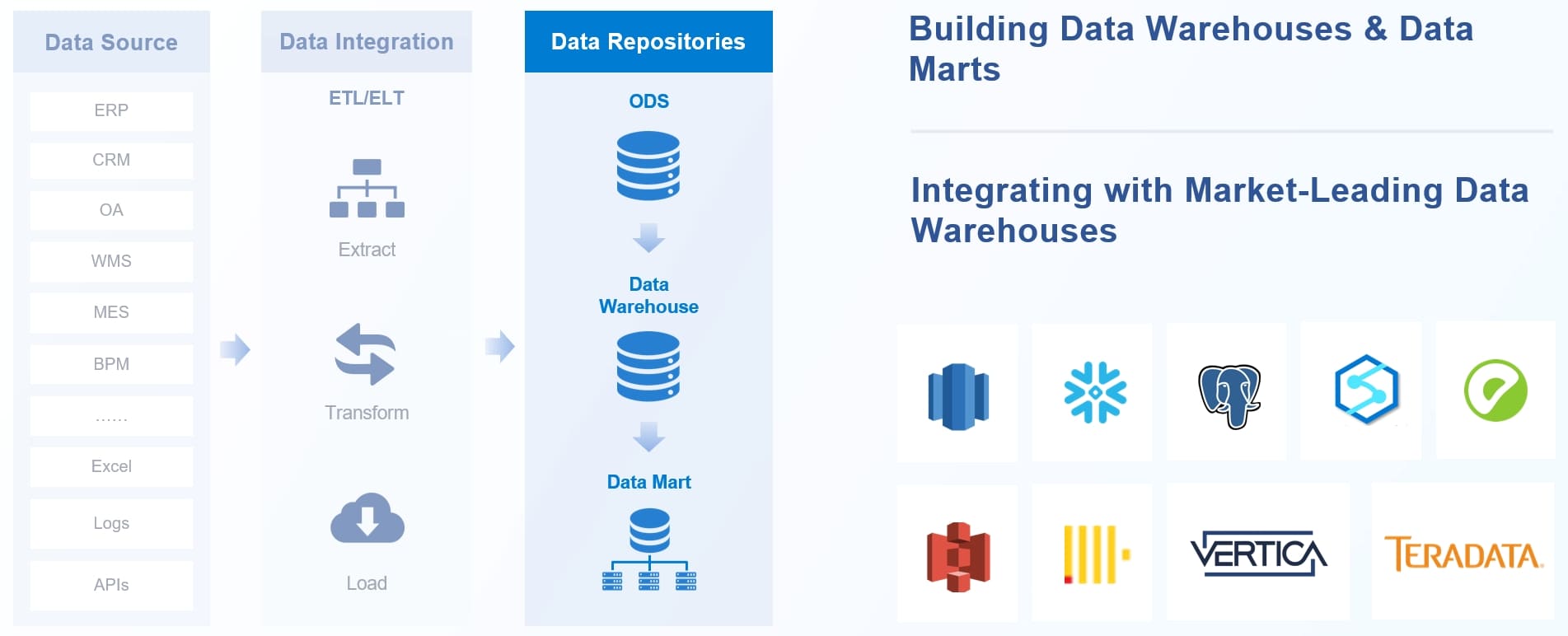
FineDataLink does not replace your warehouse database. It sits between your source systems and your warehouse, handling the integration complexity so your team can focus on modeling and analytics.
From Data Warehouse to BI and Dora AI Data Agent
A well-designed data warehouse does more than support dashboards. It also creates the trusted data foundation that AI Data Agents need.
The progression works like this:
- FineDataLink integrates and synchronizes data from business systems into the warehouse, enforcing quality and governance rules along the way.
- FineBI and FineReport turn governed warehouse data into interactive dashboards, self-service analytics, and scheduled reports that business users trust.
- Dora, FanRuan's AI Data Agent, connects to the same governed data layer and lets business users ask questions in natural language, receive summarized insights, and follow up on findings through AI-powered workflows.
Why does this matter for warehouse design? Because if your warehouse is poorly modeled, inconsistently refreshed, or lacks governance, neither BI nor AI will deliver reliable results. Dora's answers are only as good as the data it queries. A warehouse designed with the principles in this guide — clear business alignment, proper modeling, automated quality rules, and documented lineage — gives Dora a foundation it can reason over accurately.
This is the full stack: integration → warehouse → BI → AI. Each layer depends on the one below it. Design the foundation correctly, and every layer above it becomes more valuable.
FAQs
The design phase typically takes 4–8 weeks for a mid-sized organization, depending on source system complexity and stakeholder availability. Implementation adds another 2–6 months for the first production data mart. Plan for iterative delivery rather than a single big-bang release.
Frequently asked questions
Online analytical processing lets you analyze large volumes of data quickly. You can explore trends, compare metrics, and make informed decisions. This approach supports business intelligence and helps you unlock insights from your data warehouse.