

If you are searching for call reporting software, you are probably trying to answer a practical question: what kind of reporting tool fits your team’s actual calling workflow? That matters because “call reporting” can mean very different things depending on whether you manage a phone system, run a support center, or lead a sales team.
For IT and telecom teams, call reporting often means CDR analytics and usage visibility. For support operations, it usually means call center reporting with queue, SLA, and agent performance metrics. For sales leaders, it often means call tracking tied to CRM activity, lead sources, and rep coaching.
The best choice depends on three things:
- What data you need
- How often you review reports
- What decisions those reports drive
A telecom admin may review trunk usage and missed calls daily. A support manager may monitor service levels in real time and use historical data for staffing. A sales manager may need rep activity, call outcomes, and campaign attribution in weekly pipeline reviews.
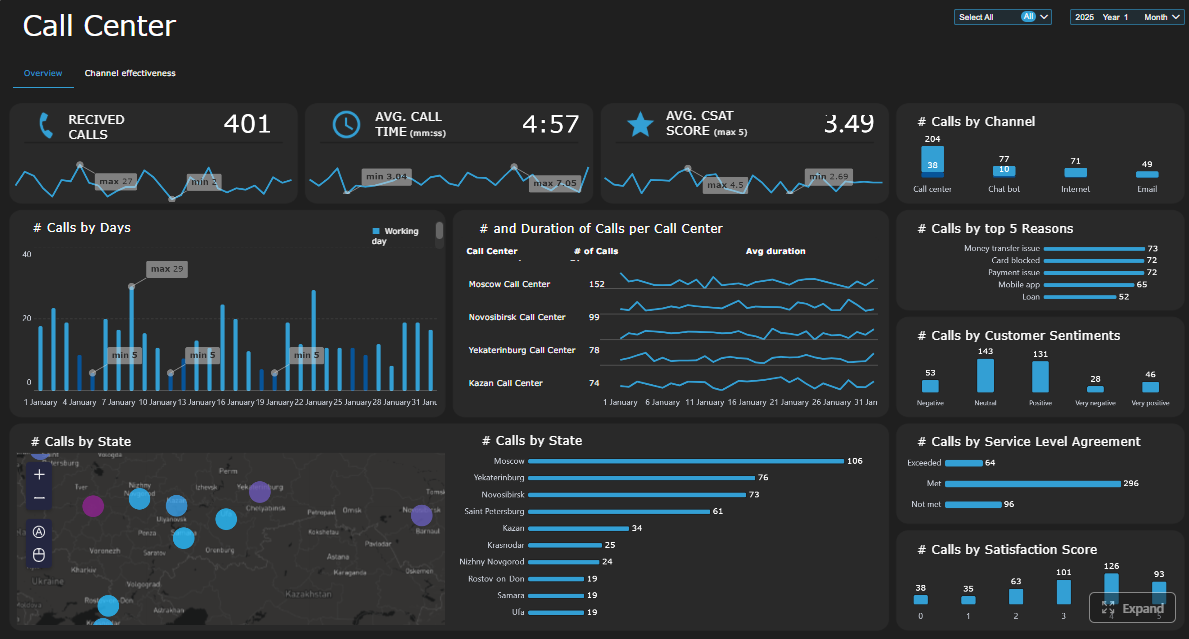 Click To Try The Dashboard
Quick Comparison Table
| Category | Best for | Dashboarding | Pixel-perfect reporting | Paginated reports | Data entry/forms | Scheduling and distribution | Enterprise deployment | Ease of use | Recommended users |
|---|---|---|---|---|---|---|---|---|---|
| CDR analytics tools | Telecom visibility, call logs, usage control, billing review | Usually good for operational monitoring | Often limited to standard templates | Common for exports and formal logs | Usually limited | Common for scheduled audit or admin reports | Often strong in telephony environments | Moderate | IT admins, telecom managers, compliance teams |
| Call center reporting software | Queue performance, SLA tracking, agent productivity | Strong, especially for real-time KPIs and wallboards | Varies by platform | Often available for historical summaries | Usually limited or workflow-specific | Strong for supervisor reports and alerts | Strong for contact center operations | Moderate | Support teams, service operations, workforce planners |
| Sales call tracking software | Revenue attribution, CRM activity, rep coaching | Strong for rep and pipeline dashboards | Usually less focused on formal print layouts | Varies | Limited, except sales workflow fields | Common for manager digests and activity reports | Good when aligned with CRM stack | Often user-friendly for sales teams | Sales managers, RevOps, SDR teams |
| FineReport | Enterprise reporting across call operations, support, sales, and management | Strong for dashboards plus detailed tabular reports | Strong | Strong | Strong | Strong | Strong for centralized reporting governance | Moderate with business-user-friendly design | Reporting teams, operations leaders, enterprise IT, cross-functional teams |
This comparison is not about one tool replacing every other category. It is about matching the reporting approach to the business problem.

How to Compare Call Reporting Software for Different Teams
A useful software comparison starts with the reporting use case, not the vendor list.
Define the core use cases: CDR analytics, call center reporting, and sales call tracking
These three categories overlap, but they are not the same.
- CDR analytics focuses on call detail records, extensions, trunks, inbound and outbound traffic, missed calls, and telecom usage patterns.
- Call center reporting focuses on service operations, including queue performance, wait times, abandonment, handle time, occupancy, and staffing.
- Sales call tracking focuses on lead sources, campaign attribution, rep activity, call outcomes, and conversion context.
If your main problem is telecom oversight, start with CDR tools. If your main problem is customer service performance, evaluate contact center reporting. If your priority is sales effectiveness, look at sales call tracking platforms.
Clarify what data each team needs, how often reports are reviewed, and which decisions depend on them
A simple way to evaluate call reporting software is to map metrics to decisions.
- IT and telecom teams need call volume, extension activity, trunk capacity, DID usage, anomalies, and retained historical logs.
- Support leaders need real-time queue visibility, SLA adherence, agent states, abandonment trends, and historical staffing patterns.
- Sales teams need call activity by rep, source attribution, opportunity linkage, and coaching signals tied to performance.
Then ask:
- Are reports reviewed in real time, daily, weekly, or monthly?
- Do frontline managers need drill-down access?
- Do executives need scheduled summaries?
- Does compliance require retention and auditability?
Identify must-have capabilities such as dashboards, filters, exports, alerts, and user permissions
Regardless of category, most teams should evaluate these essentials:
- Dashboards for quick operational visibility
- Filters and parameters for date, team, queue, rep, campaign, or extension
- Exports for audits, finance review, or deeper analysis
- Alerts for anomalies, threshold breaches, or service failures
- User permissions so different roles see the right level of detail
For larger organizations, it also helps to look for:
- Multi-department reporting
- Report scheduling
- Role-based access
- Cross-system data integration
- Standardized report design
What Call Reporting Software Actually Covers
At a basic level, call reporting software turns raw call activity into usable operational insight. It collects call-related data from phone and business systems, organizes it into reports or dashboards, and helps teams monitor performance, usage, and trends.
That can include simple historical summaries or detailed reporting environments with filters, drill-downs, alerts, and scheduled distribution.
What call reporting software is and how it turns raw call activity into usable operational insights
Raw call data by itself is not very useful. A phone system log may tell you a call happened, but not whether it signals a staffing issue, a routing problem, a billing anomaly, or a coaching opportunity.
Call reporting software helps by:
- Aggregating call activity into readable formats
- Organizing metrics by user, team, department, queue, or campaign
- Highlighting trends over time
- Supporting filtering and exception analysis
- Delivering scheduled reports to decision-makers
Call reporting vs call recording, call analytics, and basic phone logs
These terms are often grouped together, but they serve different purposes.
- Call reporting summarizes and presents operational data for management and analysis
- Call recording stores audio conversations for QA, compliance, or review
- Call analytics may go further into pattern detection, conversation analysis, or quality metrics
- Basic phone logs are usually raw records with minimal business context
A business may use all four, but not every tool handles them equally well.
Where PBX, VoIP, CRM, and contact center platforms fit into the reporting workflow
Most call reporting environments depend on multiple source systems:
- PBX systems provide core call event data
- VoIP platforms add digital telephony logs and service events
- CRM systems add lead, account, and opportunity context
- Contact center platforms add queue, agent, and service metrics
That means reporting quality depends not only on the reporting software itself, but also on how well it connects and models data across systems.
Core Data Sources Behind Reporting
Call detail records (CDRs)
CDRs are the foundation of many call reporting systems. They usually include timestamps, call duration, caller and dialed numbers, routing details, and call outcomes such as answered, missed, transferred, or abandoned.
CDRs are especially valuable for telecom analysis, audit review, and trend reporting.
PBX and VoIP system logs
These logs provide the operational signals behind calling activity, such as extension behavior, trunk utilization, queue handling, and system events. They are important for infrastructure monitoring and capacity planning.
CRM activity and agent performance data
For sales and support teams, phone data becomes far more useful when paired with CRM or agent-level context. This helps answer questions such as:
- Which campaigns generate calls?
- Which reps convert calls into opportunities?
- Which agents struggle with handle time or service levels?
- Which accounts require escalation follow-up?
CDR Analytics: Best for Technical Visibility and Usage Control
CDR-focused call reporting tools are most useful when the main objective is to understand how the phone environment is being used.
These tools help teams analyze:
- Call volume by extension or department
- Inbound and outbound patterns
- Call duration
- Missed or unanswered calls
- Trunk usage
- DID activity
- Billing or provider charge patterns
For organizations with complex telephony environments, CDR analytics often plays an important role in cost control, troubleshooting, compliance, and historical audit review.

Strengths for IT, telecom admins, compliance reviews, and cost monitoring
CDR tools are particularly strong when you need:
- Searchable call history
- Department or site-based telecom visibility
- Exportable call logs for audit or billing review
- Exception detection for suspicious usage or traffic spikes
- Historical retention for policy or compliance needs
For IT administrators, this category is usually the best fit when call reporting is primarily an operational oversight function rather than a customer-facing performance system.
Limitations when teams need coaching metrics, pipeline visibility, or customer experience reporting
CDR analytics can be excellent for infrastructure and usage analysis, but it often becomes less effective when the business needs broader operational context.
For example, a CDR report may show that call volumes dropped, but not whether:
- Sales conversions improved anyway
- Queue abandonment increased due to staffing gaps
- Agent coaching issues caused longer calls
- A campaign produced more qualified leads
That is why CDR reporting should not automatically be treated as a complete replacement for call center reporting or sales call tracking.
Key Features to Look For in CDR Tools
Searchable call detail records
Teams should be able to search and filter by time, extension, caller, DID, trunk, department, or outcome. This is essential for troubleshooting and ad hoc analysis.
Extension, DID, trunk, and department-level reporting
Good CDR tools make it easy to view usage by organizational and telecom structure, not just raw call rows.
Exportable logs, scheduled reports, and anomaly alerts
Admins often need reports delivered regularly, especially for audit, monthly review, or chargeback workflows.
Retention controls and audit-ready data access
For compliance-sensitive environments, retention policies and historical accessibility can matter as much as dashboard usability.
Call Center Reporting Software: Best for Agent Performance and Service Levels
If your priority is customer service performance, call center reporting software is usually the better fit.
These tools are designed to support daily operational management, including:
- Queue visibility
- SLA tracking
- Abandonment rate
- Average speed to answer
- Handle time
- Occupancy
- Agent states
- Staffing and scheduling decisions
Unlike pure CDR platforms, contact center reporting is built around service delivery and workforce performance, often with both real-time and historical views.
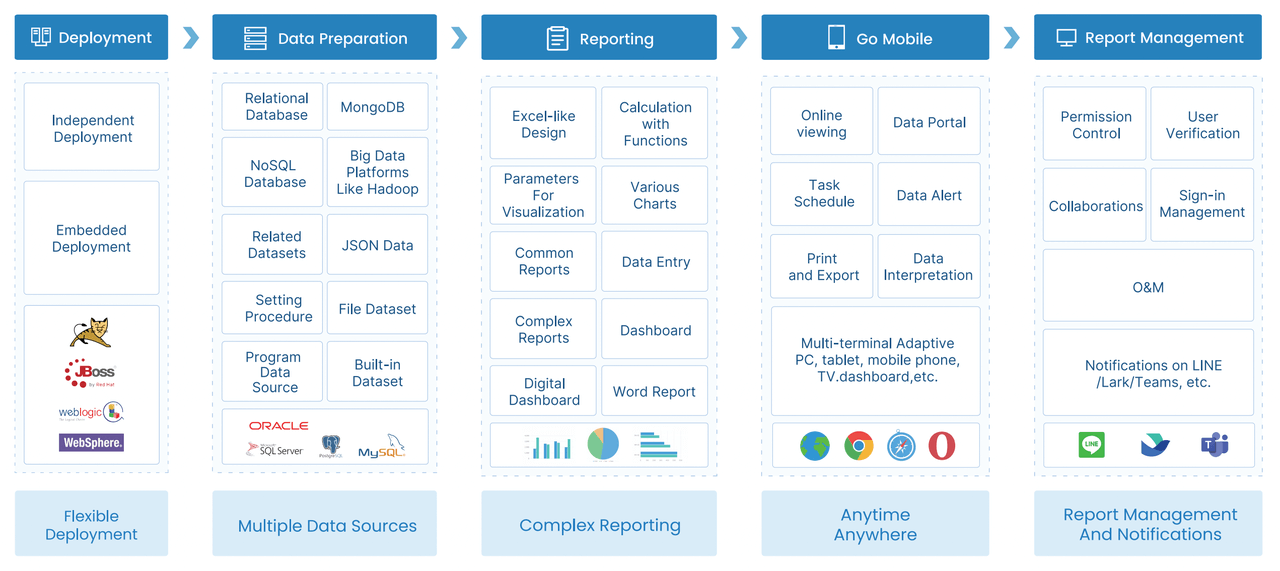
How contact center reporting supports real-time and historical reporting in one place
Support managers typically need both immediate visibility and trend analysis.
Real-time dashboards help answer questions like:
- Which queues are backing up right now?
- Are service levels slipping this hour?
- Which agents are available or overloaded?
Historical reports help answer different questions:
- Which shifts need more staffing?
- Which teams consistently miss response targets?
- Are abandonment rates improving month over month?
- How does performance vary by call type or daypart?
Why these tools are valuable for support teams
Call center reporting software is especially useful when managers need to move from “what happened” to “what should we do next.” It supports decisions around:
- Staffing
- Queue configuration
- Agent coaching
- Escalation processes
- Service target management
Where these tools may be excessive for smaller businesses with simpler calling needs
Not every organization needs a full contact center reporting stack. Smaller businesses with low call volume or simple direct-call workflows may find these tools too complex if they do not need queue management, workforce planning, or supervisor controls.
That is why the right choice depends on operating model, not just feature count.
Questions to Ask Before Choosing a Call Center Reporting Tool
Does it support real-time dashboards and wallboards?
This matters if supervisors need live visibility for queue management and floor performance.
Can managers drill down from team metrics to agent and call-level detail?
Aggregate KPIs are useful, but managers often need to investigate exceptions by team member, queue, or interaction.
How well does it connect with QA, workforce management, and ticketing tools?
The more mature the support operation, the more important surrounding workflow integration becomes.
Sales Call Tracking Software: Best for Revenue Attribution and Rep Coaching
Sales-focused call reporting is different again. Here, the goal is not telecom oversight or service level management. It is to understand which calls create pipeline, which reps are effective, and which activities influence conversion outcomes.
Sales call tracking platforms often connect phone activity with:
- Leads
- Campaigns
- Contacts
- Opportunities
- CRM stages
- Rep activity logs
- Coaching workflows
This helps sales leaders move beyond simple call counts and evaluate performance in business terms.
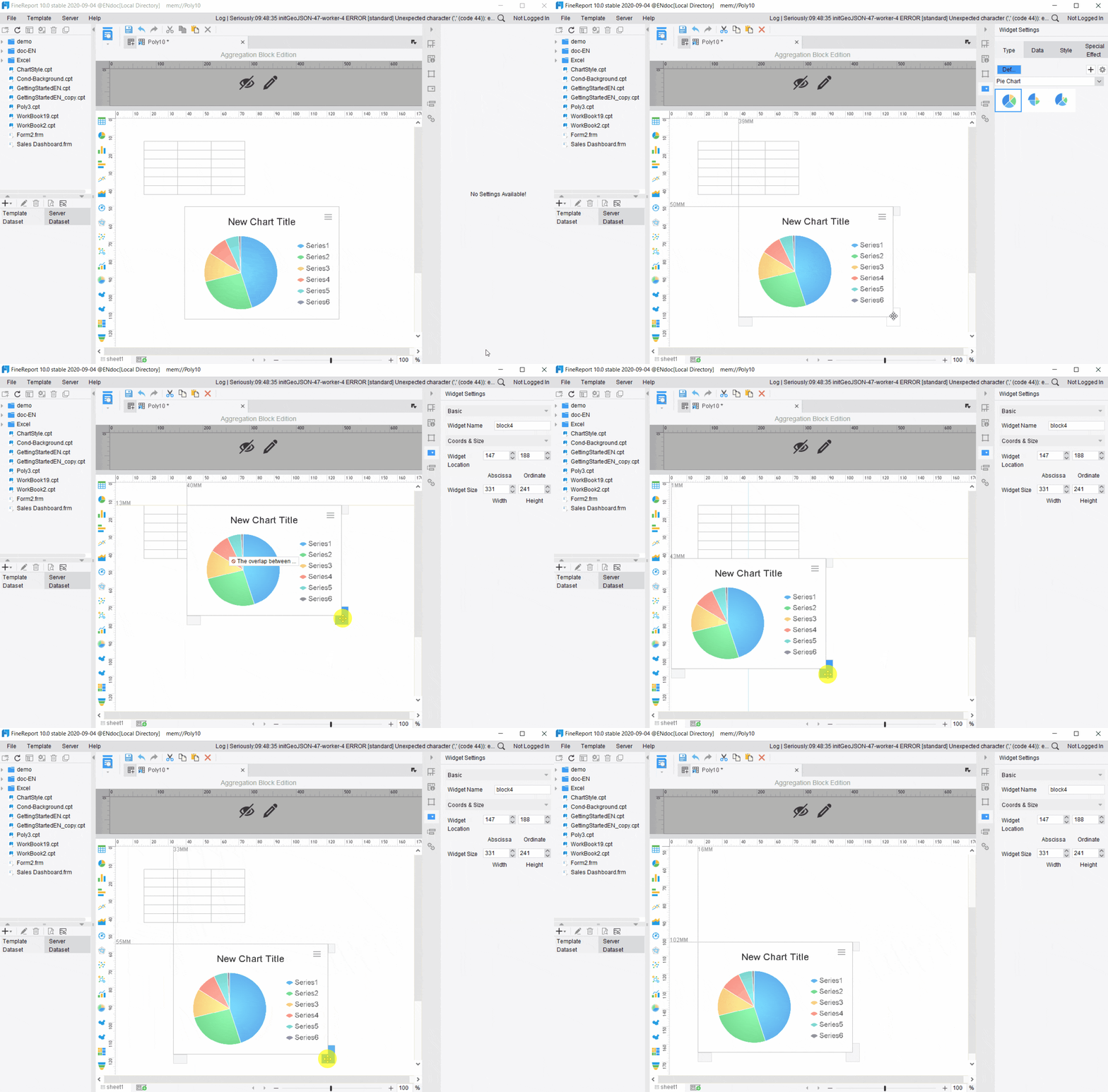
How sales-focused reporting connects calls to leads, campaigns, opportunities, and conversion outcomes
A sales team may want to know:
- Which lead sources generate the highest-quality calls?
- Which reps convert calls into meetings or opportunities?
- How many attempts are required before a connection?
- Which campaigns drive inbound phone conversions?
These use cases require CRM context, not just telephony metadata.
Features such as source tracking, CRM syncing, rep activity reporting, and coaching insights
Common capabilities in this category include:
- Lead source and campaign attribution
- Automatic call logging into CRM
- Rep-level activity dashboards
- Call outcome analysis
- Manager coaching support
- Historical trend analysis by team or individual
Trade-offs when sales tools offer lighter telecom reporting or less queue analysis
Sales-focused tools can be very strong for pipeline visibility and coaching, but they may be lighter on:
- Trunk and extension analysis
- Telecom audit requirements
- Queue and SLA analysis
- Infrastructure troubleshooting
So if your organization needs both sales performance insight and enterprise-grade operational reporting, you may need a broader reporting layer that combines multiple systems.
Buying Criteria for Sales Teams
Lead source and campaign attribution
Make sure the tool can tie calls back to the marketing and prospecting activities you actually measure.
CRM integration and activity logging
This is one of the most important requirements for sales reporting accuracy.
Rep-level dashboards and pipeline context
Sales managers need context around outcomes, not just activity counts.
Mobile and remote team visibility
Distributed sales teams often need reports accessible across devices and locations.
How to Choose the Best Option for Your Business in 2026
The best call reporting software is the one that matches your primary operational goal.
- Choose CDR analytics if you need telecom oversight, billing visibility, and technical usage control.
- Choose call center reporting software if you need service performance, queue visibility, and staffing decisions.
- Choose sales call tracking software if you need CRM-linked activity, attribution, and coaching insight.
For many organizations, though, the real challenge is not choosing one metric category. It is combining all the relevant call data into a reporting system that different stakeholders can actually use.
Match the software category to your primary goal: telecom oversight, service performance, or sales effectiveness
A common mistake is buying based on broad product demos instead of reporting priorities. Start with the main decision your reports need to support.
- Telecom risk and usage control
- Customer service management
- Revenue performance and coaching
- Executive visibility across departments
Compare pricing models, setup complexity, integrations, reporting depth, and scalability
As you review vendors, compare:
- Licensing model
- Data retention approach
- Integration requirements
- Self-service reporting flexibility
- Export and scheduling support
- Scalability across teams or sites
Also watch for hidden effort in report design, administration, and data cleanup.
Review vendor shortlists, trial criteria, and decision checkpoints before committing
A useful trial should validate more than dashboard aesthetics. It should confirm:
- Data mapping accuracy
- Refresh reliability
- Filter behavior
- Permission controls
- Export quality
- Report usability for actual managers and analysts
Final Comparison Checklist
Best fit by team type and reporting maturity
- IT and telecom teams: prioritize CDR depth and auditability
- Support operations: prioritize real-time KPIs and queue analysis
- Sales teams: prioritize CRM context and attribution
- Enterprise reporting teams: prioritize cross-system reporting and standardized output
Must-have features versus nice-to-have extras
Separate operational essentials from future-state features. Many teams overbuy on AI or advanced analytics before they solve core reporting usability.
Common implementation risks and hidden costs
Look out for:
- Weak data integration
- Inconsistent definitions across systems
- Limited permissions control
- Poor export formatting
- Heavy dependency on vendor services for every report change
How to validate reporting accuracy during a trial
Use a short but disciplined testing process:
- Compare report totals against source systems
- Validate date and timezone logic
- Test filters with real manager questions
- Check row-level drill-downs
- Confirm scheduled report output and delivery
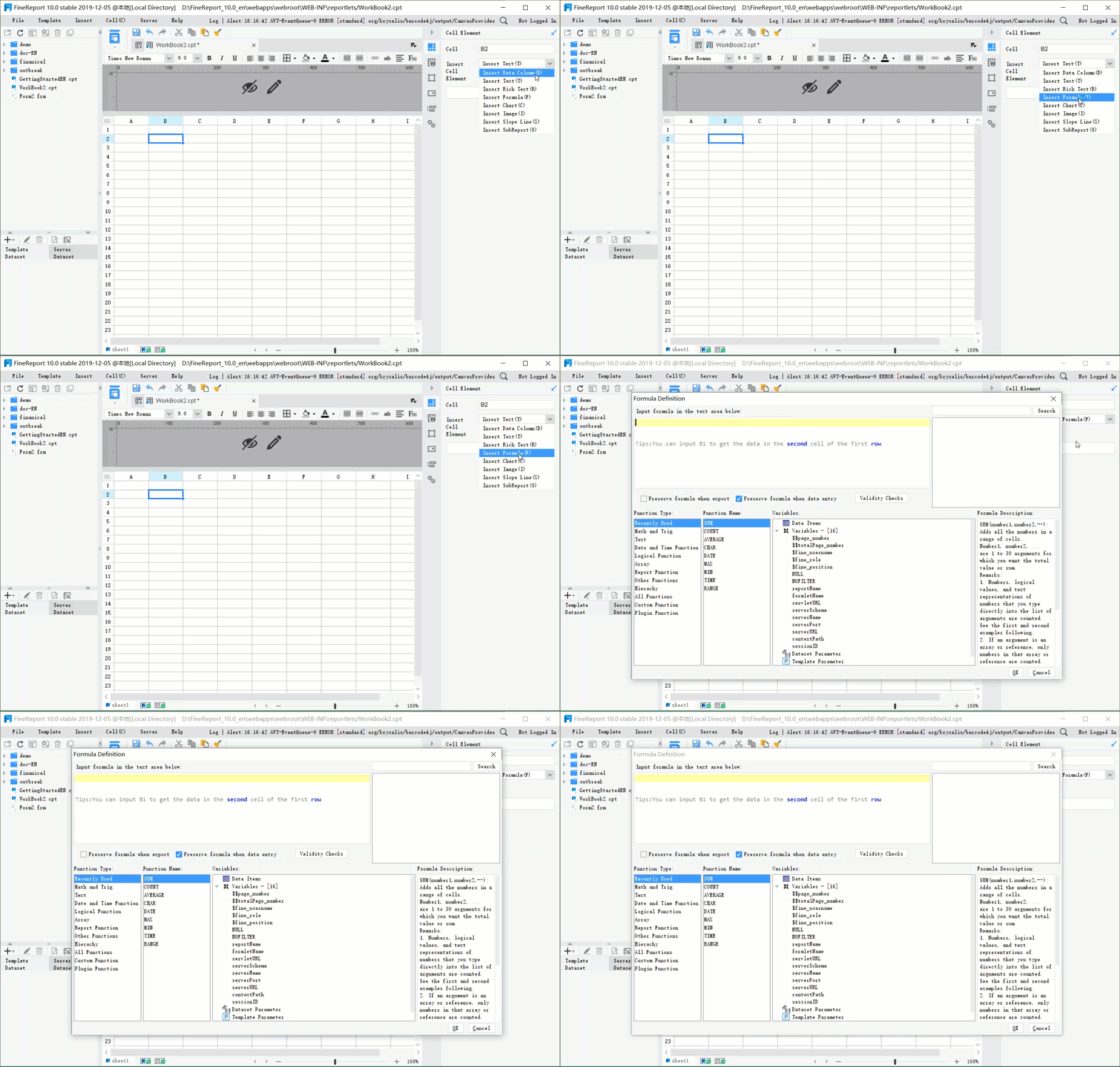
Practical Recommendations for Choosing Call Reporting Software
From a reporting consultant’s perspective, these steps usually lead to better decisions than feature shopping alone.
1. Start with the reporting decision, not the dashboard design
Ask what action each report should support. A visually attractive dashboard is not enough if it does not help teams make staffing, routing, coaching, or cost decisions.
2. Separate operational monitoring from formal business reporting
Real-time dashboards are useful, but many organizations also need scheduled, structured, printable, or shareable reports for managers, finance, and leadership.
3. Evaluate integration depth early
Call reporting becomes much more valuable when telephony data is connected to CRM, service, and business data. If integration is weak, reporting value falls quickly.
4. Standardize KPI definitions before rollout
Terms like handled call, abandoned call, service level, or qualified sales call can vary across systems. Agree on definitions before adoption.
5. Test scheduling, permissions, and exports during the trial
These are often the features that matter most after go-live, especially in multi-team environments.
When FineReport Is a Good Fit for Call Reporting Software
Tools built specifically for telephony, contact centers, or sales engagement can be strong within their own lanes. But many organizations eventually run into a broader reporting problem: they need to combine call data with operational, CRM, financial, or management reporting in one governed environment.
That is where a dedicated enterprise reporting platform like FineReport can be relevant.
FineReport is commonly used for enterprise reporting, dashboards, paginated reports, parameter queries, scheduled distribution, and data entry workflows. For teams working with call data, that means it can support not only dashboard-style visibility, but also the structured reporting workflows many organizations need for operations and management.
Where FineReport adds value in call reporting scenarios
FineReport can be a practical option when you need to:
- Combine PBX, VoIP, CRM, help desk, and business data into unified reports
- Build pixel-perfect operational reports for management review
- Create paginated and printable reports for regular distribution
- Use parameter queries so users can filter by region, queue, team, campaign, or time period
- Automate scheduled report delivery
- Provide both dashboards and detailed tabular reports in one environment
- Support data entry or form-based workflows where teams need to annotate, review, or submit follow-up information
This is especially relevant for enterprises that want one reporting layer across support operations, telecom oversight, sales management, and leadership reporting.
FineReport for cross-functional reporting needs
For example, a business may need:
- A telecom operations report for IT
- A service performance dashboard for support managers
- A sales call activity report for RevOps
- A monthly management pack with formal layouts and exports
Instead of managing separate reporting silos, some teams use FineReport to standardize design, delivery, and governance across departments.
Why this matters beyond dashboards
Many call reporting tools are effective at showing live metrics, but operational reporting often requires more than a screen view. Teams may need:
- Scheduled executive summaries
- Multi-section reports with tables and charts
- Printable layouts
- Department-specific permissions
- Drill-down from KPI dashboards into detailed records
That combination of dashboarding and formal enterprise reporting is where FineReport is often relevant.

Get Ready-to-Use Dashboard and Report Templates in Fine Gallery
Which Type of Call Reporting Software Should You Choose?
The answer depends on what your team is trying to improve.
- Choose CDR analytics if your main challenge is visibility into extensions, trunks, usage, and telecom control.
- Choose call center reporting software if your main challenge is service performance, queue management, and staffing.
- Choose sales call tracking software if your main challenge is attribution, rep productivity, and conversion insight.
- Consider FineReport if you need a broader enterprise reporting platform that can unify call data with business reporting, support pixel-perfect and paginated output, and automate reporting workflows across teams.
The key is to choose a reporting approach that fits not only the source system, but also the decision-making process around it.
Final Thoughts
Call reporting software is not a single product category with one winner. It is a set of reporting approaches built for different operational goals. The right comparison should reflect how your organization uses phone data, who needs the reports, and what business actions depend on them.
If your needs are highly specialized, a category-specific tool may be enough. If your reporting needs span telecom, support, sales, and management workflows, a flexible enterprise reporting platform can become more valuable over time.
FAQs
Call reporting software turns call data into reports that help teams monitor activity, spot trends, and make better operational decisions. It is commonly used for telecom oversight, call center performance management, and sales call tracking.




