
Hospital facility management software is a digital platform hospitals use to manage maintenance, assets, work orders, compliance documentation, space, and operational reporting across clinical and non-clinical facilities.
10 best hospital facility management software tools in 2026
1. FineReport
1.1 Tool profile and best-fit use case
FineReport is a flexible reporting and dashboard platform that helps hospitals centralize facility, maintenance, compliance, and operational data into one decision-ready view.
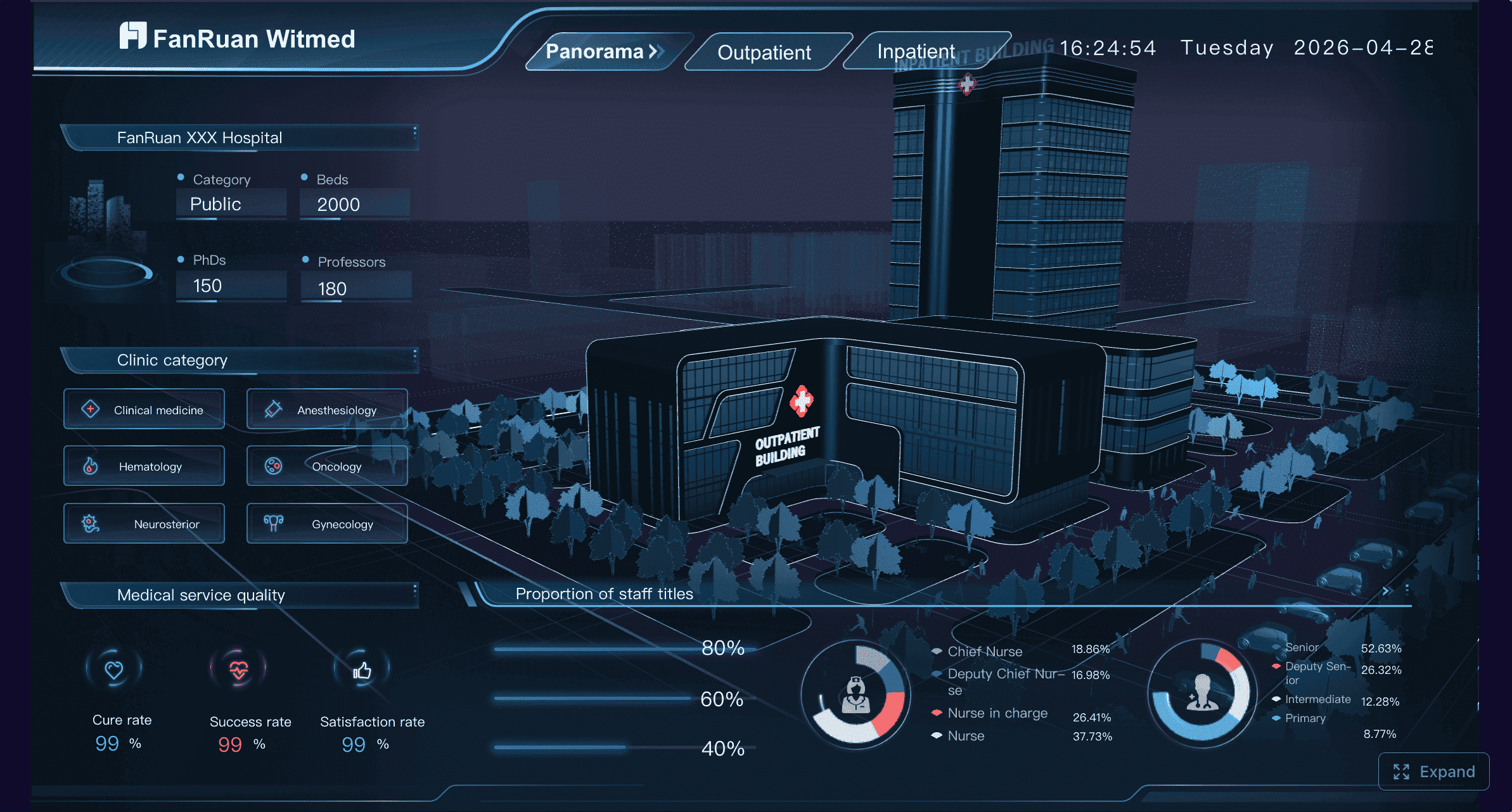
One-sentence overview: FineReport is best used as a hospital facility management analytics and reporting layer for organizations that need stronger visibility, compliance dashboards, and cross-system reporting.
Key Features:
- Real-time dashboards for work orders, preventive maintenance, utilities, and asset performance
- Pixel-perfect report design for compliance packets, survey binders, and executive summaries
- Data integration with CMMS, ERP, HR, procurement, BMS, and other hospital systems
- Mobile-friendly dashboards for facilities leaders and site managers
- Multi-site roll-up reporting for health systems
- Custom KPI tracking for uptime, backlog, SLA, labor productivity, and inspection completion
Pros & Cons:
- Pros: Highly customizable; strong for healthcare reporting; ideal for executive visibility; supports complex hospital approval and reporting structures; useful for compliance documentation standardization
- Cons: Not a standalone CMMS for maintenance execution; best value comes when connected to existing systems; setup requires data modeling discipline
Best For (Target user/scenario):
- Health systems that already use one or more facility tools but lack unified reporting
- Compliance-focused hospitals that need audit-ready reporting
- Enterprise teams that want to standardize facility KPIs across multiple campuses
1.2 Core features, compliance support, and integrations
FineReport stands out because many hospitals do not actually suffer from a lack of software modules—they suffer from fragmented data. Facilities teams may use one system for work orders, another for procurement, another for building systems, and spreadsheets for compliance rounds. FineReport helps connect those silos.
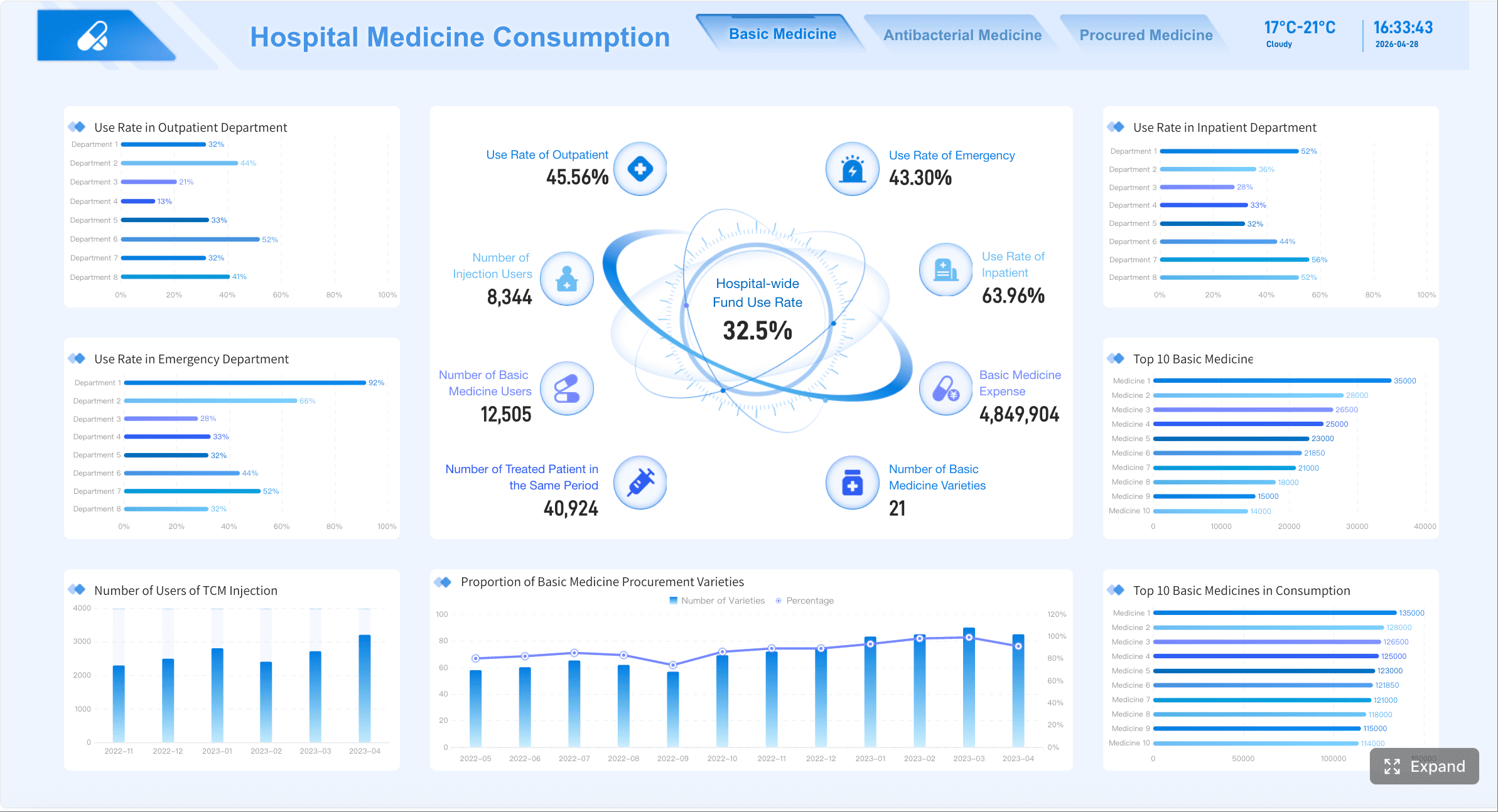
From a hospital facility management software perspective, its strongest value is in:
- Consolidating preventive maintenance completion data
- Surfacing overdue inspections and life safety tasks
- Building environment of care dashboards
- Tracking asset history and replacement trends
- Creating exportable reports for leadership, auditors, and survey readiness teams
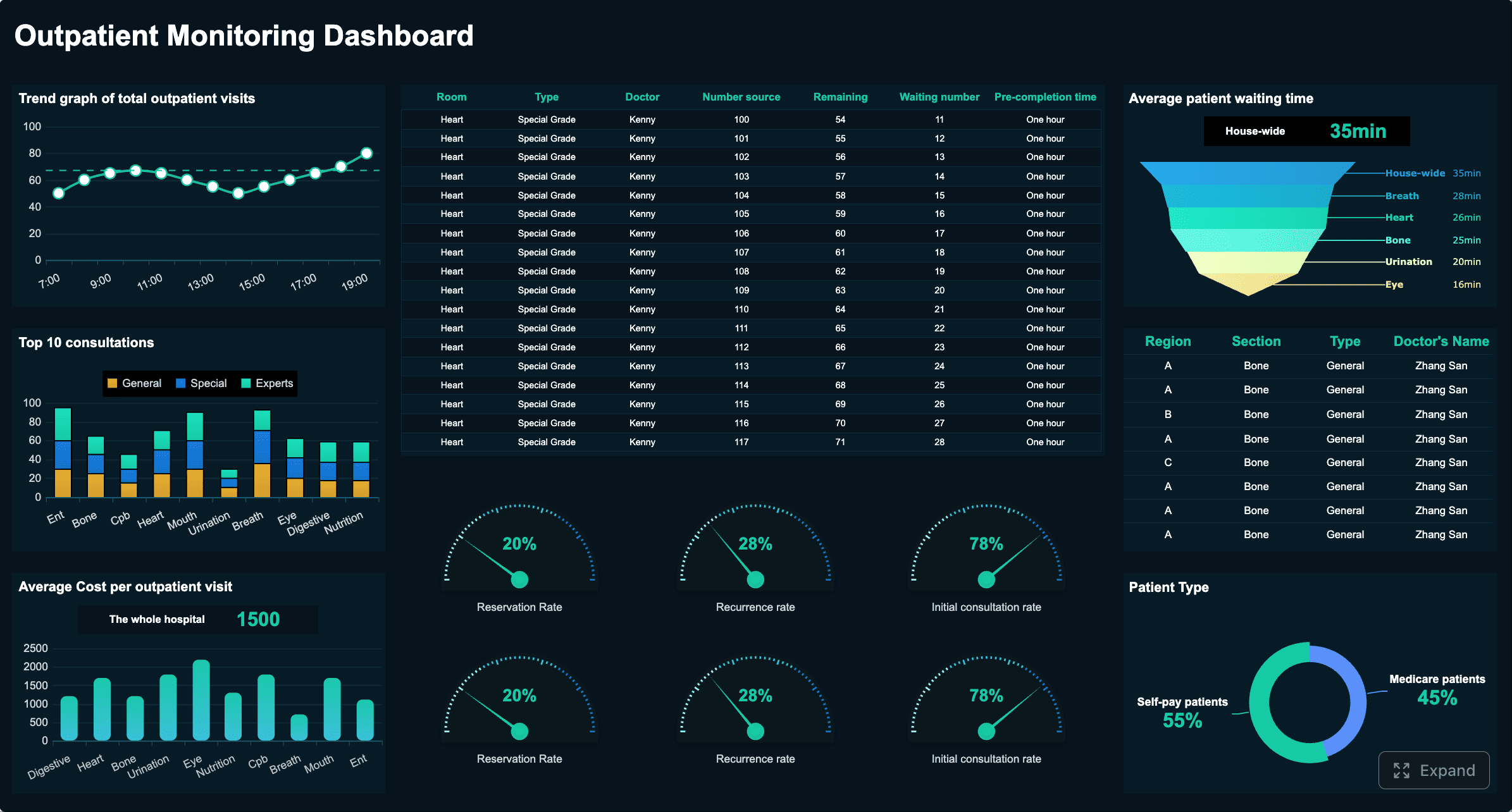
It also supports healthcare organizations that need detailed audit trails, approval-based workflows in reports, and standardized reporting templates across multiple locations. For integration-heavy hospitals, this is a major advantage.
1.3 Pros, cons, and pricing considerations
FineReport is usually a strong fit when the buying team already has operational systems in place but needs a better analytics and compliance reporting layer. It can reduce manual spreadsheet work, improve visibility into maintenance backlog, and make accreditation preparation less reactive.
Pricing depends on scope, deployment scale, and integration requirements rather than simple per-user CMMS pricing. Buyers should evaluate implementation effort around data sources, dashboard design, and governance.
1.4 Quick comparison takeaway
Choose FineReport when your top priority is visibility, compliance reporting, and cross-system facility intelligence. Consider alternatives if you need a pure-play maintenance execution platform without additional reporting strategy.
2. Accruent/FSI Healthcare CMMS
2.1 Tool profile and best-fit use case
Accruent’s FSI healthcare platform is purpose-built for healthcare maintenance and compliance operations.
One-sentence overview: FSI is a healthcare-specific CMMS/EAM platform designed for hospitals that prioritize environment of care, compliance workflows, and standardized maintenance operations.
Key Features:
- Work order and preventive maintenance management
- Asset tracking and lifecycle history
- Compliance rounding and documentation
- Space and drawing management options
- Mobile tools for technicians
- Analytics and capital planning modules
Pros & Cons:
- Pros: Strong healthcare fit; robust compliance support; mature functionality for hospitals; scalable for multi-site operations
- Cons: Broader suite can increase complexity; implementation may be heavier than SMB-oriented tools; cost can rise with multiple modules
Best For (Target user/scenario):
- Acute care hospitals
- Large regional systems
- Organizations needing healthcare-specific CMMS depth
2.2 Core features, compliance support, and integrations
FSI is one of the more healthcare-aligned products in this market. It supports preventive maintenance, work orders, asset records, inspection workflows, and documentation required for survey preparation. It is especially relevant for teams managing life safety, environment of care, and audit traceability.
2.3 Pros, cons, and pricing considerations
This is usually a stronger option for buyers willing to invest in a platform built around hospital operations rather than adapting a generic facility tool. The trade-off is that implementation and module selection require planning.
2.4 Quick comparison takeaway
Choose FSI when you want a healthcare-focused maintenance and compliance platform with room to scale. Consider lighter tools if simplicity and faster deployment matter more than specialization.
3. TMA Systems WebTMA/EQ2 HEMS
3.1 Tool profile and best-fit use case
TMA Systems offers enterprise maintenance tools and healthcare-oriented capabilities for hospitals and health systems.
One-sentence overview: TMA Systems is a configurable enterprise platform for hospitals that need maintenance control, asset tracking, and inspection readiness across complex facilities.
Key Features:
- Preventive and corrective maintenance workflows
- Asset and equipment management
- Compliance tracking and audit reporting
- Mobile access for field teams
- Configurable workflows and permissions
- Multi-facility visibility
Pros & Cons:
- Pros: Mature enterprise functionality; configurable; strong healthcare positioning; good for distributed operations
- Cons: Configuration depth can require more onboarding; user experience may feel heavier than newer mobile-first tools
Best For (Target user/scenario):
- Enterprise hospitals
- Systems with in-house IT and process owners
- Teams needing configurable governance
3.2 Core features, compliance support, and integrations
TMA is well suited for hospitals balancing maintenance execution and compliance readiness. It supports asset maintenance, work management, reporting, and configurable documentation practices that help facilities teams standardize operations.
3.3 Pros, cons, and pricing considerations
Expect pricing to be quote-based. Buyers should assess module fit, implementation support, and how much internal configuration they are prepared to own.
3.4 Quick comparison takeaway
Choose TMA Systems when your organization wants enterprise configurability and healthcare alignment. Look elsewhere if your team wants a simpler, mobile-first rollout.
4. IBM Maximo Application Suite
4.1 Tool profile and best-fit use case
IBM Maximo is a large-scale enterprise asset management platform used in asset-intensive industries, including healthcare.
One-sentence overview: Maximo is an enterprise EAM platform for health systems that need deep asset lifecycle management, advanced maintenance controls, and broad integration capabilities.
Key Features:
- Enterprise asset lifecycle management
- Preventive and predictive maintenance support
- Work orders and inventory management
- IoT and condition-monitoring integration
- Advanced analytics
- Multi-site governance
Pros & Cons:
- Pros: Extremely scalable; strong asset depth; powerful integrations; suitable for complex portfolios
- Cons: High implementation complexity; requires strong internal expertise or partner support; may be more than many hospitals need
Best For (Target user/scenario):
- Enterprise health systems
- Academic medical centers
- Organizations with sophisticated IT and asset strategies
4.2 Core features, compliance support, and integrations
Maximo is strongest when hospitals need more than basic maintenance. It supports detailed asset histories, inventory, scheduling, and enterprise-wide control. Compliance use cases are possible, but healthcare-specific survey workflows may require more configuration than purpose-built hospital tools.
4.3 Pros, cons, and pricing considerations
This is rarely the lowest-cost or fastest-deploy option. Its value rises with scale, integration needs, and strategic asset management maturity.
4.4 Quick comparison takeaway
Choose Maximo for enterprise asset rigor and long-term scalability. Consider healthcare-specific platforms if survey readiness and hospital workflows are your primary concern.
5. Brightly Asset Essentials
5.1 Tool profile and best-fit use case
Brightly Asset Essentials is a widely used CMMS for organizations that want maintenance management without full enterprise complexity.
One-sentence overview: Brightly Asset Essentials offers a practical maintenance and asset management platform for hospitals seeking balanced functionality, usability, and reporting.
Key Features:
- Work order management
- Preventive maintenance scheduling
- Asset tracking
- Mobile technician support
- Basic reporting and dashboards
- Inventory and purchasing support
Pros & Cons:
- Pros: Easier to adopt than some enterprise suites; broad CMMS fundamentals; good usability for mid-market teams
- Cons: Healthcare-specific compliance depth may be lighter than dedicated hospital tools; advanced enterprise requirements may need add-ons
Best For (Target user/scenario):
- Community hospitals
- Mid-sized health systems
- Teams upgrading from spreadsheets or legacy CMMS
5.2 Core features, compliance support, and integrations
Brightly covers the core maintenance functions most hospitals need, including PM scheduling, work order assignment, service histories, and asset records. Reporting is solid for operational management, though highly regulated healthcare environments may need more tailored compliance structures.
5.3 Pros, cons, and pricing considerations
This is often a practical shortlist option for buyers that want quicker time to value. Pricing is usually quote-based and influenced by users, sites, and modules.
5.4 Quick comparison takeaway
Choose Brightly when you want strong CMMS basics with moderate complexity. Consider specialized healthcare tools if accreditation workflows are central to your selection.
6. eMaint CMMS
6.1 Tool profile and best-fit use case
eMaint is a configurable CMMS used across multiple industries, including healthcare operations.
One-sentence overview: eMaint is a flexible CMMS for hospitals that need preventive maintenance, asset tracking, and customizable workflows without moving to a heavyweight EAM suite.
Key Features:
- Preventive maintenance automation
- Work order tracking
- Asset history and maintenance records
- Reporting and dashboards
- Mobile access
- Integration options
Pros & Cons:
- Pros: Configurable; solid maintenance workflows; scalable from single sites to larger portfolios
- Cons: Not purpose-built for healthcare; compliance processes may require customization; interface preferences vary by user
Best For (Target user/scenario):
- Hospitals with strong maintenance focus
- Teams comfortable adapting a general CMMS to healthcare use
- Organizations wanting flexibility over vertical specialization
6.2 Core features, compliance support, and integrations
eMaint handles maintenance operations well, particularly PM scheduling and work order execution. For hospitals, the key question is whether its compliance support can be configured to match accreditation and environment of care needs.
6.3 Pros, cons, and pricing considerations
It can be cost-effective relative to large EAM suites, but buyers should account for customization, validation, and reporting design work.
6.4 Quick comparison takeaway
Choose eMaint when maintenance process control matters more than out-of-the-box healthcare specialization.
7. UpKeep
7.1 Tool profile and best-fit use case
UpKeep is a mobile-first maintenance platform designed for frontline teams.
One-sentence overview: UpKeep is a user-friendly CMMS for hospital facilities teams that want fast mobile work order execution and simplified maintenance workflows.
Key Features:
- Mobile work orders
- Preventive maintenance scheduling
- Asset and parts tracking
- Technician communication
- Dashboards and reporting
- Barcode/QR-based asset workflows
Pros & Cons:
- Pros: Strong mobile usability; quick adoption; good for technician engagement
- Cons: Healthcare compliance depth is limited compared with purpose-built hospital platforms; enterprise governance may be lighter
Best For (Target user/scenario):
- Smaller hospitals
- Outpatient networks
- Teams prioritizing ease of use
7.2 Core features, compliance support, and integrations
UpKeep works well for digitizing maintenance operations, especially where teams are replacing paper-based processes. It is less differentiated in healthcare-specific accreditation support.
7.3 Pros, cons, and pricing considerations
This can be attractive for fast deployment and lower operational friction, but highly regulated hospital teams may need supplementary reporting or compliance tooling.
7.4 Quick comparison takeaway
Choose UpKeep when usability and mobile execution are your top priorities. Consider alternatives if compliance documentation is the core buying driver.
8. Fiix CMMS
8.1 Tool profile and best-fit use case
Fiix is a cloud CMMS focused on maintenance planning, asset performance, and analytics.
One-sentence overview: Fiix is a modern CMMS for hospitals seeking structured maintenance operations, cloud deployment, and better maintenance reporting.
Key Features:
- Preventive maintenance workflows
- Work order planning and tracking
- Asset and spare parts management
- Maintenance analytics
- API and integration support
- Mobile accessibility
Pros & Cons:
- Pros: Modern cloud architecture; strong maintenance visibility; useful analytics for reliability improvement
- Cons: Not specifically designed for hospitals; compliance workflows may require process adaptation; some advanced needs may depend on integrations
Best For (Target user/scenario):
- Facilities teams modernizing maintenance operations
- Multi-site groups with standard maintenance processes
- Buyers preferring cloud-native tools
8.2 Core features, compliance support, and integrations
Fiix performs well in PM scheduling, work management, and reporting. In hospital settings, it is strongest when buyers already have established compliance processes and want a modern maintenance engine.
8.3 Pros, cons, and pricing considerations
Fiix can deliver good time to value for maintenance-heavy teams, though healthcare-specific documentation requirements should be tested during demos.
8.4 Quick comparison takeaway
Choose Fiix if modern maintenance control is the goal; choose a healthcare-specific platform if compliance templates and hospital workflows must be built in.
9. FM:Systems
9.1 Tool profile and best-fit use case
FM:Systems is known more for workplace, space, and facility planning than for pure CMMS depth.
One-sentence overview: FM:Systems is a strong option for healthcare organizations that need facility and space intelligence alongside broader operational planning.
Key Features:
- Space and occupancy management
- Floor plans and room data
- Move management
- Maintenance and service request capabilities
- Reporting on utilization
- Portfolio planning support
Pros & Cons:
- Pros: Strong for space governance; useful in campus planning; relevant for renovation and utilization analysis
- Cons: May not match dedicated CMMS depth for maintenance-heavy teams; healthcare compliance depends on configuration and scope
Best For (Target user/scenario):
- Large hospital campuses
- Systems with active renovation or real estate planning
- Teams prioritizing space management
9.2 Core features, compliance support, and integrations
For hospitals under pressure to optimize departments, clinics, and support spaces, FM:Systems can help with room utilization, occupancy visibility, and capital planning. It is often strongest when paired with maintenance-focused systems.
9.3 Pros, cons, and pricing considerations
This is a better strategic fit for organizations balancing facilities operations with space planning than for teams solely focused on technician workflows.
9.4 Quick comparison takeaway
Choose FM:Systems when space, occupancy, and planning are central priorities. Consider other tools if maintenance execution is your main pain point.
10. MRI Software Facilities Management
10.1 Tool profile and best-fit use case
MRI offers facilities and workplace management tools that can support healthcare real estate and operations teams.
One-sentence overview: MRI Software is suited to healthcare organizations that need facilities management connected to broader property, workplace, or enterprise operations.
Key Features:
- Maintenance management
- Space and workplace tools
- Vendor and service coordination
- Asset visibility
- Reporting and workflow support
- Portfolio-level oversight
Pros & Cons:
- Pros: Broad facilities ecosystem; strong for mixed-use or large property portfolios; useful enterprise reporting
- Cons: May be broader than hospital-only buyers need; healthcare-specific compliance depth should be validated in detail
Best For (Target user/scenario):
- Health systems with substantial property operations
- Organizations combining facility, workplace, and real estate functions
- Buyers seeking broader enterprise coverage
10.2 Core features, compliance support, and integrations
MRI can support operational consistency across large estates, especially where facility management overlaps with occupancy, workplace, or administrative property management.
10.3 Pros, cons, and pricing considerations
The value depends on whether the hospital wants a focused facility solution or a broader enterprise platform. Buyers should review implementation effort carefully.
10.4 Quick comparison takeaway
Choose MRI when hospital facilities management is part of a wider enterprise property strategy.
Why hospital facility management software matters in 2026
Hospitals use hospital facility management software to control the operational backbone of care delivery: preventive maintenance, asset uptime, work orders, utilities, inspections, safety rounds, compliance documentation, and executive reporting. When these processes remain fragmented across paper logs, spreadsheets, and disconnected systems, the result is usually delayed repairs, weaker audit readiness, and less confidence in infrastructure performance.
In 2026, software selection is more strategic because facility teams face simultaneous pressure from:
- Rising regulatory scrutiny
- Persistent labor shortages
- Aging buildings and critical systems
- Higher utility and energy costs
- More demand for real-time reporting and risk visibility
A hospital can no longer treat maintenance software as a back-office tool. It directly affects patient safety, accreditation readiness, capital planning, and cost control.
This comparison is designed for:
- Hospital operations leaders
- Facilities directors
- Environment of care and compliance teams
- Health system IT leaders
- Capital planning and engineering stakeholders
How we compared the 10 best hospital facility management software tools
To identify the best hospital facility management software options, we compared products across both general facility management needs and healthcare-specific operational demands.
Core platform capabilities
We evaluated how each tool supports:
- Work order management
- Preventive maintenance scheduling
- Mobile technician workflows
- Asset tracking and service history
- Dashboards and reporting
- Multi-site management
- Integration flexibility
Healthcare-specific requirements
Because hospitals operate under stricter documentation and survey expectations than most industries, we also looked at:
- Accreditation readiness
- Audit trails
- Environment of care support
- Inspection and rounding documentation
- Asset traceability
- Compliance reporting structure
Buying and deployment factors
A technically strong tool can still be a poor fit if deployment is slow or ownership is too complex. We therefore reviewed:
- Pricing approach
- Implementation complexity
- Training needs
- Time to value
- Scalability across portfolios
Best-fit organizational context
Not every platform fits every provider. In this list, we note where products align best with:
- Single hospitals
- Community hospitals
- Outpatient networks
- Regional systems
- Enterprise health systems
Feature comparison: maintenance, compliance, reporting, and space management
Maintenance and asset management essentials
The best hospital facility management software should make it easy to schedule preventive maintenance, assign work, track labor, manage spare parts, and maintain a clean service history for every critical asset.
Top differences in this category usually come down to:
- Depth of PM scheduling logic
- Ease of technician mobile use
- Asset hierarchy support
- Inventory and parts management
- Response-time and completion tracking
Platforms like Maximo, eMaint, Fiix, and FSI perform well for structured maintenance operations. UpKeep is easier for frontline adoption. Brightly offers a balanced middle ground. FineReport complements these tools by turning maintenance data into clearer KPI dashboards and leadership reporting.
Compliance and audit readiness
For hospitals, maintenance software is also compliance infrastructure. Teams need to document inspections, life safety checks, environment of care rounds, policy-linked tasks, and remediation timelines in ways that hold up under survey scrutiny.
The strongest options for compliance-heavy hospitals tend to be:
- FSI
- TMA Systems
- FineReport as a reporting and documentation layer
- Selected enterprise platforms with strong configuration support
Here, the difference is not just whether a task can be logged, but whether the system can produce complete, consistent, traceable records quickly.
Reporting, analytics, and executive visibility
Executive teams increasingly expect facility data to be available in near real time. They want dashboards for overdue PMs, asset reliability, labor utilization, utility trends, safety findings, and budget impact.
This is where many maintenance platforms still vary widely. Some are excellent transaction systems but weaker in executive reporting. FineReport is especially strong in this category because it helps hospitals transform operational records into:
- Executive dashboards
- Survey packets
- Cross-campus benchmarks
- Capital replacement views
- Department-level performance scorecards
If visibility is a strategic gap in your current stack, this can materially change the value of your facility program.
Space, occupancy, and capital planning
Healthcare facilities leaders also need visibility into how space is used, how departments expand, where bottlenecks exist, and which renovations should be prioritized.
Tools such as FM:Systems and some broader enterprise platforms offer stronger space and occupancy capabilities. FSI also brings relevant options for drawing and space management. For capital planning, the best results usually come from combining good asset history with strong reporting and lifecycle analysis.
How to choose the right platform for your hospital or health system
Choosing hospital facility management software should start with operational reality, not feature checklists alone.
First, match the platform to your facility footprint:
- A single community hospital may prioritize usability and speed
- A regional system may need standardization across sites
- A large academic health system may need enterprise governance, integrations, and advanced reporting
Second, align software with your staffing model. If your team is lean, a highly complex platform may underperform simply because no one can maintain the configuration. If you have strong IT and facilities analysts, more advanced systems may create long-term value.
Third, clarify regulatory priorities. If environment of care documentation, life safety, and accreditation readiness drive your program, healthcare-specific platforms or strong reporting layers should move higher on the shortlist.
Fourth, identify required integrations. Common hospital needs include:
- ERP and procurement systems
- Building management systems
- HR and labor systems
- Inventory and supply systems
- Clinical or operational platforms where relevant
Fifth, estimate total cost of ownership, not just subscription price. Consider:
- Licensing
- Implementation services
- Data migration
- Training
- Internal administration
- Ongoing report and workflow maintenance
Finally, shortlist vendors based on:
- Deployment speed
- Healthcare experience
- Support quality
- Scalability
- Demonstrated fit with your real workflows
A useful buying process is to run side-by-side demos using actual hospital scenarios:
- A preventive maintenance schedule for critical infrastructure
- A life safety inspection exception workflow
- An executive dashboard for PM completion and backlog
- A multi-site compliance report for leadership review
Final verdict: which software is best for different hospital needs
There is no single best hospital facility management software for every provider, but there are clear best-fit patterns.
- Best for reporting, dashboards, and compliance visibility: FineReport
- Best for healthcare-specific maintenance and compliance depth: Accruent/FSI
- Best for configurable enterprise hospital operations: TMA Systems
- Best for large-scale asset management: IBM Maximo
- Best for balanced mid-market CMMS needs: Brightly Asset Essentials
- Best for flexible maintenance workflows: eMaint
- Best for mobile-first ease of use: UpKeep
- Best for modern cloud maintenance teams: Fiix
- Best for space and occupancy strategy: FM:Systems
- Best for broader enterprise facilities and property operations: MRI Software
For many hospitals, the smartest approach is not choosing one platform in isolation, but choosing the right operational system and pairing it with stronger analytics. That is where FineReport deserves serious consideration. If your current CMMS captures data but leadership still lacks visibility, if survey prep still depends on manual exports, or if multi-site reporting remains inconsistent, FineReport can become the connective layer that makes your hospital facility management software stack more useful.
Before signing a contract, use this checklist:
- Does the platform support your actual maintenance workflows?
- Can it produce audit-ready documentation quickly?
- Is mobile use practical for technicians and supervisors?
- Will it scale across all hospitals and outpatient sites?
- Can it integrate with ERP, BMS, procurement, and HR systems?
- Are dashboards strong enough for executives and compliance teams?
- What internal resources are required to maintain it?
- How long until the organization sees value?
- Does the vendor understand healthcare operations?
- Have you tested the system using real hospital scenarios?
The best buying decision comes from live demos, realistic workflows, and a clear understanding of whether your top challenge is maintenance execution, compliance readiness, executive reporting, or space planning.
FAQs
It helps hospitals manage maintenance, assets, work orders, inspections, compliance records, space, and reporting in one system. The goal is to keep facilities safe, efficient, and survey-ready.