

If you are searching for financial report writing software, you are likely not just looking for another dashboard tool. You are trying to find a system that helps your finance team produce reliable monthly reports, board packs, management statements, variance reviews, and audit-supporting outputs without rebuilding everything in spreadsheets every cycle.
For mid-sized teams, that usually means balancing two priorities at once: flexibility for finance and control for the business. You need tools that can support consolidation, traceability, permissions, repeatable formats, and exports that still look right when shared with leadership, auditors, or department heads.
Reporting depth is what separates basic analytics from real financial reporting software. A dashboard may show KPIs, but finance teams often need much more than that:
- Structured income statements, balance sheets, and cash flow reports
- Multi-entity or multi-department views
- Drill-down from summary numbers to details
- Versioning and approval support
- Scheduled report distribution
- Printable, board-ready formatting
That is the lens for this comparison. Instead of ranking tools by popularity alone, this guide compares seven software categories and platforms based on the things finance teams actually feel during close and reporting cycles: report customization, data connectivity, collaboration, governance, and implementation effort.
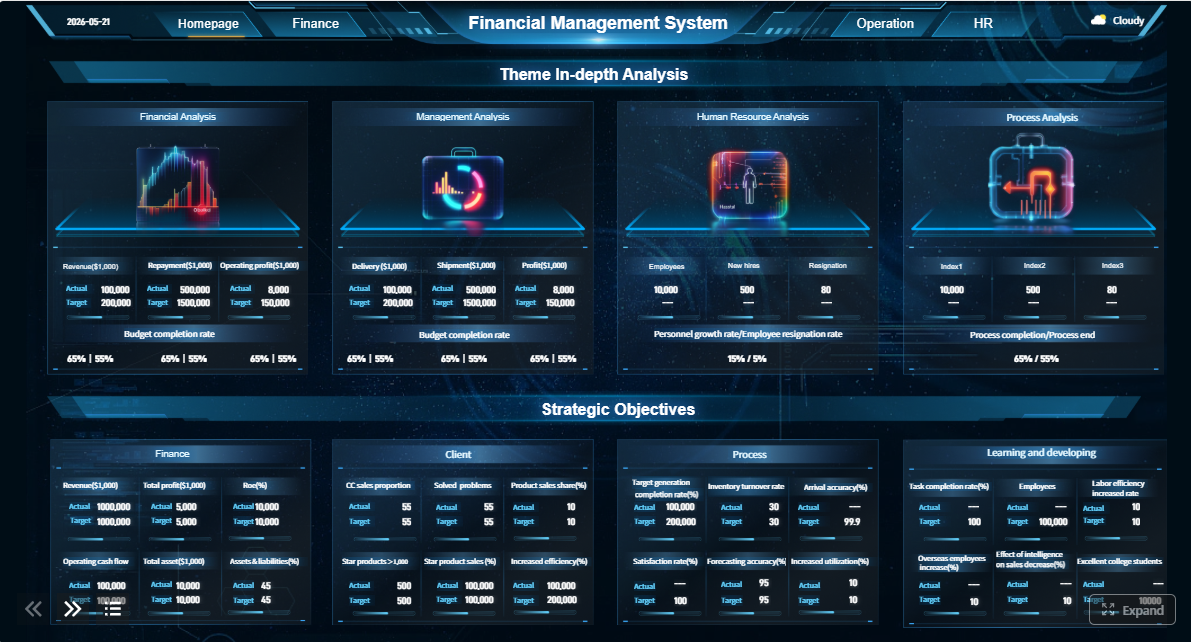 Click To Try The Dashboard
Quick Comparison Table
| Tool / Category | Best for | Dashboarding | Pixel-perfect reporting | Paginated reports | Data entry/forms | Scheduling and distribution | Enterprise deployment | Ease of use | Recommended users |
|---|---|---|---|---|---|---|---|---|---|
| Excel add-ins like Vena or Datarails | Finance teams staying close to Excel | Moderate | Strong | Moderate | Limited | Moderate | Moderate | High for Excel users | Controllers, FP&A, Excel-heavy teams |
| ERP-native reporting like Sage Intacct reporting or NetSuite reporting | Teams wanting tight transaction alignment | Moderate | Moderate | Moderate | Limited to ERP workflows | Strong | Strong within ERP ecosystem | Moderate | Finance teams standardized on one ERP |
| Query-driven tools like FineReport | Complex operational and financial reporting | Strong | Strong | Strong | Strong | Strong | Strong | Moderate | Teams needing structured reports plus dashboards |
| BI tools like Power BI | Interactive analysis and management visibility | Strong | Limited to moderate | Moderate with add-ons/services | Limited | Strong | Strong | Moderate | Analysts, business managers, finance with BI support |
| Tableau | Visual exploration and executive analytics | Strong | Limited | Limited to moderate | Limited | Moderate | Strong | Moderate | Data teams, finance teams focused on visual analysis |
| SSRS / developer-led reporting | Highly formatted scheduled reports in Microsoft environments | Limited | Strong | Strong | Limited | Strong | Strong in Microsoft stack | Lower for business users | IT-led reporting teams |
| AI-assisted reporting platforms | Narrative generation and audit-supporting workflows | Moderate | Moderate | Moderate | Limited | Moderate | Moderate to strong | Moderate | Teams prioritizing documentation and review speed |
This table is intentionally balanced. Different tools serve different reporting styles. A finance team building recurring statement packages has different needs from an analyst building interactive dashboards.

Best financial report writing software for mid-sized teams: what matters most
Mid-sized finance teams sit in an awkward but important stage of growth. They are usually too complex for manual spreadsheet-only reporting, but they may not have the budget, internal systems team, or change-management capacity of a large enterprise.
That makes software selection more practical than theoretical.
A useful financial report writing software platform for this team size should help with five things:
- Consolidation: Pull data from accounting systems, ERP platforms, spreadsheets, and sometimes operational systems into one reporting process.
- Audit trails: Track who changed what, when, and why, especially during close and review cycles.
- Permissions: Limit access by role, entity, department, or report type.
- Flexible exports: Support Excel, PDF, and printable outputs that preserve structure and formatting.
- Repeatable report production: Allow recurring monthly, quarterly, and annual reports without rebuilding layouts each time.
Why reporting depth matters more than basic dashboarding
Basic dashboarding is useful for monitoring trends, but finance reporting often requires more discipline than a set of charts can provide.
A CFO package, for example, may include:
- A summary P&L
- Department-level variance tables
- Cash position details
- Commentary sections
- Drill-down schedules
- Approval or review steps before release
That is not just visualization. That is a controlled reporting workflow.
The same is true for:
- Monthly closes, where speed and consistency matter
- Board packs, where formatting and narrative coherence matter
- Management reporting, where leaders need both summary and detail
- Audit support, where traceability and evidence matter
If a tool is great at exploring data but weak at producing governed, reusable financial outputs, it may not go deep enough for finance-led reporting.
The evaluation lens used in this comparison
To compare financial report writing software in a useful way, it helps to look beyond feature checklists.
This article evaluates tools through five practical lenses:
-
Report customization
Can the team build board-ready statements, schedules, and formatted reports without excessive workarounds? -
Data connectivity
Does the software connect well to ERP, accounting, spreadsheet, or operational data sources? -
Collaboration
Can finance iterate quickly, manage review cycles, and share outputs securely? -
Controls and governance
Are permissions, audit visibility, and version management strong enough for finance use? -
Implementation effort
How quickly can a mid-sized team get value without turning reporting into a large IT project?
How we compared 7 tools by reporting depth
Core criteria used in the comparison
The tools and categories in this guide were compared using the capabilities that usually define real reporting depth for finance teams.
1. Report design flexibility
Finance teams often need more than standard templates. They may need:
- Custom row and column logic
- Multi-section report packs
- Print-ready and PDF-ready layouts
- Structured schedules and appendices
- Branded board materials
Tools that only support lightweight visualization tend to struggle here.
2. Drill-down capability
Drill-down is not only for analysts. For finance teams, it is central to variance investigation and report trust.
A good financial reporting tool should let users move from:
- Summary statement
- Account or department subtotal
- Journal or transaction-level context
That matters when leaders ask, “What changed?” and finance needs to answer quickly.
3. Multi-entity support
Mid-sized businesses often manage:
- Multiple subsidiaries
- Departments or cost centers
- Regions
- Business units
- Intercompany structures
Not every reporting tool handles that elegantly. Some are good for one ledger view but become difficult when consolidations or parallel entity reporting is required.
4. Excel compatibility
Excel remains deeply embedded in finance. Even when teams want to reduce spreadsheet dependence, they still often need:
- Familiar editing logic
- Data exports to Excel
- Excel-based review steps
- Hybrid workflows during transition
The best choice is not always the one that removes Excel entirely. Often it is the one that places Excel in the right role.
5. Scheduled distribution
Recurring report distribution is one of the clearest markers of mature reporting software.
Look for support for:
- Scheduled PDF or Excel delivery
- Role-based report access
- Board pack assembly
- Department-specific distribution
- Consistent monthly report publishing
Governance features that matter in finance
Reporting depth is also about control, not just formatting.
Mid-sized finance teams should evaluate whether the tool supports:
- Version control
- Role-based access
- Approval workflows
- Audit visibility
- Reusable templates
- Secure report sharing
Without these controls, the reporting process may remain fast but fragile.
Usability for finance-led iteration
Many finance teams do not want every report update to become an IT ticket. That is why usability matters.
A practical reporting tool should help finance teams:
- Adjust layouts quickly
- Add columns or segments when reporting needs change
- Refresh recurring reports without heavy redevelopment
- Test report outputs during close cycles
The more a tool depends on specialist development for everyday report maintenance, the less agile finance becomes.
Reporting depth tiers at a glance
Not all financial report writing software fits the same reporting style. Most options fall into one of four broad groups.
Add-ins
These tools extend Excel-based workflows with better connectivity, versioning, and automation. They are often attractive for finance teams that want rapid adoption and familiar interfaces.
Best suited for:
- Recurring financial statements
- Budget versus actuals
- Departmental reporting
- Teams that still rely heavily on Excel
Standalone platforms
These tools provide a dedicated reporting environment outside core spreadsheets and often outside the ERP as well. They may support dashboards, formatted reports, workflows, and broader enterprise reporting.
Best suited for:
- Management reporting
- Cross-functional reporting
- Packaged reports with drill-down
- Teams wanting stronger governance
ERP-native reporting tools
These stay close to system-of-record data and can simplify trust, controls, and operational alignment.
Best suited for:
- Transaction-linked reporting
- Standard finance packages
- Teams heavily standardized on one ERP
- Approval-led workflows
Advanced query-based tools
These are stronger when data structures are complex, sources are mixed, and reporting logic needs more customization.
Best suited for:
- Multi-entity reporting
- Custom financial logic
- Operational-financial blended reports
- Detailed drill-down and parameter-based reporting
The 7 tools compared
1. Spreadsheet-based add-ins for finance-led reporting
Spreadsheet-based add-ins remain one of the most common starting points for mid-sized finance teams.
Examples in this category often include Excel-centered financial reporting and planning tools such as Vena, Datarails, or similar platforms that preserve the spreadsheet experience while adding structure around it.
They are usually best for teams that want:
- Familiar workflows
- Fast adoption
- Flexible formatting
- Low training overhead
Strengths
- Finance users can work in a familiar environment
- Formatting is often easier for statement-style reports
- Quick edits are possible during close
- Transition from legacy spreadsheet processes is smoother
Trade-offs
- Governance can weaken if spreadsheet logic spreads too widely
- Collaboration may still depend on workbook discipline
- Cross-functional reporting can become harder as scope grows
- Audit and version controls vary significantly by platform
Best fit
This category fits teams where finance wants to move faster without immediately replacing spreadsheet-based reporting behavior.
2. ERP-native reporting suites for operational alignment
ERP-native reporting tools are often attractive to finance leaders who want tighter alignment with transaction-level data and built-in system controls.
Examples may include reporting suites embedded in or closely tied to platforms like NetSuite, Sage Intacct, Microsoft Dynamics, or other ERP ecosystems.
They are usually strongest when the team values:
- Source-of-truth consistency
- Less manual handoff between systems
- Better alignment with approvals and accounting processes
Strengths
- Stronger connection to underlying transactions
- Better data governance within the ERP environment
- Easier consistency across finance and operations
- Reduced risk of reporting from stale exports
Trade-offs
- Custom formatting may be less flexible than dedicated report tools
- Reporting design can be constrained by the ERP’s framework
- Cross-system reporting may require additional tooling
- Executive pack design may still need external formatting steps
Best fit
This category works well for teams that are deeply committed to one ERP and mostly need standardized operational and finance reporting tied to that environment.
3. Query-driven tools for complex financial analysis
Query-driven reporting tools are often a better match when reporting complexity outgrows both spreadsheets and basic ERP reports.
This category is useful for finance teams handling:
- Multiple entities
- Layered dimensions
- Mixed source systems
- Custom statement logic
- Drill-down-heavy management reporting
FineReport fits naturally into this category because it supports structured report design, parameter queries, dashboard and report integration, scheduled distribution, and enterprise reporting workflows.
Strengths
- More flexible access to complex data structures
- Strong support for custom report logic
- Better fit for highly formatted recurring reports
- Useful for combining operational and financial reporting
- Often stronger for parameter-based report access and distribution
Trade-offs
- Setup can take more planning than spreadsheet add-ins
- Teams may need support defining data models and report standards
- User learning curve is typically higher than plain Excel workflows
Best fit
This category is often the right choice for mid-sized teams with growing complexity that need more than ad hoc analysis but are not ready to accept reporting limitations from simpler tools.
4. AI-assisted reporting platforms for audit-ready output
AI-assisted reporting platforms are gaining attention because they can help finance teams move faster on draft creation, consistency checks, supporting narratives, and review preparation.
These platforms are not a substitute for finance judgment. But they can be useful for reducing repetitive writing work and surfacing anomalies that deserve attention.
Strengths
- Faster first drafts for commentary and summaries
- Help identifying unusual changes or gaps
- Support for documentation and review preparation
- Useful in audit-supporting workflows where consistency matters
Trade-offs
- Financial outputs still require formal review
- Governance policies must define acceptable AI use
- Narrative speed does not automatically mean reporting accuracy
- AI support is more useful when the underlying report structure is already strong
Best fit
These tools suit teams that already have a defined reporting process and want to improve efficiency around explanation, review, and documentation.
5. Power BI for finance dashboards and interactive management reporting
Power BI is widely used for business intelligence and is often shortlisted by finance teams because it supports interactive dashboards, strong Microsoft ecosystem alignment, and broad data connectivity.
Strengths
- Strong dashboarding and visualization
- Good fit for management insight and KPI monitoring
- Broad adoption and ecosystem support
- Useful for self-service analysis across departments
Trade-offs for financial report writing software use
- Board-ready financial statements may require extra formatting work
- Pixel-perfect finance outputs are not its primary strength
- Formal reporting workflows may need supporting tools or services
- Excel-like finance editing behavior is limited compared with spreadsheet-centric tools
Best fit
Power BI is a strong option when finance needs interactive visibility, management dashboards, and broader business reporting alongside standard reporting outputs.
6. Tableau for executive analytics and visual storytelling

Tableau is often chosen for data exploration, visual analysis, and executive-facing dashboards. Finance teams with analytics-heavy needs may find it valuable for spotting trends and communicating performance visually.
Strengths
- Excellent visual exploration
- Strong storytelling for executive analytics
- Flexible dashboard creation
- Good for cross-functional business insights
Trade-offs for finance reporting depth
- Not primarily designed for highly formatted financial statements
- Paginated or print-perfect reporting may require additional tooling
- Finance workflows centered on recurring statement packages may need more structure than Tableau alone provides
Best fit
Tableau is often best for teams prioritizing analysis and presentation over controlled, finance-led report production.
7. SSRS and developer-led report tools for scheduled formatted reporting
SQL Server Reporting Services and similar developer-led reporting tools remain relevant, especially in organizations with Microsoft-heavy environments and internal technical resources.
Strengths
- Strong for paginated, repeatable reports
- Good scheduled distribution
- Useful for operational and formatted reporting
- Familiar in many established enterprise environments
Trade-offs
- Business-user flexibility is often limited
- Report changes may depend on IT or developers
- Dashboarding and modern self-service analysis are not the primary strength
- Finance teams wanting rapid iteration may feel constrained
Best fit
These tools are useful when structured report delivery matters more than self-service design and when internal technical support is available.
Side-by-side comparison: strengths, trade-offs, and best-fit teams
Where each tool stands out
The right financial report writing software depends on what kind of reporting your team does most often.
| Reporting scenario | Strongest tool types | Why |
|---|---|---|
| Board reporting | Spreadsheet add-ins, query-driven tools, some CPM platforms | Strong formatting, recurring packages, controlled review |
| Month-end packages | ERP-native tools, query-driven tools, spreadsheet add-ins | Repeatable logic, distribution, drill-down, and finance control |
| Statutory or print-ready reporting | Query-driven tools, SSRS-style tools, some ERP-native suites | Structured layouts and paginated output matter most |
| Cross-functional management reports | Power BI, Tableau, query-driven tools | Better blending of finance and operational metrics |
| Audit support | ERP-native tools, AI-assisted platforms, query-driven tools | Traceability, consistency, and supporting workflow depth |
| Fast finance-led iteration | Spreadsheet add-ins, some query-driven tools | Easier changes without full redevelopment |
A tool can be strong in one area and weaker in another. That is normal. The goal is to match the software to the reporting burden your team carries every month.
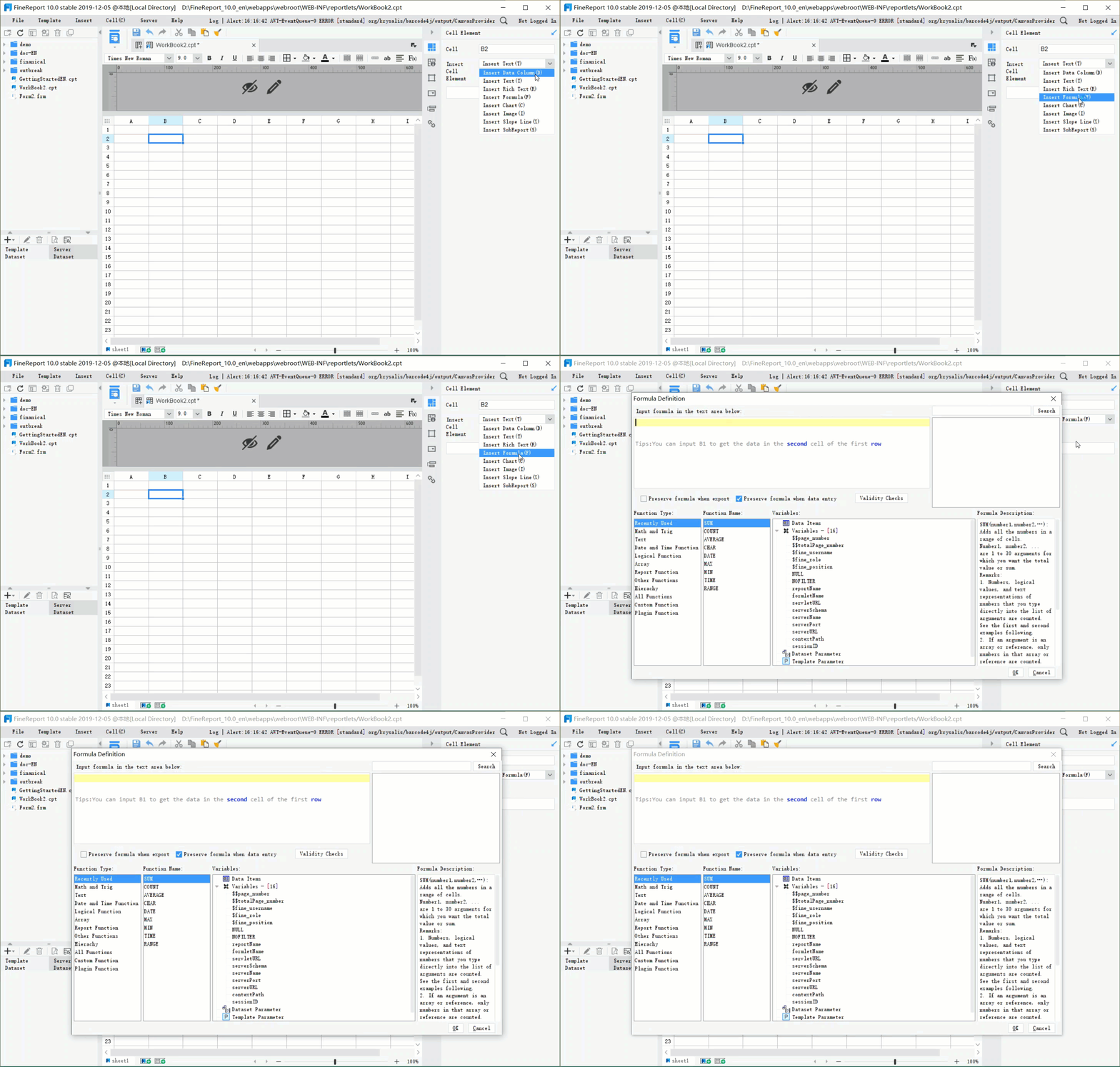
Common trade-offs mid-sized teams should expect
Mid-sized teams almost always face the same set of compromises.
Flexibility vs control
The more freedom users have to design reports, the more governance the organization must enforce. Spreadsheet-heavy tools offer flexibility, but dedicated platforms often provide stronger structure.
Ease of use vs reporting depth
The easiest tools to adopt are not always the deepest. Finance teams may start with familiar environments, then outgrow them as entity complexity and governance demands increase.
Rapid deployment vs long-term scalability
Quick wins matter, especially for lean finance teams. But software that works for ten recurring reports may struggle when the business needs fifty, across regions, entities, and stakeholder groups.
License cost vs implementation cost
A lower subscription cost does not always mean lower total cost. Implementation effort, internal admin time, process redesign, and support requirements can affect long-term value more than the license line item.
How to choose the right option for your finance team
Questions to ask before shortlisting vendors
Before you compare demos, clarify the reporting problem.
What reports must be standardized?
List the outputs that need consistency every cycle, such as:
- Monthly management pack
- Board deck support schedules
- Department P&L reports
- Cash flow reporting
- Audit support schedules
These should be the core test cases.
Which reports need ad hoc flexibility?
Some reporting should be standardized. Some should remain exploratory. If you blur the two, tools get misjudged. A good dashboard product may still be weak for recurring statement production, and vice versa.
How many entities, departments, and approval layers are involved?
If your business has multiple entities, regional leadership, or layered approvals, governance features matter much more than they do in a single-entity reporting setup.
How much Excel dependence is acceptable?
Be realistic. For many mid-sized finance teams, the question is not whether Excel exists. It is where Excel should remain central and where governance needs to move into a more controlled platform.
How important are AI assistance, audit support, and ERP-native workflows?
These are not universal priorities. They become important when your team spends meaningful time on narrative creation, reconciliation support, or system-of-record alignment.
A practical shortlist approach
The most effective way to choose financial report writing software is to shortlist by reporting depth first, not brand awareness first.
Use this sequence:
-
Classify your reporting style
Is your team mostly spreadsheet-led, ERP-led, dashboard-led, or complexity-led? -
Choose two or three tool types, not seven vendors
Compare categories first to avoid wasting time on poor-fit demos. -
Run a sample reporting workflow
Ask vendors to replicate a real month-end or board-report process, including:- Design speed
- Data refresh
- Review and approval handling
- Drill-down
- Distribution quality
- Export fidelity
-
Check the maintenance burden
Ask who updates layouts, changes dimensions, manages permissions, and handles new report requests after go-live. -
Score long-term fit, not just demo polish
The right tool is the one your finance team can sustain under real reporting pressure.
Practical recommendations for mid-sized finance teams
Here are five practical recommendations based on common reporting transformation projects.
-
Separate dashboards from governed financial reports
Do not assume one tool should do everything equally well. Dashboards are useful, but finance often needs formal outputs with stricter controls. -
Use one or two real monthly reports as the buying test
A vendor demo should prove the tool can handle your actual board pack, variance review, or consolidated statement workflow. -
Treat distribution and review as core requirements
Report writing is not finished when the report is built. Scheduling, approvals, comments, and secure sharing are part of the workflow. -
Be honest about Excel’s role
If your team will continue to live in Excel for part of the process, choose software that works with that reality rather than against it. -
Prioritize reporting depth before AI features
AI can speed explanation and quality checks, but it does not replace strong report structure, data trust, or governance.
When FineReport is a good fit for financial report writing software
Tools like Tableau and Power BI are widely used for visualization and BI analysis, but teams with complex reporting workflows may also need a dedicated enterprise reporting platform like FineReport.
For mid-sized finance teams, FineReport is especially relevant when reporting needs go beyond KPI dashboards and into structured operational and financial reporting.
FineReport supports capabilities that matter in this context:
- Pixel-perfect report design for formatted financial statements and management packs
- Paginated and printable reports for recurring monthly and board-facing outputs
- Parameter queries for filtering by period, entity, department, or region
- Scheduled distribution to automate report delivery
- Dashboard and report integration so summary views can connect with detailed reports
- Data entry and form-based workflows when finance processes require controlled input or adjustments
- Enterprise reporting governance for broader organizational use
That does not mean FineReport is the right choice for every finance team. If your primary need is lightweight dashboarding or pure Excel continuity, other tools may feel more familiar. But if your reporting process includes deeply formatted reports, recurring distribution, mixed financial and operational data, and controlled workflows, FineReport is a strong platform to evaluate.

Get Ready-to-Use Dashboard and Report Templates in Fine Gallery
Why FineReport stands out on reporting depth
From a reporting consultant’s perspective, FineReport is most useful when finance teams need one platform to bridge several reporting demands at once:
- Executive dashboards for visibility
- Print-ready reports for finance distribution
- Detailed drill-down reports for investigation
- Parameterized queries for self-service access
- Structured report templates for recurring periods
That combination is important because many teams do not actually need “more charts.” They need a more reliable way to create, govern, and distribute financial reports that still connect to live business data.
Typical use cases where FineReport fits
FineReport is worth shortlisting when your team needs to support:
- Monthly financial packages
- Department or entity-based reporting
- Board-support schedules
- Operational-financial blended reports
- Report distribution across managers and executives
- Drill-down from summary finance views into underlying details
It can also be useful when finance must collaborate with operations, sales, or manufacturing teams and needs reporting that spans both tabular detail and dashboard summaries.
Final takeaways for comparing reporting depth
The best financial report writing software for a mid-sized team depends less on raw feature count and more on how deeply the tool supports your real reporting workflow.
In general:
- Spreadsheet-based add-ins fit teams that value flexibility and fast adoption
- ERP-native reporting fits teams that prioritize controls and source-of-truth alignment
- Query-driven tools fit teams with more complexity, customization, and recurring structured reporting needs
- BI platforms fit teams that prioritize visual analysis and management insight
- AI-assisted tools fit teams trying to accelerate documentation and review, not replace finance judgment
For many mid-sized finance teams, the turning point comes when reporting is no longer just about creating numbers. It becomes about writing, reviewing, governing, and distributing those numbers in a way the business can trust.
That is where reporting depth matters most.
If your team needs highly formatted reports, parameterized access, recurring distribution, and integrated dashboards and detailed statements, FineReport is one of the more practical platforms to evaluate alongside spreadsheet, ERP, and BI-oriented options.
FAQs
Financial report writing software helps finance teams create recurring statements, board packs, variance reports, and audit-ready outputs using connected data instead of rebuilding everything in spreadsheets each cycle.




