A data file is a digital container that stores information like text, numbers, or images. You often use data files to manage and organize data efficiently. They play a crucial role in data management by allowing you to store and retrieve information easily. Data files come in various formats, such as spreadsheets and databases, which help you handle different types of data. With tools like FineDataLink, FineReport, and FineBI, you can integrate, analyze, and visualize data files effectively, enhancing your ability to make informed decisions.
What Is a Data File?
A data file is a named collection of related data stored on a computer system or cloud storage. It has a defined format (indicated by its extension, such as .csv, .xlsx, .json) that tells software how to interpret its contents. Unlike executable files (.exe, .app), data files contain information meant to be read, processed, or displayed—not executed.
Key characteristics of data files include:
- Format-defined structure. The file extension and internal schema determine how data is organized and which applications can open it.
- Portability. Data files can be copied, transferred, emailed, uploaded, and shared across systems and platforms.
- Persistence. Data remains stored until explicitly modified or deleted, independent of any running application.
- Variety. Data files range from simple plain-text logs to complex binary formats containing multimedia, geospatial, or scientific data.
In business contexts, data files serve as inputs to analytics pipelines, outputs from operational systems, exchange formats between organizations, and archival records for compliance and audit.
How Data Files Work
Data files follow a consistent lifecycle regardless of format:
- Creation. An application, system, or user generates a file in a specific format. A CRM exports customer records as CSV; a web server writes access logs as plain text; an API returns response data as JSON.
- Storage. The file is saved to local disk, network share, cloud object storage (S3, Azure Blob), or database file system. Metadata (name, size, creation date, permissions) is recorded by the file system.
- Access and processing. Applications read the file according to its format specification. A BI tool parses CSV rows into table columns; an ETL pipeline transforms JSON payloads into warehouse tables; a script extracts fields from log entries.
- Transformation and integration. Data from multiple files—or files combined with database records—is cleaned, joined, aggregated, and loaded into downstream systems for analysis, reporting, or AI consumption.
- Archival or deletion. Files are retained per policy (compliance, audit, business need) or purged when no longer required. Retention schedules, encryption, and access controls govern this stage.
Understanding this lifecycle clarifies why file format choice, naming conventions, and integration tooling matter: each stage introduces opportunities for error, inconsistency, or inefficiency if not managed deliberately.
Common Data File Types and Examples

Business environments use dozens of file formats. The following table covers the most frequently encountered types in enterprise data workflows.
Structured Data Files
Structured data files organize information in a predefined format. This structure makes it easier for you to store, retrieve, and analyze data.
CSV and Excel Files
CSV (Comma-Separated Values) and Excel files are popular structured data formats. You often use CSV files for their simplicity and compatibility with many applications. Each line in a CSV file represents a record, and commas separate the fields. Excel files, on the other hand, offer more features. You can use formulas, charts, and pivot tables to analyze data. These files are ideal for handling tabular data and performing calculations.
Database Files
Database files store data in a structured manner, allowing you to manage large datasets efficiently. You use databases like SQL Server, Oracle, or MySQL to store and query data. These systems provide robust tools for data management, ensuring data integrity and security. By using database files, you can perform complex queries and generate reports that support business intelligence initiatives.
Unstructured Data Files
Unstructured data files contain information that does not follow a specific format. These files require different approaches for analysis and management.
Text and Log Files
Text and log files store unstructured data in plain text format. You often use text files for storing notes or documentation. Log files, however, record events or transactions in systems. Analyzing log files helps you monitor system performance and identify issues. Tools like Alteryx and Tableau can process these files, enabling you to extract valuable insights.
Multimedia Files
Multimedia files include images, audio, and video. These files present unique challenges for data analysis. You need specialized tools to process and analyze multimedia content. For instance, you might use tools for analyzing video data in business intelligence applications. By leveraging multimedia files, you can gain insights into customer behavior and preferences, enhancing your strategic initiatives.
Format selection depends on data structure, volume, consumer requirements, and interoperability needs. CSV and Excel dominate business user workflows; JSON and XML serve application integration; Parquet and Avro optimize analytical and streaming workloads; PDF and images serve document-centric processes.
Structured vs Unstructured Data Files
The distinction between structured and unstructured data files determines which tools and techniques apply.
Semi-structured files (JSON, XML, log files with consistent patterns) occupy a middle ground: they lack rigid tabular schemas but contain parseable markers that enable automated extraction. Most enterprise data integration platforms handle all three categories, though unstructured processing typically requires additional specialized capabilities.
Data File vs Database vs Dataset
These terms are often used interchangeably but refer to distinct concepts. Clarity prevents miscommunication in data projects.
Practical distinctions:
- A data file is a storage artifact. You can copy, email, or upload it independently.
- A database manages data. It enforces constraints, handles concurrent access, and provides query interfaces. Data files may be imported into or exported from databases.
- A dataset describes a curated collection for use. It may reside in one file, many files, a database, or a combination. Datasets are defined by their analytical purpose, not their storage format.
In enterprise workflows, data files are typically inputs to or outputs from databases and datasets. Understanding the distinction ensures correct tool selection: you query databases, prepare datasets, and transfer or archive data files.
Why Data Files Matter in Business
Despite the prevalence of databases and cloud warehouses, data files remain central to enterprise operations for several reasons:
- System interoperability. Files are the universal exchange format between systems that cannot connect directly. ERP exports to CSV; partners receive JSON via API; regulators accept PDF submissions.
- Human accessibility. Business users create, edit, and share Excel and CSV files natively. Files bridge the gap between technical systems and non-technical stakeholders.
- Portability and archival. Files can be stored, backed up, encrypted, and transferred independently of any application or infrastructure. Compliance archives often require file-level retention.
- Integration entry point. Many data pipelines begin with file ingestion: landing zone files, FTP drops, email attachments, S3 buckets. Reliable file integration is foundational to downstream analytics.
- Legacy and edge compatibility. Older systems, IoT devices, and edge deployments often produce file-based outputs. Modern integration must accommodate these sources.
The business value of data files lies not in the files themselves but in what they enable: cross-system data flow, human-data interaction, and reliable integration foundations for analytics and AI.
Common Challenges in Managing Data Files
Data Volume and Complexity
Handling data files can become challenging as the volume and complexity of data increase. You need to adopt effective strategies to manage large datasets and ensure data quality.
Handling Large Datasets
Managing large datasets requires efficient storage and retrieval methods. You should use data compression techniques to save space and improve access speed. Tools like FineDataLink can help you synchronize and manage large volumes of data in real-time. By organizing data logically, you can enhance performance and reduce processing time.
Ensuring Data Quality
Maintaining data quality is crucial for accurate analysis and decision-making. You should implement regular data audits to identify and correct errors. Using metadata can help you track data changes and maintain consistency. FineDataLink's ETL capabilities allow you to transform and cleanse data, ensuring high-quality datasets for analysis.
Security and Compliance
Data security and compliance are vital in managing data files. You must protect sensitive information and adhere to regulatory requirements.
Protecting Sensitive Information
You need to implement robust security measures to safeguard sensitive data. File security measures involve controlling access and organizing files for easy retrieval and protection. Encryption and access controls can prevent unauthorized access. Regular security audits can help you identify vulnerabilities and strengthen your data protection strategies.
Meeting Regulatory Requirements
Compliance with data protection regulations is essential for legal and ethical data management. Laws like the HIPAA Privacy Rule and Virginia CDPA mandate the protection of personal data. You must understand these regulations and implement necessary measures to comply. Failure to meet regulatory requirements can result in fines and legal consequences. By staying informed and proactive, you can ensure compliance and protect your organization's reputation.
Best Practices for Data File Management
- Standardize formats by use case. Use CSV/Parquet for analytical interchange, JSON/XML for application integration, Excel for human-facing ad-hoc work, PDF for immutable documents. Document standards and enforce them in integration pipelines.
- Automate ingestion and transformation. Eliminate manual file handling. Use FineDataLink to monitor file locations, validate on arrival, transform to target schema, and load to downstream systems on schedule or event trigger.
- Validate at every touchpoint. Profile files on ingestion for completeness, uniqueness, format compliance, and business rule adherence. Reject or quarantine invalid files before they corrupt downstream data.
- Implement naming and metadata conventions. Consistent file names, directory structures, and embedded metadata (creation date, source system, owner) enable discovery, lineage, and governance.
- Version and retain deliberately. Apply retention policies aligned to regulatory and business requirements. Archive or purge stale files on schedule. Maintain version history for critical data exchanges.
- Secure files in transit and at rest. Encrypt sensitive files. Enforce access controls. Audit file access and transfers. Treat file storage with the same security rigor as database storage.
- Monitor and alert on file anomalies. Track file arrival times, sizes, row counts, and validation pass rates. Alert on deviations that indicate upstream issues or pipeline failures.
- Document file-to-system mappings. Maintain a registry of which files feed which pipelines, warehouses, dashboards, and reports. Update when sources or consumers change.
- Prefer columnar formats for analytics. When files serve analytical workloads, use Parquet or Avro instead of CSV. Columnar formats reduce I/O, improve compression, and accelerate aggregation queries.
- Treat files as governed data assets. Assign ownership. Define quality expectations. Track lineage. Review periodically. Files deserve the same governance discipline as database tables.
How FineDataLink Helps Manage and Integrate Data Files
In many businesses, data files are still created and exchanged through Excel, CSV, logs, APIs, and exported system files. FineDataLink helps teams connect these files with databases, ERP, CRM, and cloud applications, then transform, synchronize, and deliver trusted data to downstream warehouses, dashboards, reports, and AI workflows.
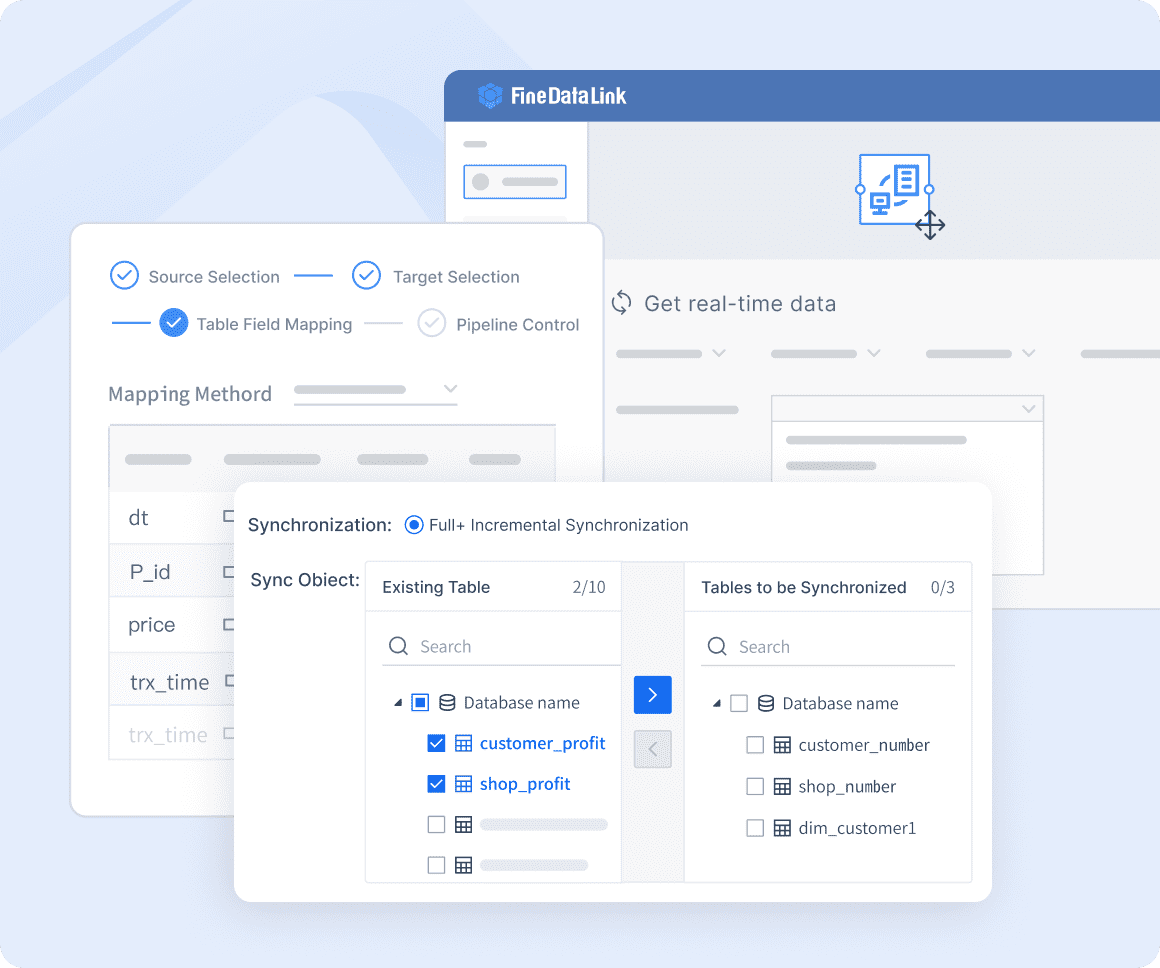
This is useful when file-based data becomes too manual, scattered, or difficult to govern. Key capabilities include:
- Multi-format file ingestion. Native support for CSV, Excel, JSON, XML, Parquet, Avro, plain text, and log files. Monitor directories, S3 buckets, FTP servers, and email attachments for new arrivals.
- Visual ETL/ELT pipeline builder. Drag-and-drop interface for designing file extraction, transformation, validation, and loading workflows without custom code.
- Built-in data quality validation. Profile files on ingestion; apply business rules; flag anomalies; quarantine invalid records before they reach downstream systems.
- Scheduled and event-driven execution. Trigger pipelines on file arrival, time schedule, or external event. Match processing frequency to business need.
- Schema drift detection and handling. Automatically detect format changes in source files; alert or adapt pipelines without manual intervention.
- End-to-end lineage. Trace data from source file through every transformation step to final destination. Support compliance, auditing, and troubleshooting.
- Scalable processing. Distributed execution handles large files and high-volume ingestion without proportional operational overhead.
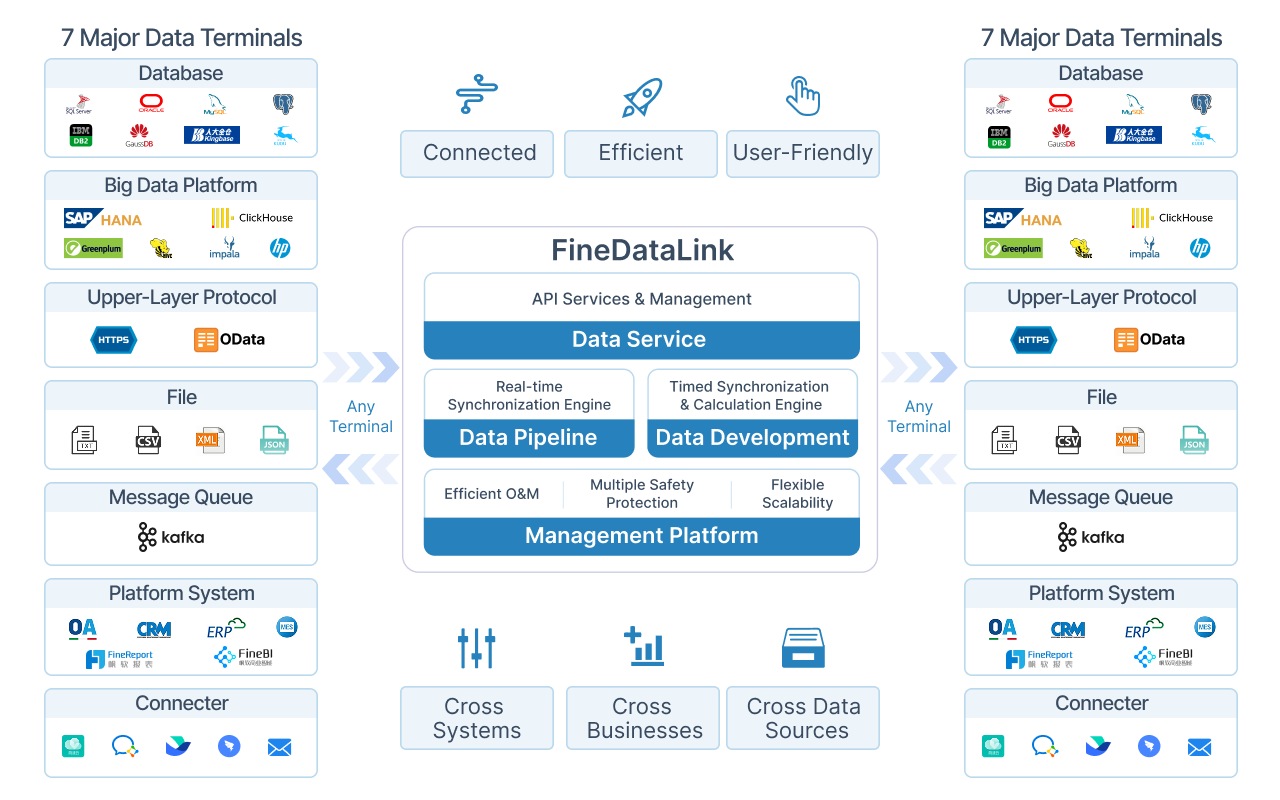
When data files are standardized and integrated into governed data pipelines, AI data agents like Dora can use trusted data to support natural-language analysis, summaries, and anomaly follow-up.
Connect and manage business data files with FineDataLink →

FanRuan
https://www.fanruan.com/en/blogFanRuan provides powerful BI solutions across industries with FineReport for flexible reporting, FineBI for self-service analysis, and FineDataLink for data integration. Our all-in-one platform empowers organizations to transform raw data into actionable insights that drive business growth.
FAQ
What is a data file?
A data file is a named digital container that stores information—text, numbers, dates, images, logs—in a specific format that software can read and process. Common examples include CSV spreadsheets, JSON API responses, Excel workbooks, XML configurations, and plain-text log files. Data files are distinguished from executable files by their purpose: they contain information to be read or processed, not instructions to be run.
What are common examples of data files?
Common business data files include CSV files for data export and interchange, Excel workbooks for financial modeling and ad-hoc analysis, JSON files for API responses and web application data, XML files for legacy system integration and industry standards, Parquet files for analytics warehouses, plain-text log files for system monitoring, and PDF files for contracts and regulatory filings. Format choice depends on data structure, volume, consumer requirements, and interoperability needs.
Is Excel a data file?
Yes. Excel files (.xlsx, .xls) are among the most widely used data files in business. They store tabular data with optional formulas, formatting, charts, and multiple sheets. Excel files serve as both human-editable analysis tools and machine-readable data sources for ETL pipelines. However, they have limitations for large-scale or automated workflows: binary format complicates programmatic access, version control is difficult, and concurrent editing creates conflicts. For production data integration, consider converting Excel sources to CSV or Parquet within governed pipelines.
What is the difference between a data file and a database?
A data file is a portable, self-contained storage artifact in a specific format (CSV, JSON, Excel). A database is a managed system that stores, queries, secures, and enforces integrity across multiple tables or collections with concurrent access support. Data files can be imported into or exported from databases, but databases provide capabilities files lack: schema enforcement, transactional integrity, query languages, and access control. In enterprise workflows, files typically serve as inputs to or outputs from databases.
How do businesses manage large data files?
Large file management requires format optimization, automated processing, and governance. Prefer columnar formats (Parquet, Avro) over row-based formats (CSV) for analytical workloads—they compress better and accelerate aggregation. Use chunked or distributed processing to avoid memory failures. Automate ingestion with tools like FineDataLink to eliminate manual handling. Implement validation, lineage tracking, and retention policies. Monitor file sizes, arrival times, and processing durations to detect anomalies early.
How can FineDataLink integrate data files with business systems?
FineDataLink connects file sources (CSV, Excel, JSON, XML, logs, Parquet) with databases, ERP, CRM, cloud warehouses, and SaaS applications through visual ETL/ELT pipelines. It automates file monitoring, validation, transformation, and loading on schedule or event trigger. Built-in data quality checks, schema drift detection, and end-to-end lineage ensure file-based data integrates reliably into governed enterprise workflows. This replaces manual exports, email attachments, and ad-hoc scripts with repeatable, monitored, auditable data pipelines.