

A daily sales report is one of the fastest ways to turn raw sales activity into operational control. If you are a store owner, sales manager, finance lead, or operations director, you need a clear view of what happened today: how much revenue came in, which products moved, which locations underperformed, and what issues need action tomorrow. Without that daily visibility, small reporting gaps quickly become missed targets, inventory surprises, margin erosion, and poor staffing decisions.
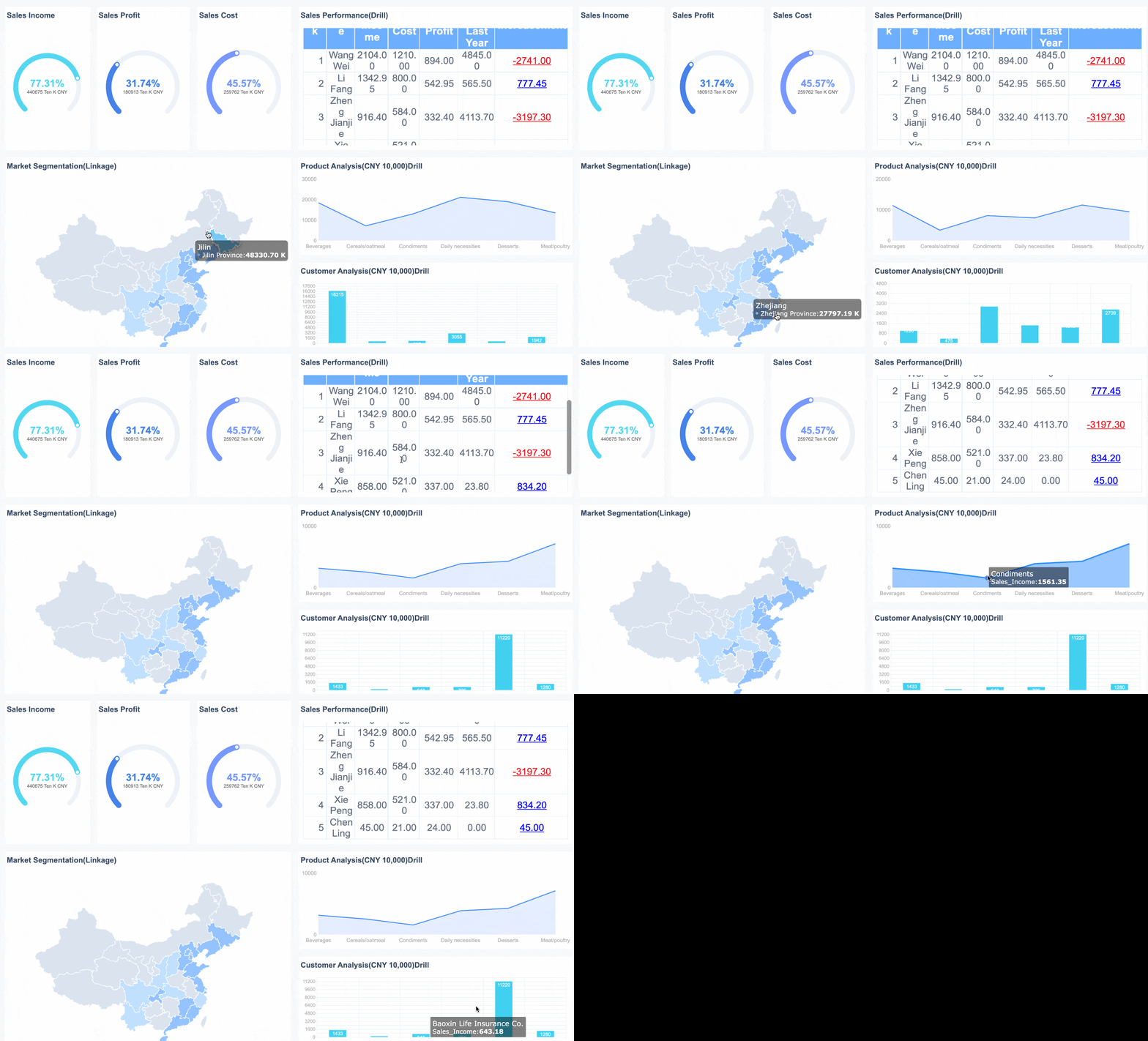
All reports in this article are built with FineReport.
What a Daily Sales Report Is and Why It Matters
A daily sales report is a structured summary of one day’s sales performance. In plain terms, it tells you what was sold, how much money was generated, how many transactions occurred, and what operational factors affected the result. It is usually created at the end of the day or at a fixed reporting cutoff time.
For most businesses, the report covers four practical areas:
- Revenue performance: how much the business sold today
- Transaction activity: how many orders or receipts were processed
- Product mix: which items, services, or categories drove results
- Team execution: which employees, channels, or locations performed best
That makes the daily sales report more than a bookkeeping exercise. It is a decision tool. A strong report helps teams identify revenue shifts early, catch refund or discount issues, and respond to unusual patterns before they become weekly or monthly problems.
It is also widely used across different roles:
- Small business owners use it to monitor cash flow and daily performance.
- Sales managers use it to compare staff output and spot coaching needs.
- Operations teams use it to understand store traffic, service bottlenecks, and stock-related issues.
- Finance teams use it to reconcile totals, track net sales, and validate reporting consistency.
- Executives use it as a daily pulse check against targets and trends.
The business value is simple: a good daily sales report shortens reaction time. Instead of waiting for the weekly review, you can adjust promotions, staffing, pricing, stock replenishment, or follow-up actions the next morning.
Key Metrics to Include in a Daily Sales Report
A useful daily sales report should be tight, standardized, and action-oriented. The goal is not to collect every available number. The goal is to surface the metrics that help someone make a decision quickly.
Revenue and sales activity
At minimum, your daily sales report should include the core revenue picture.
Key Metrics (KPIs)
- Total sales for the day: The gross or net revenue generated during the reporting period.
- Number of orders or transactions: Total completed purchases processed that day.
- Average order value (AOV): Total sales divided by total transactions; shows basket size or customer spend.
- Sales by product, service, or category: Breakdown of revenue contribution by item group.
- Units sold: Total quantity of products or services sold.
- Gross sales: Revenue before deductions such as discounts or refunds.
- Net sales: Revenue after subtracting returns, discounts, and refunds.
These metrics answer the first operational question: How much did we sell, and what drove it?
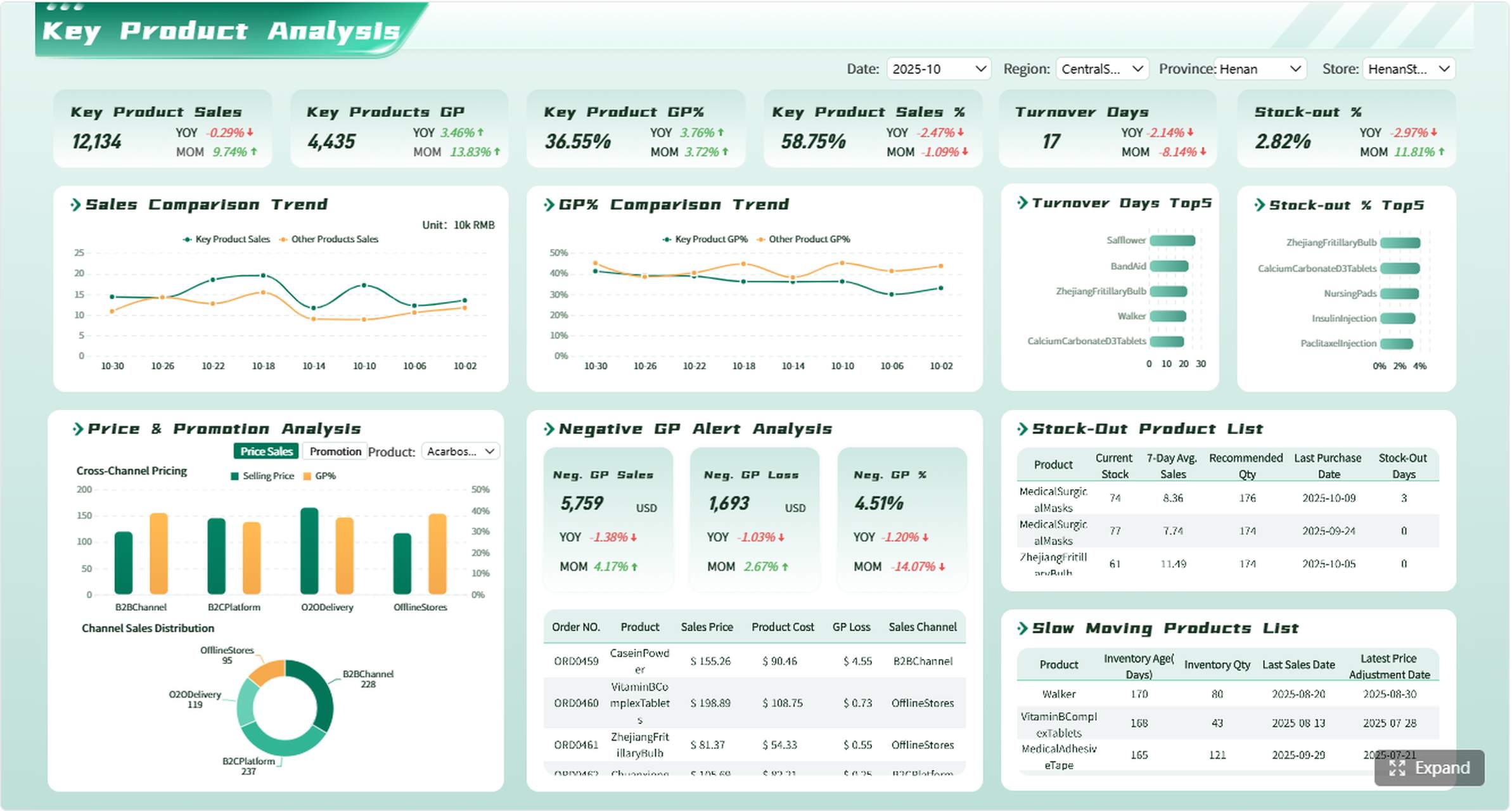
Team and channel performance
Once revenue is clear, the next layer is performance attribution. This is where managers identify who or what is driving the result.
Key Metrics (KPIs)
- Sales by employee: Revenue or transactions generated by each salesperson or cashier.
- Sales by location: Comparison across stores, regions, or branches.
- Sales by channel: Breakdown across in-store, ecommerce, field sales, phone orders, or marketplaces.
- Returns: Value or count of items returned during the day.
- Discounts: Total discounts applied, by amount or percentage.
- Refunds: Money returned to customers after completed transactions.
- Conversion rate: Percentage of leads, visitors, or inquiries that turned into sales.
- Close rate: Percentage of opportunities or quotes converted into won business, if relevant for your sales model.
These figures help you separate a demand issue from an execution issue. For example, low total sales may be caused by low traffic, poor close rates, excessive discounting, or underperformance in one channel.
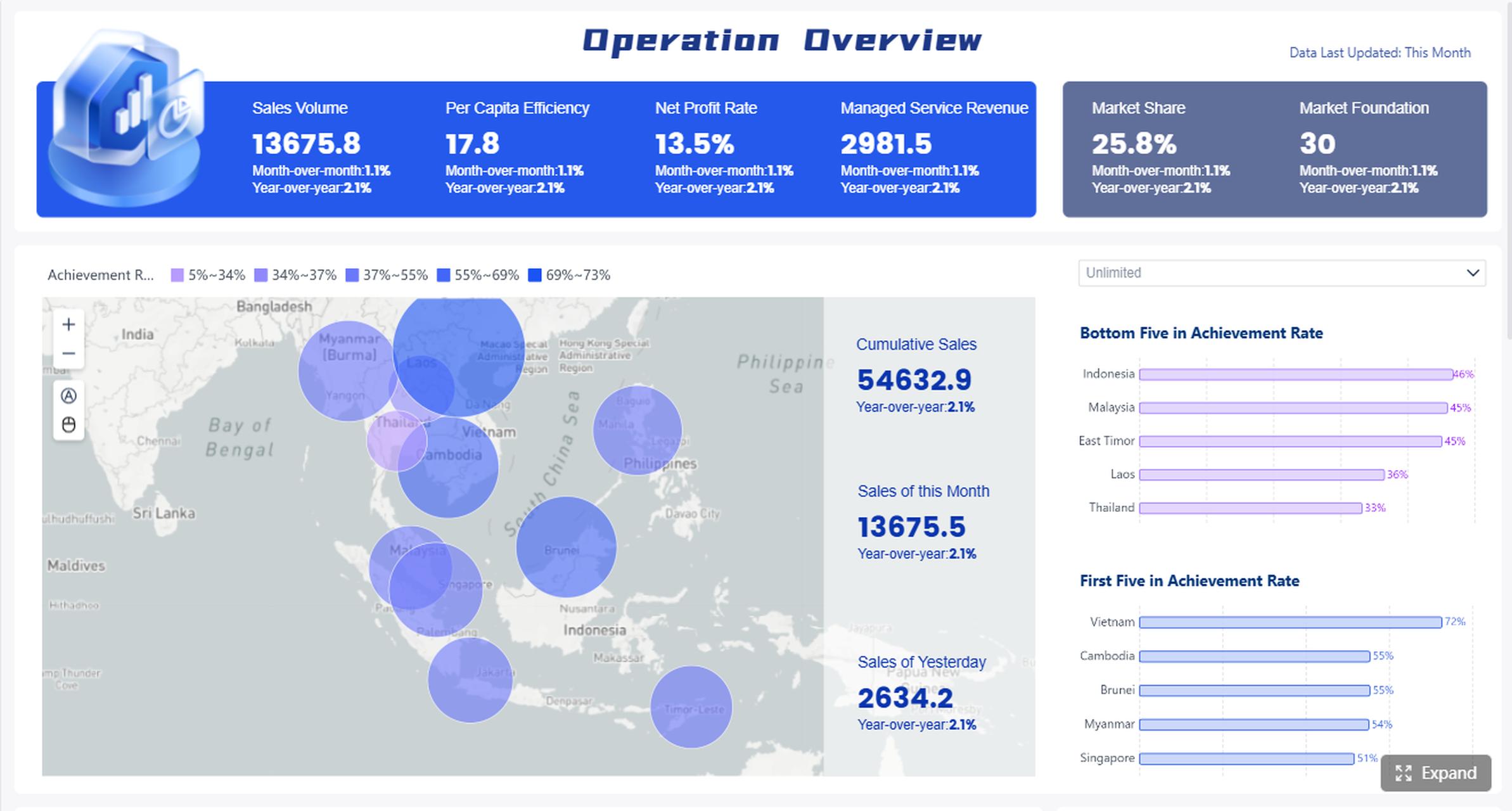
Operational context
Raw numbers alone rarely tell the full story. A daily sales report becomes far more useful when it includes context that explains why the numbers changed.
Core Elements to Include
- Promotions: Campaigns, coupons, bundles, or temporary offers active that day
- Stock issues: Out-of-stock items, delayed replenishment, or supply disruptions
- Seasonality: Weather, holidays, pay cycles, or recurring demand patterns
- Unusual events: System downtime, staffing shortages, store closures, local events, or logistics problems
- Target comparison: Actual performance versus daily target or budget
- Prior-day comparison: Today’s results versus yesterday’s results
- Same-day-last-week comparison: Useful for identifying real weekly patterns
This context layer is what turns a report into a management document instead of a static log.
How to Create a Daily Sales Report Step by Step
If you want a report people actually use, build it around a repeatable process. Below is the consultant-grade approach I recommend for teams that need consistent daily reporting without drowning in admin work.
Set the reporting goal and reporting period
Start with purpose before format. Ask: what decision is this report supposed to support?
Common goals include:
- Store operations: monitor traffic, sales mix, and shift performance
- Sales management: compare team output and track close performance
- Forecasting: identify short-term trends for inventory or staffing
- Executive updates: provide a concise performance snapshot
Then define the reporting period clearly:
- What is the cutoff time?
- Are you reporting by calendar day or business day?
- Which systems are the source of truth?
- Are returns and refunds included on the same day or posted separately?
If these rules are vague, your daily sales report will become inconsistent fast.
Collect and organize the data
Pull your numbers from the systems that actually capture sales activity. In most organizations, that includes one or more of the following:
- POS systems
- CRM platforms
- Spreadsheet trackers
- ERP or accounting tools
- Ecommerce platforms
Before publishing the report, perform a quick data quality check:
- Confirm all expected transactions have synced.
- Check for duplicate records.
- Review missing fields such as product code, employee name, or channel.
- Validate refunds, discounts, and manual overrides.
- Reconcile total sales against the day-end summary.
This is where many teams fail. They create the report first and investigate exceptions later. Experienced operators do the reverse: verify the data before distribution.
Build the report format
A daily sales report should be readable in under two minutes. The best structure is simple and repeatable.
A practical layout looks like this:
| Section | What to Include | Why It Matters |
|---|---|---|
| Summary | Total sales, transactions, AOV, net sales | Gives leaders the headline result fast |
| Detailed breakdown | Sales by product, category, employee, location, or channel | Shows what drove performance |
| Exceptions | Returns, refunds, heavy discounts, missing stock | Flags risks and abnormalities |
| Notes | Promotions, events, disruptions, observations | Adds business context |
| Actions | Follow-up steps for tomorrow | Turns insight into execution |
Keep the visual hierarchy clean. Use bold KPI cards, clear labels, and limited color coding. Overdesigned daily reports usually hide the answer instead of surfacing it.
Review, share, and archive the report
Once the report is built, close the loop operationally.
Best-practice workflow
-
Validate totals before sending
Check that gross sales, returns, discounts, and net sales reconcile correctly. -
Share with the right stakeholders at the same time every day
Consistency matters. A report sent at random times loses operational value. -
Include observations, not just data
Add one or two concise comments about what changed and why. -
Assign follow-up actions where needed
If one store underperformed or one product category dropped sharply, capture the next step. -
Archive reports in a searchable system
Daily reporting becomes far more valuable when you can compare trends over time.
This is the difference between reporting and reporting discipline.
Free Template and Simple Formats of a Daily Sales Report You Can Use
For many teams, the fastest path is to start with a simple template and refine it over time. Your first version does not need to be complicated. It needs to be complete enough to support daily review.
What to include in a basic template
A practical daily sales report template should include the following fields:
- Date
- Business unit, store, or team name
- Total sales
- Number of transactions
- Average order value
- Gross sales
- Discounts
- Returns
- Refunds
- Net sales
- Top-selling items
- Sales by employee or channel
- Comments or operational notes
- Follow-up actions for the next day
You should also leave room for short observations such as:
- promotion impact
- stockouts
- unexpected demand spikes
- staffing issues
- payment or POS errors
Spreadsheet and form options
If your process is still manual, a spreadsheet remains a workable starting point. It is especially useful for smaller teams with simple sales flows.
Common options include:
- Spreadsheet-based sales tracking sheet for manual daily updates
- Form-based daily sales report template for standardized input from multiple locations
- Shared team tracker for basic roll-up reporting
- Dashboard-connected template for automatic refresh from source systems
You can adapt the same daily sales report structure for different workflows:
- Retail: item sales, discounts, returns, cashier performance
- Service business: appointments, service revenue, upsell rates
- Ecommerce: orders, conversion rate, refunds, channel attribution
- Field sales: calls, deals closed, daily order value, rep activity
The key is to keep the structure stable while tailoring the fields to the sales model.
Industry-specific example
A restaurant needs a more operationally specific version of the daily sales report. In that environment, the report may include:
- Covers or guest count
- Sales by menu item or category
- Peak hours
- Table turns
- Voids and comps
- Cash vs card settlement
- Shift-level performance
That is a good reminder that daily sales reporting is not one-size-fits-all. The framework stays the same, but the fields should reflect the operating model.
Tools, Dashboards, and Best Practices of Making a Daily Sales Report
The right tool depends on the complexity of your reporting environment. Some teams can manage with spreadsheets. Others need integrated dashboards that pull data from multiple systems in near real time.
When to use spreadsheets vs BI tools
Use spreadsheets when:
- you have one location or a small team
- data volume is low
- reporting logic is straightforward
- manual entry is still manageable
Use BI dashboards when:
- you have multiple stores, channels, or product groups
- daily reporting requires consolidation from several systems
- leadership needs trend analysis and drill-down views
- manual work is causing delays or errors
Spreadsheets are fine for starting. They are not ideal for scale.
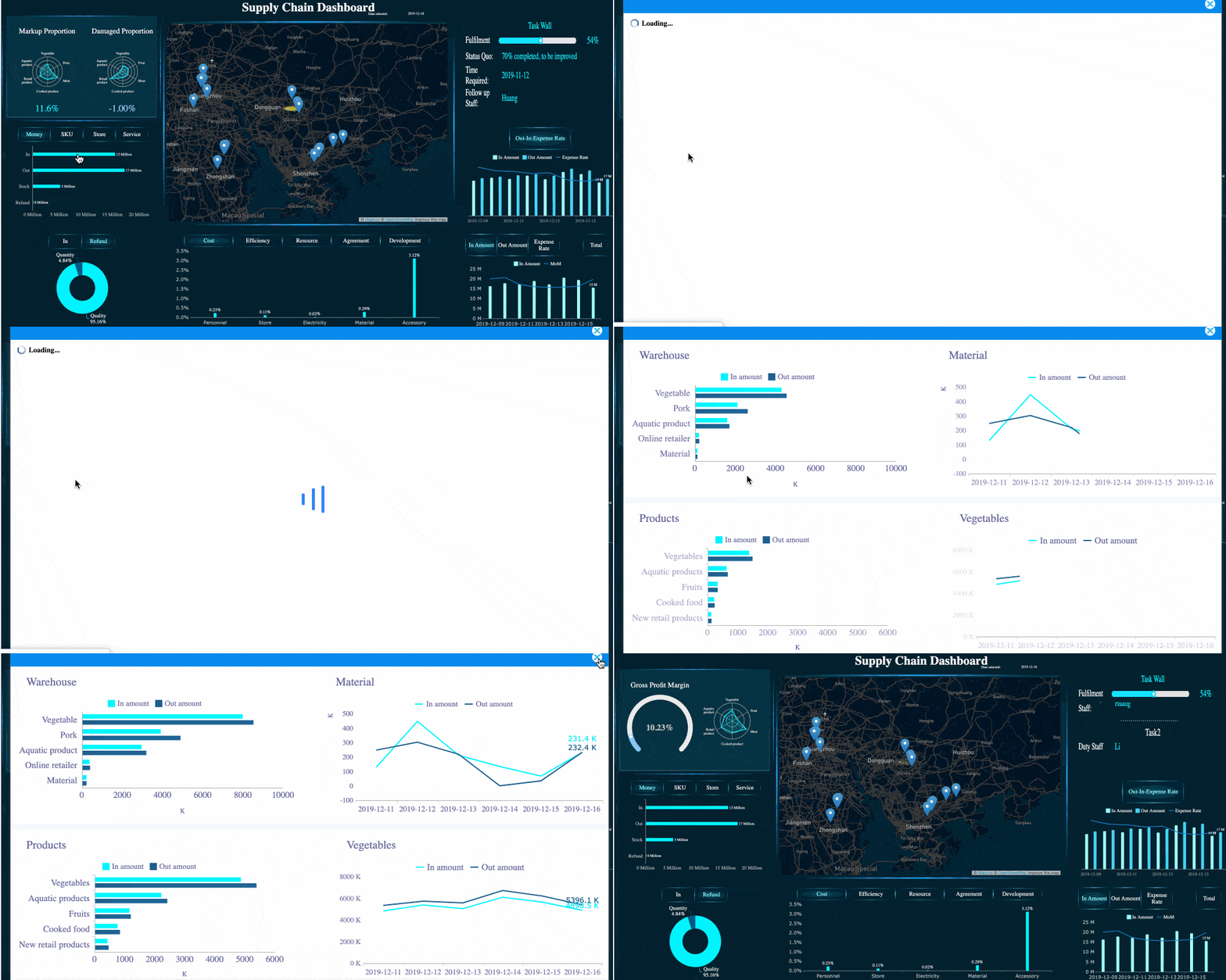 FineReport's dashboard with drill-down views
Using business systems for reporting
The strongest daily sales reports pull from operational systems instead of relying on re-entry.
Typical integrations include:
- POS to reporting dashboard for transaction-level data
- ERP to reporting layer for financial consistency
- CRM to reporting for sales activity and close-rate tracking
- Ecommerce platform to dashboard for channel performance
- Business Central and Power BI ecosystems if your organization already runs there
The advantage is obvious: fewer manual touchpoints, faster reporting cycles, and better trust in the numbers.
Best practices for accurate reporting
If you want your daily sales report to become an actual management tool, follow these implementation practices.
1. Standardize metric definitions
Agree on what each KPI means:
- Is sales reported as gross or net?
- When is a refund recognized?
- Are discounts shown separately or netted out?
- What counts as a completed transaction?
Without this discipline, every stakeholder reads the same report differently.
2. Use the same format every day
A consistent format improves speed and comparability. People should know exactly where to look for totals, anomalies, and notes.
3. Focus on action-oriented insights
Do not flood the report with numbers that no one uses. Highlight what changed, why it changed, and what should happen next.
4. Automate recurring steps
If your team spends 30 to 60 minutes assembling a daily sales report by hand, you have an automation opportunity. Pulling from connected systems reduces lag and errors.
5. Design for exceptions
The best report is not the longest one. It is the one that quickly reveals where attention is needed.
Common Mistakes to Avoid and How to Improve Your Daily Sales Report Over Time
Most daily sales reports fail for predictable reasons. The report either becomes too detailed to scan, too vague to act on, or too inconsistent to trust.
Here are the most common mistakes I see in real implementations:
- Tracking too many metrics that do not support daily decisions
- Ignoring returns, discounts, and refunds, which overstates performance
- Skipping data validation, which undermines confidence in the report
- Sending numbers without context, making the report harder to interpret
- Omitting next steps, which turns the report into passive information
- Reviewing one day in isolation, instead of comparing patterns over time
To improve your daily sales report over time, take a continuous optimization approach:
- Review which fields stakeholders actually use.
- Remove low-value metrics.
- Add comparative views against target, prior day, and same day last week.
- Introduce commentary standards so managers explain major variances.
- Move from manual files to searchable dashboards as reporting volume grows.
A mature daily sales report should help answer three questions every single day:
- What happened?
- Why did it happen?
- What do we do next?
Build Your Daily Sales Report Faster with FineReport
Building this manually is complex; use FineReport to utilize ready-made templates and automate this entire workflow.
For small teams, a spreadsheet template may be enough to get started. But once you need multi-source data, automated refreshes, role-based dashboards, mobile access, and drill-down analysis, manual reporting quickly becomes a bottleneck. That is where FineReport becomes the practical choice.
With FineReport, teams can:
- create professional daily sales report dashboards faster
- connect data from POS, ERP, CRM, and other business systems
- automate daily refresh and scheduled distribution
- standardize KPI definitions across teams and locations
- build templates for retail, restaurant, ecommerce, service, and field sales scenarios
- give leaders a real-time view of performance, exceptions, and trends
Instead of stitching together exports every evening, you can deliver a repeatable, trusted reporting workflow that supports operations, finance, and management at the same time.
 Get Ready-to-Use Dashboard Templates in Fine Gallery
If your current process depends on manual spreadsheets, disconnected exports, or inconsistent definitions, this is the point to upgrade. A modern daily sales report should not just record the day. It should improve the next one.
FAQs
A daily sales report is a summary of one day’s sales activity, including revenue, transactions, product performance, and team or channel results. It helps businesses review what happened today and decide what to adjust next.




