

The expense reporting process is the operational system companies use to capture employee spend, validate policy compliance, reimburse out-of-pocket costs, and post expenses correctly to the books. For finance leaders, controllers, and operations managers, this process directly affects three outcomes that matter every month: how fast employees get reimbursed, how reliably policy is enforced, and how cleanly the finance team closes the books. When the workflow is weak, teams deal with missing receipts, delayed approvals, duplicate claims, coding errors, and last-minute month-end cleanup. When the process is structured, expense data moves from submission to reimbursement to reconciliation with far less friction.
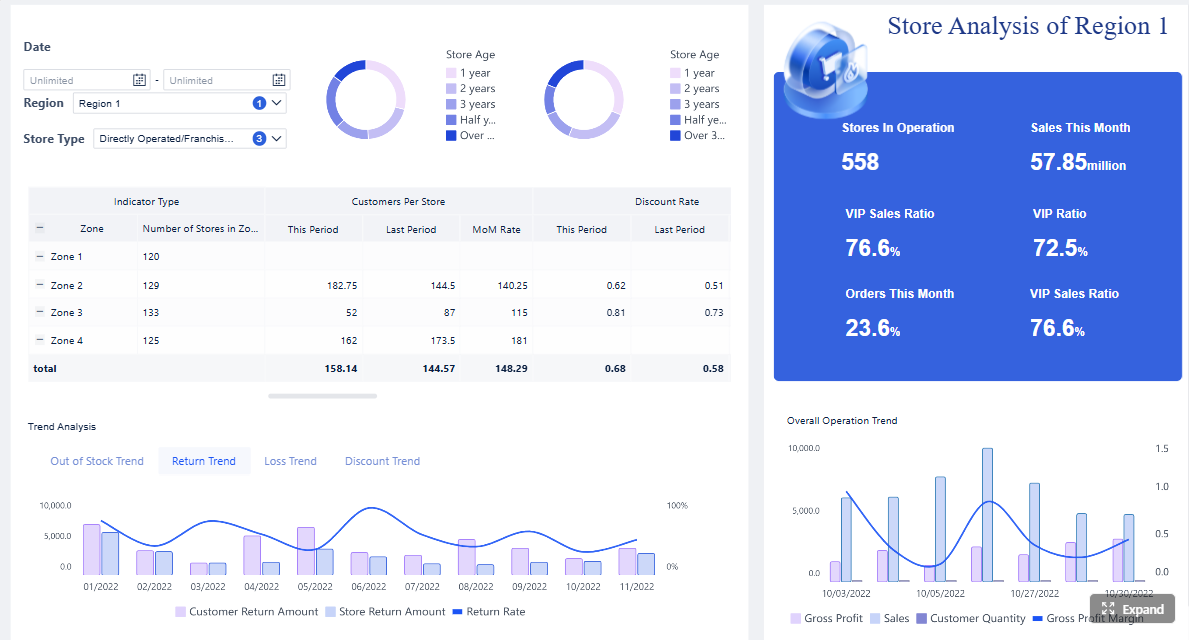
All reports in this article are built with FineReport
Expense Reporting Process: What It Is and Why It Matters
The purpose of expense reporting in day-to-day finance operations is simple: document business spending in a consistent, reviewable, and auditable way. In practice, that means employees record what they spent, why they spent it, and attach proof. Managers approve business necessity. Finance validates categories, policy compliance, tax treatment, and accounting impact. Then the business reimburses the employee or clears the card transaction and posts the expense to the correct accounts.
A strong expense reporting process does much more than move paperwork. It improves reimbursement speed, reduces compliance risk, and supports more accurate monthly reporting. Finance teams can only close cleanly when expenses are submitted on time, approved consistently, and coded correctly. If travel, meals, mileage, or project-related costs arrive late or with poor documentation, accruals become guesswork and reporting quality drops.
It is also important to separate three related but different items:
- Expense report: The full record that groups one or more business expenses for review and approval.
- Reimbursement request: The payment request tied to eligible out-of-pocket expenses submitted by an employee.
- Supporting documentation: The receipts, invoices, mileage logs, card slips, or digital confirmations that prove the expense occurred and support audit readiness.
Key Metrics (KPIs) for an Effective Expense Reporting Process
To manage the process well, finance and operations teams should track a core set of performance indicators:
- Average submission lag: The time between transaction date and employee submission. Lower lag improves accuracy and month-end visibility.
- Approval cycle time: The time from report submission to final approval. Long cycles are a common cause of reimbursement delays.
- Reimbursement turnaround time: The number of days from approval to employee payment.
- First-pass approval rate: The percentage of reports approved without rework. A high rate indicates better policy understanding and cleaner submissions.
- Missing receipt rate: The share of expense lines submitted without required documentation.
- Policy exception rate: The percentage of expenses that violate spending rules, category limits, or documentation requirements.
- Duplicate claim rate: The number of duplicated submissions detected during review.
- Correct GL coding rate: The percentage of expense lines posted to the right account, cost center, and project on the first attempt.
- Open expense accrual value: The estimated value of incurred but unsubmitted or unposted expenses near month-end.
- Audit trail completeness: The percentage of reports with full documentation, approval history, and posting references.
Step-by-Step Expense Reporting Process for Faster Reimbursements
A practical expense reporting workflow should be clear enough for employees to follow and controlled enough for finance to trust. The best-performing organizations standardize the steps below.
Step 1: Capture expenses as they happen
The first step in the expense reporting process is real-time capture. Employees should collect receipts, invoices, mileage details, and card transaction information as soon as the expense occurs. Waiting until the end of the week or month creates avoidable errors. Receipts get lost, memory fades, and business purpose descriptions become vague.
Each expense record should include:
- Date of purchase
- Vendor or merchant name
- Amount and currency
- Expense category
- Business purpose
- Project, client, or cost center
- Attendees, if required for meals or entertainment
- Tax details, if applicable
This step matters because the quality of downstream review depends on the quality of front-end capture. If employees submit partial data, finance teams spend time chasing missing fields instead of processing reimbursements.
Step 2: Build and submit the expense report
Once expenses are recorded, the employee groups them into a formal report based on company policy. That may be by reporting period, business trip, project, event, or reimbursement cycle. At this stage, the report should be validated before submission.
A complete expense report should check for:
- Required fields completed
- Receipts attached where policy requires them
- Expense categories assigned correctly
- Spending within policy limits
- Tax treatment identified correctly
- Currency conversions documented if needed
- Mileage or per diem calculations supported
This is where many delays begin. If the employee submits an incomplete report, the manager or finance reviewer sends it back, restarting the cycle. Companies that reduce back-and-forth at submission usually see much faster reimbursements.

Step 3: Review, approve, and reimburse
After submission, the expense report moves through approval routing. Usually, the employee’s manager verifies business purpose and spending reasonableness. Finance then reviews policy compliance, documentation quality, accounting treatment, and reimbursement eligibility.
To keep this stage efficient:
- Route reports automatically to the right approvers
- Flag exceptions immediately
- Separate high-risk items from standard items
- Escalate overdue approvals
- Track rejected reports by reason code
Fast reimbursement depends on how quickly teams resolve exceptions. If a meal expense lacks attendees or a hotel invoice is missing, the employee should be notified immediately rather than days later. The shorter the feedback loop, the less delay accumulates.
Step 4: Post, reconcile, and close the books
Approval is not the end of the expense reporting process. The final step is accounting integration. Approved expenses need to be matched to the general ledger, corporate card feeds, accounts payable records, reimbursements, and any project accounting structures.
Finance should complete the following:
- Post approved expense lines to the correct GL accounts
- Reconcile card transactions to submitted reports
- Match reimbursed expenses to payment records
- Review open or late-submitted expenses near month-end
- Archive documents for audit and retention policies
This is the stage that determines whether month-end closes cleanly or becomes a manual cleanup exercise. If expense reports are coded consistently and submitted on time, accruals are smaller, reconciliations are faster, and reporting accuracy improves.
What to Include in an Expense Report
An expense report should be detailed enough to support reimbursement, policy review, accounting, and audit readiness. Under-documented reports slow down every downstream activity.
Core fields every report should contain
Every standard expense report should include these fields:
- Employee name: Identifies the submitter and reimbursement owner.
- Reporting period: Defines the timeframe the report covers.
- Expense date: Determines accounting period and policy timeliness.
- Vendor: Shows where the purchase occurred.
- Amount: Records the transaction value.
- Currency: Supports international or multi-entity reporting.
- Expense category: Determines coding and policy treatment.
- Business purpose: Explains why the expense was necessary.
- Attendees: Required for certain meals or entertainment expenses.
- Cost center or department: Allocates the expense internally.
- Project or client code: Supports job costing and billable tracking.
- Payment method: Distinguishes personal spend from corporate card usage.
- Approval status: Shows where the report sits in the workflow.

Common documentation and receipt requirements
Supporting documentation policies should be unambiguous. Finance teams should define what counts as valid proof of purchase and what happens when receipts are missing.
Typical documentation standards include:
- Itemized receipts for meals, travel, and purchases
- Invoices for vendor-billed services or supplies
- Digital receipts from email or mobile apps
- Mileage logs with date, purpose, origin, destination, and miles driven
- Per diem support based on approved travel policy
- Explanations or signed declarations for lost receipts, if allowed
Certain categories need tighter rules:
- Mileage: Include route, business purpose, date, and distance.
- Per diem: Follow company policy by destination and travel dates.
- Travel: Require airfare, hotel, rail, taxi, and related confirmations.
- Meals: Include attendees, business purpose, and receipt detail.
- Client entertainment: Apply stricter policy review and documentation standards.
Best Practices to Execute Expense Reporting Efficiently
A fast expense reporting process is not just about software. It depends on policy design, workflow governance, and reporting discipline. Below are practical implementation steps I would recommend to any finance or operations team trying to improve reimbursement speed and close quality.
Ways to reduce errors and approval bottlenecks
1. Standardize categories, naming conventions, and deadlines
Start with a controlled expense taxonomy. If one employee uses “travel,” another uses “transport,” and another uses “client visit,” reporting becomes inconsistent and accounting gets messy. Define approved categories, required descriptions, and firm submission deadlines.
Best practice:
- Use a single category list across departments
- Create business purpose examples for common spend types
- Set submission cutoffs aligned with close calendars
2. Publish clear policies before employees submit
Most submission errors are not intentional. They happen because policies are vague or hard to find. Employees should know spending rules before they incur the expense, not after finance rejects the report.
Best practice:
- Document receipt thresholds
- Define reimbursable and non-reimbursable spend
- Clarify meal, mileage, travel, and entertainment rules
- Make policy guidance accessible in the submission workflow
3. Automate receipt capture, policy checks, and routing where possible
Manual review should focus on exceptions, not routine validation. Automating receipt capture, duplicate detection, and approval routing significantly reduces review effort and cycle time.
Best practice:
- Trigger alerts for missing receipts
- Auto-route by manager, department, or amount threshold
- Flag out-of-policy expenses at submission
- Escalate aging approvals automatically
4. Review recurring issues and coach the source
If the same teams submit vague business purposes or missing receipts every month, the process issue is not in finance. It is in training, policy communication, or system design. Review rejection reasons by employee, department, and expense type.
Best practice:
- Track top rejection causes monthly
- Build targeted training for repeat issues
- Update templates and field validation rules based on patterns
5. Tie expense reporting to month-end close discipline
Expense reporting should not operate separately from accounting close management. Finance should monitor unsubmitted expenses, late approvals, and open card transactions before period-end.
Best practice:
- Send pre-close submission reminders
- Estimate accruals for outstanding expenses
- Reconcile card feeds daily or weekly
- Review unposted approved expenses before close
Common Expense Reporting Mistakes and How to Avoid Them
Even mature organizations struggle with a few recurring expense workflow problems. Most are preventable with better controls and visibility.
Frequent employee submission errors
The most common employee-side mistakes include:
- Missing receipts: The employee forgets to attach proof of purchase.
- Vague business purpose: Descriptions such as “meeting” or “travel” are too weak for approval or audit review.
- Duplicate entries: The same charge is submitted twice, often across card and reimbursement channels.
- Incorrect categories: Expenses are coded to the wrong account or spend type.
- Late submission: Costs are reported after the accounting period, complicating reimbursement and close.
The fix is a combination of front-end validation, mobile capture, policy training, and automated duplicate checks.
Common finance and manager review issues
Review-side problems can be just as damaging:
- Slow approvals: Managers sit on reports, delaying reimbursement and close.
- Inconsistent enforcement: Similar expenses are treated differently by different reviewers.
- Weak audit trails: Approval history, exception handling, or documentation is not stored properly.
- Manual reconciliation gaps: Approved reports do not flow smoothly into accounting and card reconciliation.
- Poor exception visibility: Finance cannot easily see where reports are stuck or why.
Practical fixes include approval SLAs, rule-based workflows, exception dashboards, and consistent reviewer guidance. The goal is not just control. It is a faster, more reliable workflow that scales across teams and locations.
Build a Scalable Expense Reporting Process with FineReport
Building this manually is complex; use FineReport to utilize ready-made templates and automate this entire workflow. For enterprise teams, the challenge is rarely understanding what the expense reporting process should look like. The real challenge is turning policy, approvals, reimbursements, and accounting data into one visible operating system. That is where FineReport becomes a practical advantage.
With FineReport, finance and operations teams can build dashboards for:
- Expense submission tracking by employee, department, and period
- Approval workflow monitoring and SLA management
- Missing receipt and policy exception analysis
- Reimbursement cycle-time reporting
- Corporate card and GL reconciliation visibility
- Month-end expense accrual and posting readiness
- Audit trail completeness and archival status
Instead of managing reports across spreadsheets, emails, ERP exports, and disconnected approval records, teams can centralize the workflow into a structured reporting layer. That creates better visibility for managers, fewer manual follow-ups for finance, and more confidence at close.

Get Ready-to-Use Dashboard Templates in Fine Gallery
If your team wants faster reimbursements, better policy enforcement, and cleaner month-end reporting, start by standardizing the process and then give stakeholders real-time visibility into every stage.
FAQs
The expense reporting process is the workflow companies use to capture employee spending, review policy compliance, approve claims, reimburse employees, and post expenses to the correct accounts.




