

In the fast-paced world of retail and restaurant management, data is the ultimate competitive advantage. To successfully drive business growth, merchants must look beyond mere daily transaction counts and deeply analyze consumer behavior, inventory velocity, and staff performance. For millions of business owners globally, the central hub for this data is the Clover dashboard.
Whether you are running a single boutique or overseeing a growing regional franchise, knowing how to unlock the full potential of your POS data is crucial. In this comprehensive guide, we will break down the essential capabilities of the Clover backend, identify the analytics hurdles that growing businesses face, and explore how to transition from static reporting to real-time, AI-driven business intelligence.
Clover Dashboard Overview
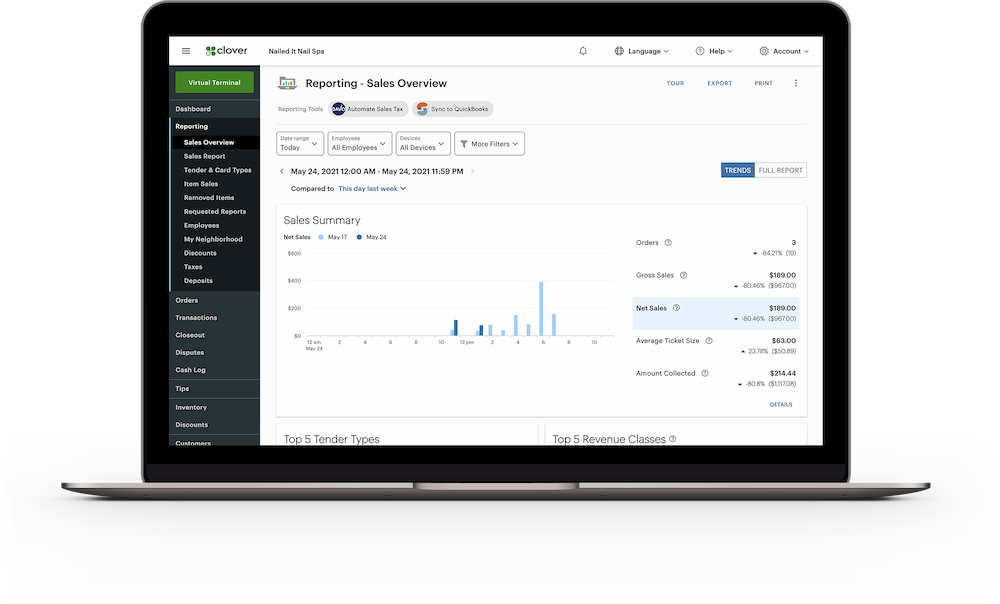
After you log into your Clover dashboard, you’ll land on the homepage. This is where you can see everything that matters to your business at a glance. The dashboard is designed to be user-friendly, so you can find what you need without any hassle.
Here’s a quick look at what you’ll find on your dashboard:
| Feature | Description | Impact on Business |
|---|---|---|
| Sales Analytics | Real-time transaction monitoring | Immediate identification of sales trends |
| Inventory Management | Automated stock level tracking | Reduction in stockouts and overstock situations |
| Employee Management | Role-based access and performance metrics | Improved staff accountability and scheduling |
| Reporting Suite | Customizable business intelligence reports | Data-driven strategic planning capabilities |
You can use these features to track sales, manage inventory, oversee employees, and generate reports. Each tool is just a click away after you log into your Clover dashboard.
Note: For the best experience, update your password every 60-90 days and enable two-factor authentication. This keeps your account secure and your business running smoothly.
Now you know how to log into your Clover dashboard, access your account, and start using the powerful tools available to you. With these steps, you can manage your business confidently and securely.
Limitations of the Native Clover Dashboard for Growing Businesses
While the built-in Clover dashboard is an excellent tool for single-location mom-and-pop shops, growing enterprises frequently run into operational bottlenecks as they scale. Successful multi-store management requires a holistic, cross-functional view of data—an area where native POS dashboards often fall short.
Growing merchants typically encounter three core analytics hurdles:
Siloed Multi-Location Data: If you operate three storefronts, the native system often requires you to log in and out of different accounts or manually switch between dashboards to compare performance. This friction makes it incredibly difficult to get a unified view of your entire enterprise health in a single glance.
Lack of Cross-Platform Integration: Your business doesn't just run on Clover. You likely use accounting platforms like QuickBooks, third-party delivery apps (like UberEats or DoorDash), and e-commerce storefronts like Shopify. The native Clover backend cannot naturally blend these external data streams, forcing managers into "Excel Hell" to stitch reports together manually.
Basic Retrospective Reporting: Standard charts only tell you what happened yesterday or last month. They lack the predictive forecasting algorithms needed to help procurement managers prepare for seasonal supply chain shocks or optimize dynamic pricing.
How to Extend Your Clover Analytics with Advanced BI Tools
To break free from these limitations, ambitious merchants are connecting their POS systems directly to advanced Business Intelligence (BI) and self-service reporting platforms. By extracting raw transactional data through Clover’s robust API and piping it into a specialized enterprise analytics engine, businesses can unlock a completely new layer of strategic insight.
This is where a dedicated solution like FineBI becomes invaluable for growing brands. As a powerful, self-service BI tool, FineBI allows retail and restaurant operators to easily connect disparate data sources—including Clover POS, ERPs, warehousing systems, and marketing platforms—into a unified data warehouse.

Instead of looking at rigid, pre-formatted tables, your team can use FineBI's interactive retail dashboards to perform advanced cross-filtering and multi-dimensional analysis without needing any coding skills. For instance, you can effortlessly map local weather patterns against outdoor dining revenue, evaluate employee shift schedules against historical hourly sales spikes, or track regional inventory aging across dozens of storefronts simultaneously.
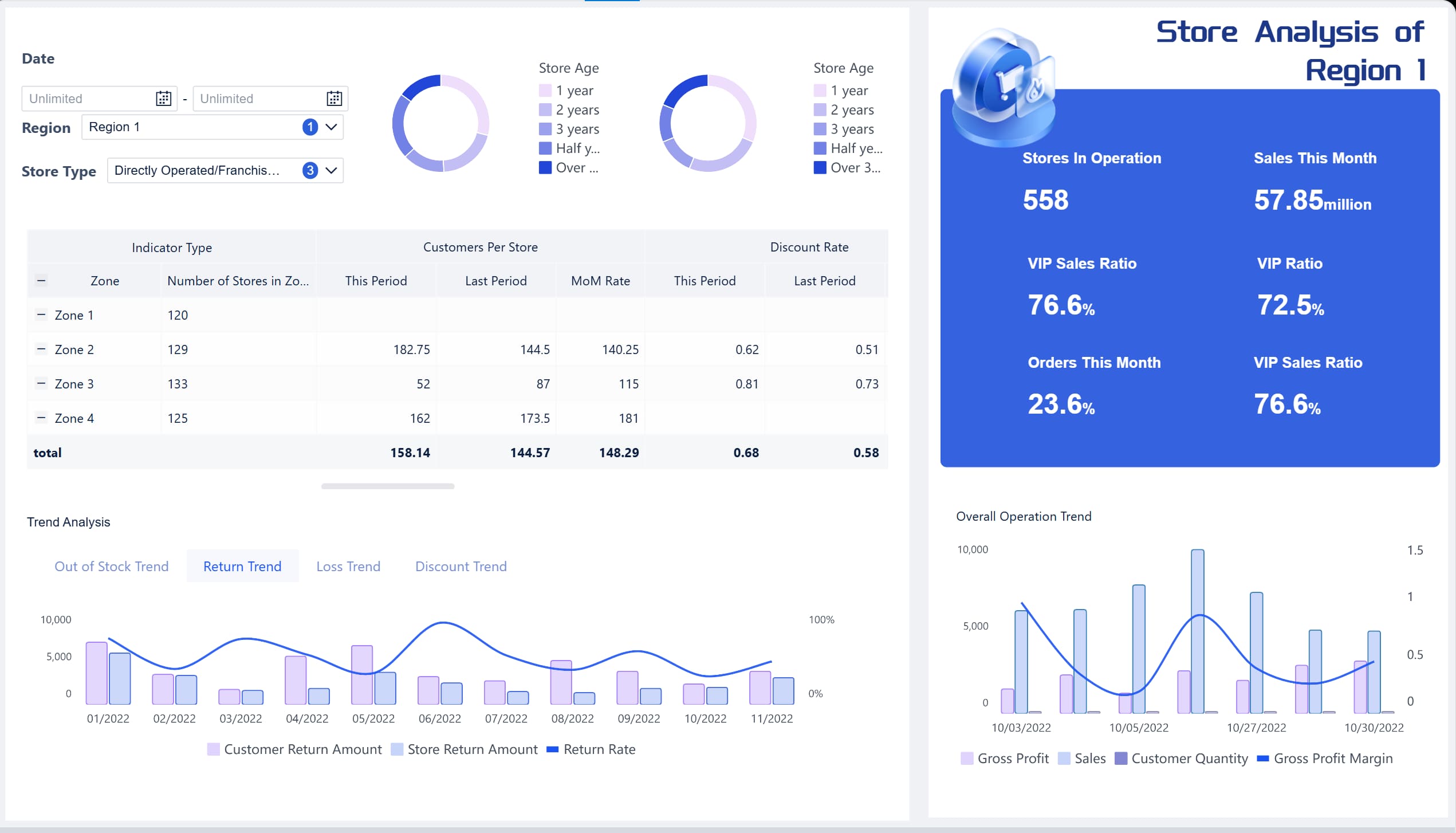
Furthermore, automating these data workflows ensures that your management team receives executive summaries natively in their inboxes every morning, entirely eliminating manual data preparation and freeing up time to focus on scaling operations.

Supercharging Your Clover Data with an AI-Powered Merchant Assistant
While having a consolidated data warehouse is a massive step forward, busy retail owners and restaurant managers rarely have the luxury of sitting at a desk for hours to build complex charts or decode dense analytical spreadsheets. To truly democratize business intelligence, modern enterprises are turning to Dora
By seamlessly connecting your Clover API to Dora
Instant Conversational Insights: Need an immediate operational update during a busy Friday rush? Simply ask: "Dora, what were our top 5 best-selling menu items across all locations last night, and which one had the highest profit margin?" The AI will instantly fetch the transaction rows, calculate the metrics, and present a clean, digestible visual chart in the chat window.
Proactive Fraud & Anomaly Detection: Dora acts as an automated, 24/7 internal auditor for your storefronts. If your Clover data registers a sudden, suspicious spike in cash drawer refunds or employee transaction voids at a specific register, Dora doesn’t wait for you to find it on an end-of-month audit. It automatically flags the anomaly and shoots an alert directly to your mobile device.
AI-Driven Inventory Forecasting: Prevent costly stockouts or dead stock before they hurt your cash flow. Merchants can ask: "Based on our Clover sales velocity from the past two summers, how much seasonal inventory should we order for our peak July rush?" The assistant utilizes integrated machine learning algorithms to mathematically map out precise procurement recommendations.
By bringing Dora into your retail workflow

Continue Reading About Dashboard
How to Quickly Build a Core App Dashboard
Store Performance Dashboard: Your Retail Command Center
Dynamic Dashboard: A Game Changer for Data Analysis
Master the Square Dashboard in Easy Steps
How to Design a Client Dashboard That Delivers Results
Draft Dashboard Review - Is It the Ultimate DFS Tool?
Mastering the Blooket Dashboard for Optimal Classroom Engagement
Mastering the Twitch Dashboard for Streamer Success
Frequently asked questions
You can click the Forgot password? link on the login page. Enter your email address. Clover will send you a reset link. Follow the instructions to create a new password and regain access.




