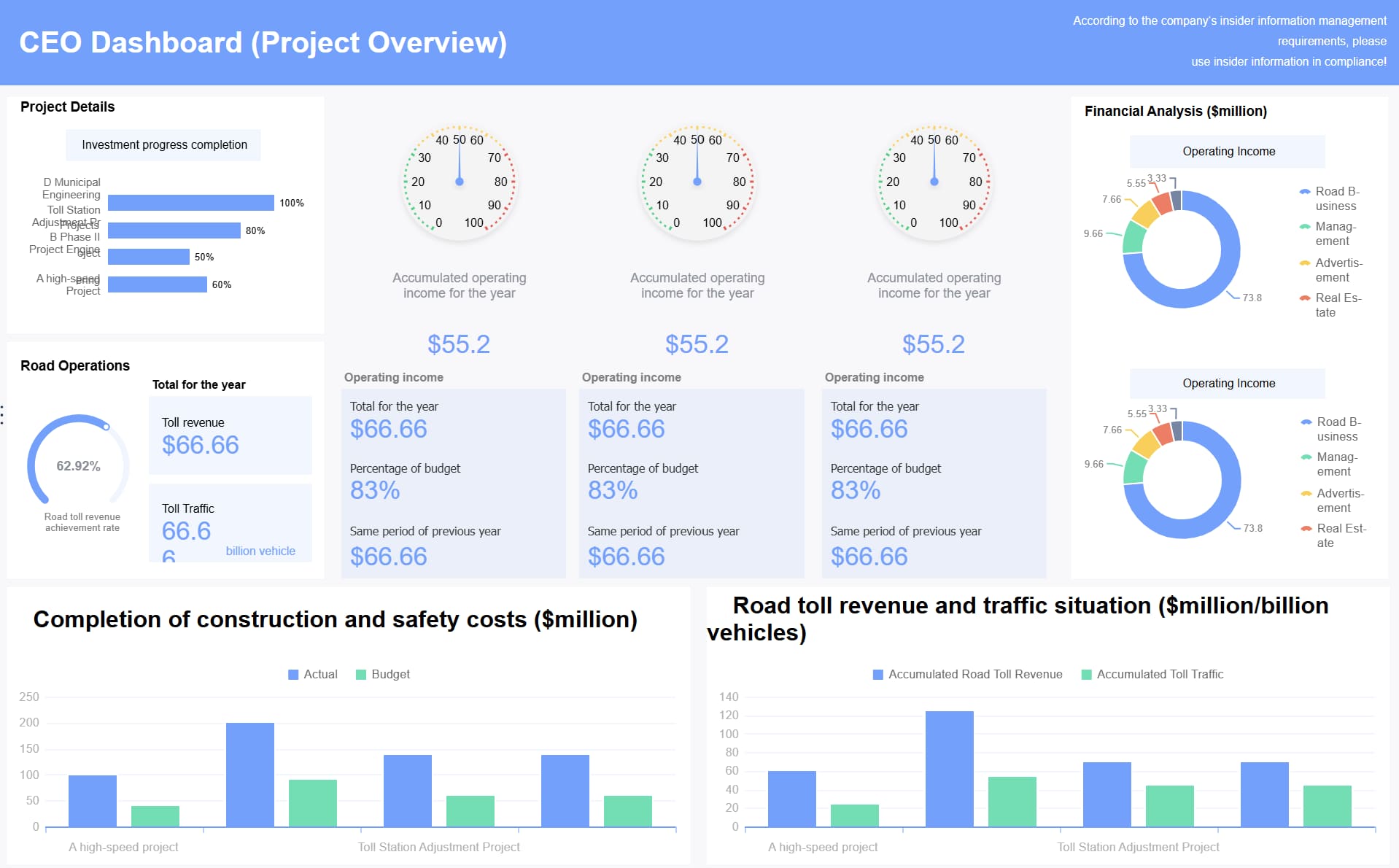
A change management dashboard lets you see all your change plans in one spot. You can get updates right away, check how things are going, and find problems early. This helps you make good choices fast. Dashboards help people talk faster because everyone sees the same facts and can look at what is important to them. Tools like FineReport from FanRuan make it simple to put all the info together, show patterns, and keep your team up to date every step.
Change management dashboard overview
Definition and purpose
A change management dashboard shows all your change activities in one place. You can follow each change, see how things are going, and find problems early. This dashboard is the main spot for your organization. It gathers important change management data and shows the status of every change. You do not have to look through emails or spreadsheets. Everything you need is right there in a simple dashboard.
You use a change management dashboard to help your team and leaders make smart choices. It lets you watch adoption trends, spot risks early, and link change progress to business results. You can also use it to make decisions based on data. The table below shows the main reasons for using a change management dashboard:
Purpose of Change Management Dashboard
Description
Track adoption trends
Helps you see how well changes are accepted in different departments or regions.
Identify risks early
Lets you find problems like low engagement or missing training before they get worse.
Correlate change progress with performance
Connects how changes are going to business or money results.
Make data-driven decisions
Helps leaders decide where to use resources or change plans based on data.
Platforms like FineReport make it easy to build and use a change management dashboard. FineReport is special because you can change reports, connect to many data sources, and see updates right away. You can use drag-and-drop tools to make dashboards that fit your needs. FineReport also works on phones, so you can check your dashboard anywhere.
Key users and stakeholders
Many people in your organization use a change management dashboard. Each group needs different things. The dashboard helps everyone stay updated and work together.
Stakeholder Type
Needs/Focus Areas
Business Users
Simple dashboards for making decisions
Power Users
More control and ways to use data
Data Scientists
Access to raw data for studying
Executive Decision-Makers
Big-picture views showing trends and special cases
You might see these teams using the dashboard:
Finance Teams: They check money details and forecasts.
Project Managers: They follow timelines and milestones.
Operations Teams: They watch real-time status and alerts.
A change management dashboard helps you share info with all these groups. You can give each person the right view for their job. This makes your change management process easier and better.
FineReport has features that make them different from other platforms. You get strong integration, custom reports, and support all day and night. The table below shows how FineReport compares to other platforms:
Feature/Capability
FanRuan FineReport
Other Platforms
Funnel Analysis
Yes
Varies
Competitive Intelligence
Yes
Varies
Custom Reporting
Many ways to customize reports
Not much customization
Integration Capabilities
Works well with other systems
Varies
Support Availability
24/7 support by video or phone
Not much support
Target Audience
Mostly big companies in government
Varies
When you use a change management dashboard, your team gets tools to handle change with confidence. You can see what works, fix problems quickly, and keep everyone moving together.
How change management dashboards work
Main features in FineReport
You need a tool that makes change management easy to use. FineReport gives you features to help you handle every change. You can build your dashboard by dragging and dropping parts. You do not need to write code or set up data by hand. You see your dashboard as you make it, so you know what your team will see.
You can drag, copy, and paste dashboard parts to build fast.
One click lines up your dashboard parts neatly.
You can change each part of your dashboard easily.
Real-time display shows your changes right away, so you do not need to keep saving.
FineReport connects to many data sources. You can bring in data from databases, Excel, or cloud apps. This lets you see all your change management data in one place. You can also use FineReport on your phone or tablet. You can check your dashboard anywhere and anytime.
Data visualization and workflow tracking
You need to see how your change management plan is working. FineReport gives you many ways to show your data and track your workflow. You can use Gantt charts to see project schedules. Kanban boards help you manage your work and spot problems. Dashboards show you key numbers at a glance. Heat maps help you find risks and decide what to fix first.
Visualization Tool
Purpose
Benefits
Gantt Charts
Project scheduling
Shows tasks, times, and links; tracks progress
Kanban Boards
Workflow management
Gives real-time updates; shows where work is stuck
Shows important numbers; gives a quick project health check
Heat Maps
Risk management
Shows risks; helps you pick what to fix first
You get live updates on every change. Your dashboard shows you what is happening right now. You do not have to wait for reports. You can spot problems early and change your plan. This helps your team act fast when things change. You can use your dashboard on any device, so you always know what is going on.
Integration and automation
You want your change management dashboard to work with other systems. FineReport gives you strong integration features. You can connect your dashboard to many platforms. This lets you bring in data from different tools and keep everything up to date.
Interoperability lets your dashboard work with many platforms.
Automation does routine jobs, like updating data and sending alerts.
Open APIs and standard data formats (like JSON, XML, or CSV) make it easy to grow and change your dashboard.
Automation in change management dashboards saves you time. You do not have to do the same jobs again and again. The system updates data, sends alerts, and keeps records for you. This lowers mistakes and speeds up your change process. You get a clear view of every step, from request to approval. You can track compliance and see records for every change.
Automation cuts down on manual work and mistakes.
It makes change requests go faster.
It keeps records for compliance and rules.
It gives you a full view, so everyone knows what is happening.
With FineReport, you can manage change management with less effort. You can focus on making smart choices and leading your team through each change. Your dashboard becomes the center of your change workflow, helping you track, report, and improve every step.
Benefits of change management dashboards
Improved visibility and control
You need to see what is happening to guide your group. A change management dashboard shows you live data for every change. You can spot risks, check progress, and make sure teams do their jobs. This helps you find problems before they get bigger. You can manage tasks and make sure everyone knows what to do.
Dashboards help you see risks when you approve or launch changes. You know which changes need help. You also learn about team tasks and slow spots. This helps teams stay responsible and keeps projects moving.
Enhanced decision-making with FanRuan
You want to make good choices during change. Change management dashboards help by showing you the right data fast. With FanRuan and FineReport, you get tools to manage change well. You can connect data from many places and see updates right away. This lets you act fast and change your plans.
Groups that check compliance with change management do better. Most teams that track how they do reach their goals. When you measure and watch change, you have a better chance to win. Dashboards help you compare results, see trends, and make choices using facts.
63% of groups that checked compliance met project goals.
76% of those who checked compliance and performance met or beat goals.
Only 24% of those who did not check compliance met or beat goals.
BOE, a tech leader, used dashboards to set standards and track change. They lowered inventory costs by 5% and got 50% more efficient. This shows how dashboards help with change management.
Real-time tracking and measurement
You need to know how change is going all the time. Real-time tracking in dashboards gives you this power. You can check project health, see if you are on time, and change plans if needed. Meetings using live data help you set new goals. Communication stays clear, and everyone knows what will happen.
Real-time tracking shows how projects are doing.
Dashboards help you share updates with everyone.
Watching all the time helps you see trends and fix problems early.
Dashboards make performance numbers easy to understand.
In finance and manufacturing, dashboards help manage risks. You can track risks, measure change impact, and make sure your team meets goals. FineReport helps these fields by giving tools to manage change and get better results. Using real-time tracking builds a culture of improvement and helps you succeed.
Key components and metrics of change management dashboards
Essential dashboard elements
A dashboard helps you see and manage change easily. The best dashboards have important parts. You get a summary page that shows all changes. Charts show trends and risks. Lists tell you tasks and deadlines. Alerts warn you about urgent issues. You can filter data by department or project. FineReport lets you build dashboards with these parts using drag-and-drop tools. You can add charts, tables, and maps. You can arrange them any way you want. You can set up real-time updates to see new information.
Summary page for all change activities
Visual charts for trends and risks
Task lists and deadlines
Alerts for urgent issues
Filters for departments or projects
Common metrics to track
Metrics help you measure how well your change management works. These numbers show what is good and what needs work. You can use a dashboard to check these numbers every day. FineReport makes it easy to show these metrics in tables and charts.
Metric
Description
Change rejection rate
Counts how many changes are rejected or not used.
Employee satisfaction
Shows how employees feel about a change and their involvement.
Employee training effectiveness
Checks how well training works for employees in change projects.
Communication effectiveness
Measures how well employees understand and use change information.
Help desk metrics
Shows how employees adjust to change by ticket volume and resolution time.
You can track these metrics to see the impact of each change. You find which changes work and which need more help. You use this data to make your change management better.
Customization in FineReport
You want a dashboard that fits your group. FineReport gives you many ways to change your dashboard. You can pick which metrics to track. You can change the layout to match your work. You can set up dashboards for different teams. You can add interactive charts and maps. You can connect data from many places. You can use phones to check dashboards anywhere.
FineReport lets you build dashboards that grow with your needs. You can update dashboards as your change management changes. You can add new metrics or remove old ones. You can make dashboards for special projects or company-wide changes.
You can see how companies use dashboards to help with change management. FineReport helps finance and manufacturing teams track changes and get better results. Northeast Securities used FineReport to make reporting and analysis easier. Their team worked faster and found the tool simple to use. Dahua Technology Co., Ltd. used FineReport with other tools for complex reports. They thought FineReport was easier and quicker for tracking changes.
In finance, dashboards give CFOs real-time updates. This helps them make decisions and manage money well. It is important for keeping the company stable. Manufacturing teams use dashboards to see important numbers right away. They can bring together data from many places. Real-time updates help teams work together and react to changes fast. Dashboards also help find problems and plan strategies.
Benefit
Description
Enhanced Decision-Making
Dashboards show key numbers in real time, helping quick choices.
Improved Operational Efficiency
They make communication better between departments, so teams work well together.
Fostering Data-Driven Culture
Dashboards help teams use data to plan and learn new things.
BOE Technology Group used dashboards to set standards and track progress. Their team lowered inventory costs and worked more efficiently. You can learn from these examples and see how dashboards help with change management in real life.
Tips for effective implementation
You need a clear plan to set up your dashboard. Start by getting support from leaders who are active and visible. Use a step-by-step change management method. Get front-line workers involved and talk openly. Connect your dashboard with project management and give enough resources to change management. Help managers during the process.
Research shows strong leader support makes projects more successful. Projects with good sponsors reach their goals 79% of the time. Using a formal method makes change management work better. You can get great results by following a clear plan.
FanRuan gives technical help for dashboard setup. If you have problems, you can ask their team for help. They help with plugins and features. You can count on their support to make setup easy and track changes well.
You can boost your organization’s success with a change management dashboard. Research shows that strong change management helps 88% of projects meet their goals and stay on track. FineReport from FanRuan gives you tools to see progress, spot risks, and act fast. For best results, follow these steps:
Pick three to five key metrics.
Set clear targets for each metric.
Review your dashboard regularly with your team.
A well-designed dashboard helps you lead change with confidence.
Product Trial
FineReport
Pixel-perfect reports · Interactive dashboards · Easy data entry · Digital twins
Access a wealth of case studies, industry insights, and solution guides to accelerate digital transformation.
FAQ
What is a change management dashboard?
A change management dashboard helps you follow changes in your projects. It shows each step of change in your organization. You get updates, find risks, and check results. It supports your goals and helps you lead change well.
What metrics should you track for it change management?
You should track numbers like change adoption, employee satisfaction, and training results. These numbers show how well your change works. Dashboards help you see what helps teams and what needs to get better.
Who should use a change management dashboard?
If you lead change or manage projects, you should use a dashboard. Project managers, IT teams, and business leaders all benefit. Dashboards help teams stay updated. You see trends, track tasks, and make better choices for your projects.
How does FineReport support it change management?
FineReport gives you tools to manage change. You can connect data from different places. You build dashboards using drag-and-drop features. You track progress, check impact, and share updates. FineReport helps teams work together and reach goals.