You can use an agent performance dashboard to see all your team’s important numbers in one spot. This tool lets you check live data and measure results fast. Managers notice quicker progress when they use dashboards powered by FanRuan and FineReport. In fact, 64% of business leaders think dashboards help them beat other companies. Teams have cut down average handle time by up to 40%. They also see big improvements in customer satisfaction by using real-time analytics.
Agent Performance Dashboard Overview
What Is an Agent Performance Dashboard
You use an agent performance dashboard to see how your team works in real time. This tool brings all your important numbers together in one place. You can check how well your agents do their jobs and spot problems before they grow. FanRuan and FineReport help you build dashboards that show live data and past trends. These dashboards give you a clear view of your call center agent performance dashboard, making it easier to manage your team.
When you use a call center agent performance dashboard, you get many benefits:
You make better decisions because you see real-time reports and past results.
You improve customer satisfaction by finding and fixing issues like long wait times.
You motivate your agents because they can see their own scores and take charge of their work.
You also help your team reach higher standards. If you use quality assurance checks, you can boost your First Call Resolution (FCR) rate by up to 10%. This means your team solves more problems on the first try, which makes customers happier.
A call center agent performance dashboard also helps you:
You can set up dashboards with different views for agents and managers. Agents see their own progress. Managers see the whole team’s results. This setup helps everyone focus on what matters most.
Key Benefit
Explanation
Real-time visibility
See agent performance as it happens.
Data-driven decisions
Make choices based on facts, not guesses.
Targeted coaching
Give feedback that matches each agent’s needs.
Bottleneck identification
Find and fix problems that slow down your team.
Improved customer experience
Better agent work leads to happier customers.
Tailored views
Show the right data to the right people.
Advanced capabilities
Use AI and real-time alerts for smarter management.
Key Metrics and Analytics
A call center agent performance dashboard tracks many important numbers. These numbers help you measure how well your agents serve customers. You can use these metrics to set goals and see where you need to improve.
Here are the most common metrics you will find:
First Call Resolution (FCR) – Shows how often agents solve problems on the first call.
Average Handle Time (AHT) – Measures how long agents spend on each call, including talk, hold, and after-call work.
Customer Satisfaction Score (CSAT) – Tells you how happy customers are after talking to your team.
Net Promoter Score (NPS) – Shows how likely customers are to recommend your company.
Customer Effort Score (CES) – Measures how easy it is for customers to get help.
Average Speed of Answer (ASA) – Tracks how fast agents pick up calls.
Call Abandonment Rate – Counts how many customers hang up before reaching an agent.
Service Level – Shows the percentage of calls answered within a set time.
Agent Occupancy Rate – Measures how much time agents spend helping customers.
Transfer Rate – Tracks how often calls get sent to another agent or department.
Escalation Rate – Shows how many calls need higher-level support.
After-Call Work (ACW) – Measures time spent finishing tasks after a call.
Adherence to Schedule – Checks if agents stick to their work schedules.
Call Quality Monitoring Score – Rates calls based on supervisor reviews.
Agent Turnover Rate – Shows how often agents leave the team.
You can also track conversation volume and see how it affects your team. If you notice a high number of calls, you can add more agents or change your schedule. Lower AHT can mean faster service, but you must make sure agents still solve problems well. The goal is to balance speed with quality.
If you focus only on speed, you might see FCR drop. You want agents to solve problems, not just finish calls quickly.
Good training and clear scripts help agents keep AHT low while still giving great support.
When you use analytics, you can coach agents based on real calls. This helps both the agent and the customer.
You can measure the return on your dashboard by tracking revenue, costs, and other key numbers. A call center agent performance dashboard lets you see these results in real time. You can also look back at past data to spot trends.
Challenge
Solution
Data accuracy and integration issues
Use strong validation and connect your dashboard to all your systems.
Employee resistance
Involve your team in the setup and explain the benefits clearly.
A call center agent performance dashboard helps you keep your team on track. You can set clear goals, review results often, and give feedback that helps agents grow. When you use dashboards the right way, you see better results for your team and your customers.
Navigating Agent Performance Dashboards with FineReport
Accessing the Call Center Dashboard
You can start tracking your team’s performance by using the call center dashboard in FineReport. First, open your browser and enter the report URL. This link follows a simple format. You use your server’s IP address and port, then add the path to your report. If you want everyone to see the dashboard, ask your administrator to turn off user authentication. This step lets your team view the call center dashboard without logging in. You can also show the dashboard inside another web page. Just add an iframe and set its source to the report URL.
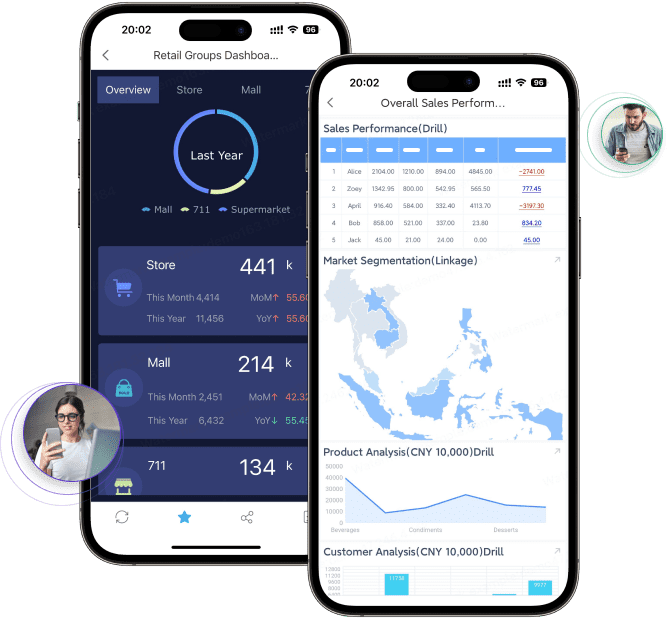
FineReport gives you the power to check the call center dashboard on your phone or tablet. You can use the FanRuan Data Analysis App or open the dashboard in your mobile browser. This flexibility means you always have access to live data, even when you are not at your desk. You can see call volume trends and agent results in real time. This helps you spot busy times and adjust your team’s schedule quickly.
You can also use the ai agent dashboard to track how your AI-powered contact centers perform. The ai agent dashboard shows you how AI agents handle customer conversations. You see key numbers like response speed, resolution rates, and customer satisfaction. You can compare these results with your human agents on the call center dashboard.
The ai agent dashboard pulls data from many sources. You get a full view of every interaction. You can watch real-time analytics and see how AI agents respond to changes in call volume trends. This helps you find ways to improve both your AI and human teams. You can use the ai agent dashboard on your computer or mobile device. This makes it easy to check results anytime.
FineReport lets you combine data from different systems. You see everything in one place. You can switch between the call center dashboard and the ai agent dashboard with just a few clicks. This setup helps you manage your team and your technology together.
Agent Performance Dashboard Features for Team Improvement
Performance Overview and Ranking
An agent performance dashboard helps you see how your team is doing. FineReport shows each agent’s results in a simple way. You can tell who has high customer satisfaction and who needs help. The dashboard ranks agents using real numbers. This makes everything clear and fair for everyone.
When you add rankings, agents start to compete in a good way. They know their place on the list. They can see how they are doing and what to work on. Everyone trusts the results because the data is open. Agents feel more excited to do well when they see their scores. Fewer chances are missed because agents pay more attention. Task completion rates get better when agents track their work. Your team can focus on giving great customer service.
Identifying Knowledge Gaps
You can find skill gaps fast with analytics in your agent performance dashboard. FineReport shows where agents have trouble, like answering hard questions or using scripts. You do not have to guess what training is needed. The dashboard tells you where to look.
When you use analytics for training, learning gets better. You make lessons that fix real problems, not just general ones. This helps agents learn faster and do their jobs better. Customer satisfaction scores go up because agents handle calls well. Your team feels loyal when you help them grow.
You can use training reports to see how agents improve. If the same problems keep happening, you change your training plan. Training becomes a tool for winning, not just something to finish. Over time, your whole team gets better and results improve everywhere.
Conversation Analytics and Quality Assurance
Conversation analytics in your agent performance dashboard give you strong insights. FineReport lets you check call recordings, chat logs, and feedback all together. You can find patterns like long waits or too many transfers that make customers unhappy. You can see how customers feel after each call.
Analytics help you find out why problems happen. If customers say service is slow, you look at the data to find out why. You can match feedback to certain calls and agents. This helps you fix things fast and make service better. You can use these insights every day. Agents learn from real calls and change how they work.
Quality assurance is easier with the dashboard. You set clear rules and check if agents follow them. You give feedback based on facts, not guesses. This leads to better work and happier customers. Over time, customer satisfaction scores go up as you fix problems and improve your process.
Applying Insights to Boost Results in Agent Performance Dashboard
Data-Driven Coaching and Training
You can use dashboard insights to make your coaching sessions more effective. When you see real numbers, you know exactly where each agent needs help. FineReport lets you look at call quality, customer feedback, and task completion rates. You can spot patterns, like agents who struggle with long calls or those who need help with scripts.
You do not have to guess what training works. You can match lessons to real problems. For example, if you see that agents often transfer calls, you can teach them how to solve issues on the first try. This approach saves time and makes customers happier. You can also track how agents improve after training. If someone still has trouble, you can give extra support.
SAMOA, a leading distributor, used FineReport to change how they train and manage teams. They built a system that shows live results and clear goals. Managers now give feedback based on facts, not feelings. This change helped SAMOA boost team performance and keep agents motivated.
Setting Goals and Tracking Progress
You can set clear goals for your team using dashboards. Start by deciding what you want to achieve. Make your goals SMART—specific, measurable, achievable, relevant, and time-bound. Set a baseline so you know where you start. Pick the right metrics, like calls handled per day or customer satisfaction scores.
FineReport helps you track these goals in real time. You do not need to collect data by hand. The dashboard updates automatically. You can see who meets their targets and who needs help. Review the data often. If you notice a problem, adjust your plan.
Many industries, like semiconductor manufacturing, use dashboards to improve results. They replace old tools with real-time dashboards. Teams spot problems faster and make better decisions. Custom dashboards help you focus on what matters most for your business.
Dashboards from FanRuan and FineReport help your team do better. These tools make hard call data easy to understand. You can see how customer satisfaction gets higher, repeat contacts go down, and agents work faster.
Improvement Area
Percentage Improvement
CSAT Improvements
15-25%
Reduction in Repeat Contacts
20-30%
Improvement in Agent Productivity
25-35%
FineReport lets you build dashboards and reports that update right away. You get quick feedback, spot trends, and track progress easily. Pick FineReport to help your team grow and manage performance together.
Product Trial
FineReport
Pixel-perfect reports · Interactive dashboards · Easy data entry · Digital twins
Access a wealth of case studies, industry insights, and solution guides to accelerate digital transformation.
FAQ
How does an agent performance dashboard help you manage your team?
An agent performance dashboard helps you watch each agent’s progress. You see live data about AI and customer chats. You can notice patterns and fix problems fast. This tool helps you make customers happier and agents work better.
Can you use FineReport dashboards on mobile devices?
You can use FineReport dashboards on your phone or tablet. You check AI agent results and customer feedback anywhere you go. You stay in touch and make choices fast. You can see customer happiness and agent scores right away.
What metrics should you track in an agent performance dashboard?
You should track AI conversation numbers, customer happiness scores, average handle time, and agent ranking. These numbers help you set goals and see how you are doing. You can make the customer experience better and help your team improve.
How does AI improve agent performance dashboards?
You use AI to study customer chats and what agents do. You get quick feedback and see patterns. You can check quality and find skill gaps without extra work. AI helps you coach agents and make customers happier.